The Kubernetes Ingress resource never grew past “host, path, TLS secret”, so every controller invented annotations to cover the rest — and a decade later your Ingress objects are half spec, half nginx.ingress.kubernetes.io/ strings that only one controller understands. The Gateway API replaces that with three typed objects: GatewayClass names the implementation, Gateway owns listeners and TLS, and HTTPRoute owns hostnames, path matches and filters. The core of it is GA — GatewayClass, Gateway, HTTPRoute and GRPCRoute are all at v1 — so this is a migration you can actually finish. This guide translates a real ingress-nginx Ingress into the new objects, runs both paths side by side behind DNS, and shows exactly what to do when it goes wrong.
What you’ll accomplish
- Install the Gateway API CRDs and one implementation without disturbing the running ingress-nginx controller.
- Translate an existing Ingress — host, path prefixes, TLS from cert-manager, redirect and rewrite annotations — into a
Gatewayplus anHTTPRoutewith filters. - Serve the same hostname from two load balancer addresses at once and verify the new one with
curlbefore any user sees it. - Cut over with a DNS change, and roll back with the same DNS change.
- Identify the annotations that have no Gateway API equivalent, and know which implementation-specific policy object replaces each one.
Prerequisites
- Kubernetes 1.26 or newer. The Gateway API CRDs officially support the five most recent minor releases; on anything older you are running unsupported combinations. Nothing here needs a feature gate.
- The CRDs are not shipped with Kubernetes. Unlike Ingress, the Gateway API lives out-of-tree as CRDs you install yourself, versioned separately from the cluster.
- Honest status. The standard channel carries
GatewayClass,Gateway,HTTPRouteandGRPCRouteatv1, plusReferenceGrantatv1beta1.TCPRoute,UDPRouteandTLSRouteship only in the experimental channel and are still alpha — if you terminate raw TCP through ingress-nginx’s TCP services ConfigMap, that part of your setup is not ready to move. - An implementation, chosen deliberately. Envoy Gateway and NGINX Gateway Fabric are standalone; Istio and Cilium expose the Gateway API from a mesh or CNI you may already run. Managed clusters complicate this: GKE preinstalls its own GatewayClasses and controller, and installing upstream CRDs on top can conflict with the managed ones. Check what
kubectl get gatewayclassalready returns before you install anything. - cert-manager 1.15 or newer if you want the same automated certificates you have today, started with the
--enable-gateway-apiflag. See cert-manager TLS on Kubernetes for the issuer setup itself. cluster-adminto install CRDs, control over the DNS zone serving the hostname, and a cloud load balancer quota with room for one more address.
How it works
An Ingress is a single object that mixes three concerns owned by three different people: which controller runs it, what the listener and certificate look like, and where a given path goes. The Gateway API splits those apart.
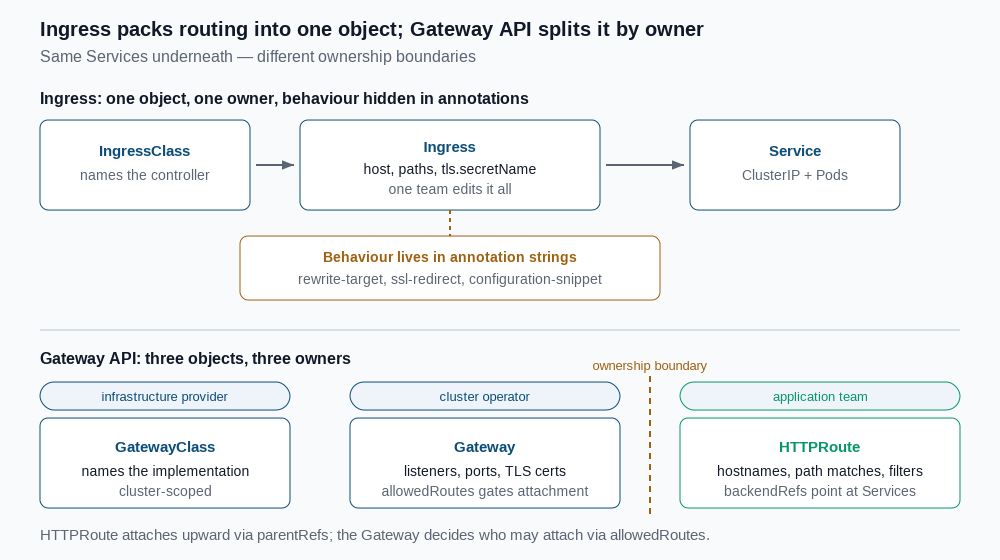
GatewayClass is cluster-scoped and does exactly what IngressClass did: it names a controllerName so one implementation claims it. Gateway is namespaced and holds the listeners — port, protocol, hostname, and tls.certificateRefs pointing at Secrets. It also holds allowedRoutes, which is the part Ingress never had: a listener declares which namespaces may attach Routes to it, so a platform team can hand out routing rights without handing out the listener.
HTTPRoute is the application team’s object. It names its parentRefs (the Gateway and optionally the specific listener), lists hostnames, and carries rules of matches, filters and backendRefs. Attachment is two-sided: the Route asks, the Gateway’s allowedRoutes decides. If either side says no, the Route reports Accepted: False with a reason rather than silently doing nothing.
Filters are what replace most annotations. RequestRedirect covers ssl-redirect and permanent-redirect. URLRewrite covers the common rewrite-target cases with ReplacePrefixMatch or ReplaceFullPath, and can rewrite the Host header. RequestHeaderModifier and ResponseHeaderModifier cover header manipulation. RequestMirror covers shadow traffic.
What has no equivalent is the escape hatch. configuration-snippet, server-snippet, auth-snippet and auth-url inject NGINX config or call out to an auth service; the Gateway API deliberately has no field for arbitrary proxy config, because the whole point is portability. Each implementation replaces them with policy attachment — Envoy Gateway has SecurityPolicy, BackendTrafficPolicy and ClientTrafficPolicy; NGINX Gateway Fabric has SnippetsFilter, ClientSettingsPolicy and UpstreamSettingsPolicy; Istio uses AuthorizationPolicy and RequestAuthentication. Those are implementation-specific by design, so budget for rewriting them rather than translating them.
Step-by-step
1. Inventory the annotations you actually depend on. This is the step people skip and then regret in the middle of a cutover.
kubectl get ingress -A -o json \
  | jq -r '.items[] | .metadata.annotations // {} | keys[]' \
  | grep '^nginx.ingress.kubernetes.io/' | sort | uniq -c | sort -rn
9 nginx.ingress.kubernetes.io/ssl-redirect
6 nginx.ingress.kubernetes.io/rewrite-target
4 nginx.ingress.kubernetes.io/proxy-body-size
2 nginx.ingress.kubernetes.io/auth-urlAnything in that list beyond the first two needs a decision before you continue. If you are unclear on what the existing setup does, the ingress-nginx guide covers the annotation behaviour you are about to replace.
2. Install the Gateway API CRDs. Use the standard channel unless you know you need an experimental Route type. Check the project’s releases page for the current version rather than copying a tag blindly.
kubectl apply -f https://github.com/kubernetes-sigs/gateway-api/releases/download/v1.2.1/standard-install.yamlcustomresourcedefinition.apiextensions.k8s.io/gatewayclasses.gateway.networking.k8s.io created
customresourcedefinition.apiextensions.k8s.io/gateways.gateway.networking.k8s.io created
customresourcedefinition.apiextensions.k8s.io/grpcroutes.gateway.networking.k8s.io created
customresourcedefinition.apiextensions.k8s.io/httproutes.gateway.networking.k8s.io created
customresourcedefinition.apiextensions.k8s.io/referencegrants.gateway.networking.k8s.io createdInstalling CRDs changes nothing about traffic. ingress-nginx keeps serving exactly as before.
3. Install an implementation. Envoy Gateway is used here because it installs cleanly next to an existing ingress controller.
helm install eg oci://docker.io/envoyproxy/gateway-helm \
  --version v1.2.1 \
  -n envoy-gateway-system --create-namespace
NAME: eg
STATUS: deployed
NAMESPACE: envoy-gateway-systemWait for the controller before creating anything that depends on it:
kubectl -n envoy-gateway-system rollout status deployment/envoy-gateway --timeout=180sdeployment "envoy-gateway" successfully rolled out4. Create the GatewayClass and confirm it is accepted. The controllerName is what binds it to the implementation you installed.
apiVersion: gateway.networking.k8s.io/v1
kind: GatewayClass
metadata:
  name: eg
spec:
  controllerName: gateway.envoyproxy.io/gatewayclass-controller
kubectl get gatewayclass egNAME CONTROLLER ACCEPTED AGE
eg gateway.envoyproxy.io/gatewayclass-controller True 12sACCEPTED staying empty or False means no running controller claims that controllerName. Fix that before going further — every later object will just sit there.
5. Create the Gateway with both listeners. One HTTP listener to redirect, one HTTPS listener holding the certificate. The cert-manager.io/cluster-issuer annotation on the Gateway makes cert-manager create the Secret named in certificateRefs.
apiVersion: gateway.networking.k8s.io/v1
kind: Gateway
metadata:
  name: public
  namespace: gateway-system
  annotations:
    cert-manager.io/cluster-issuer: letsencrypt-prod
spec:
  gatewayClassName: eg
  listeners:
    - name: http
      protocol: HTTP
      port: 80
      hostname: app.example.com
      allowedRoutes:
        namespaces:
          from: All
    - name: https
      protocol: HTTPS
      port: 443
      hostname: app.example.com
      tls:
        mode: Terminate
        certificateRefs:
          - kind: Secret
            name: app-example-com-tls
      allowedRoutes:
        namespaces:
          from: All
kubectl -n gateway-system get gateway publicNAME CLASS ADDRESS PROGRAMMED AGE
public eg 203.0.113.20 True 94sAn empty ADDRESS means the cloud load balancer has not been provisioned yet; PROGRAMMED: False means the listeners were rejected, and kubectl describe will say why.
6. Translate the Ingress. Here is the object you are replacing:
apiVersion: networking.k8s.io/v1
kind: Ingress
metadata:
  name: storefront
  namespace: storefront
  annotations:
    nginx.ingress.kubernetes.io/ssl-redirect: "true"
    nginx.ingress.kubernetes.io/rewrite-target: /$2
spec:
  ingressClassName: nginx
  tls:
    - hosts: [app.example.com]
      secretName: app-example-com-tls
  rules:
    - host: app.example.com
      http:
        paths:
          - path: /api(/|$)(.*)
            pathType: ImplementationSpecific
            backend:
              service:
                name: api
                port:
                  number: 8080
          - path: /
            pathType: Prefix
            backend:
              service:
                name: web
                port:
                  number: 80
And here is the HTTPRoute that replaces it. The TLS Secret moved to the Gateway, the regex rewrite became a URLRewrite filter, and the redirect became a rule on the HTTP listener.
apiVersion: gateway.networking.k8s.io/v1
kind: HTTPRoute
metadata:
  name: storefront
  namespace: storefront
spec:
  parentRefs:
    - name: public
      namespace: gateway-system
      sectionName: https
  hostnames:
    - app.example.com
  rules:
    # Longest prefix wins regardless of order, so /api is safe next to /.
    - matches:
        - path:
            type: PathPrefix
            value: /api
      filters:
        - type: URLRewrite
          urlRewrite:
            path:
              type: ReplacePrefixMatch
              replacePrefixMatch: /
      backendRefs:
        - name: api
          port: 8080
    - matches:
        - path:
            type: PathPrefix
            value: /
      backendRefs:
        - name: web
          port: 80
---
apiVersion: gateway.networking.k8s.io/v1
kind: HTTPRoute
metadata:
  name: storefront-https-redirect
  namespace: storefront
spec:
  parentRefs:
    - name: public
      namespace: gateway-system
      sectionName: http
  hostnames:
    - app.example.com
  rules:
    - filters:
        - type: RequestRedirect
          requestRedirect:
            scheme: https
            statusCode: 301
Two things changed meaning, and you should know it now rather than in production. Ingress path matching with ImplementationSpecific was regex; PathPrefix is not, and ReplacePrefixMatch only strips the matched prefix — a rewrite that used capture groups for anything cleverer has to be rebuilt. And Gateway API rule precedence is specified: the longest matching path wins, then method, then header matches, so rule order in the file no longer decides anything.
7. Grant cross-namespace access if the Route and Gateway are in different namespaces. Attachment across namespaces is allowed by allowedRoutes on the Gateway, as above. A backendRef pointing at a Service in another namespace is different — that needs a ReferenceGrant in the Service’s namespace:
apiVersion: gateway.networking.k8s.io/v1beta1
kind: ReferenceGrant
metadata:
  name: allow-storefront-routes
  namespace: payments
spec:
  from:
    - group: gateway.networking.k8s.io
      kind: HTTPRoute
      namespace: storefront
  to:
    - group: ""
      kind: Service
8. Cut over with DNS, not with a delete. Both objects are live and serving; only the A record decides who gets traffic.
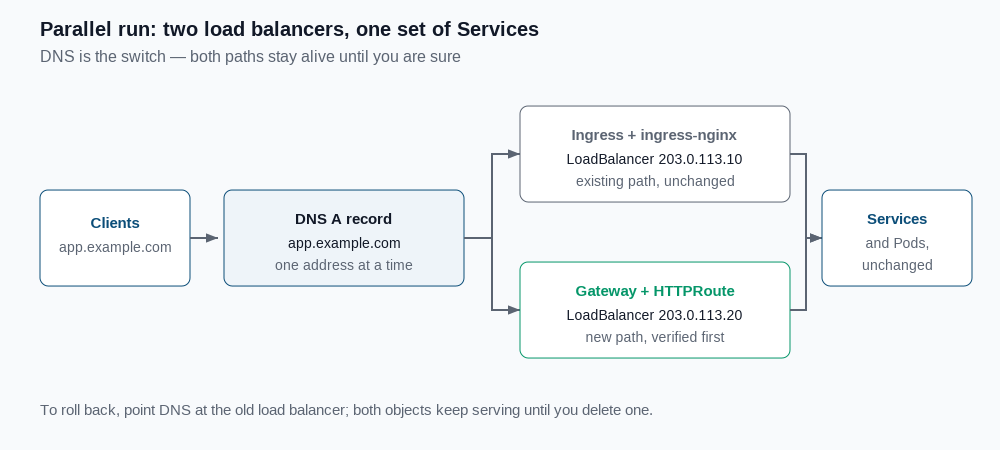
Lower the record’s TTL a day ahead, point it at the Gateway address, and leave the Ingress object in place. Rolling back is repointing the record — there is no manifest to reapply under pressure.
Validate it works
Check that the Route actually attached before touching DNS. This is the single most useful command in the whole migration:
kubectl -n storefront get httproute storefront -o jsonpath='{.status.parents[*].conditions[*].type}{"\n"}{.status.parents[*].conditions[*].status}{"\n"}'Accepted ResolvedRefs
True TrueThen hit the new address directly, bypassing DNS entirely:
curl -sS -o /dev/null -w '%{http_code} %{url_effective}\n' \
  --resolve app.example.com:443:203.0.113.20 \
  https://app.example.com/api/orders
200 https://app.example.com/api/ordersConfirm the rewrite stripped the prefix the way the annotation used to, and that the HTTP listener redirects:
curl -sS -o /dev/null -w '%{http_code} -> %{redirect_url}\n' \
  --resolve app.example.com:80:203.0.113.20 \
  http://app.example.com/
301 -> https://app.example.com/Finally, verify cert-manager issued against the Gateway rather than a stale Ingress-shim certificate:
kubectl -n gateway-system get certificateNAME READY SECRET AGE
app-example-com-tls True app-example-com-tls 6mTroubleshooting
HTTPRoute shows Accepted: False with reason NotAllowedByListeners. The Gateway listener’s allowedRoutes.namespaces.from is Same (the default) and your Route lives elsewhere. Set it to All, or to Selector with a namespace label selector. The mirrored failure is NoMatchingListenerHostname: the Route’s hostnames do not intersect the listener’s hostname, most often because the listener is app.example.com and the Route asks for *.example.com.
ResolvedRefs: False with BackendNotFound or RefNotPermitted. BackendNotFound is a typo in the Service name or port — backendRefs.port is the Service port, not the container port. RefNotPermitted means the Service is in another namespace and no ReferenceGrant allows it. The same reason appears on the Gateway when certificateRefs points at a Secret in a namespace the Gateway may not read.
The Gateway sits with no ADDRESS forever. Either the cloud controller cannot provision a load balancer — check kubectl -n envoy-gateway-system get svc for the Service the implementation created and read its events — or you are on a bare-metal cluster with no LoadBalancer provider at all, in which case you need MetalLB or an equivalent, exactly as ingress-nginx did.
cert-manager ignores the Gateway. The Gateway shim is off unless the controller runs with --enable-gateway-api; without it the annotation is silently inert and there is no event to tell you. Check the running flags with kubectl -n cert-manager get deploy cert-manager -o jsonpath='{.spec.template.spec.containers[0].args}' and add the flag if it is missing.
Traffic behaves differently after cutover even though the Route is accepted. Look first at the annotations you inventoried in step 1. proxy-body-size, proxy-read-timeout, backend-protocol and anything auth-related do not exist as filters and were dropped when you deleted them from the manifest. They come back as implementation policy objects, and a large upload failing with 413 right after a cutover is almost always proxy-body-size that nobody replaced.
When this is the wrong approach
- You depend on snippets or external auth. If
auth-url,auth-snippetorconfiguration-snippetare load-bearing, migration is a rewrite against one implementation’s policy CRDs, not a translation — and you give up the portability that was the reason to move. - You terminate TCP or UDP through the ingress controller. Those Route types are still alpha in the experimental channel. Keep that traffic where it is.
- A managed control plane already ships a Gateway controller. On GKE, installing upstream CRDs beside the managed ones creates a version conflict that surfaces at the worst time. Use the provider’s GatewayClasses or stay on Ingress.
- The cluster is due for a major upgrade. Do one large change at a time; see the cluster upgrade runbook and finish that first.
- A single team owns everything. The role split is the main structural gain. With one team and a handful of Ingresses, you are paying migration cost for a boundary you do not need yet.
The reference material worth keeping open is the Gateway API project documentation for the full field reference and conformance status, alongside the Kubernetes Gateway API concept page for how it sits next to Ingress.
If this is the kind of work you’d rather never own again, it’s the daily job of Managed Cloud Ops — book an infrastructure review.