A server rebooted at 03:00, the journal stops mid-sentence, and there is nothing in it that explains why. That gap is not a logging bug — when the kernel panics, it cannot flush anything to disk, so whatever it was about to say is lost with it. The mechanism that fixes this is kdump: a second, minimal kernel preloaded into a reserved slice of RAM, which boots after the panic and writes the dead kernel’s memory to a file called a vmcore. This guide gets that mechanism armed and proven on both RHEL-family and Debian/Ubuntu hosts, so the next panic leaves evidence. It also sets an honest expectation up front: capturing a usable vmcore is a job you can finish today, while fully analysing one is often a matter of extracting a stack trace and handing the file to a kernel vendor.
What you’ll accomplish
- Reserve crashkernel memory correctly and verify the reservation actually took effect, rather than assuming it did.
- Enable and configure the dump service under its real name on your distribution —
kdump.servicewith/etc/kdump.conf, orkdump-tools.servicewith/etc/default/kdump-tools. - Choose a dump target that has room: a local path, an SSH host, or an NFS export.
- Shrink the dump with
makedumpfilecompression and page filtering so it fits, and estimate the size before the incident. - Trigger a real panic on purpose with sysrq and confirm the vmcore landed.
- Get a first stack trace out of the dump with
crash, or at minimum recover the kernel log the panic never got to write.
Prerequisites
- Root or
sudoon the host, plus console access — you are going to deliberately panic this machine, so do it on a host you can reboot and reach out of band. - At least 2 GB of RAM. On very small instances the reservation competes with the workload, and under roughly 1 GB kdump is rarely worth the memory it costs.
- Enough free space on the dump target. A filtered, compressed vmcore is usually a small fraction of RAM, but “usually” is doing real work in that sentence — a host with a large page cache dirty at panic time can produce a much bigger file.
- The package and service names differ, and getting them wrong is the most common first stumble:
- RHEL, AlmaLinux, Rocky, CentOS Stream, Fedora: package
kexec-tools, servicekdump.service, config/etc/kdump.conf, helperkdumpctl. - Debian and Ubuntu: package
kdump-tools(Ubuntu also ships alinux-crashdumpmetapackage that pulls in the debug symbols too), servicekdump-tools.service, config/etc/default/kdump-tools, helperkdump-config.
- RHEL, AlmaLinux, Rocky, CentOS Stream, Fedora: package
- Boot parameters are edited differently too:
grubbyon RHEL-family,/etc/default/grubplusupdate-grubon Debian/Ubuntu. - Under Secure Boot the capture kernel must be signed by a trusted key, so a
kexec -pthat fails with a permission error has probably hit that and not a config mistake.
How it works
Nothing about a panic is graceful. The kernel has decided it cannot continue, and by definition it can no longer be trusted to run its own storage stack. So kdump does not try to write anything from the broken kernel. Instead, at boot time the kernel sets aside a region of physical memory that it will never allocate from — the crashkernel reservation. A second kernel and a small initramfs are loaded into that region ahead of time by kexec -p, where they sit idle. When the panic fires, the panic path jumps straight into that preloaded kernel via kexec, skipping firmware and skipping the reset that would wipe RAM.
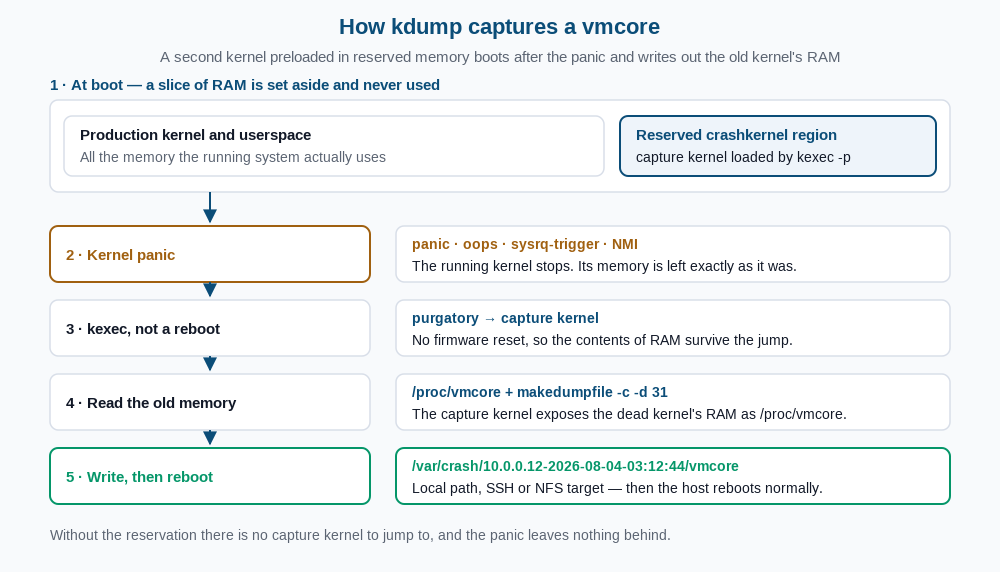
The capture kernel comes up in that small reserved region with almost no memory and no normal userspace. What it does have is /proc/vmcore, a view of the previous kernel’s physical memory, which its tiny init script copies out through makedumpfile. Once the copy completes, the host reboots for real.
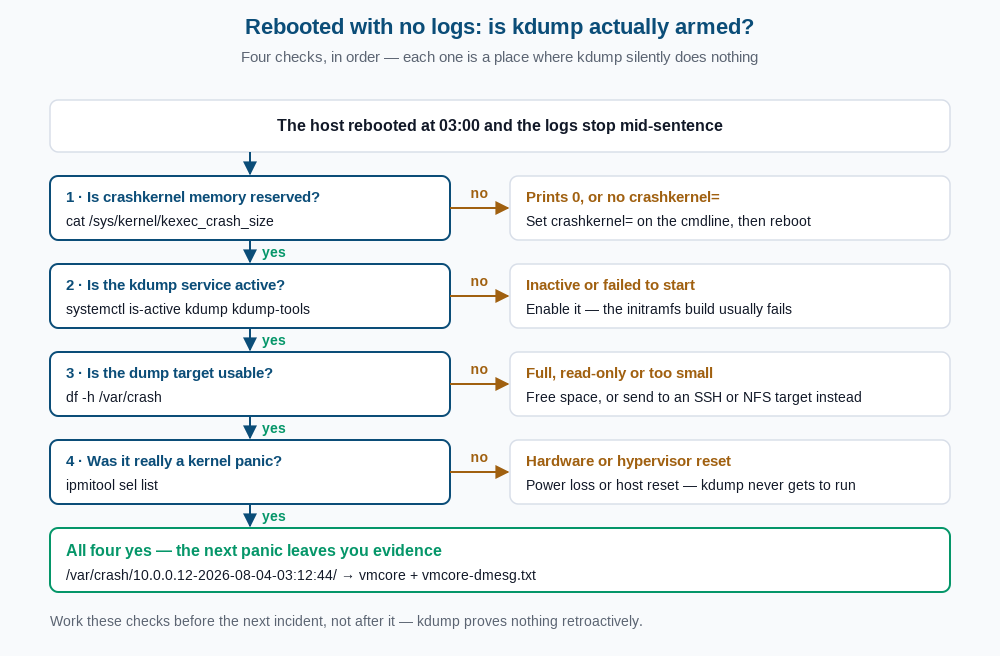
Two consequences explain most kdump failures. If the reservation did not happen at boot, there is nowhere for the capture kernel to live and the panic simply reboots the box with nothing written. And kdump only helps for events that reach the kernel’s panic path — a hypervisor reset, a power loss or a hard watchdog reset never gets there, and no amount of configuration will produce a vmcore for them.
Step-by-step
-
Install the tooling. Pick the line for your distribution.
sudo dnf install -y kexec-toolssudo apt install -y kdump-toolsThe Debian/Ubuntu package asks two debconf questions during install — whether to enable kdump, and whether to reboot now — and it writes a crashkernel reservation into a GRUB drop-in for you. The RHEL-family package does not prompt, but recent installs already carry a
crashkernel=value on the command line. -
Check whether memory is already reserved. This is the single most informative command in the whole exercise.
cat /sys/kernel/kexec_crash_size
cat /proc/cmdline
Expected on a host where the reservation worked — a byte count, and a matching parameter:
268435456
BOOT_IMAGE=/vmlinuz-5.14.0-427.el9.x86_64 root=/dev/mapper/rl-root ro crashkernel=1G-4G:192M,4G-64G:256M,64G-:512M
A
0means nothing was reserved, and everything else you configure will be inert. If/proc/cmdlinehas nocrashkernel=at all, go to step 3. -
Set the reservation and reboot. The ranged syntax means “reserve this much for a host with this much RAM”, so one line covers a fleet of mixed sizes. On RHEL-family:
sudo grubby --update-kernel=ALL --args="crashkernel=1G-4G:192M,4G-64G:256M,64G-:512M"
sudo grubby --info=ALL | grep -m1 args
Expected: the
args=line now contains yourcrashkernel=value. On Debian/Ubuntu, editGRUB_CMDLINE_LINUX_DEFAULTin/etc/default/grub(or the drop-in the package created under/etc/default/grub.d/) to include the same parameter, then:sudo update-grubExpected:
Generating grub configuration file ...followed bydone. Reboot, then re-run step 2 and confirmkexec_crash_sizeis non-zero. -
Choose the dump target. On RHEL-family this lives in
/etc/kdump.conf. The defaults write to the root filesystem:path /var/crash core_collector makedumpfile -l --message-level 7 -d 31 failure_action rebootTo send the dump to another host instead, replace the path with an
sshornfsline:ssh kdump@dumps.example.net sshkey /root/.ssh/kdump_id_rsa path /srv/vmcores core_collector makedumpfile -F -l --message-level 7 -d 31The
-Fflag makesmakedumpfilewrite to standard output so the dump can be streamed over the SSH connection; it is required for ansshtarget and wrong for a local one. Push the key to the target with:sudo kdumpctl propagateExpected:
/root/.ssh/kdump_id_rsa.pub has been added to ~kdump@dumps.example.net/.ssh/authorized_keys2. On Debian/Ubuntu the same choices live in/etc/default/kdump-tools:USE_KDUMP=1 KDUMP_COREDIR="/var/crash" MAKEDUMP_ARGS="-c -d 31" -
Understand the filtering flags before you copy them.
-dtakes a bitmask of page types to exclude: 1 zero pages, 2 non-private cache pages, 4 private cache pages, 8 user data pages, 16 free pages.-d 31is all five, and it is the standard choice because none of those page types normally says anything about why the kernel died. Compression is-cfor zlib,-lfor lzo and-pfor snappy — lzo is much faster to write, which matters when the capture kernel is copying gigabytes with a watchdog running. On RHEL 9 you can ask for a size estimate before the incident:sudo kdumpctl estimateExpected: a short report naming a recommended crashkernel size and an estimated dump size, for example
Reserved crashkernel: 256MalongsideRecommended crashkernel: 210M. -
Enable and start the service. Same idea, different names.
sudo systemctl enable --now kdump.service
systemctl is-active kdump.service
sudo systemctl enable --now kdump-tools.service systemctl is-active kdump-tools.serviceExpected:
activein both cases. Starting the service is what builds the capture initramfs and callskexec -p, so the first start is slow — tens of seconds is normal. -
Confirm the capture kernel is actually loaded. An active service is not the same thing as a loaded kernel.
cat /sys/kernel/kexec_crash_loadedExpected:
1. A0here with an active service meanskexec -pfailed, and the reason will be injournalctl -u kdump.service -b(or-u kdump-tools.service). For a fuller report:sudo kdumpctl statussudo kdump-config statusExpected on Debian/Ubuntu:
current state : ready to kdump.
Validate it works
Do not skip this. A kdump configuration that has never been tested has a genuinely poor track record, because most of the failure modes only appear at the moment of the panic.
Confirm the dump target has room for the estimate you got in step 5:
df -h /var/crashThen panic the machine on purpose. This is a real, immediate crash — every unsaved thing on the host is lost, so treat it as a maintenance window:
sudo sysctl -w kernel.sysrq=1
echo c | sudo tee /proc/sysrq-trigger
Expected: the session dies instantly. On the console you will see sysrq: Trigger a crash followed by a Kernel panic - not syncing: sysrq triggered crash banner, then the capture kernel booting and makedumpfile printing a progress percentage as it copies. The host reboots on its own when the copy finishes.
When it is back, look for the dump:
ls -lh /var/crash/*/Expected on RHEL-family — a timestamped directory named after the host address, containing the dump and a plain-text kernel log:
/var/crash/10.0.0.12-2026-08-04-03:12:44/:
total 214M
-rw-------. 1 root root 214M Aug  4 03:14 vmcore
-rw-------. 1 root root  92K Aug  4 03:14 vmcore-dmesg.txt
Debian/Ubuntu names things differently: a directory like /var/crash/202608040312/ holding dump.202608040312 and dmesg.202608040312. Read the log first, because it is the part that needed no debug symbols and it contains the panic message the journal never got:
sudo tail -n 40 /var/crash/*/vmcore-dmesg.txtIf your setup did not produce that file, extract the log from the dump directly:
sudo makedumpfile --dump-dmesg /var/crash/*/vmcore /tmp/dmesg.txtExpected: The dmesg log is saved to /tmp/dmesg.txt. followed by makedumpfile Completed.
For a first pass of real analysis you need crash and a debug kernel whose build matches the crashed one exactly. On RHEL-family:
sudo dnf install -y crash
sudo dnf debuginfo-install -y kernel-$(uname -r)
sudo crash /usr/lib/debug/lib/modules/$(uname -r)/vmlinux /var/crash/10.0.0.12-2026-08-04-03:12:44/vmcore
At the crash> prompt, three commands answer most first questions: bt prints the backtrace of the task that panicked, log prints the kernel ring buffer, and ps lists the processes as they were at the moment of death. bt -a gives you the backtrace on every CPU, which is what you want for a lockup rather than a straightforward oops. Exit with exit.
Troubleshooting
kexec_crash_sizeis 0 after a reboot. The kernel could not find a contiguous block where it wanted one. Check the boot log withdmesg | grep -i crashkernel;crashkernel reservation failed - memory is in useorNo suitable area foundare the two you will see. On x86_64 with lots of RAM or an awkward firmware memory map, ask for the reservation above the 4 GB line withcrashkernel=512M,high, which also reserves a small low region automatically. Reboot and re-check.- The service is active but
kexec_crash_loadedis 0. The capture initramfs failed to build, usually because a driver needed to reach the dump target is missing from it, or because the reservation is too small to boot into. Rebuild it explicitly withsudo kdumpctl rebuild(orsudo kdump-config load) and read the output — dracut reports the missing module by name. On Secure Boot hosts, akexec_file_loadpermission failure here means the capture kernel image is not signed by a key the running kernel trusts. - The dump target ran out of space mid-copy. You get a truncated
vmcorethatcrashrefuses to open. Either free space, or stop dumping to the root filesystem: ansshornfstarget moves the problem to a host with room. Size it againstkdumpctl estimate, and remember that-d 31filtering only helps if the excluded pages are actually the bulk of your memory. - The SSH dump hangs or times out. The capture kernel has a minimal network stack and no name resolution to speak of. Use an IP address rather than a hostname in the
sshline, make sure the interface driver is included in the capture initramfs, and confirm the target host’sauthorized_keys2really received the key fromkdumpctl propagate. A dump that stalls with a watchdog armed will be cut short by the watchdog, so raise the timeout or disable the hardware watchdog for the capture kernel viadracut_args. - A cloud VM rebooted and there is no vmcore at all, even though kdump is configured. Check whether it was a panic in the first place. A hypervisor-initiated reset, live migration failure or host maintenance event never enters the panic path, and the provider’s console log or instance event history is the only place that story exists. Similarly, if the guest was killed by the host for exceeding a memory limit, the kernel never panicked — that is a different investigation, closer to how the OOM killer picks its victim.
When this is the wrong approach
kdump costs memory permanently — a few hundred megabytes carved out of every host, forever, for an event that may never happen. On a fleet of small, disposable application nodes that trade is often not worth making. Reserve it for hosts where a panic is expensive and unexplained reboots have actually occurred: database primaries, hypervisors, storage nodes, anything carrying an out-of-tree or vendor driver.
It is also the wrong tool for anything the kernel survives. If the box is merely slow, thrashing, or losing one service at a time, you want live diagnostics, and tuning work such as kernel sysctl settings is a more productive place to spend the afternoon. A vmcore is a photograph of a dead system; it tells you nothing about a sick one.
Finally, be realistic about the analysis. Reading bt and log will often name the module or subsystem involved, which is usually enough to open a well-formed support case or match a known upstream bug. Going further — walking kernel data structures, reconstructing a race — is specialist work, and if the panic came from a vendor driver or a distribution kernel, the fastest path is to hand the vmcore and the matching kernel version to the people who compiled it. The kernel’s own kdump documentation covers the mechanism in detail, and Red Hat’s product documentation carries the distribution-specific configuration and the vendor’s expectations for what a submitted dump should contain.
If this is the kind of work you’d rather never own again, it’s the daily job of Managed Cloud Ops — book an infrastructure review.