If you run a WordPress or WooCommerce site, here is how to check, tune or switch off speculative loading. That feature, on by default since WordPress 6.8, lets Chrome and Edge start fetching the next page for logged-out visitors a fraction of a second before their click finishes. You may have spotted requests in your logs that you can’t explain, or you may want page changes to feel faster. The default setup is safe for almost every site, because the browser fetches a page only when someone presses a link, so nearly every early request becomes a real visit. Keep it on, exclude the few URLs that show per-visitor data or change something when opened, and turn it off with one filter only if something breaks.
What you’ll accomplish
- Confirm whether speculative loading is active on your site, and with which settings.
- Watch a prefetch happen in Chrome DevTools and recognise it in your server access log by its
Sec-Purpose: prefetchrequest header. - Exclude cart, checkout, account and plugin “action” URLs with a small must-use plugin.
- Decide whether to raise the eagerness or switch to prerender, using clear conditions instead of guesswork.
- Turn the feature off completely, in a way the Speculative Loading plugin can’t override.
Prerequisites
- WordPress 6.8 or later. Run
wp core versionor check Dashboard > Updates. Thewp-config.phpconstants in step 5 need WordPress 7.1 or later. - Pretty permalinks. Under Settings > Permalinks, anything other than “Plain” counts. With plain permalinks, WordPress turns the feature off by default.
- A Chromium-based browser (Chrome, Edge or Opera) for testing. Firefox and Safari ignore the rules, so they show nothing.
- SSH or file access to
wp-content/mu-plugins/, the folder for must-use plugins (PHP files WordPress loads on every request, which can’t be deactivated from the admin screen). - WP-CLI, which runs WordPress tasks from the shell, is helpful but optional. Every check has a browser or
curlalternative.
How it works
Speculative loading uses the Speculation Rules API, a browser feature that lets a page tell the browser which links it may load ahead of time. WordPress prints one rule as a <script type="speculationrules"> block in the page footer. Browsers that don’t support it skip the block, so nothing changes for them.
WordPress only prints the rule when two conditions are true: nobody is logged in, and the site uses pretty permalinks. So you, logged into wp-admin, never see it on your own site. A WooCommerce shopper with a cart but no account is still logged out, so they do get it.
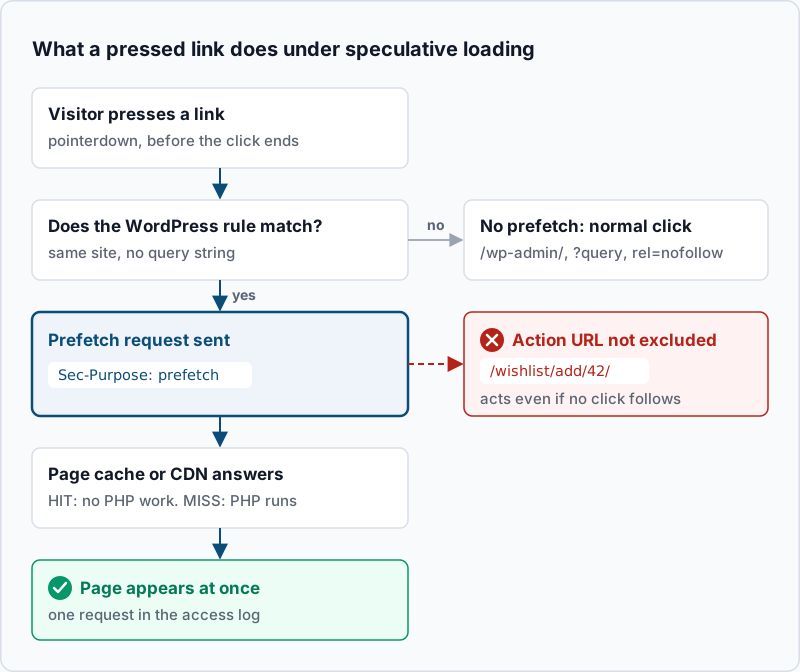
The rule matches every link on the same site, except these, which WordPress always leaves out:
/wp-login.phpand any other/wp-*.phpfile, plus everything under/wp-admin/. Log-out links go throughwp-login.php, so they are never prefetched.- Files under the uploads,
wp-content, plugins and theme folders. - Any URL with a query string, such as
?add-to-cart=42, when pretty permalinks are on. - Links with
rel="nofollow". WooCommerce adds it to the add-to-cart buttons in product lists. - Links that carry the
no-prefetchclass, or sit inside an element that has it.
Two settings decide what the browser does with a matching link. The mode is either prefetch (download the HTML only) or prerender (download the page and render it in a hidden tab, running its JavaScript). The eagerness is how early the browser acts. WordPress defaults to prefetch with conservative eagerness.
| Eagerness | When Chrome starts on desktop | On mobile |
|---|---|---|
| conservative (WordPress default) | Pointer or finger pressed on the link | Same |
| moderate | Pointer rests on the link for 200 ms, or press, whichever comes first | Viewport heuristics based on scrolling |
| eager | Pointer rests on the link for 10 ms (Chrome 143 and later) | Link has been in view for 50 ms |
Chrome also caps these at two speculations at a time per page and drops the oldest when a third starts. That cap keeps the extra load small even at eager settings.
What your server, cache and analytics see
A prefetch is an ordinary GET request with the visitor’s cookies plus one extra header, Sec-Purpose: prefetch. A prerender sends Sec-Purpose: prefetch;prerender. When the visitor completes the click, the browser uses the response it already has. So a normal visit usually produces one line in your access log, and that line is the prefetch. Don’t filter Sec-Purpose requests out of log-based statistics: you would remove real page views along with the unused ones.
Page caches and CDNs (content delivery networks, which serve copies of your pages from servers near the visitor) treat the prefetch like any other request. A cached page costs nothing extra. An uncached one runs PHP as usual, which matters for WooCommerce guests whose cart cookie bypasses the cache. Prefetch never runs page JavaScript, so tools like Google Analytics don’t count it. Prerender does run it, which is why analytics behaviour is the main question before you switch modes. For the cache side, see WordPress page cache vs object cache vs browser cache.
Step-by-step
-
Read the active configuration. From the site’s root folder, run:
wp option get permalink_structure
wp eval 'echo wp_json_encode( wp_get_speculation_rules_configuration() ), PHP_EOL;'
Example output:
/%postname%/
{"mode":"prefetch","eagerness":"conservative"}
WP-CLI runs as a logged-out visitor, so this is what anonymous visitors get. If the second line says
null, the feature is off: either permalinks are plain (an empty first line) or a plugin or theme returnsnullfrom thewp_speculation_rules_configurationfilter. If it saysprerenderandmoderate, the Speculative Loading feature plugin is most likely active. On WordPress 7.1 or later, a host-level default can also cause it (see step 5). -
Look at the rule in the page HTML. Use a logged-out request:
curl -s https://www.example.com/ | grep -A1 'type="speculationrules"'Example output:
<script type="speculationrules">
{"prefetch":[{"source":"document","where":{"and":[{"href_matches":"/*"},{"not":{"href_matches":["/wp-*.php","/wp-admin/*","/wp-content/uploads/*","/wp-content/*","/wp-content/plugins/*","/wp-content/themes/storefront/*","/*\\?(.+)"]}},{"not":{"selector_matches":"a[rel~=\"nofollow\"]"}},{"not":{"selector_matches":".no-prefetch, .no-prefetch a"}}]},"eagerness":"conservative"}]}
No output means no rule on that page. If step 1 showed a configuration but
curlshows nothing, you are probably looking at a page cached before WordPress 6.8. Purge the page cache and try again. -
Watch a prefetch in Chrome DevTools. Open the site in a private window so you are logged out. Open DevTools, go to Application, and under Background services select Speculative loads. Reload the page, because the panel only records what happens while it is open. The Rules tab lists the rule set and the Speculations tab lists matching URLs with a status. Press and hold a menu link: its status moves on from “Not triggered” once the prefetch runs. In the Network panel, select that request and check Headers. You should see
Sec-Purpose: prefetchunder the request headers. -
Exclude cart, checkout, account and action URLs. Create
wp-content/mu-plugins/speculative-loading-rules.php:<?php /** * Plugin Name: Speculative loading exclusions */ add_filter( 'wp_speculation_rules_href_exclude_paths', function ( $paths ) { $paths[] = '/cart/*'; $paths[] = '/checkout/*'; $paths[] = '/my-account/*'; return $paths; } );These pages show data that belongs to one shopper and usually bypass the page cache, so every speculation of them runs PHP. Under the default that cost is small, because a press is almost always followed by the click. It grows once you raise the eagerness, and under prerender the checkout scripts would run before the shopper even sees the page. Excluding them up front keeps step 5 safe.
Use the slugs your shop actually uses, listed under WooCommerce > Settings > Advanced > Page setup. Paths are relative to the site’s home page. WordPress adds the subdirectory prefix itself if the site lives in one. Add any plugin URL that changes something when opened and has no query string. A hypothetical wishlist link like
/wishlist/add/42/would need'/wishlist/*'. Then check the file and purge the page cache:php -l wp-content/mu-plugins/speculative-loading-rules.phpExpected output:
No syntax errors detected in wp-content/mu-plugins/speculative-loading-rules.php. To exclude a single link instead, add the CSS classno-prefetchto it. In the block editor that is Advanced > Additional CSS class(es) on a Button or Group block. -
Change mode or eagerness only on purpose. Stay on the default unless both of these are true: anonymous pages are served from a page cache, and step 4 is done. Then moderate is a reasonable step up. Add this to the same must-use plugin:
add_filter( 'wp_speculation_rules_configuration', function ( $config ) {
	if ( is_array( $config ) ) {
		$config['eagerness'] = 'moderate';
	}
	return $config;
} );
The
is_array()check keeps the feature off for logged-in users. On WordPress 7.1 or later, a host can instead setdefine( 'WP_SPECULATIVE_LOADING_DEFAULT_EAGERNESS', 'moderate' );inwp-config.php, or an environment variable with the same name.WP_SPECULATIVE_LOADING_DEFAULT_MODEworks the same way for the mode. Both only change what WordPress’s “auto” value turns into, so any plugin filter still wins. Useprerenderonly after confirming your analytics, ads and chat widgets wait for the page to be shown. The Chrome prerender documentation covers how to check that. If the Speculative Loading feature plugin is installed, it applies its own settings from Settings > Reading (prerender and moderate by default), so change them there or deactivate it. -
Record the header in your access log. Default log formats don’t include
Sec-Purpose. On nginx, add a format in thehttpblock and use it in the site’sserverblock:log_format specl '$remote_addr - $remote_user [$time_local] "$request" $status $body_bytes_sent "$http_referer" "$http_user_agent" "$http_sec_purpose"'; access_log /var/log/nginx/access.log specl;On Apache, the equivalent is
LogFormat "%h %l %u %t \"%r\" %>s %b \"%{Referer}i\" \"%{User-Agent}i\" \"%{Sec-Purpose}i\"" specl, with the site’sCustomLogline switched tospecl. On cPanel the per-domain logs use a format WHM manages, so use DevTools from step 3 instead. Runnginx -t && systemctl reload nginxand expectsyntax is okandtest is successful.
Validate it works
Run these three checks after any change, and purge the page cache first.
curl -s https://www.example.com/ | grep -o '"/cart/\*"'Expected output: "/cart/*". That proves your exclusion reached the HTML visitors get.
Next, in a private Chrome window with the Speculative loads panel open, press a cart link. It should show no speculation, while a blog or product link still does.
Finally, count prefetch lines in the log (nginx format from step 6):
grep -c '"prefetch"$' /var/log/nginx/access.logExample output: 318. Any non-zero count proves Chromium visitors are prefetching. Under conservative eagerness nearly every one of these lines is also a real page view, so a sudden jump after a plugin update points to raised eagerness.
Troubleshooting
- No rule in the HTML. Check, in order: you tested logged in, permalinks are plain, a cached copy predates the change, or a plugin returns
nullfromwp_speculation_rules_configuration. Step 1 tells you which. - Rule present, but DevTools shows nothing. Chrome skips speculation when Preload pages is off in
chrome://settings/performance, which some ad blockers such as uBlock Origin also turn off. A strict Content Security Policy (a header that limits which scripts can run) without'unsafe-inline'blocks the inline rule, and the Console shows a CSP error. Add the script’s hash toscript-src, or add your nonce (the random token your policy issues for each page) through thewp_inline_script_attributesfilter. - Many unused prefetches or extra PHP load. Something raised the eagerness. Look for the Speculative Loading plugin (
curlthe page and search forspeculation-rulesin its generator meta tag) or another plugin filtering the configuration. Go back to conservative or improve the page cache hit rate. See the WooCommerce bypass-cookie recipe for guest carts behind Cloudflare. - 503 responses on prefetches behind Cloudflare. Cloudflare’s Speed Brain feature adds its own conservative prefetch rule through a
Speculation-Rulesheader. Its documentation says prefetches that don’t succeed get a 503 response. The browser drops that prefetch and loads the page normally. - A stale cart or a state change nobody asked for. A clean-path URL that shows or changes per-visitor data is being speculated. Add it to the exclusion list from step 4.
When this is the wrong approach
Speculative loading only speeds up the second and later pages of a visit. It does nothing for the first page or for slow server response, so a slow site needs work on the server and cache first.
Turn it off when your Content Security Policy can’t allow the inline rule, or when the site depends on GET links that change data and you can’t list them. Put this in the must-use plugin:
add_filter( 'wp_speculation_rules_configuration', '__return_null', 100 );Priority 100 runs after the Speculative Loading plugin’s own filter at the default priority of 10, so the plugin can’t turn it back on. Purge the page cache, then repeat step 2: no output means it is off. More background is in the WordPress 6.8 developer note.
Running WordPress that earns real money deserves an operator — Stack Harbor runs that stack under Enterprise WordPress; book an infrastructure consult.