Skip to content

Services · Cloud PaaS

Push code. Not servers.

Provisioned runtimes, managed databases, autoscaling, and zero-downtime deployments, with Stack Harbor operations underneath.

Best for application teams, SaaS products, WordPress at scale, agency multi-stack environments, and microservice architectures.

Client portal

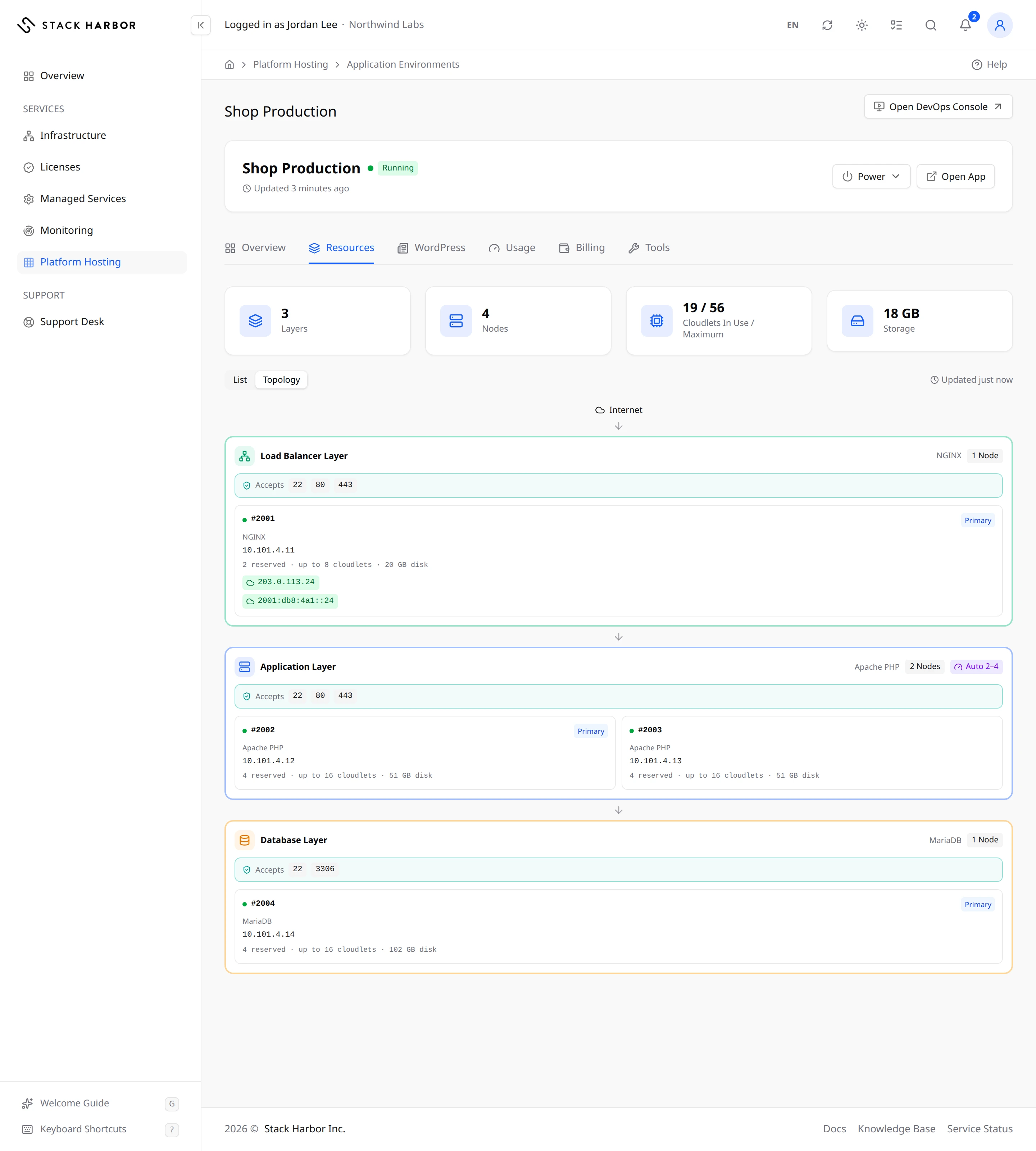
Inside the Stack Harbor client portal.

Screens from the portal, shown with sample data.

An environment’s topology in the Stack Harbor client portal
An environment’s layers and nodes, drawn as a diagram. How it works →

Capabilities

What the platform provides.

  • Managed runtimes

    PHP, Node.js, Java, Python, Go, Ruby, .NET. Provisioned in seconds, patched on schedule, isolated per environment.

  • Managed databases

    MariaDB, MySQL, PostgreSQL, Redis, MongoDB. Replicated, backed up, monitored, with point-in-time restore.

  • Autoscaling

    Horizontal scaling on CPU / RAM / custom metrics. Vertical scaling live without downtime where the workload allows.

  • Zero-downtime deploys

    Git push or CI pipeline to environment. Blue/green and rolling deploys built in.

  • Environment templates

    Production, staging, QA, dev, cloned from templates in one click. Reproducible across teams and regions.

  • Edge & TLS

    Managed load balancers, certificates, CDN integration, and WAF rules at the platform edge.

Compute vs PaaS

Which one fits your workload?

Pick Cloud Compute when

  • You run a cPanel/WHM, control-panel, or OS-level workload.
  • You need root and full OS control for compliance or custom stack.
  • You operate non-app workloads (DB clusters, search, CI runners).
  • Your team has DevOps depth and prefers to own the platform.
Pick Cloud PaaS when

  • You ship application code: web, API, SaaS, WordPress.
  • You need elastic scaling and staging clones without ops overhead.
  • You want managed databases and zero-downtime deploys out of the box.
  • A smaller team has to run the same environment.

How PaaS environments fit together

Three environments, one platform, zero servers to manage.

A typical Stack Harbor PaaS account runs production, staging, and dev as templated environments on shared platform capacity. Push code via Git; the platform provisions runtimes, databases, scaling, and TLS automatically.

PaaS root
PaaS platform · your account
production
PROD
  • Web
    Node.js 22 · 4 nodes · autoscale
  • Cache
    Redis · HA
  • Database
    PostgreSQL 16 · primary + replica
  • Edge
    TLS · WAF · CDN
staging
STAGE
  • Web
    Node.js 22 · 1 node
  • Cache
    Redis
  • Database
    PostgreSQL 16
  • Edge
    TLS · staging.* domain
dev
DEV
  • Web
    Node.js 22 · ephemeral
  • Cache
    Redis · in-memory
  • Database
    PostgreSQL 16 · snapshot
  • Edge
    TLS · preview.* domain
Promotion workflow
  1. 1 Git push to dev
  2. 2 Tests + preview URL
  3. 3 Promote to staging
  4. 4 Approve · cut to prod

In the customer console

Your environments, in plain view.

Every PaaS environment we run on your behalf is visible in the customer console — running, stopped, sleeping, tagged by purpose. Open the DevOps Console for a one-click deep-link into the underlying Jelastic/Virtuozzo platform. No black box.

Self-serve in the customer portal · scriptable through the public API. The DevOps Console button deep-links into Jelastic for power-user operations.

Git push, automatically

Every commit deploys itself, and gets watched.

Push to a tracked branch; the platform builds, deploys, and starts measuring. Each commit gets a deploy ID with health telemetry attached, so a regression always traces back to a SHA.

  1. 01
    Push
    git push to a tracked branch.
  2. 02
    Build
    PaaS picks the right runtime, runs the build, signs the artifact.
  3. 03
    Deploy
    Blue/green into the target environment. Health check gates the cutover.
  4. 04
    Watch
    Metrics, errors, p95 latency tagged by deploy ID.
    live

Supported stacks

Every popular runtime, ready to run.

The platform provisions managed runtimes for the languages teams actually build on — Java, PHP, Ruby, .NET, Node.js, Python, Go — plus custom Docker containers and a full Elastic VPS tier for the workloads that need it. Each tab in the environment builder picks the right base image, balancer, and lifecycle hooks; you push code.

Java PHP Ruby .NET Node.js Python Go Docker (custom) Elastic VPS
  • Java

    JVM apps, Maven / Gradle builds, Tomcat · Jetty · WildFly · GlassFish · Payara · Spring Boot · TomEE.

  • PHP

    Any 7.x or 8.x version. FPM pools, OPCache, Composer, Apache or NGINX or LiteSpeed WS in front.

  • Ruby

    MRI runtimes with Passenger or Puma. Rails, Sinatra, plain Rack — bundler-driven deploys.

  • .NET

    ASP.NET Core on Kestrel / NGINX, classic .NET Framework on Windows IIS — managed Mono and .NET Core stacks.

  • Node.js

    pm2 / node clusters, npm / yarn / pnpm installs, separate dev / prod profiles, npm scripts as build hooks.

  • Python

    gunicorn / uwsgi behind NGINX. Django, Flask, FastAPI — virtualenv per environment, pinned via requirements.

  • Go

    Single-binary deployments with built-in service watchdog. No runtime to install — push the binary or push the source.

  • Docker (custom)

    Bring any Docker image from Docker Hub, GHCR, ECR, or a private registry. Multi-container topologies, orchestrated.

  • Elastic VPS

    Full VM with the OS of your choice (AlmaLinux, Ubuntu, Debian, Windows) when the workload needs root and a real init system.

See the canonical Virtuozzo VAP stack catalog →

Reference cluster

A production PaaS environment, fully redundant.

A typical clustered PaaS environment runs every tier with active redundancy — paired web balancers, a six-node application cluster pulled directly from your Git repo, paired database and Redis balancers, synchronous MariaDB Galera replication, a Redis cluster, distributed shared storage, and off-host backups. No single node is a single point of failure.

Edge
Cloudflare · TLS · WAF
Web load balancers
NGINX
lb·1
Web load balancers
NGINX
lb·2
Application cluster Apache + PHP · NGINX · LiteSpeed WS
  • app·1
  • app·2
  • app·3
  • app·4
  • app·5
  • app·6

git source: github · gitlab · bitbucket

DB load balancers
ProxySQL
db-lb·1
DB load balancers
ProxySQL
db-lb·2
MariaDB Galera synchronous replication · auto-clustering
  • M·1
  • M·2
  • M·3
  • M·4
  • M·5
Redis load balancers
HAProxy
redis-lb·1
Redis load balancers
HAProxy
redis-lb·2
Redis cluster session · object cache
  • R·1
  • R·2
  • R·3
Storage cluster Shared Storage · auto-clustering
  • S·1
  • S·2
  • S·3
Backup storage
off-host · scheduled snapshots
live traffic synchronous replication scheduled backup

Scaling profiles

Horizontal and vertical, on the same platform.

Horizontal scaling adds more nodes. Vertical scaling raises each node's ceiling without restarting. The platform supports both, on the same environment, triggered by metrics you define.

Horizontal

add more nodes
app·1
app·1
app·2
app·3
app·4

1 node → 4 nodes

  • Stateless tier

    App servers clone freely. Sessions live in Redis; uploaded files on shared storage. Scale to N quickly.

  • Stateful tier

    Galera adds quorum members with sync state. Redis cluster reshards online. Storage rebalances. Slower, but supported.

Vertical

more cloudlets per node
node·1
4 cloudlets
node·1
16 cloudlets

4 cloudlets → 16 cloudlets

  • Live resize

    Each node grows in cloudlets — 128 MB RAM + ~400 MHz CPU per cloudlet — up to its dynamic ceiling. No restart, no new IP.

  • Ceiling per node

    Reserved cloudlets are billed; dynamic cloudlets only when consumed. Vertical headroom is wider than most teams use.

Auto horizontal scaling rules

configured per environment
Add nodes
When load is more than
80 %
For at least
5 min
Scale out to
2 nodes (+1)
Remove nodes
When load is less than
38 %
For at least
10 min
Scale in to
1 node (-1)

Same rule shape per metric — CPU, RAM, network, disk I/O, IOPS — set independently per layer.

Triggers: CPU · RAM · request rate · custom metric

Direct node access

SSH Gate: one key, every container, no jump host to maintain.

The platform fronts every environment with a managed SSH gateway. You register one public key on your account; the gate authenticates you, looks up your role on the target environment, and routes you to the right container. Web SSH is available in the dashboard for the moments you don't have your terminal in front of you.

Terminal
$ ssh {nodeId}-{envName}@gate.stackharbor.com
Last login: Thu May 14 04:42:21 from 10.0.2.20
[root@node7202-env-6209048 ~]# _

No bastion to harden, no per-node key sprawl, no shared passwords. Sessions are logged and tied to a real account.

  • One key in your account

    Add it once to your Stack Harbor profile. Rotates without touching the environments.

  • Role-aware routing

    The gate checks your role (owner / admin / SSH-only) against the target environment and the specific node before granting access.

  • Web SSH in the dashboard

    For when you're on a tablet, on a borrowed laptop, or in front of the customer — same shell, same auth, no client install.

  • Audit-ready logs

    Every gate session is tied to your account, with timestamps and target node. Useful for SOC 2 / ISO 27001 evidence.

Read the SSH Gate documentation →

Use cases

Workloads that fit PaaS.

  • High-traffic WordPress with autoscaling
  • Custom application code: PHP, Node.js, Java, .NET, Ruby on Rails, Python, Go
  • WooCommerce stores with seasonal spikes
  • Headless / decoupled web stacks
  • Docker-packaged services and multi-container topologies
  • Microservice deployments
  • Agency multi-stack client environments
  • Staging / preview environment factories

Production discipline

The operations layer behind every environment.

  • Monitoring & alerting

    Per-environment metrics, log aggregation, alert rules, on-call rotation.

  • Patching cadence

    Staged runtime and OS patching with rollback windows.

  • Backup policy

    Database point-in-time recovery and file snapshots.

  • Senior support

    Engineers in the same time zone, on the support desk.

Pricing model

Pay for resources and management depth.

PaaS pricing combines a platform fee per environment with the compute, storage, and network you use. The fee scopes to coverage, replication topology, and SLA tier. Stack Harbor provides a fixed quote after the scoping call.

Pricing drivers

  • Environment count (prod / staging / dev / preview)
  • Runtime and database stack
  • Autoscaling profile
  • High-availability + replication
  • Support and SLA tier

FAQ

Questions teams ask about PaaS.

  • How is PaaS different from Cloud Compute?

    With Cloud Compute you operate the VMs and the OS underneath. With PaaS you push code and the platform provisions runtimes, databases, load balancers, and scaling. You do not manage the OS.

  • Which runtimes are supported?

    PHP (any version), Node.js, Java, Python, Go, Ruby, .NET, and managed databases (MariaDB, MySQL, PostgreSQL, Redis, MongoDB). Custom Docker images supported.

  • Can we autoscale?

    Yes. Horizontal scaling triggers on CPU, RAM, or custom metrics. Vertical scaling adjusts node size live without downtime where the workload allows.

  • Do you support staging clones?

    Yes. Production-to-staging cloning is a one-click operation; environments can be templated and version-controlled.

  • Can we still get cPanel/WHM here?

    cPanel/WHM environments live on Cloud Compute, not PaaS. PaaS is for application workloads that benefit from managed runtimes.

Push code without owning the platform.

Talk to Stack Harbor about your stack. We recommend the runtime, database, and scaling profile, then stage the environment.