For a new cPanel & WHM server, pick AlmaLinux 9 or Rocky Linux 9 unless your team already runs Ubuntu everywhere else, in which case Ubuntu 22.04 LTS is a sound choice. AlmaLinux and Rocky are both free rebuilds of Red Hat Enterprise Linux (RHEL), Red Hat’s commercial distribution. For cPanel they behave almost the same, and the choice between them comes down to governance and habit. Ubuntu is a different family, with a different package manager and a shorter standard support window per release. The decision matters because cPanel cannot move a server from one family to the other in place. Changing your mind later means building a new server and transferring every account.
What you’ll accomplish
- Understand what actually separates AlmaLinux, Rocky Linux and Ubuntu on a hosting server, and what does not.
- See how long each current release receives security updates, on one timeline.
- Match a distribution to your team, your tooling and your vendors with a short criteria table.
- Check which OS and cPanel version a server runs today, with the exact commands.
- Know the realistic path for moving between them, and when an in-place upgrade is possible.
What each option is
AlmaLinux is a free, community-run rebuild of RHEL, managed by the non-profit AlmaLinux OS Foundation. It started in 2021 after CentOS Linux 8 was cut short, with initial backing from CloudLinux Inc. Since 2023 it aims for ABI compatibility with RHEL. ABI (application binary interface) compatibility means software built for RHEL runs on AlmaLinux unchanged, even if a bug fix lands on a slightly different schedule.
Rocky Linux is another free RHEL rebuild, founded by CentOS co-founder Gregory Kurtzer and governed by the Rocky Enterprise Software Foundation. Rocky aims to match RHEL bug for bug. On a cPanel server you will rarely notice that difference, because the same packages, the same dnf commands and the same file paths apply to both.
Ubuntu LTS comes from Canonical and belongs to the Debian family. It uses apt and .deb packages instead of dnf and RPM packages. LTS (long-term support) releases ship every two years in April and get five years of standard security updates. Canonical’s paid Ubuntu Pro subscription extends that with ESM (Expanded Security Maintenance), another five years of security fixes.
CloudLinux is worth a mention because many people search “AlmaLinux vs CloudLinux”. CloudLinux OS is a paid, RHEL-compatible distribution from CloudLinux Inc., the company that originally backed AlmaLinux. It adds per-account resource limits and isolation for shared hosting, and it needs its own license. Whether that is worth paying for depends on how many unrelated customers share each server.
One thing to rule out early: CentOS Linux 7 reached end of life on June 30, 2024, and CentOS Stream is not a supported cPanel base. Neither belongs on a new hosting server.
How long each release gets security updates
The timeline below shows the security-update window for each release you might install today. AlmaLinux and Rocky follow RHEL’s ten-year cycle per major version. Ubuntu LTS gets five years of standard updates, then five more through Ubuntu Pro.
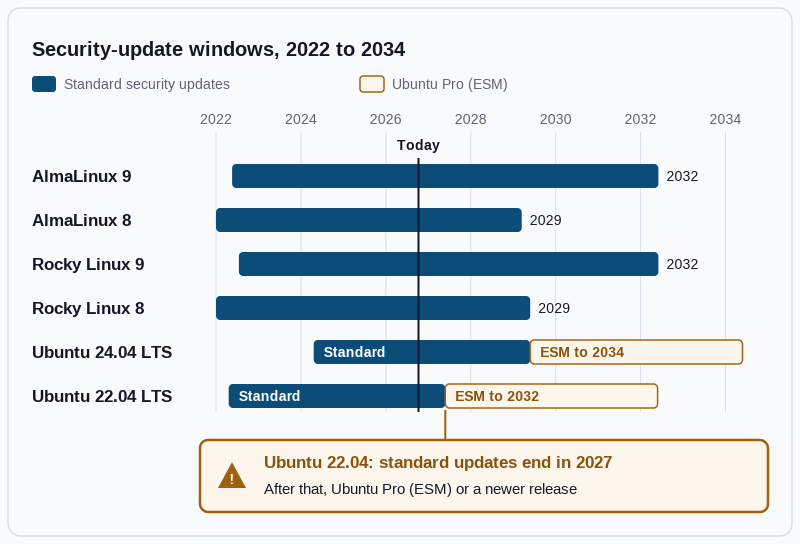
The detail that catches people is the Ubuntu 22.04 line. Its standard updates end in 2027, only months from now. ESM keeps the OS patched until 2032, but cPanel decides on its own schedule how long it supports each OS release. Do not plan on running cPanel through a release’s ESM years unless cPanel’s own documentation says it supports that.
The exact end dates move occasionally, so confirm them before you commit. For Ubuntu, the source is the Ubuntu release cycle page. For AlmaLinux and Rocky Linux, check the release notes on each project’s own site.
The criteria compared
| What you care about | AlmaLinux 9 | Rocky Linux 9 | Ubuntu LTS |
|---|---|---|---|
| Supported by cPanel & WHM | Yes | Yes | 22.04 yes; check 24.04 for your cPanel version |
| Family and package manager | RHEL, dnf and RPM | RHEL, dnf and RPM | Debian, apt and .deb |
| Security updates per major release | About 10 years | About 10 years | 5 years standard, plus 5 with Ubuntu Pro |
| Relationship to RHEL | ABI-compatible | Aims for bug-for-bug match | Unrelated |
| Governance | AlmaLinux OS Foundation, non-profit | Rocky Enterprise Software Foundation | Canonical, a company |
| In-place major upgrade on a cPanel server | 8 to 9 with cPanel’s ELevate | Check cPanel’s ELevate notes first | Check cPanel’s ELevate notes first |
| Path to CloudLinux | Direct conversion supported by CloudLinux | Direct conversion supported by CloudLinux | No direct conversion; check CloudLinux’s documentation |
| Typical cPanel how-to articles and forum answers | Plenty, since RHEL-family guides apply | Plenty, since RHEL-family guides apply | Fewer, growing |
Two rows deserve a note. First, cPanel’s support list changes with each release, so treat the first row as a starting point and confirm it on the cPanel & WHM system requirements page at docs.cpanel.net. Second, AlmaLinux 10 and Rocky Linux 10 now exist. Do not install cPanel on version 10 of either until cPanel lists it as supported for the version you plan to run.
On a cPanel server, much of what feels like “the OS” is managed by cPanel itself. Apache, PHP through EasyApache 4, mail, DNS and MySQL or MariaDB are cPanel-built packages on every supported distribution. WHM looks the same either way. The family shows up underneath: in your own scripts, in monitoring and backup agents, and in the commands you type at 2 a.m.
Check what a server runs today
Before you decide anything about an existing server, confirm what it actually runs. These two commands work on all three distributions.
grep -E '^(NAME|VERSION_ID|ID_LIKE)=' /etc/os-release
/usr/local/cpanel/cpanel -V
Example output on an AlmaLinux server:
NAME="AlmaLinux"
VERSION_ID="9.6"
ID_LIKE="rhel centos fedora"
126.0 (build 31)
Example output on a Rocky Linux server:
NAME="Rocky Linux"
VERSION_ID="9.6"
ID_LIKE="rhel centos fedora"
126.0 (build 28)
Example output on an Ubuntu server:
NAME="Ubuntu"
VERSION_ID="22.04"
ID_LIKE=debian
126.0 (build 31)
ID_LIKE tells you the family. Anything listing rhel is in the AlmaLinux and Rocky group, and debian means Ubuntu. The last line is the cPanel version. Compare the pair with cPanel’s supported list. If cpanel -V reports “No such file or directory”, cPanel is not installed on that machine.
On a RHEL-family server you can also ask for the major version alone, which is handy in scripts:
rpm -E %rhelExample output:
9Who should pick which
Pick AlmaLinux 9 if you want a widely used, well-documented cPanel base. Most cPanel documentation, third-party plugin guides and forum answers assume a RHEL-family system. CloudLinux can also convert it in place if you outgrow plain AlmaLinux later. It suits most new single servers and most fleets.
Pick Rocky Linux 9 if your organisation already standardised on Rocky, or your security team prefers a bug-for-bug RHEL match for audit reasons. For cPanel work it is a peer of AlmaLinux. Check cPanel’s ELevate documentation for your exact upgrade path before you rely on an in-place upgrade later.
Pick Ubuntu 22.04 LTS if your team runs Ubuntu on everything else and your tooling, configuration management and on-call habits are built around apt. That familiarity is worth a lot during an incident. Plan for a shorter window, though: standard updates for 22.04 end in 2027. Confirm whether your cPanel version supports Ubuntu 24.04 before you build, because that release gives you more runway.
Pick CloudLinux if you sell shared hosting and one busy account can slow everyone else down. That is a hosting-model decision more than an OS preference, and it sits on top of the RHEL-family choice.
For general hosting without cPanel, the same logic holds with fewer constraints. Ubuntu LTS is a very common base for containers, Node.js, Python and cloud images, and vendor install guides almost always cover it. AlmaLinux or Rocky make sense where you need RHEL compatibility or the ten-year cycle.
Whichever you choose, use one family across the fleet. Mixing AlmaLinux and Rocky works, but every runbook then needs two versions of the truth. Before you commit, check that every agent you depend on, such as backup, malware scanning and monitoring, lists your exact OS and version as supported.
How to move between them
How hard a move is depends on whether you stay inside a family.
Within the RHEL family, same distribution, new major version. cPanel maintains its own ELevate script, which upgrades a cPanel server in place. It moves AlmaLinux 8 to AlmaLinux 9, and it handled the CentOS 7 to AlmaLinux 8 move for many servers. The ELevate AlmaLinux 8 to 9 runbook walks through the blocker checks, the offline window and the validation. Take a snapshot first; there is no undo.
Within the RHEL family, AlmaLinux to Rocky or back. Both projects publish conversion scripts, almalinux-deploy and migrate2rocky. On a cPanel server, treat these with care and check cPanel’s guidance first, because the panel’s own packages are involved. Since the two behave the same for cPanel, the gain rarely justifies the risk on a production box. Switch at the next rebuild instead.
Within the RHEL family, to CloudLinux. CloudLinux provides its own conversion tool for AlmaLinux and Rocky servers, including ones running cPanel. Follow CloudLinux’s documentation for the current steps.
Across families, RHEL to Ubuntu or Ubuntu to RHEL. There is no in-place path. Build a new server on the target OS, install cPanel, and move accounts with the WHM Transfer Tool. The whole-server migration with whmtransfer article covers the parts that usually go wrong. Plan for new IP addresses, DNS changes and a cutover window. Anything you added outside cPanel, such as cron jobs, custom scripts and agents, needs rebuilding by hand for the new package manager.
The practical lesson is to make the family choice once, when the server is new. Version upgrades within a family are routine work. A family change is a full migration project.
When this is the wrong approach
Comparing distributions is the wrong use of your time in a few cases.
- The server is on CentOS 7 or another unsupported OS. The question is no longer which one you prefer. Get onto a supported release first, then revisit the choice at the next rebuild.
- Your cPanel license or provider limits the choice. Some hosting providers and managed images offer only one base. Ask before you plan around a distribution they do not offer.
- The real problem is resource contention between accounts. Changing from AlmaLinux to Rocky or Ubuntu will not fix one account starving the rest. That is a CloudLinux or architecture question.
- You are running a single application, not a hosting panel. Without cPanel’s support list in the way, pick the OS your team and your application vendor know best.
The choice between AlmaLinux and Rocky matters far less than staying on a supported release and upgrading well before it ends.
If this is the kind of work you’d rather never own again, it’s the daily job of Managed Cloud Ops — book an infrastructure review.