A PTR record is the one piece of your mail setup you cannot create yourself: it lives in the in-addr.arpa (IPv4) or ip6.arpa (IPv6) tree, and authority there follows the IP address, not the domain — so it belongs to whoever leased you the address. Fixing greylisting or rejection on a cPanel host is a coordination task with the IP provider, plus two things you do control: the forward A/AAAA record the PTR must point back to, and the HELO name Exim announces.
What you’ll accomplish
- Build the reverse-zone name for any IPv4 or IPv6 address by hand, so you can query it directly.
- Identify from the DNS delegation which organization controls the PTR for your sending IP, and find their contact via RDAP.
- Tell apart the three conditions a receiver checks — PTR exists, PTR is forward-confirmed, HELO matches — and know which one you fail.
- File a PTR request a provider can action without a round trip, sequencing the forward record ahead of it.
- Set the cPanel/WHM side so the announced HELO and the PTR agree.
Prerequisites
- Root SSH and root WHM on the cPanel server; an account-level cPanel login is not enough.
bind-utils,curl,jq,whois. On AlmaLinux/Rocky:dnf install -y bind-utils whois jq.- Write access to the forward zone for the domain you will name in the PTR.
- A ticket channel or control panel with whoever owns the IP: data centre, VPS provider, cloud account, or transit provider.
- Examples use
192.0.2.10,2001:db8:100:1::25and the hostnamemail.example.com. The Exim Configuration Manager labels quoted below have been stable across many cPanel & WHM releases; confirm the wording in your build.
How it works
The reverse tree is a separate namespace. For IPv4, the four octets are reversed and appended to in-addr.arpa: 192.0.2.10 becomes 10.2.0.192.in-addr.arpa. For IPv6 the rule is finer — expand the address to all 32 hexadecimal digits, reverse the digit order, and separate every single digit with a dot before appending ip6.arpa. 2001:db8:100:1::25 expands to 20010db8010000010000000000000025 and reverses into:
5.2.0.0.0.0.0.0.0.0.0.0.0.0.0.0.1.0.0.0.0.0.1.0.8.b.d.0.1.0.0.2.ip6.arpaThat is 32 labels, one per nibble. Most guides skip IPv6, and it is exactly where mail quietly starts failing when a host turns IPv6 on without a PTR.
Authority follows the address block. IANA delegates in-addr.arpa to the regional registries, each registry delegates the ranges it holds, and the allocation holder delegates onward to customers. dig +trace -x 192.0.2.10 prints the NS set at every hop; the last delegation names the party that can write your PTR.
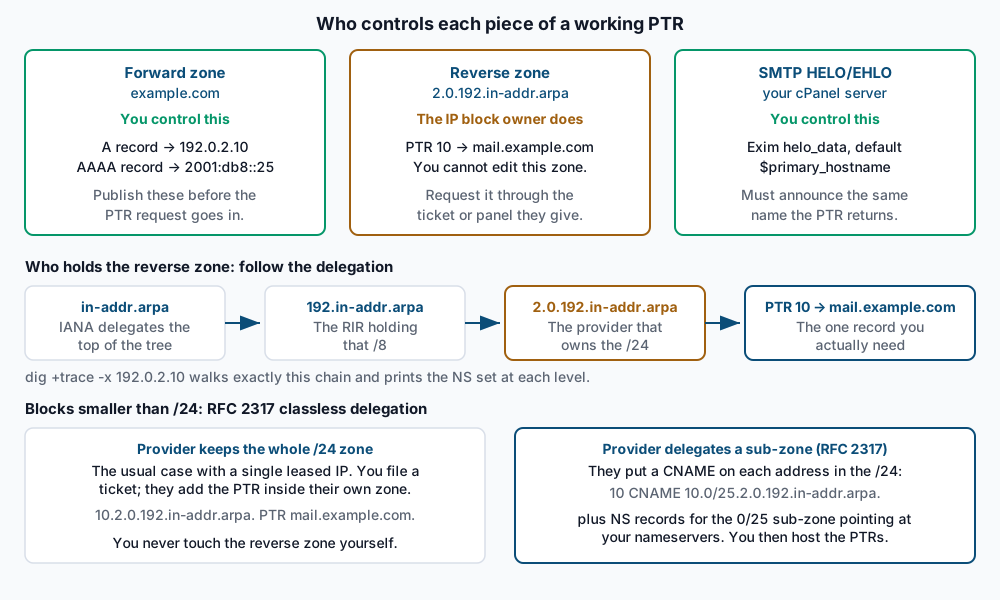
Delegation stops at the /24 in practice. DNS delegates on label boundaries, and for IPv4 a label is one octet, so the smallest normally delegable zone is a /24. Lease a single IP or a /29 and there is no separate zone to hand you. RFC 2317 works around this: the provider keeps the /24 zone but puts a CNAME on each address label pointing into a synthetic sub-zone whose name embeds the prefix, then delegates that sub-zone to your nameservers. The parent record reads 10 CNAME 10.0/25.2.0.192.in-addr.arpa., and the sub-zone 0/25.2.0.192.in-addr.arpa. carries the real PTRs. With a single leased IP you will usually get the simpler case instead: the provider writes the PTR in their own zone and you never touch DNS.
Receivers run three separate checks, and most setups fail exactly one. Conflating them is why a “fixed” PTR sometimes changes nothing:
- Does a PTR exist for the connecting IP? No PTR is a common hard rejection at large mailbox providers.
- Is it forward-confirmed? The hostname the PTR returned must itself resolve — via
AorAAAA— back to the same IP that connected. That round trip is FCrDNS, standardised as theiprevmethod in RFC 8601 section 3 and reported asiprev=passin anAuthentication-Resultsheader. - Does the HELO/EHLO match? The name announced at the start of the session, against the PTR hostname. A mismatch is usually a spam-score penalty rather than a refusal — but stacked with a generic PTR it pushes mail into the junk folder.
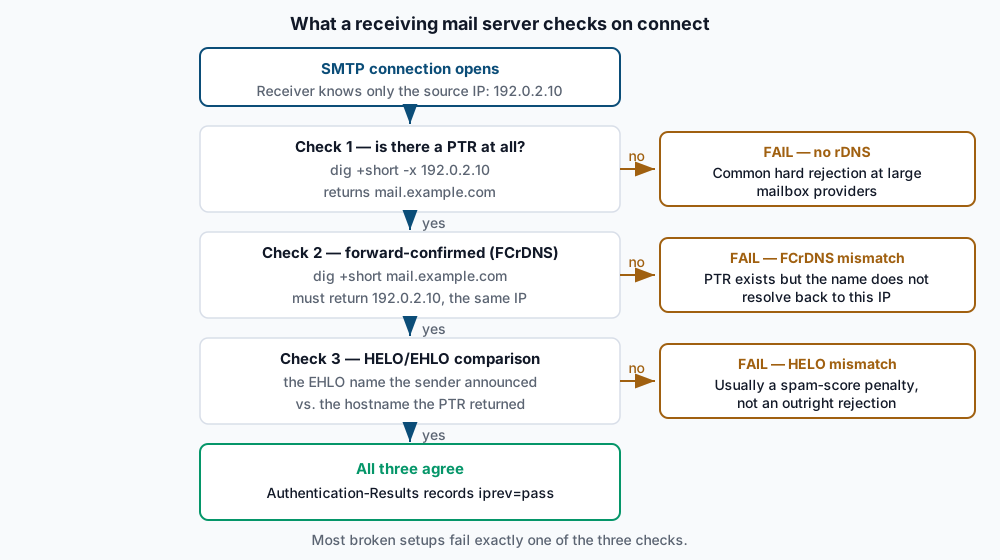
Google puts the requirement plainly for all senders: the sending IP must have a PTR resolving to a hostname, and that hostname must have an A or AAAA resolving back to the same IP (Google email sender guidelines).
On the cPanel side, the HELO comes from Exim’s helo_data. That option in the smtp transport supplies the argument to the outgoing EHLO, and its default is $primary_hostname. A frequent misconception is that smtp_active_hostname sets the outgoing HELO — it does not; it changes the name Exim uses in its server-side responses. cPanel layers on top: WHM’s Exim Configuration Manager offers Use the reverse DNS entry for the mail HELO/EHLO if available, which derives the HELO from the outgoing IP’s PTR, and Reference /etc/mailhelo for custom outgoing SMTP HELO for per-domain overrides.
Step-by-step
-
Determine the IP the mail actually leaves from. The server’s main IP, the hostname’s IP, and the egress IP for mail are three different things on a cPanel box:
ip route get 8.8.8.8 | sed -n 's/.*src \([0-9.]*\).*/\1/p'
ip -6 route get 2001:4860:4860::8888 2>/dev/null | sed -n 's/.*src \([0-9a-f:]*\).*/\1/p'
cat /etc/mailips
The first two print one address each.
/etc/mailipsis absent on most servers; anydomain: IPline overrides the routing default. Confirm by mailing yourself and reading the topmostReceived:header the receiver added — that IP is the only authoritative answer. -
Confirm the current PTR, both families.
dig +short -x 192.0.2.10
dig +short -x 2001:db8:100:1::25
Expect a fully qualified name ending in a dot, or empty output. Empty means no PTR — check 1 fails.
static-192-0-2-10.provider.net.means a PTR exists but is the provider’s generic default. -
Find who controls the block. Read the delegation, then the registry:
dig +trace -x 192.0.2.10 | grep -E 'IN[[:space:]]+(NS|PTR)'
dig +short NS 2.0.192.in-addr.arpa
curl -sL https://rdap.org/ip/192.0.2.10 | jq '{name, handle, startAddress, endAddress}'
The
+traceoutput ends with theNSset closest to your address — those nameservers belong to the party that writes the PTR. RDAP names the allocation holder and its range; add.entities[].vcardArrayto thejqfilter for abuse and technical contacts. If those nameservers are your host’s, their ticket queue is where the change happens; if they belong to an upstream, your host files it for you. -
Decide the target hostname and commit to it. One name per sending IP. For a dedicated sender
mail.example.comis fine; for a multi-tenant cPanel server use the server’s own hostname, because a shared IP cannot honestly claim one tenant’s domain. Do not pick a name you will rename later — a stale PTR is worse than a generic one. -
Publish the forward record first — this ordering is the whole point.
dig +short mail.example.com A
dig +short mail.example.com AAAA
These must return exactly the sending IPs and nothing else, before the PTR request goes in. If the PTR lands first, every receiver checking FCrDNS during the gap sees a PTR pointing at a name that does not resolve — worse than having no PTR at all.
-
Open the request with everything the provider needs in one message. Vague tickets get bounced, and each round trip costs a business day. State the exact IP and address family, the hostname you want returned, that the forward record is already published and resolving, and the reason (outbound SMTP deliverability) — one line per IP. Many providers expose a self-service field instead: DigitalOcean derives the PTR from the droplet name, AWS uses a request form for Elastic IPs, OVH and Vultr have a per-address reverse-DNS field.
-
Point the cPanel HELO at the same name. If the server hostname is the target, set it in WHM » Networking Setup » Change Hostname and accept that interface’s prompt to add the matching
Aentry. Then in WHM » Service Configuration » Exim Configuration Manager » Basic Editor, under Domains and IPs, enable Use the reverse DNS entry for the mail HELO/EHLO if available. For per-domain HELO names across multiple sending IPs, enable Reference /etc/mailhelo for custom outgoing SMTP HELO and populate that file. Save from the Basic Editor rather than editing/etc/exim.conf, which cPanel regenerates; manual directives belong in/etc/exim.conf.local. Apply with:/scripts/restartsrv_eximExpect
exim restarted successfullyand a running PID. -
Sequence the wait, don’t absorb it. “Providers are slow” means something concrete: self-service fields apply in minutes, a mainstream host’s ticket queue runs one to two business days, an upstream asked on your behalf can take a week. File the request before the migration window, verify it against the new IP while the old server still carries live mail, then cut the MX and outbound path over.
Validate it works
Round-trip both families — every line must agree:
dig +short -x 192.0.2.10
dig +short mail.example.com A
dig +short -x 2001:db8:100:1::25
dig +short mail.example.com AAAA
The PTR queries return mail.example.com.; the forward queries return the two sending IPs. Any disagreement is an FCrDNS failure. Then check what Exim announces:
exim -bP primary_hostname
exim -bP transport smtp | grep helo_data
primary_hostname should print your target name; helo_data prints either the default $primary_hostname or the reverse-DNS expansion cPanel installs. Finally, test against a real receiver — the only check exercising all three conditions at once:
swaks --to you@gmail.com --from postmaster@example.com --server localhostRead the delivered message’s full source: the receiver’s Received: header names the connecting IP and the HELO it saw, and iprev=pass in Authentication-Results confirms the round trip from their side.
Troubleshooting
- PTR is correct but mail is still rejected. SPF, DKIM, and DMARC are evaluated separately, and a failure in any of them holds delivery back regardless of a clean
iprev=pass. A550 5.7.1naming SPF or DMARC is not a reverse-DNS problem — fix those on their own terms, per SPF, DKIM, and DMARC on cPanel. - PTR resolves but there is no matching forward record.
dig +short -xreturns a name;dig +shorton that name returns nothing — an identity asserted and unbacked. Usually the forward record went into the wrong zone, onto nameservers the domain no longer uses, or was skipped at step 5. - The PTR on a shared IP belongs to another tenant. On shared hosting the PTR names the server, not a customer, and cannot name two domains truthfully. Do not ask the host to repoint it — that breaks every other tenant’s alignment. The answer is a dedicated outbound IP, after which the PTR is yours; see per-account outbound IP routing.
- Multiple PTRs on one IP. DNS permits several PTR records at one name, and
dig +short -xreturns all of them. Receivers differ: some match any returned name, others take only the first. Treat more than one as a misconfiguration — usually a previous tenant’s leftover — and ask for exactly one. - IPv6 sending from an address with no PTR. A server with an
AAAAon its hostname prefers IPv6 to any receiver publishingAAAAon its MX, and the PTR requirement applies to IPv6 strictly. If the provider will not give you an IPv6 PTR, disabling IPv6 for outbound mail is legitimate, not a workaround: bind the Eximsmtptransport to IPv4 only. - A correct change still looks broken. Reverse zones carry TTLs of an hour or more, and negative answers stay cached for the SOA minimum, so a resolver that saw NXDOMAIN before the PTR existed keeps saying so. Query the delegated nameservers directly —
dig @ns1.provider.net -x 192.0.2.10— and if that answers, you are waiting on caches, not the provider.
When this is the wrong approach
If you send at real volume from an IP whose reputation you do not control, or the provider refuses to set a PTR at all, chasing reverse DNS on that address is the wrong fight: relaying outbound mail through a dedicated sending service moves the PTR, the reputation, and the warm-up problem onto infrastructure built for it. And on shared hosting, when the honest answer is a dedicated IP, provision that first — no DNS work substitutes for an address whose identity is actually yours.
If this is the kind of work you’d rather never own again, it’s the daily job of Managed Cloud Ops — book an infrastructure review.