WHM’s Add a New IP Address screen does four things well: it writes the address into whatever network-configuration layer the server uses, brings it up on the interface, records it in /etc/ips and /etc/ipaddrpool so accounts can be pointed at it, and announces it on the local segment with a gratuitous ARP. That is the smaller half of the job. Whether the address is reachable at all, whether a site serves on it, and whether mail leaving from it is accepted are decided outside WHM entirely — by the upstream firewall or cloud security group, the per-account assignment and the vhost and certificate that follow it, Exim’s choice of source address, the PTR record at your provider, and the SPF record of every domain now sending from it. Miss one and nothing breaks today; it breaks tomorrow, quietly, in a way nobody connects to the IP change. This is the order those pieces go in, with the check that proves each one before you move to the next.
What you’ll accomplish
- Add a routed block to a WHM server and confirm the kernel, WHM and the outside world all agree the addresses exist.
- Assign one to an account so its sites serve on it, with the virtual host, DNS records and certificate following correctly.
- Control which address Exim sends from, and pair it with a PTR record and an SPF entry that survive a receiving mail server.
- Close the four gaps WHM’s wizard leaves open, before they surface as a ticket a day later.
- Recognize the cases where a dedicated IP is not the right answer.
Prerequisites
- A block your provider has actually routed to the server. Buying addresses and having them routed are two different events. If the block is routed elsewhere, or the addresses need a separate static-route or Elastic-IP style attachment, no configuration inside WHM will make them answer. Confirm the routing state in the provider portal first.
- Root SSH access and a WHM root or reseller-with-IP-privileges login. Most of this runbook is shell work; the WHM interface is the friendlier path for two steps, noted where it applies.
- A short maintenance window. Assigning an IP to an account gracefully restarts Apache, and changing Exim’s outbound configuration restarts Exim. Neither is long, but both interrupt requests in flight.
- An honest note about the network layer. cPanel & WHM runs on RHEL-family systems using
network-scriptsor NetworkManager and on Ubuntu LTS using netplan, and the IP wizard writes to whichever one that particular server uses. Do not hand-edit those files to add an address — let WHM write them, then read back what it wrote. Mixing hand-edits with WHM-managed entries is the most common way a block survives the change and disappears at the next reboot.
How it works
An additional IP is not one setting. It is the same fact recorded in nine places, four of which WHM writes for you and five of which it does not.
On the server, /etc/ips is the canonical list of additional addresses, one per line in IP:NETMASK:BROADCAST form. /etc/ipaddrpool is narrower: the addresses currently free to hand to an account. WHM’s IP Functions screens read and write both. When an address is assigned to an account, the pairing lands in /etc/domainips, the account’s Apache virtual host is rewritten to bind to it, and the A records in that account’s DNS zones are updated.
Mail is a separate system with its own idea of which address to use. Exim takes its outbound source address from the Exim Configuration Manager options in WHM, not from the vhost: with “Send mail from the account’s dedicated IP address” enabled, an account with a dedicated IP sends from it; /etc/mailips overrides that per domain when its option is on; and /etc/mailhelo sets the HELO name Exim announces. Those three settings, the PTR record, and the SPF record of the sending domain all have to agree, and the IP wizard writes none of them.
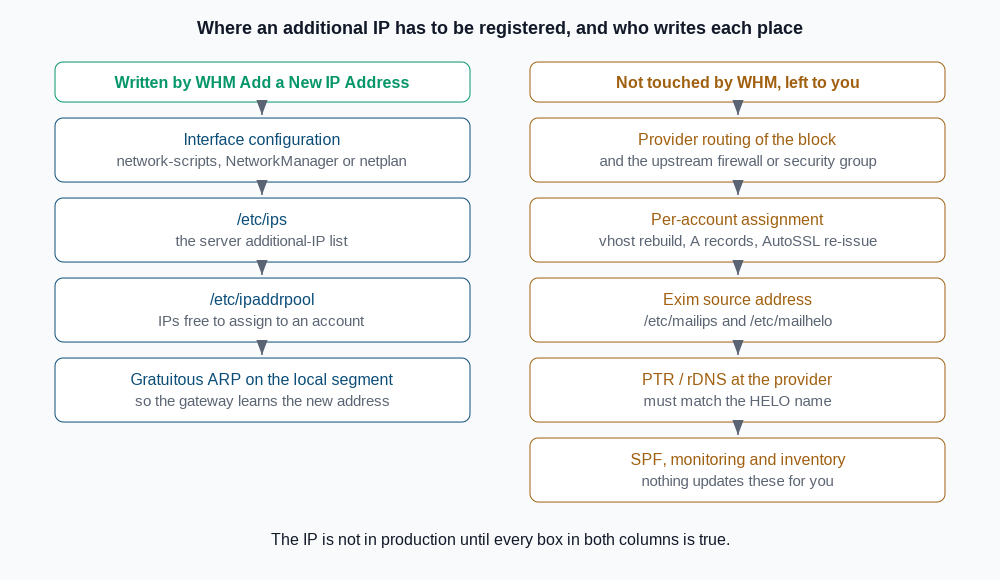
The practical consequence is a hard ordering. Firewall before addressing, addressing before assignment, assignment before certificates, certificates before mail, mail before DNS records that advertise it. Each stage has a check that either passes or sends you back one step.
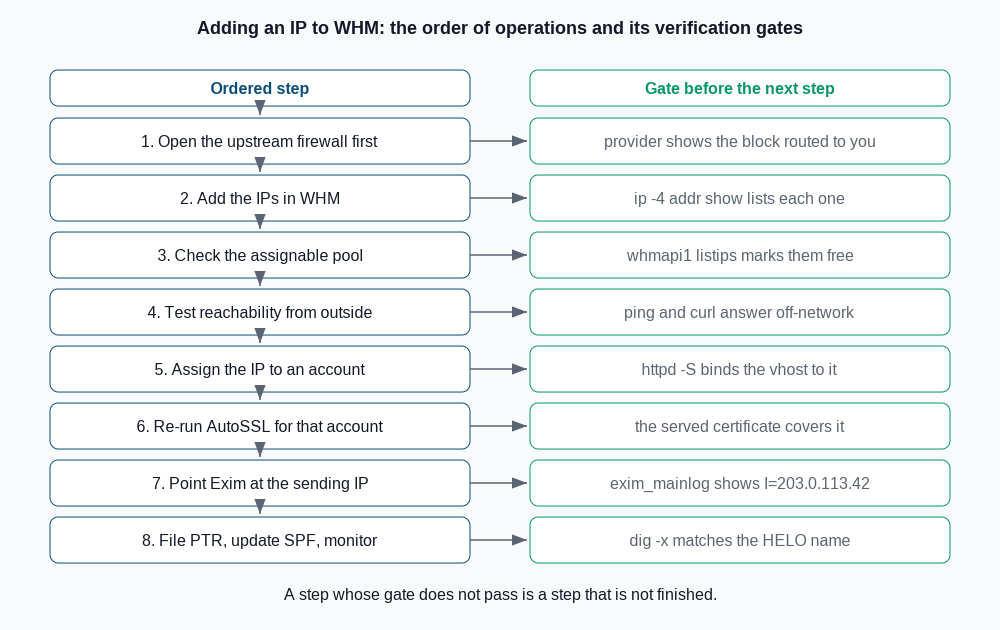
Step-by-step
-
Record the baseline and open the upstream first. Before changing anything, capture what the server currently has, so a later diff is meaningful.
ip -4 addr show scope global
cat /etc/ips
2: eth0 inet 203.0.113.10/24 brd 203.0.113.255 scope global eth0Now add the new block to the upstream firewall, cloud security group or router ACL — whatever sits between the internet and this server. Do this before adding the addresses in WHM, not after. An address that is configured but blocked upstream looks healthy in every WHM screen and is dead from the outside.
-
Add the block in WHM. The interface path is Home » IP Functions » Add a New IP Address, which accepts a single address or a range plus a netmask. The equivalent from the shell:
whmapi1 addips ips=203.0.113.42-203.0.113.46 netmask=255.255.255.0The success signal is in the metadata block, not the data:
---
metadata:
  command: addips
  reason: OK
  result: 1
  version: 1
result: 1means WHM applied the change. Confirm the kernel agrees:ip -4 addr show scope global cat /etc/ipsinet 203.0.113.10/24 brd 203.0.113.255 scope global eth0 inet 203.0.113.42/24 brd 203.0.113.255 scope global secondary eth0203.0.113.42:255.255.255.0:203.0.113.255If WHM reports success and
ip addrdoes not show the address, the apply failed silently — see the first troubleshooting entry rather than continuing. -
Confirm the addresses are assignable. WHM’s view and the pool are not the same list, and an address can exist on the interface while being invisible to account assignment.
whmapi1 listips
cat /etc/ipaddrpool
Each entry carries a
usedflag;used: 0means the address is free to assign. If an address appears inip addrand/etc/ipsbut not in/etc/ipaddrpool, rebuild the pool:/usr/local/cpanel/scripts/rebuildippoolRe-read
/etc/ipaddrpoolafterwards and confirm the missing address is listed. -
Prove the address answers from off-network. Everything so far was the server talking to itself. From a host outside your provider’s network:
ping -c 3 203.0.113.42
curl -sI http://203.0.113.42/ | head -n 1
3 packets transmitted, 3 received, 0% packet loss HTTP/1.1 403 ForbiddenAny HTTP status line proves the packet path works; a 403 from the default virtual host is a pass here. If ping fails and the upstream is open, refresh the gateway’s ARP cache:
arping -U -I eth0 -c 3 203.0.113.42 -
Assign the address to an account. Home » IP Functions » Change a Site’s IP Address, or from the shell:
whmapi1 setsiteip ip=203.0.113.42 user=acmecorpThis rewrites the account’s virtual host, updates the A records in the account’s zones and records the pairing in
/etc/domainips. Verify all three:grep example.com /etc/domainips httpd -S 2>&1 | grep example.com dig +short A example.com @127.0.0.1example.com: 203.0.113.42 port 443 namevhost example.com (/etc/apache2/conf/httpd.conf:1420) 203.0.113.42If
httpd -Sstill shows the old address, rebuild and restart the web server explicitly:/usr/local/cpanel/scripts/rebuildhttpdconf /usr/local/cpanel/scripts/restartsrv_httpdThe wider decision of which accounts deserve their own address is covered in assigning a dedicated IP to a cPanel account.
-
Re-run AutoSSL for that account. Certificates bind to names, not addresses, so an existing one usually keeps working — but a domain validated over HTTP fails its next renewal if the move broke reachability, and now is the cheap time to find out.
/usr/local/cpanel/bin/autossl_check --user=acmecorpThe run writes to
/var/cpanel/logs/autossl/. Confirm what is actually being served on the new address:openssl s_client -connect 203.0.113.42:443 -servername example.com < /dev/null 2>/dev/null | openssl x509 -noout -subject -datessubject=CN = example.com notBefore=Aug 16 00:00:00 2026 GMT notAfter=Nov 14 23:59:59 2026 GMT -
Decide which address Exim sends from. Open Home » Service Configuration » Exim Configuration Manager and check three options on the Domains and IPs tab: “Send mail from the account’s dedicated IP address”, “Reference /etc/mailips for outgoing SMTP connections”, and “Reference /etc/mailhelo for outgoing SMTP HELO”. The files are only consulted when their option is on, which is the single most common reason a carefully written
/etc/mailipsdoes nothing.cat /etc/mailips cat /etc/mailheloexample.com: 203.0.113.42 example.com: mail.example.comThen rebuild and restart:
/usr/local/cpanel/scripts/buildeximconf
/usr/local/cpanel/scripts/restartsrv_exim
To see the source address, add
outgoing_interfacetolog_selectorin the Advanced Editor, send a test message to a mailbox you control off-server, and read the delivery line:printf 'Subject: source IP check\n\ntest\n' | exim -v -f postmaster@example.com you@external.example grep -F 'you@external.example' /var/log/exim_mainlog | tail -n 1=> you@external.example R=dkim_lookuphost T=dkim_remote_smtp H=mx.external.example [198.51.100.25] I=[203.0.113.42]The
I=field is the address the message actually left from. If it is not the one you intended, nothing downstream will help. -
File the PTR, update SPF, and add the address to monitoring. Reverse DNS is delegated to whoever holds the reverse zone — your hosting or cloud provider, never cPanel. File it through their portal, then confirm it resolves and matches the HELO name from step 7:
dig -x 203.0.113.42 +short
dig +short A mail.example.com
mail.example.com. 203.0.113.42Forward and reverse must agree; a PTR pointing at a name that does not resolve back to the address is worse than no PTR. Then update SPF for every domain now sending from the new address:
dig +short TXT example.com | grep spf1"v=spf1 +mx +a +ip4:203.0.113.42 ~all"Finally, add the address to liveness and blocklist monitoring, and record which account owns it in your inventory. Why reverse DNS lives at the host covers where PTR actually gets set.
Validate it works
Three end-to-end checks, all run from somewhere other than the server. First, the address answers from off-net: ping -c 3 203.0.113.42 returns replies and curl -sI https://203.0.113.42/ returns a status line. Second, the account’s site serves on it: curl -sI --resolve example.com:443:203.0.113.42 https://example.com/ returns the expected status with no certificate warning, and the same request against the old address no longer serves that site. Third, mail leaves from the intended address with matching identity: send to an external mailbox, confirm the I= field in /var/log/exim_mainlog shows the new address, then read the received headers at the destination and check that the reverse lookup of the connecting address returns the HELO name the server announced.
Repeat the first check after a reboot. That is the one that catches a configuration written to a file the server does not read at boot, and it is far cheaper to discover on a scheduled reboot than an unscheduled one.
Troubleshooting
The address is in the pool but gone after a reboot. WHM wrote it to the running interface and to /etc/ips, but the persistent configuration did not take — usually because the interface files were hand-edited earlier, or because a different config layer is authoritative than the one being written. Work out which layer the server reads at boot, remove any hand-written duplicate entries for the address, then remove and re-add it through WHM. Confirm with ip -4 addr show scope global right after a reboot, not from memory.
Everything looks right in WHM and nothing answers from outside. The upstream is still dropping it. Security groups and provider firewalls are per-address in some products and per-interface in others, and a secondary address often does not inherit the primary’s rules. Test from a host outside the provider network — a neighbouring instance in the same VPC frequently reaches the address over the local segment while the internet cannot.
The address answers locally but traffic never arrives. The gateway is still caching the previous owner in its ARP table, which is normal when a provider recycles a block. Send unsolicited ARP with arping -U -I eth0 -c 5 203.0.113.42, then re-test from off-network. If it never clears, the provider has to flush it upstream.
Mail from the new address is deferred or soft-bounced. Two causes, usually together: the sending domain’s SPF record does not list the new address, so receivers see an unauthorized sender, and the PTR is missing or does not match the HELO name, which several large providers treat as a rejection condition. Check both with dig +short TXT example.com and dig -x. A new address also has no sending reputation, so ramp volume gradually rather than moving an entire mail stream at once.
AutoSSL fails right after assigning the dedicated address. The HTTP validation request is reaching the wrong place. Check that the domain’s public A record points at the new address and has propagated (dig +short A example.com @8.8.8.8), that port 80 is open for it upstream — validation runs over HTTP even for HTTPS certificates — and that httpd -S binds the vhost to the address DNS names. A domain whose DNS still points at the old address while the vhost has moved fails every time, with no error that mentions IPs.
When this is the wrong approach
The historical reason for dedicated IPs — one per SSL certificate — has not been true for over a decade. Every client that matters supports SNI, and cPanel serves many certificates from one address without difficulty. When someone requests a dedicated IP “for SSL”, the request rests on a constraint that no longer exists, and the honest answer is that a shared address serves the site identically. Shared IP versus dedicated IP on cPanel works through what each one still buys.
Three reasons remain. Mail reputation separation is the strongest, but only for an account sending enough to build a reputation of its own — a low-volume sender on a cold address often lands worse than on a warm shared one. Compliance or contractual requirements sometimes name a specific address, and an argument about SNI does not change a signed document. And third-party allow-lists — a payment gateway, a partner API, a client’s corporate firewall — need an address that stays put.
If the real requirement is isolating one busy tenant, additional addresses on the same host do not deliver it: that tenant still shares CPU, disk, memory and outbound reputation with everyone else on the box. Moving it to its own server is the larger change that actually solves the problem. cPanel’s product documentation is the reference for the IP Functions screens and the Exim Configuration Manager options named above.
If this is the kind of work you’d rather never own again, it’s the daily job of Managed Cloud Ops — book an infrastructure review.