This guide shows you how to build one container image that runs on both Intel/AMD (amd64) and ARM (arm64) servers, using Docker Buildx, Docker’s extended build tool. It is for developers and admins whose images are built on one kind of machine and deployed on another. A common example is an image built with docker build on an Apple Silicon laptop. It dies with exec format error the moment it lands on an amd64 production host.
Nothing is broken in that case. Docker built exactly one architecture, the one your laptop runs, and the tag gives no hint that any other exists. The fix is docker buildx build --platform linux/amd64,linux/arm64 --push. That command publishes a manifest list, which is one tag pointing at one image per architecture. Each host then pulls the variant it can actually run.
This guide covers the builder driver (the backend Buildx builds with) that makes multi-platform output possible. It shows the two ways to build the other architecture, either with QEMU emulation (software that imitates the foreign CPU) or on a native remote build machine. You will also export the build cache so the second build is not as slow as the first. Finally, you will verify the result before it reaches production.
What you’ll accomplish
- Create a
docker-containerbuilder that can emit multi-platform output, which the default builder cannot. - Publish one tag that resolves to a
linux/amd64image on x86 hosts and alinux/arm64image on Graviton, Ampere or Apple Silicon. - Choose deliberately between QEMU emulation and a native remote builder node, and know what each costs.
- Export and import build cache to a registry or the GitHub Actions cache so CI is not rebuilding from zero.
- Verify the manifest list with
docker buildx imagetools inspectbefore anything is deployed.
Prerequisites
- Docker Engine 23.0 or newer, or Docker Desktop 4.x. Buildx has shipped as a bundled CLI plugin since 23.0; confirm with
docker buildx version, which should printgithub.com/docker/buildx v0.12.0or higher. Older engines need the plugin installed by hand into~/.docker/cli-plugins/. - A registry you can push to, and a working
docker login. Multi-platform results normally cannot be loaded into the local image store, so a registry is where the manifest list has to live. - For emulated builds on a plain Linux host: the ability to run one privileged container once, to register QEMU binfmt handlers. Docker Desktop already ships them.
- Honest version differences.
--loadrefuses manifest lists on the classic image store; Docker Engine 25+ with the containerd image store enabled can load them, but that store is opt-in.--pushis the path that works everywhere. On CI,docker/setup-buildx-actionanddocker/setup-qemu-actiondo steps 3 and 4 for you. - Assumed throughout: a registry namespace of
acmeand an image calledapp.
How it works
A tag in a registry does not have to point at an image. It can point at an image index — the OCI name for what Docker calls a manifest list — a small JSON document listing child manifests, each annotated with an os and architecture. When a host runs docker pull acme/app:1.4.0, the client sends its own platform, the registry hands back the index, and the client pulls only the child whose platform matches. Both hosts run the same command, get different bytes, and neither knows the other exists.
A plain docker build never creates an index. It builds one image for the daemon’s own platform and pushes a single manifest. Pull that on a foreign architecture and the kernel is handed an ELF binary it cannot interpret, which surfaces as exec /app: exec format error — a message from the kernel’s exec path, not from Docker.
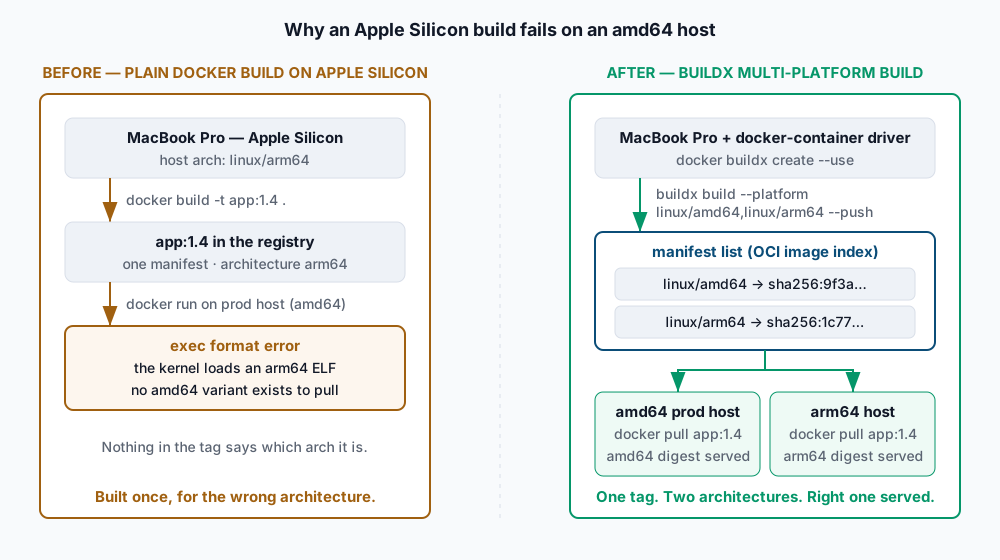
Buildx can produce an index because BuildKit runs several builds concurrently and assembles the results. What it needs is somewhere to put them. The default builder uses the docker driver, which writes straight into the daemon’s image store, and that store has no room for an index — hence Multi-platform build is not supported for the docker driver. The docker-container driver starts BuildKit inside its own container, where output goes to an exporter rather than the image store, and the registry exporter writes an index without complaint.
That leaves the real question: where do the foreign-architecture layers come from? Anything the Dockerfile copies is architecture-neutral, but anything it RUNs is a binary that has to execute somewhere.
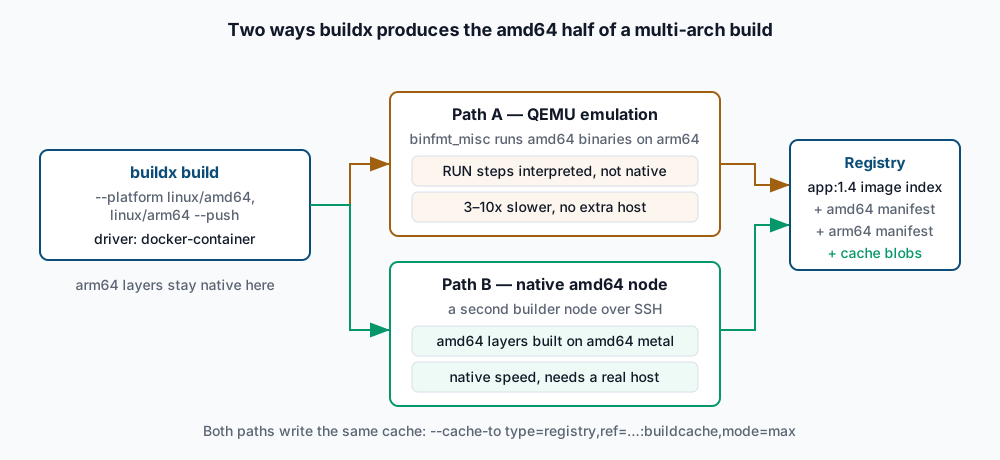
Path A is QEMU. The kernel’s binfmt_misc subsystem is told that ELF headers marked x86-64 go to qemu-x86_64-static, and every foreign binary is interpreted instruction by instruction. It needs no extra hardware and is typically three to ten times slower on compile-heavy steps.
Path B is a native node. A builder can have more than one node, each backed by a different Docker endpoint, and buildx routes each requested platform to a node that supports it natively. An amd64 VM reachable over SSH turns the emulated half into a normal build.
A third option sidesteps the question: cross-compile. FROM --platform=$BUILDPLATFORM pins the builder stage to the machine you are actually on, and the TARGETOS/TARGETARCH build arguments tell the compiler what to emit. Nothing is emulated because nothing foreign ever runs. For Go, Rust and anything else with a real cross-compiler this is the fastest and most predictable path.
Cache is the last piece. A container-driver builder has its own cache that does not survive being removed, and CI runners start empty every time. --cache-to writes the build cache to a destination and --cache-from reads it back, so unchanged layers are pulled instead of rebuilt.
Step-by-step
-
Confirm what the current builder can do. The
PLATFORMScolumn tells you which architectures are reachable, and an asterisk marks the emulated ones.docker buildx lsExpected: a
defaultbuilder using thedockerdriver, and a platform list resemblinglinux/arm64, linux/amd64*, linux/386*. The asterisks mean QEMU handlers are registered — reachable, not native. Iflinux/amd64is absent entirely, step 3 will fail and you need step 2 first. -
Register QEMU handlers, on Linux only. Docker Desktop already has these. On a bare Linux host, one privileged container installs the binfmt entries into the running kernel.
docker run --privileged --rm tonistiigi/binfmt --install allExpected: a JSON summary with a
supportedlist includinglinux/amd64andlinux/arm64, and anemulatorslist namingqemu-x86_64. Confirm independently withls /proc/sys/fs/binfmt_misc/ | grep qemu. These registrations do not survive a reboot unless your distribution shipsqemu-user-staticas a package with a systemd unit — install that instead if you want persistence. -
Create a builder on the docker-container driver.
--bootstrapstarts the BuildKit container immediately so failures surface now rather than mid-build.docker buildx create --name multi --driver docker-container --bootstrap --useExpected: progress lines ending in
#1 [internal] booting buildkit ... DONE, then the builder name printed on stdout. A container namedbuildx_buildkit_multi0is now running;docker pswill show it.--usemakes it the default for subsequentdocker buildx buildcalls in this Docker context. -
Make the Dockerfile architecture-aware. This is the cross-compiling shape.
$BUILDPLATFORMand theTARGET*arguments are supplied by BuildKit itself — you declare them withARGand never set them.FROM --platform=$BUILDPLATFORM golang:1.24-alpine AS builder ARG TARGETOS ARG TARGETARCH WORKDIR /src COPY go.mod go.sum ./ RUN go mod download COPY . . # compile from the builder's own arch to the requested target arch RUN CGO_ENABLED=0 GOOS=$TARGETOS GOARCH=$TARGETARCH go build -o /out/app ./cmd/app FROM alpine:3.20 RUN apk add --no-cache ca-certificates COPY --from=builder /out/app /app ENTRYPOINT ["/app"]Expected: with
--platform=$BUILDPLATFORMon the builder stage, that stage runs once natively no matter how many targets you ask for, and only the small final stage is produced per platform. Drop that flag and the builder stage runs once per platform, half of it under emulation — the most common reason multi-arch builds crawl. If your language has no cross-compiler, or the build needsCGO_ENABLED=1against target-native libraries, omit the flag and accept emulation. -
Build both platforms and push. One command, two platforms, one tag.
docker buildx build \
  --platform linux/amd64,linux/arm64 \
  -t acme/app:1.4.0 \
  --push .
Expected: BuildKit prints two parallel stage trees, one suffixed
[linux/amd64]and one[linux/arm64], thenexporting manifest list sha256:...andpushing manifest for docker.io/acme/app:1.4.0. The finalDONEline is the success signal. If you instead getERROR: Multi-platform build is not supported for the docker driver, the--usefrom step 3 did not stick — add--builder multito the command. -
Add registry cache so the next build is not the first build.
mode=maxexports intermediate layers too, not just the final ones, which is what makes a cold CI run useful.docker buildx build \ --platform linux/amd64,linux/arm64 \ -t acme/app:1.4.1 \ --cache-from type=registry,ref=acme/app:buildcache \ --cache-to type=registry,ref=acme/app:buildcache,mode=max \ --push .Expected: on the second and later runs, most steps report
CACHEDand wall-clock time drops sharply. The cache lands under a separate tag —acme/app:buildcache— a real object in your repository, so exclude it from tag-listing automation and from retention policies that delete unknown tags. -
Attach a native amd64 node, if emulation is too slow. Point a Docker context at a remote host, then append it to the existing builder as a second node.
docker context create amd64box --docker "host=ssh://build@10.20.0.31"
docker buildx create --append --name multi --node amd64box --platform linux/amd64 amd64box
docker buildx inspect multi --bootstrap
Expected:
docker buildx inspect multilists two nodes, the appended one reportinglinux/amd64without an asterisk. Subsequent builds route the amd64 half there. The SSH endpoint needs key-based auth that works non-interactively and a Docker daemon thebuilduser can reach. -
Wire it into GitHub Actions. The
ghacache backend uses the Actions cache service and needs no registry credentials, but only works inside a GitHub-hosted job.- uses: docker/setup-qemu-action@v3 - uses: docker/setup-buildx-action@v3 - uses: docker/build-push-action@v6 with: platforms: linux/amd64,linux/arm64 push: true tags: acme/app:${{ github.sha }} cache-from: type=gha cache-to: type=gha,mode=maxExpected: the job log shows
importing cache manifest from ghaon runs after the first. Add a per-branchscopeif concurrent branches keep evicting each other’s entries — the Actions cache is size-capped, and amode=maxmulti-arch cache fills it quickly.
Validate it works
Inspect the published tag. This is the authoritative check and needs no host of either architecture:
docker buildx imagetools inspect acme/app:1.4.0Expected:
Name:      docker.io/acme/app:1.4.0
MediaType: application/vnd.oci.image.index.v1+json
Digest:    sha256:6b1f0c...

Manifests:
  Name:      docker.io/acme/app:1.4.0@sha256:9f3a2d...
  MediaType: application/vnd.oci.image.manifest.v1+json
  Platform:  linux/amd64

  Name:      docker.io/acme/app:1.4.0@sha256:1c77b4...
  MediaType: application/vnd.oci.image.manifest.v1+json
  Platform:  linux/arm64
Two manifests with distinct Platform values is the result you wanted. Entries reading Platform: unknown/unknown are the SBOM and provenance attestations BuildKit attaches by default; they are normal, and --provenance=false --sbom=false removes them if a downstream tool rejects them.
Confirm each variant actually runs:
docker run --rm --platform linux/amd64 acme/app:1.4.0 --version
docker run --rm --platform linux/arm64 acme/app:1.4.0 --version
Expected: both print your version string. On one machine, one of the two runs under QEMU — which proves the image exists, not that it is fast. The decisive test is the amd64 variant on an amd64 host with no emulation available, where a wrong architecture fails loudly.
For a check involving no Docker daemon, skopeo reads the index straight from the registry; our skopeo inspection guide covers the syntax. And because you now publish two independent images per tag, scan both — a base image CVE can land on one architecture and not the other, as covered in our image scanning walkthrough.
Troubleshooting
ERROR: Multi-platform build is not supported for the docker driver. You are on the default builder. Create and select adocker-containerbuilder as in step 3, or pass--builder multiexplicitly. Note that builder selection is per Docker context — switching context withdocker context usesilently reverts you to that context’s default builder.ERROR: docker exporter does not currently support exporting manifest lists. You asked for--loadwith more than one platform. Load one platform at a time for local testing (--platform linux/arm64 --load) and use--pushfor the multi-platform artefact. Enabling the containerd image store lifts this restriction, but that is a daemon-wide change worth making deliberately rather than to unblock one build.- The emulated half dies with
qemu: uncaught target signal 11 (Segmentation fault)orIllegal instruction. QEMU’s user-mode emulation is incomplete, and JIT compilers,pipwheels building native extensions, and anything probing CPU features are frequent casualties. Do not debug the emulator. Restructure the build to cross-compile as in step 4, or attach a native node as in step 7. - The registry rejects the cache push. Some registries — Amazon ECR among them, and various self-hosted setups — reject the OCI artefact media type BuildKit uses for cache by default. Add
image-manifest=true,oci-mediatypes=trueto the--cache-tooptions so the cache is written as an ordinary image manifest. exec format errorpersists after a successful multi-arch push. Two usual causes. Either the deployment pins a digest rather than a tag — a digest addresses one specific manifest, so pinning the amd64 child gets you the amd64 image everywhere. Or an intermediate step flattened the index:docker pullfollowed bydocker pushto another registry keeps only the local platform. Copy indexes withdocker buildx imagetools create --tagorskopeo copy --all, never with pull-and-push.
When this is the wrong approach
If every host you deploy to is amd64 and always will be, multi-arch buys nothing and costs build time. Build one platform. The case for it appears when laptops and production disagree, when you are migrating to Graviton or Ampere instances, or when other people run your image on hardware you do not control.
If your build is a long compile in a language without usable cross-compilation, emulation may be slow enough to be untenable. A native builder node — a small always-on VM of the other architecture, or a matrix job on architecture-specific CI runners that pushes per-arch tags and joins them with docker buildx imagetools create — is more machinery, but it finishes.
And buildx is not the only tool. buildah builds without a daemon and handles manifest lists directly, which suits rootless and CI-in-container environments; our daemonless build guide covers that path. The authoritative references are Docker’s multi-platform build documentation and the buildx repository, which documents every driver and cache backend this guide only summarises.
If this is the kind of work you’d rather never own again, it’s the daily job of Managed Cloud Ops — book an infrastructure review.