If you are on RHEL, Rocky, AlmaLinux, or Fedora and need to open ports, restrict access by source, or understand why traffic is being dropped, firewalld is the tool in front of you and firewall-cmd is how you drive it. This guide covers the zone model that makes firewalld different from a flat rule list, how interfaces and source addresses get matched to zones, how to add services and ports, when to reach for rich rules, and the one habit — --permanent plus --reload — that separates a working firewall from a config that vanishes on reboot. It also covers the safe way to make changes over SSH so you do not lock yourself out.
What you’ll accomplish
- A correctly configured firewalld instance with interfaces and source subnets assigned to the zones you intend.
- Services and ports opened in the right zone, persisted across reboots.
- At least one rich rule for source-scoped access to a management port.
- A verified end state you can read back with
firewall-cmd --list-all. - A change workflow that cannot lock you out of a remote host.
Prerequisites
- A host running firewalld 0.9 or later. It ships and is enabled by default on RHEL 8/9, Rocky, AlmaLinux, and Fedora. Check with
firewall-cmd --version. - Root or
sudoaccess. Every command below assumessudowhere noted. - Console or out-of-band access (cloud serial console, IPMI, hypervisor console) as a fallback before you touch SSH rules.
An honest note on scope: firewalld is the RHEL-family firewall manager. On Debian and Ubuntu the conventional tool is ufw — if that is your platform, read UFW firewall basics instead. Both are front ends that ultimately program nftables. If you need behaviour neither abstraction exposes cleanly, see iptables stateful firewall deep dive.
How it works
firewalld does not evaluate a single top-to-bottom list of rules. It groups rules into zones, and every incoming packet is matched to exactly one zone. The zone decides which services and ports are allowed. This is the mental model to hold: you do not “add a rule to the firewall,” you “add a rule to a zone,” and separately you decide which traffic lands in that zone.
A packet is matched to a zone by this precedence, and the first match wins:
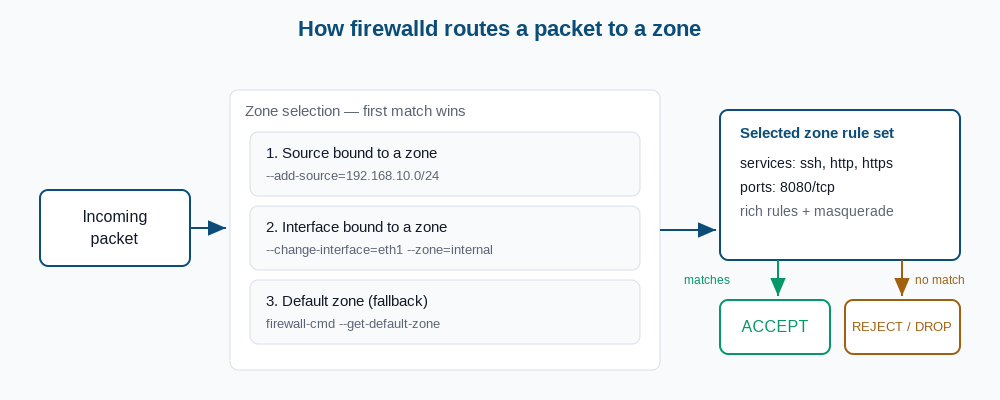
- Source address. If the packet’s source IP falls in a subnet bound to a zone, that zone is used — regardless of which interface it arrived on. Source bindings are the most specific match.
- Interface. Otherwise, if the arriving interface is bound to a zone, that zone is used.
- Default zone. If neither matches, the packet falls into the default zone, which is
publicon a fresh install.
firewalld ships several predefined zones with different trust levels: drop and block (most restrictive), public (default; only explicitly allowed traffic), internal and home (more permissive, meant for trusted LANs), and trusted (accepts everything). You can use these as-is, edit them, or create your own.
The second thing to internalize is runtime versus permanent. firewalld keeps two configurations. The runtime config is live and is lost on reload or reboot. The permanent config is written to /etc/firewalld/ and survives. A command without --permanent changes only runtime; a command with --permanent changes only the on-disk config and does not take effect until you firewall-cmd --reload. Forgetting one half of this is the single most common firewalld mistake.
Step-by-step
-
Inventory the current state before changing anything. Know your default zone, which zones are active, and what the active zone already allows.
firewall-cmd --state
firewall-cmd --get-default-zone
firewall-cmd --get-active-zones
firewall-cmd --list-all
Expected output resembles:
running
public
public
  interfaces: eth0
public (active)
  target: default
  interfaces: eth0
  services: cockpit dhcpv6-client ssh
  ports:
The key confirmation is
runningand thatsshis already in the services list of your active zone. If it is, you will not lock yourself out in the next steps. -
Assign the interface to the zone you intend. On many installs eth0 is already in
public. To move an internal NIC intointernal, do it permanently and reload:sudo firewall-cmd --permanent --zone=internal --change-interface=eth1 sudo firewall-cmd --reload firewall-cmd --get-active-zonesSuccess signal —
eth1now appears underinternal:internal (active) interfaces: eth1 public (active) interfaces: eth0 -
Bind a source subnet to a zone. Source bindings are how you say “traffic from this network is trusted.” This adds the management subnet to
internalregardless of interface:sudo firewall-cmd --permanent --zone=internal --add-source=192.168.10.0/24 sudo firewall-cmd --reload firewall-cmd --zone=internal --list-sourcesExpected output:
192.168.10.0/24 -
Add a service to a zone. firewalld ships named service definitions (a service is a bundle of ports and protocols). List them with
firewall-cmd --get-services. To open HTTP and HTTPS inpublic:sudo firewall-cmd --permanent --zone=public --add-service=http sudo firewall-cmd --permanent --zone=public --add-service=https sudo firewall-cmd --reload firewall-cmd --zone=public --list-servicesExpected output includes the two you added:
cockpit dhcpv6-client http https ssh -
Add a raw port when no service definition exists. For an application on a non-standard port:
sudo firewall-cmd --permanent --zone=public --add-port=8080/tcp
sudo firewall-cmd --reload
firewall-cmd --zone=public --list-ports
Expected output:
8080/tcp -
Test a change in runtime before committing it. This is the safe pattern for anything that could cut your session. Add the rule to runtime only, confirm you are still connected, then persist it:
sudo firewall-cmd --zone=public --add-port=2202/tcp
firewall-cmd --zone=public --list-ports
If your SSH session is still alive and the port behaves as expected, write it permanently:
sudo firewall-cmd --permanent --zone=public --add-port=2202/tcpIf a runtime change locks you out, doing nothing recovers you — the runtime config is discarded on the next reload or reboot, and you never wrote it to disk.
-
Write a rich rule for source-scoped access. Rich rules express what plain services and ports cannot: allow-from-a-source, logging, rate limiting, and rejects. This opens the PostgreSQL port only to the management subnet and rejects it from everywhere else by omission:
sudo firewall-cmd --permanent --zone=public \
  --add-rich-rule='rule family="ipv4" source address="192.168.10.0/24" port port="5432" protocol="tcp" accept'
sudo firewall-cmd --reload
firewall-cmd --zone=public --list-rich-rules
Expected output echoes the rule back exactly as stored:
rule family="ipv4" source address="192.168.10.0/24" port port="5432" protocol="tcp" accept -
Add a rich rule with rate limiting for a sensitive port. The
limitclause caps new connections and is a simple brute-force dampener:sudo firewall-cmd --permanent --zone=public \ --add-rich-rule='rule service name="ssh" limit value="10/m" accept' sudo firewall-cmd --reloadSuccess is silent — the rule appears in
--list-rich-rulesandsuccessprints after each--add.
Validate it works
Read the full effective state of each active zone. This is the single most useful firewalld command:
firewall-cmd --list-all-zones | less
firewall-cmd --zone=public --list-all
firewall-cmd --zone=internal --list-all
--zone=public --list-all shows the complete picture for one zone:
public (active)
  target: default
  interfaces: eth0
  sources:
  services: cockpit dhcpv6-client http https ssh
  ports: 8080/tcp 2202/tcp
  rich rules:
    rule family="ipv4" source address="192.168.10.0/24" port port="5432" protocol="tcp" accept
Confirm the permanent config matches runtime — if these differ, you forgot a --reload or a --permanent:
sudo firewall-cmd --permanent --zone=public --list-allFinally, verify from outside the host. A port scan from a different machine is the truth-teller:
# From your workstation, not the firewalled host
nmap -p 22,80,443,5432,8080 server.example.net
Ports you opened should read open; source-scoped ports like 5432 should read filtered from an address outside the allowed subnet.
Troubleshooting
- Rule disappeared after reboot. You added it to runtime without
--permanent. Re-add with--permanentand--reload. Confirm with the--permanent ... --list-allcomparison above. - Added
--permanentbut nothing changed. A permanent change does not take effect untilfirewall-cmd --reload. Runtime is still serving the old ruleset until you reload. - Locked out of SSH. If you still have a console, run
sudo firewall-cmd --zone=<zone> --add-service=sshin runtime to restore access immediately, then persist it. If you only made a runtime change and are locked out,sudo firewall-cmd --reloaddiscards runtime and reverts to the last saved permanent config. As a last resort,sudo systemctl stop firewalldopens everything — use it only long enough to fix the rule. - Rule is in the wrong zone / not taking effect. Check which zone the traffic actually lands in with
firewall-cmd --get-active-zones. Remember source bindings beat interface bindings — a source ininternaloverrides eth0’spubliczone for that traffic. Put the rule in the zone that actually matches the packet. - Rich rule ignored. Within a zone, an explicit
acceptrich rule for a source is what grants access; there is no implicit allow. Check syntax withfirewall-cmd --list-rich-rules— firewalld echoes rules exactly as parsed, so a rule that reads back malformed was never stored correctly. Areject/droprich rule takes precedence over anacceptfor the same match, so order your intent accordingly.
When this is the wrong approach
- You are on a cloud VM behind a security group. AWS security groups, Azure NSGs, and GCP firewall rules already filter at the network edge before packets reach the host. A host firewall is defence in depth, not a substitute — but if you only need edge filtering, configure the security group and keep the host firewall minimal.
- You are on Debian or Ubuntu. firewalld is not the native tool there. ufw is simpler for the same outcomes — see UFW firewall basics.
- You need behaviour firewalld does not model cleanly — complex NAT, custom chains, connection marking, or fine-grained stateful logic. Drop to nftables or iptables directly; see iptables stateful firewall deep dive. Note that firewalld and manual nftables rules can conflict, so pick one owner per host.
The canonical reference for zone semantics, rich-rule syntax, and service definitions is the firewalld project documentation.
If this is the kind of work you’d rather never own again, it’s the daily job of Managed Cloud Ops — book an infrastructure review.