This guide shows you how to work in a very large Git repository without downloading or unpacking all of it. Maybe git clone on your monorepo (one repository holding many projects) runs long enough for a coffee break, and git status pauses for seconds at a time. A partial clone (git clone --filter=...) tells the server to skip the objects you have not asked for yet, so the first download shrinks and Git fetches the rest on demand. A sparse checkout writes only part of the tree to disk, so your working directory holds the few directories you touch instead of four hundred. By the end you will have the two working together, sensible clone flags for your CI (continuous integration) pipeline, and a way out of the slow background fetches that make git blame look frozen.
What you’ll accomplish
- Choose between blobless, treeless and shallow clones knowing exactly what each omits and what it costs you later.
- Clone a large repository with
--filter=blob:none --sparseand materialise only the directories a given task needs. - Manage the cone with
git sparse-checkout set,add,listanddisable, and keepgit statusfast with the sparse index. - Pick CI clone flags that suit the pipeline you actually have, instead of copying
--depth=1everywhere. - Recognise the lazy-fetch failures — a
git blamethat appears to hang, a checkout that stalls on hotel Wi-Fi — and get out of them.
Prerequisites
- Git 2.37 or newer on the client for the behaviour described here. Partial clone has been usable since 2.19 and
git sparse-checkoutsince 2.25, but cone mode only became the default forgit sparse-checkout setin 2.37, andgit sparse-checkout initis deprecated in favour ofset. If you are on an older Git, the commands still work but you must pass--coneexplicitly. - A server that advertises object filtering. The remote needs
uploadpack.allowFilter = true, and in practiceuploadpack.allowAnySHA1InWant = trueas well so later fetches can ask for arbitrary objects by hash. GitHub, GitLab, Bitbucket Data Center, Gitea and Azure Repos all support this. A plaingit daemonor a bare repo served over SSH does not until you set those keys. - Network reachability for the whole life of the clone. A partial clone is not self-contained. Every command that needs a missing object contacts the remote, so an unreachable server turns
git log -pinto an error instead of a slow command. - Disk headroom that you monitor rather than assume. A blobless clone starts small and grows every time you check out an old commit. Six months in, it can be within a few hundred megabytes of a full clone.
- A checkout you can throw away while you experiment. None of this is destructive, but re-cloning is the fastest way to reset a confused sparse state.
How it works
Git stores three kinds of objects that matter here. Commits point at a root tree. Trees are directory listings that point at other trees and at blobs. Blobs are file contents. A normal clone downloads every one of them for every commit in history, which is why a repository with large binaries in its past is expensive even when the current checkout is small.
A partial clone asks the server to omit a class of objects and records the remote as a promisor: a place that promises to supply the missing objects later. When a command touches an object that is not on disk, Git transparently fetches it and continues.
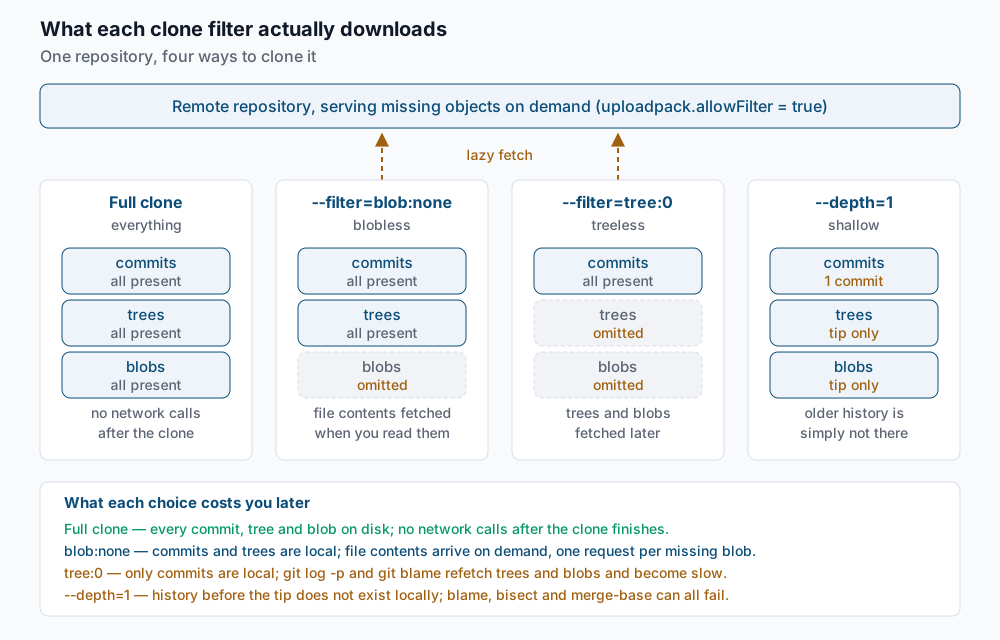
The three practical choices behave very differently once the clone is done:
--filter=blob:none(blobless) keeps every commit and every tree, and omits file contents. Commands that walk history structurally —git log,git log --raw,git diff --stat,git merge-base— stay fast because they only need trees. Anything that reads a file’s bytes triggers a fetch. This is the right default for a developer clone of a monorepo.--filter=tree:0(treeless) keeps only commits. It clones fastest and is the smallest on disk, but every history command that needs to know which files changed has to refetch trees, one commit at a time.git log -pandgit blamego from seconds to minutes. Use it for short-lived CI jobs that build the tip and then get deleted.--depth=N(shallow) is a different mechanism entirely: it truncates history rather than filtering objects. Nothing is fetched later because the older commits are not referenced at all.git blamepast the cut-off,git merge-baseagainst an old branch, and git bisect over a long range all simply fail.--filter=blob:limit=1mis the middle ground: download every blob smaller than 1 MB and lazily fetch the rest. It works well on repositories whose pain is a handful of large assets rather than sheer file count.
Sparse checkout is orthogonal. It does not change what Git downloads; it changes what Git writes to your disk. Paths outside the cone get the skip-worktree bit in the index, so Git does not create the files and does not stat them during git status.
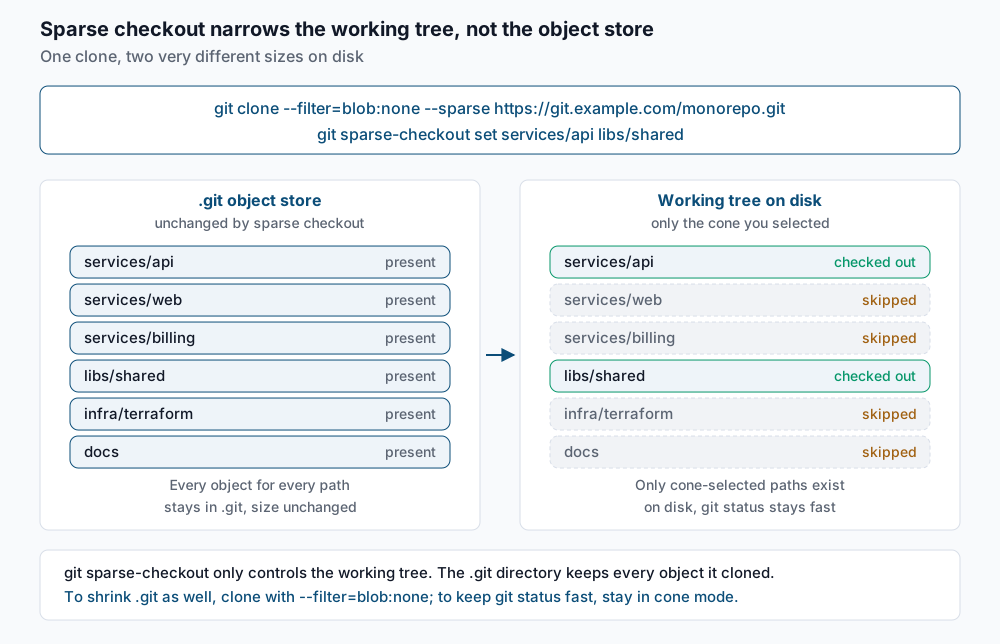
Cone mode restricts patterns to whole directory prefixes. That restriction is the point: it lets Git use a sparse index, where excluded directories collapse into a single index entry instead of one entry per file. On a repository with 300,000 files that is the difference between a 25 MB index and a 300 KB one, and it is what makes git status return instantly. Non-cone mode accepts full gitignore-style patterns, cannot use the sparse index, and is deprecated in current Git — reach for it only if you genuinely need to exclude a file rather than a directory.
Step-by-step
1. Confirm the server supports filtering. There is no capability query; the honest test is to attempt a filtered clone and watch for a warning.
git clone --filter=blob:none --no-checkout https://git.example.com/monorepo.git /tmp/filter-probeIf the remote does not allow filters, Git tells you and silently falls back to a full clone:
warning: filtering not recognized by server, ignoringNo warning means filtering worked. Delete the probe and continue.
2. Clone blobless, sparse, and without checking anything out. The --no-checkout matters: without it Git materialises the whole tree first and you pay for the blobs you were trying to avoid.
git clone --filter=blob:none --sparse --no-checkout https://git.example.com/monorepo.gitCloning into 'monorepo'...
remote: Enumerating objects: 412883, done.
remote: Counting objects: 100% (412883/412883), done.
remote: Compressing objects: 100% (98241/98241), done.
remote: Total 412883 (delta 312904), reused 411002 (delta 311340), pack-reused 0
Receiving objects: 100% (412883/412883), 118.44 MiB | 22.10 MiB/s, done.
Resolving deltas: 100% (312904/312904), done.The object count is the full history; the transferred size is not, because no blobs came along.
3. Set the cone. Name the directories you need. Git checks out those paths plus any files sitting at the repository root.
cd monorepo
git sparse-checkout set services/api libs/shared
The command prints nothing on success. Confirm what it recorded:
git sparse-checkout listlibs/shared
services/api4. Verify the working tree is actually narrow.
lsREADME.md libs package.json servicesls servicesapiservices/web, services/billing, infra and docs exist in history and in .git, but not on disk.
5. Add a directory when a task crosses a boundary. add extends the cone; set replaces it entirely, which is the usual way people accidentally drop a path they still needed.
git sparse-checkout add services/billinggit sparse-checkout listlibs/shared
services/api
services/billing6. Turn on the sparse index. This is what makes git status and git checkout fast, and it requires cone mode.
git config index.sparse true
git sparse-checkout reapply
git config --get index.sparsetrue7. Use the right flags in CI. A pipeline that only builds the tip wants a shallow clone; a pipeline that needs history — release notes, changelog generation, a diff against the merge base — wants a blobless one instead.
git clone --filter=blob:none --single-branch --no-tags --branch main \
  https://git.example.com/monorepo.git
Cloning into 'monorepo'...
remote: Enumerating objects: 61240, done.
Receiving objects: 100% (61240/61240), 19.02 MiB | 24.51 MiB/s, done.
Resolving deltas: 100% (41903/41903), done.--no-tags skips the tag refs, which on a repository with ten thousand release tags is a real saving. --single-branch avoids downloading every other branch’s commits. Combining --filter=blob:none with --depth=1 is legal but usually pointless: --depth=1 already limits you to one commit’s worth of blobs, and the filter only adds a promisor remote that can stall the job later. Pick one.
8. Undo it when you are done. disable restores the full working tree and clears the sparse configuration.
git sparse-checkout disableThe command is silent. ls services will now show every service directory again.
Validate it works
Check that the clone really is partial and knows where to get the rest:
git config --get-regexp '^remote\.origin\.'remote.origin.url https://git.example.com/monorepo.git
remote.origin.fetch +refs/heads/*:refs/remotes/origin/*
remote.origin.promisor true
remote.origin.partialclonefilter blob:nonepromisor true is the marker. Without it, the filter did not take effect.
Count how many objects are genuinely absent:
git rev-list --objects --all --missing=print | grep -c '^?'289644Compare the on-disk size against a full clone of the same repository:
git count-objects -vHcount: 0
size: 0 bytes
in-pack: 412883
packs: 2
size-pack: 121.30 MiB
prune-packable: 0
garbage: 0
size-garbage: 0 bytesThen time the thing sparse checkout is supposed to fix:
time git statusOn branch main
nothing to commit, working tree clean
real 0m0.081s
user 0m0.038s
sys 0m0.041sIf that number is closer to a second than a tenth, the sparse index is not active — re-check index.sparse and core.sparseCheckoutCone:
git config --get core.sparseCheckoutConetrueTroubleshooting
warning: filtering not recognized by server, ignoring. The remote does not have uploadpack.allowFilter enabled, and you just did a full clone that looks partial in your shell history. On a self-hosted server, set uploadpack.allowFilter = true and uploadpack.allowAnySHA1InWant = true in the bare repository’s config or in the server-wide config, then re-clone. There is no client-side workaround.
git blame or git log -p appears to hang. In a treeless clone every commit inspected needs its trees refetched, and in a blobless clone every diff needs two blobs, each a separate round trip. Over a VPN this is minutes of near-idle waiting. The fix is structural, not tactical: use --filter=blob:none rather than --filter=tree:0 for any clone a human will use. To backfill an existing partial clone on Git 2.38 or newer, drop the filter and refetch from scratch:
git config --unset remote.origin.partialclonefilter
git config --unset remote.origin.promisor
git fetch --refetch origin
Checking out an old tag stalls for minutes. Switching to a commit far from your current one asks Git for every blob in that tree at once. On a good link it is one large fetch and fine; on a slow one it is the worst experience partial clone offers. Do the archaeology from a full clone kept somewhere convenient, or add a second checkout with git worktree so you are not switching your main working tree at all.
Files outside the cone show up as deleted, or refuse to be staged. Excluded paths carry the skip-worktree bit, and a merge, rebase or stash that touches them can leave the index inconsistent. Find the affected entries and reset the state:
git ls-files -v | grep '^S' | headS docs/architecture.md
S infra/terraform/main.tf
S services/web/package.jsongit sparse-checkout reapplyreapply re-evaluates the cone against the current index and is the correct first response to almost any confused sparse state.
.git keeps growing and packs: climbs into the hundreds. Every lazy fetch writes a new packfile. Git’s automatic maintenance consolidates ordinary packs, but promisor packs are repacked separately, so a long-lived blobless clone accumulates them. Run maintenance explicitly:
git gcEnumerating objects: 418302, done.
Counting objects: 100% (418302/418302), done.
Writing objects: 100% (418302/418302), done.
Total 418302 (delta 316441), reused 412883 (delta 312904)If the clone has drifted to nearly full size anyway, re-cloning is faster than fighting it.
When this is the wrong approach
- Repositories under a gigabyte. If a full clone finishes in under a minute, partial clone adds a promisor remote, a new class of network failure and a support burden for no measurable gain. Measure first.
- Work that happens offline. A partial clone needs the server. A flight, a train tunnel or a VPN outage turns ordinary commands into errors, and the failure message rarely says “you are offline”.
- History-heavy analysis. Auditing a decade of
git blame, bisecting across thousands of commits, or running a code-archaeology tool over the whole history is exactly the workload partial clone punishes. Keep one full clone for that and hang worktrees off it. - Repositories already using Git LFS. LFS solves the large-blob problem at a different layer, and stacking
--filter=blob:noneon top complicates the smudge filter without shrinking much — the pointer files are tiny. If cloning is still slow,GIT_LFS_SKIP_SMUDGE=1plus a targetedgit lfs pull --includeis the more direct lever. - Toolchains that assume a full working tree. IDE indexers, monorepo build graphs that resolve paths outside the cone, and hooks that lint every tracked file will all break or silently skip work when most of the tree is missing. Confirm your build system understands sparse checkouts before rolling this out to a team.
The authoritative references are the Git documentation for git sparse-checkout and the --filter section of git clone.
If this is the kind of work you’d rather never own again, it’s the daily job of Managed Cloud Ops — book an infrastructure review.