This page maps every file and service that belongs to one PHP version on a cPanel & WHM server, for administrators who need to change the right one. EasyApache 4, the cPanel system that installs Apache and PHP as packages, gives each version such as ea-php83 its own copy of everything. That makes it easy to edit the php.ini of 8.2 while the site runs 8.3. Each version lives under /opt/cpanel/ea-phpXY/root/ and runs its own service, ea-phpXY-php-fpm, and MultiPHP Manager decides which domain uses which one. Edit php.ini and php.d inside that folder, and for one domain’s PHP-FPM settings change the YAML file under /var/cpanel/userdata/, never the generated pool file.
What you’ll accomplish
- Read an
ea-phpXYpackage name and know which part of PHP it installs. - Find the binary, php.ini, extension files, PHP-FPM service, pool file, socket and logs for any installed version.
- Confirm which version a given domain runs, from the API and from the files cPanel writes.
- Change a server-wide setting, a per-domain PHP-FPM setting or an extension in the place that survives cPanel’s next rebuild.
Prerequisites
- Root SSH access, or WHM root access with Terminal enabled.
- cPanel & WHM with EasyApache 4, on AlmaLinux, Rocky Linux or CloudLinux. On cPanel for Ubuntu, the package names are the same. Use
dpkg -l 'ea-php83*'where this page usesrpm,aptwhere it usesdnf, and confirm the paths with step 5 before you edit. - The examples use
ea-php83. Replace83with your version. As of October 2026, cPanel ships ea-php82, ea-php83, ea-php84 and ea-php85. EasyApache 4 release 25.91 of 21 October 2026 moved them to 8.2.35, 8.3.36, 8.4.27 and 8.5.12. PHP 8.5 arrived asea-php85in release 25.37 on 25 November 2025 (EasyApache 4 change log). The ea-php74, ea-php80 and ea-php81 packages still exist, but cPanel marked them end of life in April 2026. - If CloudLinux PHP Selector is in use, its
alt-phpversions live under/opt/alt/phpXY/and are outside this map.
How it works
EasyApache 4 installs each PHP version as a family of packages that share one prefix. ea-php83 itself is a small package that pulls in the rest. ea-php83-php-cli holds the command-line and CGI binaries, ea-php83-php-fpm holds the FastCGI Process Manager (PHP-FPM, the pool of PHP workers that Apache hands requests to), and ea-php83-php-common holds the core. Each optional extension is its own package named ea-php83-php-<ext>, such as ea-php83-php-intl or ea-php83-php-soap.
Everything one version needs sits under its own root folder, as if it were a small separate system. Two pieces live outside that folder: the per-domain settings in /var/cpanel/userdata/ and the systemd service.
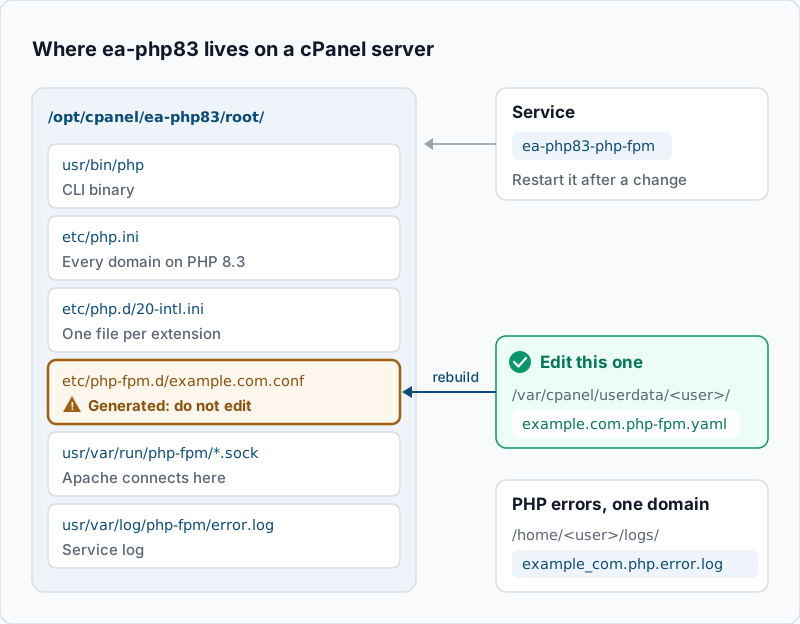
Here is the full map for one version. Every path below comes from the ea-php83 package or from cPanel’s PHP-FPM layout.
| What | Where (ea-php83) |
|---|---|
| CLI binary | /opt/cpanel/ea-php83/root/usr/bin/php |
| CGI binary | /opt/cpanel/ea-php83/root/usr/bin/php-cgi |
| Shortcut to the CLI | /usr/local/bin/ea-php83 |
| Shortcut to the CGI binary | /usr/bin/ea-php83 |
| PHP-FPM binary | /opt/cpanel/ea-php83/root/usr/sbin/php-fpm |
| Main php.ini | /opt/cpanel/ea-php83/root/etc/php.ini |
| Extension switches | /opt/cpanel/ea-php83/root/etc/php.d/*.ini |
| Extension files | /opt/cpanel/ea-php83/root/usr/lib64/php/modules/ |
| PHP-FPM main config | /opt/cpanel/ea-php83/root/etc/php-fpm.conf |
| One pool per domain | /opt/cpanel/ea-php83/root/etc/php-fpm.d/<domain>.conf |
| Sockets | /opt/cpanel/ea-php83/root/usr/var/run/php-fpm/ |
| PHP-FPM service log | /opt/cpanel/ea-php83/root/usr/var/log/php-fpm/error.log |
| PHP errors for one domain | /home/<user>/logs/<domain_tld>.php.error.log |
| Service | ea-php83-php-fpm |
| Domain’s version | phpversion: in /var/cpanel/userdata/<user>/<domain> |
| Domain’s FPM settings | /var/cpanel/userdata/<user>/<domain>.php-fpm.yaml |
The pool file is the trap. cPanel builds each <domain>.conf from the YAML files, and its documentation says not to edit these configuration files by hand. A change made directly in the pool file disappears the next time cPanel rebuilds the pools, for example after a version switch in MultiPHP Manager. The YAML file is the one that lasts.
Two shortcuts also catch people out. /usr/local/bin/ea-php83 points at the CLI binary. /usr/bin/ea-php83 points at php-cgi, the CGI build of the same version, which prints HTTP headers before its output. The plain php commands are cPanel wrappers: /usr/local/bin/php runs the CLI build and /usr/bin/php runs the CGI build. Each one looks at the folder of the script you pass, or the folder you are in. It finds the domain whose document root contains that folder and runs that domain’s version. Outside any document root, it runs the server’s default version.
Step-by-step
-
List the versions installed on the server. Ask WHM, because it reports what MultiPHP Manager can assign:
whmapi1 php_get_installed_versionsExample output:
---
data:
  versions:
    - ea-php82
    - ea-php83
    - ea-php85
metadata:
  command: php_get_installed_versions
  reason: OK
  result: 1
  version: 1
Each name in the list has a matching folder in
ls -d /opt/cpanel/ea-php*. If a folder has no entry in the API list, MultiPHP Manager cannot assign it. Check what is left in it with step 2 before you edit anything there. -
List the packages that make up one version. This prints names only, so the version numbers do not clutter the output:
rpm -qa --qf '%{NAME}\n' 'ea-php83*' | sortExample output (shortened):
ea-php83
ea-php83-pear
ea-php83-php-bcmath
ea-php83-php-cli
ea-php83-php-common
ea-php83-php-curl
ea-php83-php-fpm
ea-php83-php-gd
ea-php83-php-mbstring
ea-php83-php-mysqlnd
ea-php83-php-opcache
ea-php83-php-xml
ea-php83-php-zip
ea-php83-runtime
If
ea-php83-php-fpmis missing, no domain can run this version under PHP-FPM, and the service in step 6 will not exist. -
Find which version a domain uses. The API resolves inheritance for you, so start there:
whmapi1 php_get_vhost_versions | grep -E '^ +(php_fpm|version|vhost): 'Example output:
      php_fpm: 1
      version: ea-php83
      vhost: boutique-lac.ca
      php_fpm: 0
      version: ea-php82
      vhost: cabinet-rioux.com
      php_fpm: 1
      version: ea-php83
      vhost: intranet.cabinet-rioux.com
      php_fpm: 1
      version: ea-php85
      vhost: staging.boutique-lac.ca
Read each group of three lines together.
php_fpm: 1means the domain runs on theea-phpXY-php-fpmservice of its version.php_fpm: 0means it uses another handler, and the pool, socket and service in this map do not apply to it. The full output also has aphpversion_sourceblock, which shows whether the domain set its own version or inherits the system default. On disk, the same choice is a single line in the domain’s userdata file:grep '^phpversion:' /var/cpanel/userdata/lacnord/boutique-lac.caExample output:
phpversion: ea-php83Read this file, but change the version through MultiPHP Manager or
whmapi1 php_set_vhost_versions. Those tools also update the Apache configuration and the PHP-FPM pools. cPanel also writes a marked block into the domain’s.htaccessthat names the version:# php -- BEGIN cPanel-generated handler, do not edit # Set the “ea-php83” package as the default “PHP” programming language. <IfModule mime_module> AddHandler application/x-httpd-ea-php83 .php .php8 .phtml </IfModule> # php -- END cPanel-generated handler, do not editThat block must name the same version as the API. If it names another one, treat it as a stale handler line. MultiPHP Manager per account shows how to find and clear those lines.
-
Run the CLI of the version you mean. Call the binary by its full path, so the result does not depend on your current directory:
/opt/cpanel/ea-php83/root/usr/bin/php -vExample output:
PHP 8.3.36 (cli) (built: Oct 21 2026 09:47:12) (NTS)
Copyright (c) The PHP Group
Zend Engine v4.3.36, Copyright (c) Zend Technologies
    with Zend OPcache v8.3.36, Copyright (c), by Zend Technologies
/usr/local/bin/ea-php83 -vgives the same result. Use one of these two in cron jobs. If a cron job calls plainphp, it gets the version the wrapper picks for the script’s folder. Outside every document root, that is the server default. PHP CLI running a different version than PHP-FPM walks through fixing those jobs. -
Find the php.ini and the extension files for that version. PHP reports its own configuration paths:
/opt/cpanel/ea-php83/root/usr/bin/php --iniExample output (shortened):
Configuration File (php.ini) Path: /opt/cpanel/ea-php83/root/etc
Loaded Configuration File:         /opt/cpanel/ea-php83/root/etc/php.ini
Scan for additional .ini files in: /opt/cpanel/ea-php83/root/etc/php.d
Additional .ini files parsed:      /opt/cpanel/ea-php83/root/etc/php.d/10-opcache.ini,
/opt/cpanel/ea-php83/root/etc/php.d/20-bcmath.ini,
/opt/cpanel/ea-php83/root/etc/php.d/20-curl.ini,
/opt/cpanel/ea-php83/root/etc/php.d/30-mysqli.ini
Each extension package drops one small file in
php.dthat turns it on. The number sets the load order. OPcache gets10-, most extensions get20-, and those that depend on another extension, such asmysqli, get30-. Settings inphp.iniandphp.dapply to every domain on this version, unless a domain overrides them. -
Find the PHP-FPM service, the pool and the logs. Check the service first:
systemctl status ea-php83-php-fpm --no-pager | head -n 3Example output:
● ea-php83-php-fpm.service - The PHP FastCGI Process Manager
     Loaded: loaded (/usr/lib/systemd/system/ea-php83-php-fpm.service; enabled; preset: disabled)
     Active: active (running) since Fri 2026-10-30 22:18:05 EDT; 13h ago
Then list the pools. Expect one
<domain>.confper domain that runs this version with PHP-FPM:ls /opt/cpanel/ea-php83/root/etc/php-fpm.d/Example output:
boutique-lac.ca.conf intranet.cabinet-rioux.com.conf www.conf.default www.conf.exampleTo see which socket Apache talks to and where that domain’s PHP errors go, read the two lines in its pool file:
grep -E '^\s*(listen|php_admin_value\[error_log\])\s*=' /opt/cpanel/ea-php83/root/etc/php-fpm.d/boutique-lac.ca.confExpected: a
listenline that ends in.sockinside/opt/cpanel/ea-php83/root/usr/var/run/php-fpm/, and anerror_logpath inside the account’slogsfolder. PHP errors from the site go to that per-domain log,/home/lacnord/logs/boutique-lac_ca.php.error.logby default. Errors from the PHP-FPM service itself, such as a pool that fails to start or reaches its worker limit, go to/opt/cpanel/ea-php83/root/usr/var/log/php-fpm/error.log. -
Change a setting in the place that lasts. Pick the row that matches your goal:
-
Every domain on ea-php83: edit
/opt/cpanel/ea-php83/root/etc/php.ini, or use WHM » Software » MultiPHP INI Editor and pick PHP 8.3, which writes the same file. Then restart the service withsystemctl restart ea-php83-php-fpm. -
One domain’s PHP-FPM pool, such as its worker limit: change it in WHM » Software » MultiPHP Manager with the domain’s PHP-FPM settings button, or edit its YAML file. For example, set
pm_max_children: 8in/var/cpanel/userdata/lacnord/boutique-lac.ca.php-fpm.yaml. Then rebuild that pool and restart:/usr/local/cpanel/scripts/php_fpm_config --rebuild --domain=boutique-lac.ca; echo "exit=$?" systemctl restart ea-php83-php-fpmExpected:
exit=0from the rebuild and no output from the restart. Any other exit code means the rebuild failed. Check the YAML you edited first, for a typo or a missing space after a colon. The PHP-FPM slow log guide shows the same YAML-then-rebuild cycle in detail.
Never put the change in
php-fpm.d/<domain>.conf. It works until the next rebuild, then it is gone with no warning. -
-
Add an extension to one version only. Install the package for that version. The other versions are not touched:
dnf install -y ea-php83-php-intl
ls /opt/cpanel/ea-php83/root/etc/php.d/ | grep intl
Expected:
dnfends withComplete!, and thelsline prints20-intl.ini. Ifdnfsays no match for the package, check the spelling and the version number in the name.The extension package does not restart PHP-FPM itself, so running workers may not see it yet. Restart the version’s service:
systemctl restart ea-php83-php-fpmTo keep your EasyApache 4 profile in step with the server, you can make the same change in WHM » Software » EasyApache 4 » Customize » PHP Extensions instead. To limit an extension to a single account rather than a whole version, see enabling a PHP extension on one cPanel account.
Validate it works
-
Confirm the domain’s version and handler again with the step 3 command. The
versionline must name the version you edited. -
Confirm the CLI sees an extension you added:
/opt/cpanel/ea-php83/root/usr/bin/php -m | grep -i '^intl$'Expected: one line that reads
intl. -
Confirm the service restarted after your change.
systemctl show -p ActiveEnterTimestamp ea-php83-php-fpmmust print a time later than your edit. -
Confirm the web side. Place a temporary phpinfo page in the domain, open it, and check that Loaded Configuration File reads
/opt/cpanel/ea-php83/root/etc/php.iniand Server API readsFPM/FastCGI. Delete the page right away. How to check which PHP version your site really runs covers this check and the WordPress Site Health route. -
For a pool change, read the setting back from the generated file, for example
grep pm.max_children /opt/cpanel/ea-php83/root/etc/php-fpm.d/boutique-lac.ca.conf. It must show the value you set in the YAML.
Troubleshooting
- You edited php.ini and nothing changed. Check the
versionline from step 3. The domain may run a different version, so you edited the wrongea-phpXYfolder. If the version matches, check for a.user.iniin the document root, which overrides the server value under PHP-FPM. The service also needs a restart. systemctl status ea-php83-php-fpmsays the unit could not be found. Theea-php83-php-fpmpackage is not installed. Add it in WHM » Software » EasyApache 4, then switch PHP-FPM on for the domain in MultiPHP Manager.- The service will not start after a change. Test the configuration with
/opt/cpanel/ea-php83/root/usr/sbin/php-fpm -t, then readjournalctl -u ea-php83-php-fpm -n 50. A bad value in a YAML file usually shows up here. Fix the YAML, then run/usr/local/cpanel/scripts/php_fpm_config --rebuildand restart. - A pool setting keeps coming back to its old value. Someone edited
php-fpm.d/<domain>.confdirectly, and a rebuild replaced it. Move the setting into<domain>.php-fpm.yamland rebuild. - A cron job reports a different version than the site. The job calls plain
php, so the wrapper picks the version from the folder./usr/bin/phpalso runs the CGI build, which adds HTTP headers to the output. Point the job at/opt/cpanel/ea-php83/root/usr/bin/phpor/usr/local/bin/ea-php83.
When this is the wrong approach
If you rent a single cPanel account, you cannot reach /opt/cpanel or the services. Use MultiPHP Manager and MultiPHP INI Editor in cPanel, and ask your host for anything at the package level. On CloudLinux servers where users pick their PHP in Select PHP Version, the alt-php builds under /opt/alt/ serve those accounts, so this map is only half the picture. On LiteSpeed Web Server, PHP runs through lsphp rather than PHP-FPM, so the pool and service parts do not apply. If you manage many servers, keep these changes in configuration management. Hand edits on one machine tend to drift away from the others.
If this is the kind of work you’d rather never own again, it’s the daily job of Managed Cloud Ops — book an infrastructure review.