If your cPanel or CloudLinux server runs several PHP versions, here is how to confirm that each one carries the October 2026 PHP2Shell fix. It is written for server administrators and agencies who manage WHM, the server administration side of cPanel, and who ran an update last week without proof that it reached every version. The flaws are CVE-2026-109618 and CVE-2026-109619, two critical bugs that can let an unauthenticated visitor run code on a web server. For PHP 7.4, 8.0 and 8.1 the fix arrived as a backport, a patch applied to the old release without changing its number, so php -v printing 7.4.33 tells you nothing either way. The proof is each package’s changelog, the dated list of changes stored inside the installed package, read once per version.
You will build the list of installed versions, map every domain to its version, update what is missing, restart the workers and run the audit again.
Vendor status below is as of 26 October 2026. On 21 October 2026 the PHP project released 8.2.35, 8.3.36, 8.4.27 and 8.5.12 (php.net release archive). cPanel’s EasyApache 4 release 25.91, from the same day, backported the fix to ea-php74, ea-php80 and ea-php81 with no version change (tickets EA-13613, EA-13612 and EA-13611). It also moved ea-php82 to 8.2.35, ea-php83 to 8.3.36, ea-php84 to 8.4.27 and ea-php85 to 8.5.12 (EasyApache 4 change log). Release 25.92 rebuilt the matching -meta packages so that their changelogs name the backport too. CloudLinux’s blog post, last updated 23 October, lists fixed alt-php packages in the stable repository for 5.2 to 5.6, 7.0 to 7.4 and 8.0 to 8.5 on CloudLinux 7, 8 and 9 (CloudLinux blog). On CloudLinux 10, only alt-php52 is in the stable repository; the rest come from the TuxCare Extended Lifecycle Support (ELS) repository, a subscription source of patches for software past its end of life. CloudLinux 6 is listed as not confirmed.
What you’ll accomplish
- A list of every PHP version installed on the server, from both EasyApache 4 and CloudLinux, with a fixed or not-fixed verdict for each one.
- Proof for each verdict taken from the package changelog, so a backported ea-php74 counts as fixed only when it is.
- A map of which domains run which version, including accounts that picked their own version through PHP Selector.
- Updated packages wherever the fix was missing, and restarted Apache, PHP-FPM and LiteSpeed workers.
- A one-screen check you can run again after the next PHP advisory.
Prerequisites
- Root access over SSH, or WHM root access with Terminal enabled.
- cPanel & WHM with EasyApache 4, the cPanel packaging system that installs Apache and each PHP version. Every supported cPanel release uses it.
- An RPM-based operating system, meaning AlmaLinux, Rocky Linux or CloudLinux. On cPanel for Ubuntu,
dpkg -l 'ea-php*' | grep '^ii'lists the same package names, and you compare the package version with the change log by hand. - On CloudLinux 7, replace
dnfwithyumin every command. - A recent snapshot or backup, and tolerance for a few dropped requests while PHP-FPM restarts.
- If any version turns out to be unfixed, the interim settings from PHP2Shell mitigations until you can patch already in place.
If the server has a single PHP version from the distribution rather than from cPanel, follow how to update PHP on a Linux server after a security fix instead.
How it works
EasyApache 4 installs each PHP version as its own set of packages under /opt/cpanel/ea-phpNN/, with its own binaries and its own PHP-FPM service named ea-phpNN-php-fpm. CloudLinux adds a second family, alt-php, installed under /opt/alt/phpNN/ and offered to accounts through PHP Selector. PHP Selector hands each user a chosen version inside CageFS, the per-user virtual file system CloudLinux uses to isolate accounts. Each domain picks its EasyApache version in MultiPHP Manager. A domain left on the system default can also be served by whichever alt-php its owner selected. So “is the server patched” is really two questions. Does every installed version carry the fix, and does every domain point at a version that does?
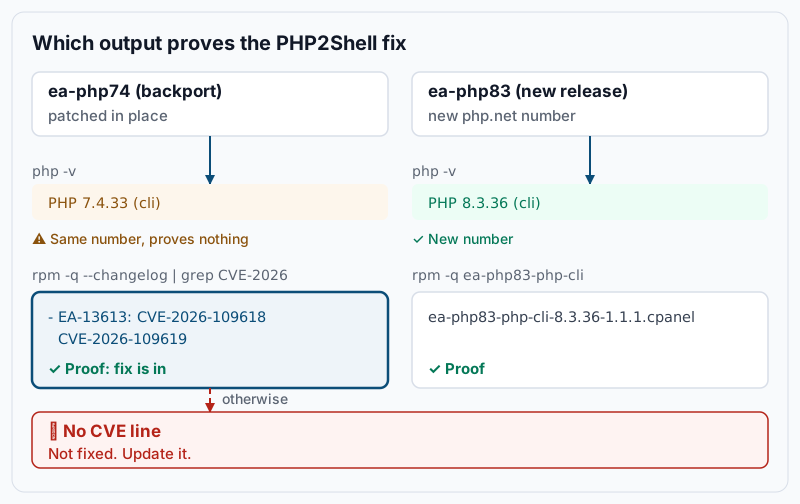
The backport changes the trap. For ea-php82 and newer, the new php.net number (8.2.35, 8.3.36, 8.4.27, 8.5.12) is proof on its own. For ea-php74, ea-php80 and ea-php81, the PHP version stays 7.4.33, 8.0.30 or 8.1.34. Only two things move: the package release number after the version, and a new dated entry in the changelog that names both CVEs. Reading that entry is the audit. The CloudLinux alt-php builds follow the same split. alt-php82 to alt-php85 carry the new php.net numbers (8.2.35-1, 8.3.36-1, 8.4.27-1 and 8.5.12-1), while the older versions carry the backport under their existing number.
Step-by-step
-
List every PHP that EasyApache 4 installed. Ask WHM first, because it knows which versions MultiPHP Manager can assign:
whmapi1 php_get_installed_versionsExample output:
---
data:
  versions:
    - ea-php74
    - ea-php81
    - ea-php83
    - ea-php84
metadata:
  command: php_get_installed_versions
  reason: OK
  result: 1
  version: 1
Then list the packages with their full version and release, which you will compare later:
rpm -qa --qf '%{NAME}-%{VERSION}-%{RELEASE}\n' 'ea-php[0-9][0-9]-php-cli' | sortExample output:
ea-php74-php-cli-7.4.33-12.12.1.cpanel
ea-php81-php-cli-8.1.34-5.5.1.cpanel
ea-php83-php-cli-8.3.36-1.1.1.cpanel
ea-php84-php-cli-8.4.26-1.1.1.cpanel
The two lists should name the same versions. A version in the second list only is installed yet hidden from MultiPHP Manager, usually a half-removed package. Fix that in WHM » Software » EasyApache 4 first.
-
List the CloudLinux alt-php versions, if any. Skip this step on AlmaLinux or Rocky Linux without CloudLinux.
rpm -qa --qf '%{NAME}-%{VERSION}-%{RELEASE}\n' 'alt-php[0-9][0-9]' | sortExample output:
alt-php74-7.4.33-10.el8.cloudlinux
alt-php81-8.1.34-7.el8.cloudlinux
alt-php83-8.3.36-1.el8.cloudlinux
alt-php84-8.4.27-1.el8.cloudlinux
Any account whose domain is on the system default can select one of these, so each needs the same proof.
-
Prove each version from its changelog. This loop prints one line per installed version. It marks a version
FIXED (changelog)when its package changelog names either CVE, andCHECKotherwise:for p in $(rpm -qa --qf '%{NAME}\n' 'ea-php[0-9][0-9]-php-cli' 'alt-php[0-9][0-9]' | sort); do v=$(rpm -q --qf '%{VERSION}-%{RELEASE}' "$p") if rpm -q --changelog "$p" | grep -qE 'CVE-2026-(109618|109619)'; then s='FIXED (changelog)' else s='CHECK' fi printf '%-18s %-26s %s\n' "$p" "$v" "$s" doneExample output:
alt-php74          7.4.33-10.el8.cloudlinux   FIXED (changelog)
alt-php81          8.1.34-7.el8.cloudlinux    FIXED (changelog)
alt-php83          8.3.36-1.el8.cloudlinux    CHECK
alt-php84          8.4.27-1.el8.cloudlinux    CHECK
ea-php74-php-cli   7.4.33-12.12.1.cpanel      FIXED (changelog)
ea-php81-php-cli   8.1.34-5.5.1.cpanel        CHECK
ea-php83-php-cli   8.3.36-1.1.1.cpanel        CHECK
ea-php84-php-cli   8.4.26-1.1.1.cpanel        CHECK
Read the
CHECKrows against the php.net numbers. ACHECKrow at 8.2.35, 8.3.36, 8.4.27 or 8.5.12 or newer is fixed by its version number, so alt-php83, alt-php84 and ea-php83 above are fine. ACHECKrow at any other number is not fixed. In the example, ea-php81 at 8.1.34-5.5.1 has no CVE line, and ea-php84 at 8.4.26 is one release short. Both need step 6. To see the actual changelog entry for one package:rpm -q --changelog ea-php74-php-cli | grep -B1 -E 'CVE-2026-(109618|109619)' | head -4Example output:
* Wed Oct 21 2026 cPanel Packaging <packaging@cpanel.net> - 7.4.33-12.12.1
- EA-13613: Backport fix for CVE-2026-109618 and CVE-2026-109619
The wording varies between cPanel and CloudLinux builds. What matters is the two CVE numbers and a date on or after 21 October 2026.
-
Look at the build date, but do not stop there. Each binary prints the date it was compiled. For an EasyApache version:
/opt/cpanel/ea-php74/root/usr/bin/php -vExample output:
PHP 7.4.33 (cli) (built: Oct 21 2026 14:02:17) ( NTS )
Copyright (c) The PHP Group
Zend Engine v3.4.0, Copyright (c) Zend Technologies
For an alt-php version, the binary is
/opt/alt/php74/usr/bin/php. A build date on or after 21 October 2026 is consistent with a fixed package, but it is only a hint. A rebuild can happen for unrelated reasons, so the changelog from step 3 stays the proof. -
Map every domain to its version. A fixed version helps nobody while a domain still runs an unfixed one. WHM lists every virtual host with its resolved version:
whmapi1 php_get_vhost_versions | grep -E '^ +(vhost|version): 'Example output:
    version: ea-php84
    vhost: agence-nord.ca
    version: ea-php81
    vhost: boutique-lac.com
    version: ea-php83
    vhost: example.com
    version: ea-php83
    vhost: intranet.example.com
Every version listed here must have passed step 3. In the example,
boutique-lac.comandagence-nord.caare exposed. The full output also carries aphpversion_sourceblock per domain, which tells you whether the domain set its own version or inherited the system default. A domain on the system default is the kind PHP Selector can override on CloudLinux. There, open WHM » CloudLinux Manager » PHP Selector to see each account’s choice, or ask from the shell for one user:cloudlinux-selector get --json --interpreter php --user boutiqueExpected output: a JSON document that names the PHP version this user selected. A value of
nativemeans the account stayed on the EasyApache version from MultiPHP Manager. PHP Selector does not act on domains where cPanel’s PHP-FPM is on, because those run theea-phpNN-php-fpmpool. -
Update the versions that are not fixed. Check what the repositories offer, then update both package families in one go:
dnf check-update 'ea-php*' 'alt-php*'
dnf -y update 'ea-php*' 'alt-php*'
dnf check-updatelists every package with a newer build and exits with code 100 when there is one. Empty output with exit code 0 means your mirror has nothing newer. The update ends withComplete!. If WHM » Server Configuration » Update Preferences sets operating system package updates to automatic, the nightly cPanel update runs this for you. You still need the restart and the re-check. On CloudLinux 10, alt-php versions other than 5.2 only arrive once the TuxCare ELS repository is enabled on the server. As of 28 October 2026, CloudLinux asks you to keep that repository enabled on CloudLinux 7, 8 and 9 too, because it is becoming the single source of alt-php packages there as well. After an alt-php update, CageFS should pick up the new files on its own. If an account still sees the old build date, force the refresh:cagefsctl --force-update -
Restart every worker that runs PHP. Package updates do not reliably restart the services that loaded them, and a running worker keeps the old code until it restarts. Restart all EasyApache PHP-FPM pools, then Apache:
/scripts/restartsrv_apache_php_fpm
/scripts/restartsrv_httpd
Example output (abridged):
Waiting for “apache_php_fpm” to restart ……finished.
Waiting for “httpd” to restart gracefully ……finished.
The Apache restart covers the DSO handler, where PHP lives inside Apache, and the
mod_lsapihandler CloudLinux uses for alt-php, whoselsphpworkers die with Apache. Thecgiandsuphphandlers start a fresh PHP process per request and need no restart. If LiteSpeed Web Server replaces Apache, restart it so itslsphpworkers reload:/usr/local/lsws/bin/lswsctrl restart -
Move domains off versions with no fix. If step 3 still shows an unfixed version after the update, for example on CloudLinux 10 without ELS, re-point its domains to a fixed version. Prefer 8.3 or 8.4, because PHP 8.2 reaches end of life on 31 December 2026. From the shell:
whmapi1 php_set_vhost_versions version=ea-php83 vhost=boutique-lac.comExpected:
result: 1andreason: OKin the metadata block. The same change exists in WHM » Software » MultiPHP Manager; MultiPHP Manager per account covers the testing a version jump needs. When many accounts sit on 7.4 or 8.0, use the server-wide PHP end-of-life migration plan. Once no domain uses the unfixed version, remove it in WHM » Software » EasyApache 4 so nobody can select it again.
Validate it works
-
Run the loop from step 3 again. Every row must read
FIXED (changelog)or carry a php.net-fixed number. Save the output with the date as your evidence. -
Run the domain map from step 5 again. No domain may resolve to a version that failed the loop, and on CloudLinux no account may have selected an unfixed alt-php.
-
Confirm the workers restarted after the update. For each PHP-FPM service:
systemctl list-units --plain --no-legend 'ea-php*php-fpm*' | awk '{print $1}' | xargs -n1 systemctl show -p Id -p ActiveEnterTimestampExample output:
Id=ea-php74-php-fpm.service
ActiveEnterTimestamp=Mon 2026-10-26 09:14:02 EDT
Id=ea-php81-php-fpm.service
ActiveEnterTimestamp=Mon 2026-10-26 09:14:03 EDT
Id=ea-php83-php-fpm.service
ActiveEnterTimestamp=Mon 2026-10-26 09:14:03 EDT
Each
ActiveEnterTimestampmust be later than thednf updaterun. Check Apache the same way withsystemctl show -p ActiveEnterTimestamp httpd. -
Confirm the web side on one domain per version with a temporary phpinfo page or WordPress Site Health, as in how to check which PHP version your site really runs. The PHP Version and build date must match the package you proved, and the Server API must be the handler you restarted.
-
Confirm
session.upload_progress.enabledstill readsOffin that phpinfo page. The php.net advisory of 23 October 2026 for CVE-2026-115560 recommends keeping it off until a fix release ships, and as of 26 October 2026 none exists.
Troubleshooting
- The loop still says
CHECKon an old number afterdnf update. Rule out the mirror withdnf clean all && dnf makecache, thendnf check-update 'ea-php*'again. Next look forexclude=lines namingea-phporalt-phpin/etc/dnf/dnf.confor/etc/yum.conf, and for the EasyApache repository indnf repolist. If none of those is the cause, the vendor has no fixed build for that version yet, and step 8 applies. - An account still sees the old alt-php build date from its own shell. CageFS serves it a stale copy. Run
cagefsctl --force-update, then have the user open a new session and runphp -vagain. - A PHP-FPM service fails to start after the update. Read the reason with
journalctl -u ea-php84-php-fpm -n 50. A pool file that no longer matches the account layout is the usual cause. Rebuild all pool files with/usr/local/cpanel/scripts/php_fpm_config --rebuild, then restart. - One domain still serves the old PHP after the restarts. Run
ps -C lsphp -o pid,lstart,cmdto spotlsphpworkers started before the update. On LiteSpeed,lswsctrl restartis the fix. On Apache, a fullsystemctl restart httpdends children that a graceful restart left to finish long requests.
When this is the wrong approach
If you rent an account on someone else’s cPanel server, none of these commands run for you. Pick a fixed version in MultiPHP Manager or Select PHP Version in cPanel, and ask your host to confirm the package changelog. If a provider manages the server, ask for the step 3 output before you change anything, so you do not collide with their window. The Imunify360 web application firewall rulesets 8.83 to 8.88 reduce exposure while you work; as of 26 October 2026 CloudLinux presents them as an interim mitigation, not a fix. If many accounts still run PHP 7.4 or 8.0, the backport buys weeks, not years. The paths out are in getting the PHP2Shell fix on PHP 7.4, 8.0 or 8.1, and the lasting answer is the migration plan from step 8.
If this is the kind of work you’d rather never own again, it’s the daily job of Managed Cloud Ops — book an infrastructure review.