AutoSSL, the cPanel service that orders and renews free certificates, has stopped renewing one domain on your server, and its log line for that name mentions CAA, in wording like DNS CAA records forbid "Let's Encrypt" from issuing certificates. The cause is a CAA record, a DNS record that names which certificate authorities (CAs, the organisations that sign certificates) may issue for a domain, and the record this domain inherits does not name AutoSSL’s provider. The fix is to add one issue record for the provider beside whatever the record already allows, wait out the TTL (the time-to-live, how long resolvers may keep serving the old answer) and run AutoSSL again. You will finish with a fresh certificate installed and a CAA record you can explain.
What you’ll accomplish
- Find the CAA message AutoSSL logged for the domain, in WHM or from the shell.
- Read the CAA record the certificate authority sees, including one inherited from a parent name.
- Publish a record that allows your AutoSSL provider without dropping a CA a customer still uses.
- Run AutoSSL for the account on demand and prove the new certificate is in place.
- Put a CAA line into the WHM zone template so new domains start out allowed.
Prerequisites
- Root access to WHM (Web Host Manager, the server-wide side of cPanel), or a cPanel login for the affected account for the Zone Editor and SSL/TLS Status steps.
digon any machine. On the server it comes from thebind-utilspackage; most laptops already have it.- Knowing where the domain’s DNS is served: on this cPanel server, or at an outside provider such as Cloudflare or the registrar.
dig +short NS example.comtells you. - A supported cPanel & WHM version; current versions ship Let’s Encrypt as the default AutoSSL provider. Step 3 covers a server that still shows the retired Sectigo-backed provider.
- Everything below uses
example.comon the accountacme; swap in your own values.
How it works
Before a CA signs a certificate, it looks up CAA records for the name. Let’s Encrypt describes the rule on its CAA page: it uses the record set closest to the name, so it checks shop.example.com first and then example.com, and it follows CNAME targets. The first set it finds decides. No record anywhere up the tree means any public CA may issue. A set that lists the CA’s identifier means it may issue. A set that exists but does not list it means it must refuse. The rules themselves are standardised in RFC 8659.
The identifiers are fixed strings, one or more per CA:
- Let’s Encrypt:
letsencrypt.org. - Sectigo, which backed the cPanel-branded provider that cPanel removed in version 120:
sectigo.com,usertrust.comortrust-provider.com, per Sectigo’s knowledge base. - Any other CA publishes its own identifier in its documentation; a customer who buys from DigiCert, for example, needs
digicert.comin the set.
Two tags matter here. issue governs ordinary certificates. issuewild governs wildcard names such as *.example.com; when no issuewild record exists, the issue records apply to wildcards too. Each record also starts with a flag, almost always 0, which cPanel’s form calls Issuer Critical Flag. The third tag, iodef, and the critical flag are explained in CAA records: what they do; this page is about what AutoSSL does with the record.
cPanel’s Manage AutoSSL documentation says AutoSSL’s preflight check adds a CAA record to the domain’s zone file before a certificate is ordered. That only helps when the zone lives on this server. When DNS is served elsewhere, or a record for another CA already exists, the set the CA sees excludes the provider. AutoSSL logs the refusal for that name, no certificate is ordered, and the next run logs it again. The diagram shows the three answers DNS can give and where the failure sits.
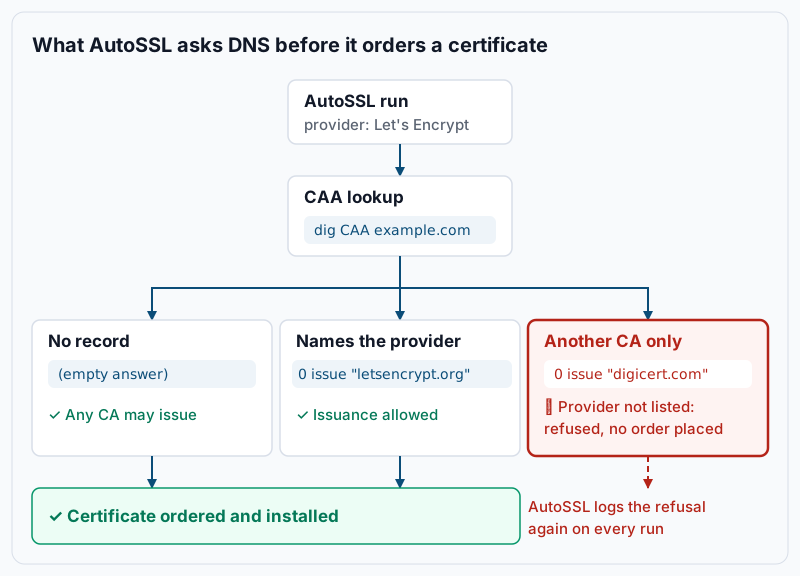
AutoSSL keeps each run’s log for 30 days under /var/cpanel/logs/autossl, in text and JSON, and the Logs tab in WHM shows the same files.
Step-by-step
-
Read the message AutoSSL logged. In WHM open SSL/TLS » Manage AutoSSL, choose the Logs tab, select the latest run, click View Log and search the page for
CAA. From the shell, WHM API 1 returns the latest problem per domain for a user:whmapi1 --output=jsonpretty get_autossl_problems_for_user username='acme'Example output, shape only; the key names under
datadiffer between versions, so look for your domain and the problem text next to it:{ "data": { "problems_by_domain": [ { "domain": "shop.example.com", "problem": "DNS CAA records forbid \"Let's Encrypt\" from issuing certificates." } ] }, "metadata": { "command": "get_autossl_problems_for_user", "reason": "OK", "result": 1, "version": 1 } }A problem that names CAA is what the rest of this page fixes. One that names DCV instead (domain control validation, the HTTP check that proves you control the name) has a different cause, and AutoSSL skipped a domain walks through those reasons.
-
Read the CAA record the CA will see. Ask for the name itself, then its parent, then the parent’s authoritative servers (the name servers the NS records say hold the zone), then a public resolver:
dig +short CAA shop.example.com
dig +short CAA example.com
dig +short NS example.com
dig +short CAA example.com @ns1.example-dns.net
dig +short CAA example.com @1.1.1.1
Example output:
0 issue "digicert.com"
ns1.example-dns.net.
ns2.example-dns.net.
0 issue "digicert.com"
0 issue "digicert.com"
Read it the way the CA does. The first line is empty, so
shop.example.comhas no record of its own and the parent’s set applies. That set names only DigiCert, so Let’s Encrypt must refuse every name underexample.comthat lacks its own record. If the name is a CNAME, run the same checks against the target, because the CA follows it. If the authoritative server and 1.1.1.1 disagree, a change is still propagating; the authoritative answer is the one that wins once caches expire. ASERVFAILinstead of an answer is its own problem, covered under Troubleshooting. -
Confirm which provider AutoSSL uses and which identifier it needs. Manage AutoSSL shows Current Provider at the top of the page, with a Provider Account ID when the provider has one. From the shell:
whmapi1 --output=jsonpretty get_autossl_providersExample output, trimmed and shape only; each entry under
datadescribes one provider, and the enabled one is the current provider:{ "data": { "payload": [ { "display_name": "Let's Encrypt™", "enabled": 1 } ] }, "metadata": { "command": "get_autossl_providers", "reason": "OK", "result": 1, "version": 1 } }Let’s Encrypt needs
letsencrypt.org. A server that still shows the cPanel-branded Sectigo provider cannot issue with it: switch to Let’s Encrypt on the Providers tab, accept its terms, click Save, and useletsencrypt.orgfrom here on. Sectigo vs Let’s Encrypt on cPanel explains the choice. -
Publish the corrected record in the zone on the server. In cPanel open Domains » Zone Editor, click Manage next to the domain, then Add Record and choose the CAA type. Fill in Name
example.com., TTL3600, TypeCAA, Issuer Critical Flag0, Tagissue, Valueletsencrypt.org, and click Save Record. In WHM the same form is under DNS Functions » DNS Zone Manager » Manage. Keep the DigiCert record if a customer still uses a DigiCert certificate in that zone: records with the same tag add up, so twoissuerecords allow both CAs. Add anissuewildrecord only when wildcard permissions should differ from the ordinary ones. Check the zone from the server itself:dig +short CAA example.com @127.0.0.1Example output:
0 issue "digicert.com"
0 issue "letsencrypt.org"
A subdomain that needs a different policy gets its own CAA set at its own name, for example at
shop.example.com; that set replaces the parent’s for that name only. -
Publish it at the outside DNS provider instead when the zone is not on this server. The NS answer from step 2 tells you where the zone lives, and AutoSSL’s preflight cannot write there. At Cloudflare, open the zone, go to DNS » Records and click Add record. Choose type CAA, set Name to your domain, Tag to
issueand CA domain name toletsencrypt.org, then save. Other providers ask for the same values; if the form also shows a Flags field, leave it at0. Then confirm against that provider’s own name servers:dig +short CAA example.com @ns1.example-dns.netExample output:
0 issue "digicert.com" 0 issue "letsencrypt.org" -
Wait out the TTL, then run AutoSSL for the account. The old record’s TTL is how long resolvers, including the CA’s, may keep the old answer. Query without
+shortto see the remaining seconds at a public resolver:dig CAA example.com @1.1.1.1 | grep -A3 'ANSWER SECTION'Example output:
;; ANSWER SECTION:
example.com.		1187	IN	CAA	0 issue "digicert.com"
example.com.		1187	IN	CAA	0 issue "letsencrypt.org"
Once the new line shows, start a run for the one account instead of waiting for the nightly check:
whmapi1 --output=jsonpretty start_autossl_check_for_one_user username='acme'Example output, metadata part;
resultof1means the check was started in the background:"metadata": { "command": "start_autossl_check_for_one_user", "reason": "OK", "result": 1, "version": 1 }In WHM the same thing is the Check button in the Run AutoSSL Check section of Manage AutoSSL. From a shell,
/usr/local/cpanel/bin/autossl_check --user=acmeruns the same check in the foreground and writes its log to the directory above. A few minutes later, ask for the domain’s problems again:whmapi1 --output=jsonpretty get_autossl_problems_for_domain domain='shop.example.com'Example output, same shape as step 1 with nothing listed:
{
  "data": {
    "problems_by_domain": []
  },
  "metadata": {
    "command": "get_autossl_problems_for_domain",
    "reason": "OK",
    "result": 1,
    "version": 1
  }
}
No entry for the domain means the last run had nothing to report for that name.
-
Prove the certificate was issued and installed. Ask the web server for the certificate it now serves:
echo | openssl s_client -connect shop.example.com:443 -servername shop.example.com 2>/dev/null | openssl x509 -noout -issuer -datesExample output:
issuer=C=US, O=Let's Encrypt, CN=R13
notBefore=Oct 26 07:12:44 2026 GMT
notAfter=Jan 24 07:12:43 2027 GMT
The issuer names the provider and
notBeforeis today. The cPanel » Security » SSL/TLS Status page shows the same domain with a lock icon and the new expiry date. -
Optional: add CAA to the WHM zone template. If you want every new domain to start with a record that allows the provider, put it in the template WHM uses to create zones. Open WHM » DNS Functions » Edit Zone Templates and edit
standard(dedicated IP, addon and parked domains) andstandardvirtualftp(shared IP);simplecovers zones with only an A record. Add one line beside the existing records:%domain%. IN CAA 0 issue "letsencrypt.org"cPanel’s documentation is explicit: a changed template applies only to zone files created afterwards, and templates do not travel with an account transferred to another server. Existing zones still need step 4.
Validate it works
Three checks, from DNS inward:
- Both views of DNS list the provider.
dig +short CAA example.com @ns1.example-dns.netanddig +short CAA example.com @1.1.1.1return the same set, and it contains0 issue "letsencrypt.org". - AutoSSL has nothing to report.
whmapi1 --output=jsonpretty get_autossl_problems_for_user username='acme'lists no problem for the domain. - The site serves the new certificate. The
opensslcommand from step 7 shows the provider as issuer and anotAfterabout three months out.
When all three pass, the renewal is fixed and the next nightly run will keep it fixed.
Troubleshooting
- The record is published, the next run logs the same CAA line. Either a cache still holds the old answer, or you edited a zone nobody reads. Compare
dig +short NS example.comwith your server’s name servers: if they differ, the zone on this server is a copy, and step 5 applies at the provider the NS records point to. diganswersSERVFAILfor the CAA query. Let’s Encrypt treats a failed CAA lookup as a refusal. Its documentation names the usual causes: a broken DNSSEC chain, and a name server that answers unknown record types wrongly. Test withdig CAA example.com @ns1.example-dns.netanddig +dnssec CAA example.com @1.1.1.1; the fix belongs to whoever runs the zone.- The record names
letsencrypt.orgwith anaccounturi=parameter, and AutoSSL is still refused. That parameter pins issuance to one ACME account (ACME is the protocol AutoSSL uses to order from Let’s Encrypt). It must equal the Provider Account ID shown at the top of Manage AutoSSL. Fix the URI or drop the parameter. Avalidationmethods=parameter must likewise include the method AutoSSL uses for that name,http-01for ordinary names. - A CAA record appeared in the zone that nobody added. AutoSSL’s preflight check writes one when the zone is on the server. Leave it and add any other CA beside it; the next run can add it again if you delete it.
- Plain names renew, the wildcard name is refused. An
issuewildrecord exists and names another CA. Add0 issuewild "letsencrypt.org"beside it. Wildcards also need DNS validation, which AutoSSL can only do when the zone is on the server; Wildcard SSL on cPanel with Cloudflare DNS covers the outside-DNS case. - Only one name under the domain fails. That name has its own CAA set, or is a CNAME to a name that does. Run step 2 against that exact name and its target.
When this is the wrong approach
- The customer wants a certificate from a CA AutoSSL cannot use, such as an OV certificate (organisation-validated, with the company name checked) bought from DigiCert. Install it under cPanel » Security » SSL/TLS and exclude the domain from AutoSSL there; the CAA record then needs only that CA, not the AutoSSL provider.
- The log names DCV, a rate limit or an unreachable name, not CAA. A CAA change will not help; follow AutoSSL skipped a domain instead.
- The certificate expires in hours. Fix the record if it is the one cause, but do not spend the window on it. The SSL renewal recovery path orders the steps for that situation.
- You are deciding whether to set CAA at all. A missing record allows every CA, which is the right default for many small sites; CAA records: what they do weighs that choice.
If this is the kind of work you’d rather never own again, it’s the daily job of Managed Cloud Ops — book an infrastructure review.