Asynchronous replication ships every committed change from a primary MariaDB server to one or more replicas by streaming its binary log. You enable log_bin and set a unique server_id on the primary, create a dedicated replication user, take a consistent snapshot of the data that records the exact binlog coordinate (or GTID) it was taken at, restore that snapshot on the replica, point the replica at the primary with CHANGE MASTER TO, and start the replica threads. From then on the replica pulls new events over the network and applies them. This guide covers both the classic file-and-position method and the GTID method, which is what we use for anything we expect to fail over or re-point later.
What you’ll accomplish
- A primary server writing a
ROW-format binary log with a stableserver_id. - A dedicated replication account scoped to the
REPLICATION SLAVEprivilege only. - A consistent starting snapshot taken with
mariadb-dumpthat pins the replica to the correct binlog coordinate or GTID. - A replica running both replication threads and applying changes with near-zero lag.
- A monitoring habit built on
SHOW REPLICA STATUSso you notice drift before your application does.
Prerequisites
- MariaDB 10.6+ or 11.x installed on both hosts. Keep the major/minor versions equal or the replica ahead of the primary — never the reverse.
- Network reachability from the replica to the primary on port
3306. If a firewall sits between them, open that port to the replica’s address only. - Root or
sudoon both machines, plus a MariaDB account with administrative privileges. - A distinct
server_idper host. Every server participating in replication must have a unique non-zero value, or the topology silently breaks. - Enough disk on the primary to retain binary logs long enough for the replica to catch up after downtime. Set
expire_logs_daysorbinlog_expire_logs_secondsdeliberately.
How it works
The primary records every committed write as an event in its binary log. The replica runs two threads. The IO thread connects to the primary, requests events starting from a known coordinate, and writes them into a local relay log. The SQL thread reads the relay log and applies the events to the replica’s tables. Because the primary does not wait for the replica to acknowledge anything, this is asynchronous: a committed transaction on the primary is durable there regardless of replica state, and the replica trails by whatever the network and apply speed allow.
There are two ways to name the starting point. The classic method uses a filename and byte offset, for example mariadb-bin.000042 at position 339. The GTID method assigns every transaction a global identifier of the form domain-server-sequence, and the replica tracks the set of GTIDs it has applied. GTID is easier to reason about when you re-point a replica to a new primary, because you ask for “everything after this GTID set” instead of translating byte offsets between servers. We default to GTID.
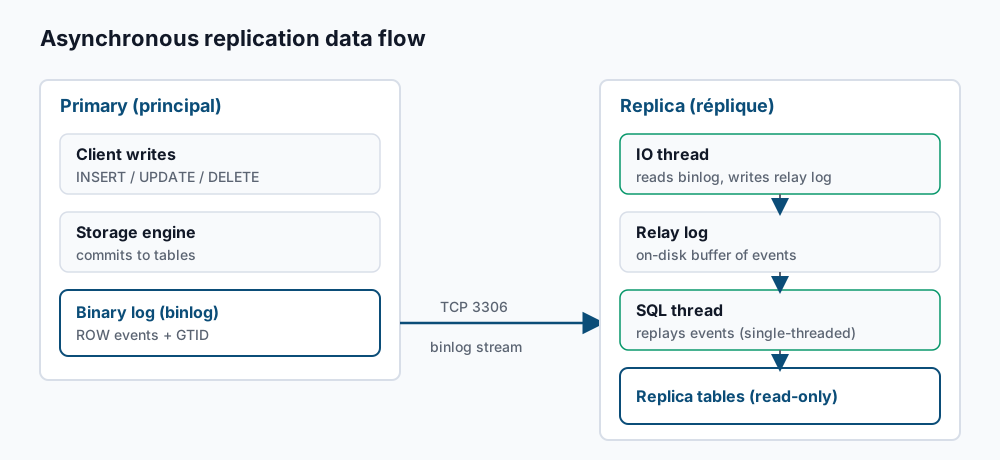
Step-by-step
1. Configure the primary. Drop a config file so your changes survive package upgrades. Create /etc/mysql/mariadb.conf.d/60-replication.cnf on the primary:
[mariadb]
server_id               = 1
log_bin                 = mariadb-bin
binlog_format           = ROW
log_slave_updates       = ON
binlog_expire_logs_seconds = 604800
ROW format replicates the actual changed rows rather than the statements, which avoids a class of non-deterministic replication bugs. Restart to apply:
sudo systemctl restart mariadb2. Confirm the binary log is live. Log in and check:
SHOW VARIABLES LIKE 'log_bin';You want:
+---------------+-------+
| Variable_name | Value |
+---------------+-------+
| log_bin       | ON    |
+---------------+-------+
3. Create the replication user. On the primary, grant only what the replica needs. Replace the address with your replica’s IP:
CREATE USER 'repl'@'10.0.0.20' IDENTIFIED BY 'a-long-random-secret';
GRANT REPLICATION SLAVE ON *.* TO 'repl'@'10.0.0.20';
FLUSH PRIVILEGES;
REPLICATION SLAVE is the only privilege the streaming connection requires. Do not grant this account table access.
4. Take a consistent snapshot. From the primary (or a host that can reach it), dump every database with a transaction-consistent view and record the coordinate. --single-transaction gives InnoDB a consistent read without locking writes; --master-data=2 writes the binlog coordinate as a commented CHANGE MASTER line; --gtid records the GTID position too:
mariadb-dump --single-transaction --master-data=2 --gtid \
  --all-databases --routines --triggers --events \
  -u root -p > /var/backups/primary-snapshot.sql
Inspect the header to see where the snapshot sits:
grep -m2 -E 'CHANGE MASTER|gtid_slave_pos' /var/backups/primary-snapshot.sqlYou’ll see something like:
-- CHANGE MASTER TO MASTER_LOG_FILE='mariadb-bin.000042', MASTER_LOG_POS=339;
-- SET GLOBAL gtid_slave_pos='0-1-1004';
5. Configure the replica. Give it a different server_id and mark it read-only so applications don’t accidentally write to it. Create /etc/mysql/mariadb.conf.d/60-replication.cnf on the replica:
[mariadb]
server_id  = 2
read_only  = ON
log_bin    = mariadb-bin
log_slave_updates = ON
Restart the replica:
sudo systemctl restart mariadb6. Load the snapshot on the replica. Copy the dump over, then import it:
mariadb -u root -p < /var/backups/primary-snapshot.sqlFor a GTID setup, set the starting GTID position from the value the dump recorded before you connect the threads:
SET GLOBAL gtid_slave_pos = '0-1-1004';7. Point the replica at the primary. For GTID-based replication, tell it to track its own applied position:
CHANGE MASTER TO
  MASTER_HOST     = '10.0.0.10',
  MASTER_PORT     = 3306,
  MASTER_USER     = 'repl',
  MASTER_PASSWORD = 'a-long-random-secret',
  MASTER_USE_GTID = slave_pos;
If you prefer the classic file-and-position method instead, use the coordinate from step 4 and omit MASTER_USE_GTID:
CHANGE MASTER TO
  MASTER_HOST      = '10.0.0.10',
  MASTER_USER      = 'repl',
  MASTER_PASSWORD  = 'a-long-random-secret',
  MASTER_LOG_FILE  = 'mariadb-bin.000042',
  MASTER_LOG_POS   = 339;
8. Start replication. Kick off both threads:
START SLAVE;Then read the full status. The \G suffix formats each field on its own line:
SHOW REPLICA STATUS\GOn MariaDB 10.6 the alias SHOW SLAVE STATUS\G is still accepted and returns the same output.
Validate it works
In the status output, three fields tell you replication is healthy:
    Slave_IO_Running: Yes
   Slave_SQL_Running: Yes
Seconds_Behind_Master: 0
Slave_IO_Running: Yes means the connection to the primary is up and events are arriving. Slave_SQL_Running: Yes means the SQL thread is applying them. Seconds_Behind_Master: 0 means the replica is caught up. Now prove data actually flows. On the primary:
CREATE DATABASE replcheck;
CREATE TABLE replcheck.t (id INT PRIMARY KEY, note VARCHAR(32));
INSERT INTO replcheck.t VALUES (1, 'hello from primary');
On the replica, within a second or two:
SELECT * FROM replcheck.t;+----+--------------------+
| id | note |
+----+--------------------+
| 1 | hello from primary |
+----+--------------------+If the row appears, the pipeline is working end to end. Drop replcheck on the primary when you’re done and it will disappear from the replica too.
Troubleshooting
Slave_IO_Running stuck on Connecting. The IO thread cannot reach or authenticate to the primary. Check Last_IO_Error in the status output. The usual causes are a firewall blocking port 3306, a bind-address on the primary that only listens on 127.0.0.1, or a replication-user grant that doesn’t match the replica’s actual source address. Test raw connectivity with mariadb -h <primary> -u repl -p from the replica before blaming replication.
Duplicate server_id. If two hosts share a server_id, the primary drops one connection whenever the other reconnects, and the IO thread flaps. Confirm each host is unique with SELECT @@server_id; and fix the config drop-in.
Writes rejected on the replica. With read_only = ON, a normal user gets The MariaDB server is running with the --read-only option. That is the safety net working — point your application’s writes at the primary. Users with the SUPER privilege bypass read_only, so avoid running your app as an admin account.
Got fatal error 1236. The replica asked for a binlog position the primary no longer has, usually because logs were purged before the replica caught up, or the coordinate was wrong. Re-take the snapshot from step 4 and re-seed the replica. To prevent recurrence, lengthen binlog_expire_logs_seconds so logs outlive your worst-case replica downtime.
Seconds_Behind_Master climbing steadily. The SQL thread applies transactions on a single thread by default, so a write-heavy primary can outrun it. Enable parallel apply with SET GLOBAL slave_parallel_threads = 4; (then STOP SLAVE; START SLAVE;), and make sure long-running batch jobs on the primary are broken into smaller transactions. See analyzing the slow query log for finding the queries that dominate apply time.
Skipping a poison event. If a single bad event halts the SQL thread and you have confirmed it is safe to discard, skip exactly one event and resume:
STOP SLAVE;
SET GLOBAL sql_slave_skip_counter = 1;
START SLAVE;
For GTID topologies, skipping by injecting an empty transaction for the offending GTID is cleaner than the counter — do it only when you understand exactly which change you are dropping, because you are now diverging from the primary.
When this is the wrong approach
Asynchronous replication is for read scaling, out-of-band backups, and reporting replicas. It is not high availability on its own. Because the primary never waits for the replica, a primary crash can lose the last few transactions that hadn’t reached the replica yet.
If you need synchronous replication where a commit isn’t acknowledged until the cluster has it, use Galera instead — see recovering a Galera cluster from split-brain for what that operational model looks like. If you need automated failover — promoting a replica when the primary dies without a human running commands — you want an orchestration layer (MariaDB MaxScale or a comparable manager) on top of this replication, not replication by itself. Read-scaling and true HA are different problems; solve the one you actually have.
Official references: MariaDB — Setting Up Replication and MariaDB — Global Transaction ID.
If this is the kind of work you’d rather never own again, it’s the daily job of Managed Cloud Ops — book an infrastructure review.