ERROR 1213 (40001): Deadlock found when trying to get lock; try restarting transaction means two of your transactions each hold a row lock the other is waiting for. InnoDB spotted the cycle, picked the cheaper transaction as the victim, and rolled it back so the other could finish. This is not corruption and not a bug — it is InnoDB doing its job. Your work is to read the evidence InnoDB already captured, decide which of a handful of causes you have, and stop it from recurring. This guide walks the exact commands, the output you should expect, and the four fixes that actually matter.
What you’ll accomplish
- Reproduce a deadlock on demand so you can see the mechanism, not just the error.
- Read the
LATEST DETECTED DEADLOCKsection ofSHOW ENGINE INNODB STATUSand identify which transaction held what and waited on what. - Turn on
innodb_print_all_deadlocksso every deadlock lands in the error log instead of being overwritten. - Tell a deadlock (ERROR 1213, auto rolled back) apart from a lock wait timeout (ERROR 1205).
- Apply consistent lock ordering, shorter transactions, better indexing, and a retry loop so 1213 stops paging you.
Prerequisites
- MySQL 8.0 or 8.4, or MariaDB 10.6+. All examples use the InnoDB engine, which is the default.
- An account with
PROCESSprivilege (needed forSHOW ENGINE INNODB STATUS) and, for the global toggle,SYSTEM_VARIABLES_ADMIN(MySQL) orSUPER(MariaDB). - Shell access to the error log, typically
/var/log/mysql/error.logon Debian/Ubuntu or/var/log/mysqld.logon RHEL-family systems. - Two client sessions you can hold open side by side to reproduce the deadlock.
MariaDB differs in a few places, called out inline. The biggest: MariaDB up to 10.5 exposes only the single most recent deadlock and has no per-deadlock error-log printing until 10.6. On 10.6+, the variable exists but is spelled the same as MySQL.
How it works
A deadlock needs two transactions and two resources. Transaction 1 locks row A and then asks for row B; Transaction 2 has already locked row B and now asks for row A. Neither can proceed because each needs a lock the other holds. Left alone they would wait forever, so InnoDB maintains a wait-for graph and, the moment a cycle appears, breaks it by rolling back whichever transaction has done less work (roughly, modified the fewest rows and holds the fewest undo entries). That transaction receives ERROR 1213; the survivor commits normally.
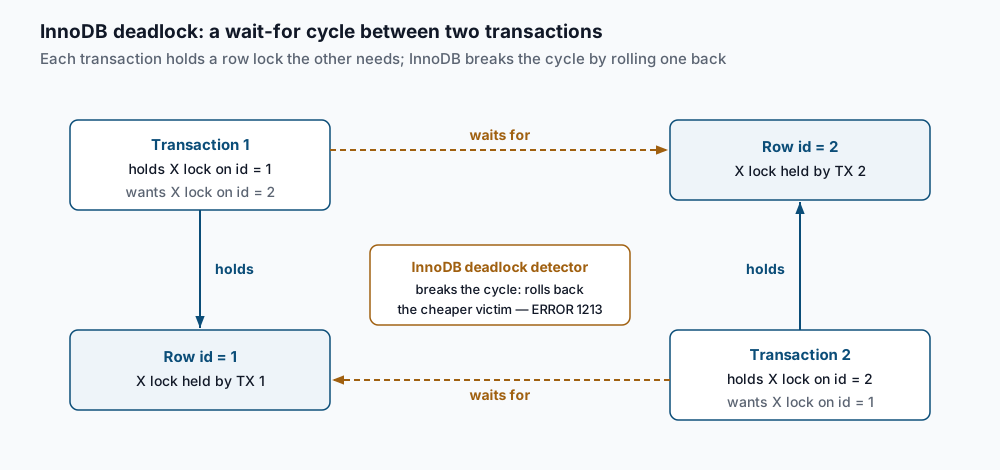
Locks here are almost always exclusive record locks (lock_mode X) taken by UPDATE, DELETE, or SELECT ... FOR UPDATE. Two flavors matter when you read the evidence. A record lock (locks rec but not gap) locks one index entry. A gap lock or next-key lock (locks gap before rec or no qualifier) locks the space between index entries to stop phantom inserts under REPEATABLE READ. Gap locks are a frequent, surprising source of deadlocks: an UPDATE ... WHERE non_indexed_column = ? can lock a whole range because InnoDB has no index to narrow to a single row.
Step-by-step
1. Build a table and reproduce the deadlock. In session A, create a tiny table and start a transaction:
CREATE DATABASE IF NOT EXISTS shop;
USE shop;
CREATE TABLE accounts (
  id INT PRIMARY KEY,
  balance INT NOT NULL
) ENGINE=InnoDB;
INSERT INTO accounts VALUES (1, 100), (2, 100);

START TRANSACTION;
UPDATE accounts SET balance = balance - 10 WHERE id = 1;
You will see Query OK, 1 row affected. Session A now holds an X lock on row id = 1. In session B:
USE shop;
START TRANSACTION;
UPDATE accounts SET balance = balance - 10 WHERE id = 2;
Again Query OK, 1 row affected. Session B holds the X lock on id = 2. Now close the cycle. Back in session A:
UPDATE accounts SET balance = balance + 10 WHERE id = 2;This statement blocks — session A is waiting for the lock session B holds. Finally, in session B:
UPDATE accounts SET balance = balance + 10 WHERE id = 1;One session immediately returns:
ERROR 1213 (40001): Deadlock found when trying to get lock; try restarting transactionThe other session’s blocked UPDATE completes on the spot, because the victim’s rollback released the lock it was waiting on.
2. Read the deadlock evidence. InnoDB kept a full record. Run:
SHOW ENGINE INNODB STATUS\GScroll to the LATEST DETECTED DEADLOCK block:
------------------------
LATEST DETECTED DEADLOCK
------------------------
2026-07-24 14:02:11 0x7f2a1c
*** (1) TRANSACTION:
TRANSACTION 4211, ACTIVE 8 sec starting index read
mysql tables in use 1, locked 1
LOCK WAIT 3 lock struct(s), heap size 1128, 2 row lock(s), undo log entries 1
MySQL thread id 42, query id 918 localhost app updating
UPDATE accounts SET balance = balance + 10 WHERE id = 2
*** (1) HOLDS THE LOCK(S):
RECORD LOCKS space id 58 page no 4 n bits 72 index PRIMARY of table `shop`.`accounts`
  trx id 4211 lock_mode X locks rec but not gap
*** (1) WAITING FOR THIS LOCK TO BE GRANTED:
RECORD LOCKS space id 58 page no 4 n bits 72 index PRIMARY of table `shop`.`accounts`
  trx id 4211 lock_mode X locks rec but not gap waiting
*** (2) TRANSACTION:
TRANSACTION 4212, ACTIVE 5 sec starting index read
LOCK WAIT 3 lock struct(s), heap size 1128, 2 row lock(s), undo log entries 1
MySQL thread id 43, query id 921 localhost app updating
UPDATE accounts SET balance = balance + 10 WHERE id = 1
*** (2) HOLDS THE LOCK(S):
RECORD LOCKS space id 58 page no 4 n bits 72 index PRIMARY of table `shop`.`accounts`
  trx id 4212 lock_mode X locks rec but not gap
*** (2) WAITING FOR THIS LOCK TO BE GRANTED:
RECORD LOCKS space id 58 page no 4 n bits 72 index PRIMARY of table `shop`.`accounts`
  trx id 4212 lock_mode X locks rec but not gap waiting
*** WE ROLL BACK TRANSACTION (2)
Read it top to bottom. (1) and (2) are the two transactions. For each, the UPDATE line under TRANSACTION is the statement that was blocked at the moment of the deadlock — not the whole transaction. HOLDS THE LOCK(S) shows what it already owned; WAITING FOR shows what it could not get. index PRIMARY tells you the lock is on the primary key; lock_mode X is exclusive; locks rec but not gap is a plain record lock. The last line, WE ROLL BACK TRANSACTION (2), names the victim. Here both transactions wait on the PRIMARY index of shop.accounts — the classic two-row cross-lock.
3. Send every deadlock to the error log. SHOW ENGINE INNODB STATUS keeps only the most recent deadlock; the next one overwrites it. To keep a history, enable printing:
SET GLOBAL innodb_print_all_deadlocks = ON;Confirm it took:
SHOW VARIABLES LIKE 'innodb_print_all_deadlocks';+----------------------------+-------+
| Variable_name | Value |
+----------------------------+-------+
| innodb_print_all_deadlocks | ON |
+----------------------------+-------+Make it survive a restart by adding it under [mysqld] in /etc/mysql/my.cnf (or a file under conf.d):
[mysqld]
innodb_print_all_deadlocks = ON
From now on the same block you read in step 2 is appended to the error log with a timestamp every time a deadlock occurs. This is the single most useful change for a system that deadlocks intermittently in production, where you are never watching at the right second.
4. Fix the root cause. The evidence points to one of four fixes, in rough order of impact:
- Consistent lock ordering. If every code path touches rows in the same order — always
idascending, always parent before child — a cycle cannot form. Our reproduction deadlocked only because session A went 1 then 2 while session B went 2 then 1. Sort the ids in the application before you update, or update with a singleWHERE id IN (1, 2) ORDER BY idwhere the semantics allow. - Shorter transactions. A lock is held until
COMMIT. Do not open a transaction, call an external API, and update afterward. Read first, do slow work outside the transaction, then open a short write-only transaction and commit fast. - Index the columns you filter on. An
UPDATE ... WHERE email = ?with no index onemailscans and gap-locks far more rows than the one you meant to touch, colliding with unrelated transactions. Add the index and each statement locks a single record. - Retry on 1213 in the application. Deadlocks can never be fully engineered away under concurrency, so the caller must catch SQLSTATE
40001and replay the whole transaction. Two or three retries with a little jitter clears virtually all of them.
Validate it works
Reproduce the deadlock again after enabling the log, then confirm it was recorded. Tail the error log while you run the two-session sequence from step 1:
sudo grep -A 3 "LATEST DETECTED DEADLOCK" /var/log/mysql/error.log | tail -n 20You should see the timestamped block appear. To confirm nothing is stuck holding locks after the fact, check for lingering lock waits:
SELECT * FROM performance_schema.data_lock_waits\GAn empty set means no transaction is currently blocked. On a healthy system after the deadlock resolves, this returns Empty set. (On MariaDB, use information_schema.INNODB_LOCK_WAITS instead — performance_schema.data_lock_waits is MySQL 8.0+.)
Troubleshooting
- You got ERROR 1205, not 1213.
ERROR 1205 (HY000): Lock wait timeout exceeded; try restarting transactionis a lock wait timeout, not a deadlock. There is no cycle — one transaction simply waited longer thaninnodb_lock_wait_timeout(default 50 seconds) for a lock another transaction was holding, often a long-running or forgotten uncommitted transaction. InnoDB does not roll back the whole transaction for 1205 by default, only the one statement. Find the blocker withSELECT * FROM performance_schema.data_lock_waitsandSHOW PROCESSLIST, then commit or kill it. Do not lower the timeout to hide it. SHOW ENGINE INNODB STATUSshows no deadlock section. TheLATEST DETECTED DEADLOCKheader only appears once at least one deadlock has occurred since the last server start. If it is missing, none has happened yet, or the server restarted after the last one. This is also whyinnodb_print_all_deadlocksmatters — the live status is not a history.- The victim keeps being the transaction you care about. InnoDB picks the transaction with the smaller undo footprint as the victim, so your big important batch job survives and the small quick writes get rolled back. You cannot pick the victim directly, but you can make the important path deterministic by fixing lock ordering, and make the small path resilient by retrying.
- Deadlocks appear on an
UPDATEwith aWHEREon a non-key column. This is gap locking underREPEATABLE READ. TheSHOW ENGINE INNODB STATUSline will readlocks gap before recor lack therec but not gapqualifier. Add an index on the filtered column, or, if your workload does not need phantom protection, evaluateREAD COMMITTED, which takes far fewer gap locks. Test isolation changes carefully — they affect correctness. - Two sessions deadlock on the same single row. Look for a secondary index in the lock lines. Updating an indexed column locks both the clustered (PRIMARY) record and the secondary index entry, and two transactions can cross-lock those two structures even for one logical row. Consistent statement ordering still resolves it.
When this is the wrong approach
If your application deadlocks a few times a day under heavy concurrency and already retries cleanly, that is normal and healthy — engineering every last deadlock away is not worth it. Chase deadlocks only when they are frequent enough to hurt latency or when a retry loop is missing. And if what you actually have is one query slowly blocking everything rather than a true cycle, you are looking at a lock wait timeout or a slow query, not a deadlock; start with the MySQL slow query log instead. For the cPanel-specific view of the same InnoDB mechanism, see InnoDB deadlock detection on cPanel. The upstream reference for the algorithm is the MySQL manual on InnoDB deadlocks and deadlock detection.
If this is the kind of work you’d rather never own again, it’s the daily job of Managed Cloud Ops — book an infrastructure review.