If you run a WooCommerce store whose products sold out for good, or whose supplier dropped a whole line, each retired product URL needs a deliberate answer. Keep temporarily out-of-stock pages live, 301 (permanently redirect) a discontinued product to its true successor, and send 410 Gone only when there is no successor, traffic or link. Deleting a product outright turns its web address (URL) into a 404 (not found), which throws away its rankings and the links it collected. Redirecting everything to the home page looks tidy, yet Google may treat irrelevant redirects as soft 404s and drop them anyway. The steps below sort the catalogue and confirm each URL’s answer.
What you’ll accomplish
- Sort every out-of-stock product into one of four outcomes with a rule you can repeat each season.
- Keep restocking products indexable, with product data that tells Google the truth about availability.
- Ship 301 and 410 answers through the Redirection plugin, nginx or Apache.
- Confirm each URL with curl, Google’s Rich Results Test and Search Console.
Prerequisites
- Administrator access to WordPress and WooCommerce.
- WP-CLI, the WordPress command-line tool, on the server and run as the site’s user. The project lives at wp-cli.org.
- Access to the site’s property in Google Search Console (GSC), Google’s free reporting tool for site owners.
- Either the Redirection plugin installed, or shell access to edit the nginx or Apache configuration.
- A backlink export from your search engine optimization (SEO) tool, if you have one. It helps, but it is optional.
How it works
Every product URL answers a crawler with an HTTP (Hypertext Transfer Protocol) status code, a three-digit number that says what happened. A 200 means “here is the page”. A 301 means “this moved for good”, and it passes most of the old page’s ranking signals to the new address. A 404 says the page was not found, and a 410 says it is gone on purpose. Google drops both from its index, and the 410 states your intent more plainly.
A soft 404 is a URL that returns 200, or redirects, but looks empty or unrelated to what was asked for. Google’s guidance on site moves warns that redirecting many old URLs to one irrelevant page, such as the home page, might be treated as a soft 404. A mass redirect of dead products to the shop root is therefore unlikely to keep their rankings.
WooCommerce adds two wrinkles. First, an out-of-stock product still resolves. The option under WooCommerce → Settings → Products → Inventory, labelled “Hide out of stock items from the catalog”, only removes products from shop, category and search listings. Each product’s own URL keeps returning 200. Second, WooCommerce core prints Product structured data, a JSON-LD (JavaScript Object Notation for Linked Data) block of schema.org facts that search engines read. Its offers.availability value comes from the stock status: InStock or OutOfStock, and recent versions map “On backorder” to BackOrder. If Yoast WooCommerce SEO or Rank Math replaces that block, their output is what Google sees, so check that output instead of the stock badge.
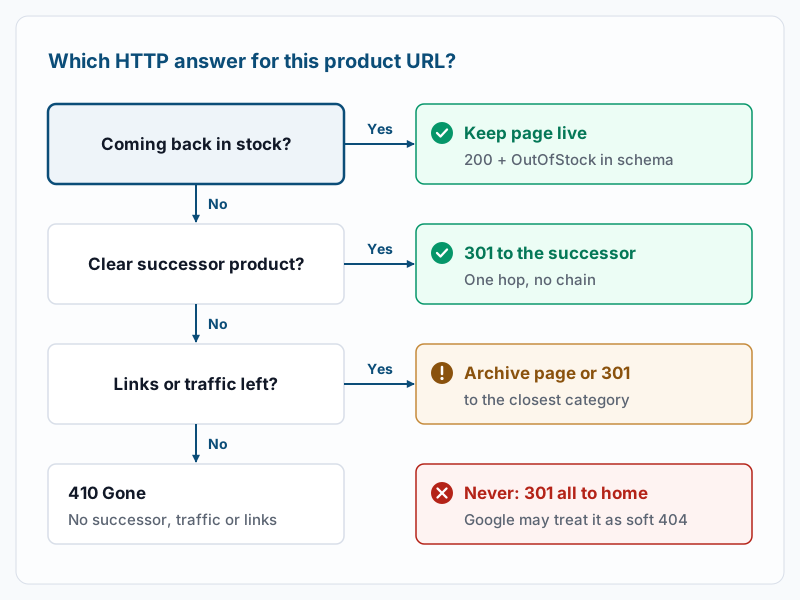
| Situation | What to do | HTTP status | What Google does with it |
|---|---|---|---|
| Out of stock, coming back | Keep the page, show a restock date or a “notify me” form | 200, schema OutOfStock or BackOrder | Keeps it indexed and shows the availability |
| Discontinued, clear successor | Redirect to the successor product | 301 | Moves the signals to the new URL over a few weeks |
| No successor, still earns links or traffic | Archive page with alternatives, or 301 to the closest category | 200 or 301 | Keeps a useful page; a loose redirect risks a soft 404 |
| No successor, no traffic, no links | Return Gone | 410 (or 404) | Drops it from the index |
| Anything redirected to the home page | Avoid | 301 | May treat it as a soft 404 |
Step-by-step
- List the out-of-stock products. The
wp post listcommand passes extra arguments to the WordPress query, so you can filter on the_stock_statusfield. Run it from the WordPress root:
wp post list --post_type=product --post_status=publish --meta_key=_stock_status --meta_value=outofstock --fields=ID,post_name,post_modified --format=csvExample output:
ID,post_name,post_modified
4812,trail-kettle-1l,2026-09-14 10:22:41
3977,ceramic-pour-over-v1,2026-06-02 16:05:13
2210,canvas-apron-olive,2025-11-28 09:47:30
If you get only the header line, no published product is marked outofstock. When you know some have sold out, check whether stock management is off for them; their status then stays whatever someone set by hand. Run the command again with --meta_value=onbackorder to list backorder products, which belong in the first bucket. The settings behind these values are covered in WooCommerce stock management and backorders.
- Check variable products at the variation level. A variable product, one sold in sizes or colours, stores stock on each variation. The parent reads
outofstockonly when every variation is out of stock, so a sold-out size can hide inside an “in stock” parent. List one parent’s variations, replacing1with the ID of an administrator account:
wp wc product_variation list 3977 --user=1 --fields=id,sku,stock_status --format=tableExample output:
+------+----------+--------------+
| id   | sku      | stock_status |
+------+----------+--------------+
| 3981 | POV1-WHT | outofstock   |
| 3982 | POV1-BLK | outofstock   |
+------+----------+--------------+
Every row matches the parent here. If a variation shows instock while the parent says outofstock, the parent’s stored status is stale. Open the product in the admin and click Update; saving resyncs the parent from its variations.
- Join the list with Search Console data. In Search Console, open Performance → Search results, set the date range to the last 12 months, select the Pages tab and export it. The download contains a
Pages.csvfile whose first column holds the page URL. Save the out-of-stock slugs, then keep only the URLs that match one:
wp post list --post_type=product --post_status=publish --meta_key=_stock_status --meta_value=outofstock --field=post_name > oos-slugs.txt
awk -F, 'NR==FNR {oos[$1]=1; next} FNR>1 {u=$1; sub(/\/$/,"",u); n=split(u,p,"/"); if (p[n] in oos) print p[n]","$2","$3}' oos-slugs.txt Pages.csv | sort -t, -k3,3nr
Example output:
trail-kettle-1l,214,9630
ceramic-pour-over-v1,37,4122
The columns are slug, clicks and impressions, sorted by impressions. A slug missing from this output had no search impressions in the window, which makes it a 410 candidate. If nothing prints but you know these products get visits, open Pages.csv and confirm the first column holds full product URLs separated by commas. Search Console’s Links → Top linked pages report adds link data.
- Keep restocking products live and honest. For anything coming back, leave the product published. Set Stock status to “Out of stock”, or allow backorders if you will take orders before the restock. Write the expected date at the top of the short description. For email alerts, add an extension such as Back In Stock Notifications, since WooCommerce core has no such form. Do not set Catalog visibility to “Hidden” and do not mark the page noindex. Hiding it from listings with the Inventory option is fine, because the URL stays 200 and indexable. Then check the availability the page announces:
curl -s https://example.com/product/trail-kettle-1l/ | grep -o '"availability": *"[^"]*"'Example output:
"availability":"https:\/\/schema.org\/OutOfStock"Escaped slashes are normal, and the address may start with http or https depending on the WooCommerce version. If the line says InStock for a sold-out product, or two lines print, a second source is writing schema; see Troubleshooting. If nothing prints, the page carries no product schema at all, or a cache is serving an older copy.
- Redirect discontinued products that have a successor. Pick the one product a shopper of the old item would buy today: the new model, or the same item in its replacement material. In the Redirection plugin, go to Tools → Redirection, add a rule with source
/product/ceramic-pour-over-v1/, target/product/ceramic-pour-over-v2/and HTTP code 301. On nginx, the equivalent rule goes inside the site’sserverblock:
location = /product/ceramic-pour-over-v1/ {
    return 301 https://example.com/product/ceramic-pour-over-v2/;
}
On Apache, add this line to the virtual host or to .htaccess above the WordPress rules:
Redirect 301 /product/ceramic-pour-over-v1/ https://example.com/product/ceramic-pour-over-v2/Test and reload nginx after the edit:
sudo nginx -t && sudo systemctl reload nginxExample output:
nginx: the configuration file /etc/nginx/nginx.conf syntax is ok
nginx: configuration file /etc/nginx/nginx.conf test is successful
Any emerg line means the reload did not happen; fix the reported line first. On Apache, sudo apachectl configtest should print Syntax OK before you reload. Then move the old product to draft, so it leaves the XML sitemap and on-site search:
wp post update 3977 --post_status=draftExample output:
Success: Updated post 3977.A draft keeps the product data for reporting. If you renamed the old product into the new one instead, WordPress already stores the previous slug in _wp_old_slug and redirects it. That only covers a renamed slug on the same product, never a separate successor.
-
Decide the in-between products. These have no successor but still show clicks or links. You have two honest choices. The first is an archive page: keep it published and out of stock, open the description with “No longer available”, and link two or three current alternatives. Schema.org also defines a
Discontinuedavailability value, but WooCommerce core will keep printingOutOfStock, which is still accurate. The second is a 301 to the closest category, only when the match is tight. A retired camping kettle goes to Kettles, not to Kitchen and not to the home page. If a shopper landing there would not see why they arrived, the target is too broad. -
Return 410 for the rest. These have no successor, no clicks in 12 months and no links. WordPress core never sends a 410 by itself; a trashed or drafted product returns 404, which is acceptable. For an explicit 410 in Redirection, add a rule for the source URL and open its advanced options. Set When matched to “Error (404)”, then choose 410 in the HTTP code list. Labels can differ slightly between plugin versions. On nginx:
location = /product/canvas-apron-olive/ {
    return 410;
}
On Apache, Redirect gone /product/canvas-apron-olive/ does the same. With the rule live, move the product to the trash:
wp post delete 2210Example output:
Success: Trashed post 2210.Without --force, the product goes to the trash and can be restored. One side effect to know: for a URL that 404s, WordPress may guess a published post with a similar slug and redirect to it. If canvas-apron-olive-xl exists, the retired URL can land there. The 410 rule prevents that. Returning false from the do_redirect_guess_404_permalink filter, available since WordPress 5.5, switches the guessing off site-wide.
Validate it works
Request the headers for each decided URL. A successor redirect should look like this:
curl -sI https://example.com/product/ceramic-pour-over-v1/Example output:
HTTP/2 301
date: Wed, 04 Nov 2026 14:12:09 GMT
content-type: text/html; charset=UTF-8
location: https://example.com/product/ceramic-pour-over-v2/
A retired product should answer with HTTP/2 410, and an older server may show HTTP/1.1 410 Gone. If you see HTTP/2 200 instead, a cache is answering before your rule; see Troubleshooting. Next, follow the redirect to its end and count the hops:
curl -sIL -o /dev/null -w '%{http_code} %{num_redirects} %{url_effective}\n' https://example.com/product/ceramic-pour-over-v1/Example output:
200 1 https://example.com/product/ceramic-pour-over-v2/You want a final 200 after exactly 1 redirect. A 2 or higher is a chain. For the restocking and archive pages, paste the URL into Google’s Rich Results Test and confirm a Product item with availability OutOfStock or BackOrder. Finally, run URL Inspection in Search Console on the successor and click Request indexing. A few weeks later, the old URLs should show as redirected or not found in the Pages report.
Troubleshooting
A redirect chain appears after the successor is retired too. Version one points to version two, which now points to version three. Each hop delays the move and leaks signals. Edit the oldest rule so it points straight at the current product, then rerun the hop count. A full sweep is covered in find and fix WordPress redirect chains.
The old 200 page keeps coming back. A page cache plugin or a CDN (content delivery network) serves a stored copy before PHP runs, so a Redirection rule never fires. Look for headers like cf-cache-status: HIT or x-litespeed-cache: hit in the curl -sI output. Purge that URL in the cache and the CDN, then test again.
The schema still says InStock. Two availability lines usually mean WooCommerce and an SEO plugin both print Product data, or that one of them reads a different field. Turn off the duplicate source in the SEO plugin’s WooCommerce settings, purge the cache, and recheck with the Rich Results Test.
A Redirection rule never fires. The source rarely matches exactly. Common causes are a missing trailing slash, a product base such as /shop/ instead of /product/, or a disabled group. Check the rule’s slash and case options, and look at the plugin’s log to see what URL actually arrived.
Search Console flags an archive page as a soft 404. Google judged the page too thin to be useful. Add real content: what the product was, why it was retired and two or three current alternatives with links. If the page cannot offer that, switch it to a category 301 or a 410.
When this is the wrong approach
Seasonal products that return every year should keep their URL permanently, even through months of being out of stock. The page gathers history each season, and a redirect would throw it away.
Large catalogues that churn thousands of supplier stock-keeping units (SKUs) each month do not suit per-URL choices. Set the rule once in your import process, and serve 410s by pattern with an nginx map instead of single locations, as shown in nginx map module redirects.
A recalled product needs its page to stay visible with the recall notice, at 200, whatever its traffic. Safety information matters more than search rankings here.
If you also run Google Shopping ads, Merchant Center reads your product feed separately from your pages. Keep each item’s availability value in the feed current, and remove discontinued items from the feed when you retire their pages.
Running WordPress that earns real money deserves an operator — Stack Harbor runs that stack under Enterprise WordPress; book an infrastructure consult.