If WooCommerce orders are piling up in on-hold or pending payment, or a customer says the confirmation email never came, the order status tells you why. Each status is a state that a specific actor moved the order into, whether a payment gateway, an offline payment method or someone in the admin, and every change leaves a note on the order. Orders stuck in on-hold were usually put there by an offline method such as bank transfer, or by a card payment whose confirmation callback never arrived. A pile of pending payment orders means shoppers reached the payment page and left. A missing email usually means the order never made the status change that sends it, so read the order notes before you debug your mail setup.
What you’ll accomplish
- Read any order’s status and name the exact mechanism that set it, instead of guessing.
- Explain why on-hold and pending payment orders accumulate, and configure the auto-cancel that clears the pending ones.
- Map each status transition to the customer and admin emails it does — and does not — send.
- Register a custom order status correctly, and know the four things it will silently break.
- Run a status audit on the store from the command line, on both HPOS and legacy order storage.
Prerequisites
WooCommerce 8.0 or newer on WordPress 6.4+, PHP 8.1+. Shell access with WP-CLI available as wp, run as the site user from the WordPress root. The wp wc subcommands used here go through the REST controllers, which run capability checks, so they need a --user= flag naming an administrator; --user=1 is used throughout — substitute your own admin ID.
One storage fact changes half the queries. High-Performance Order Storage keeps orders in a dedicated wp_wc_orders table with a plain status column. Without HPOS, orders are still posts in wp_posts and the status lives in post_status. Order notes are unaffected — they are comments in wp_comments with comment_type = 'order_note' in both modes. Confirm which mode you are in before running anything.
wp option get woocommerce_custom_orders_table_enabled
wp config get table_prefix
Expect yes (HPOS active) or no, followed by your table prefix. If you are unsure how the store got into its current mode, or you are planning the switch, see the HPOS migration guide.
How it works
Internally, every core status is stored with a wc- prefix: wc-pending, wc-processing, wc-on-hold, wc-completed, wc-cancelled, wc-refunded, wc-failed, and wc-checkout-draft. That prefix exists because the statuses were originally registered as WordPress post statuses and had to avoid colliding with pending, draft and publish. The prefix is an implementation detail you have to know about anyway: $order->get_status() returns the slug without it, while the database column, register_post_status() and the wc_order_statuses filter all use it with the prefix. Comparing the two forms directly is the single most common bug in status-handling code.
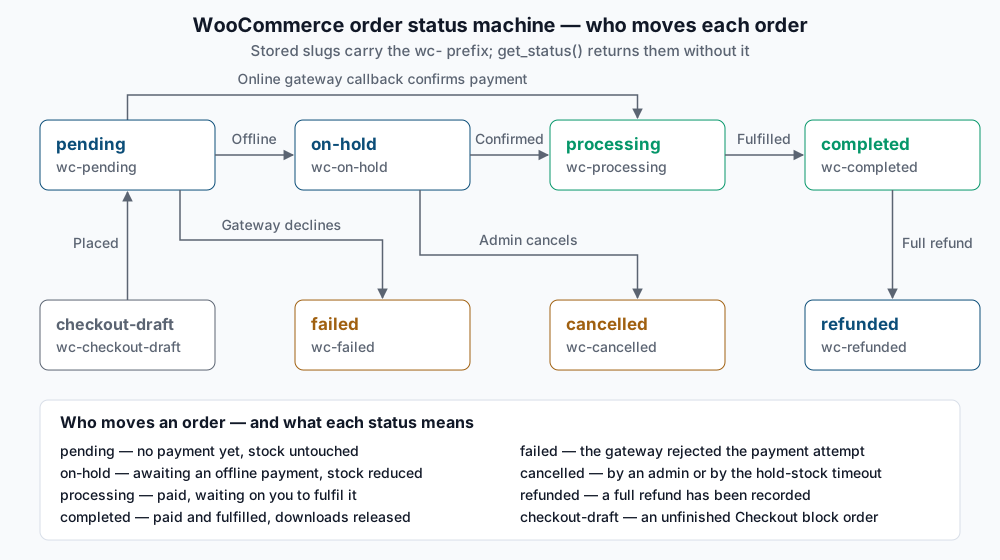
Three different actors move orders:
The gateway. An online gateway creates the order as pending, sends the shopper away, then calls WC_Order::payment_complete() when its callback, webhook or IPN confirms the money. That method does not hardcode processing — it asks the order whether anything in it needs human handling. If every line item is both virtual and downloadable, the order goes straight to completed and the download links are released; otherwise it goes to processing. This is why a store selling only digital goods never sees processing, and a store that added one shippable item to a digital bundle suddenly does.
Offline gateways. Direct bank transfer, cheque and cash on delivery cannot confirm anything, so they set a status by hand at checkout. Bank transfer and cheque set on-hold, which reduces stock and waits for you to confirm the money arrived. Cash on delivery sets processing — unless the order contains a downloadable item, in which case it sets on-hold so the files are not released before payment. That single branch explains most “why is COD sometimes on-hold” tickets.
You, in the admin. Changing the status in the order screen or with a bulk action fires exactly the same transition hooks a gateway would, so it triggers the same emails and the same stock movements. There is no “quiet” manual change.
Stock follows the status, not the cart. WooCommerce reduces stock when an order reaches on-hold, processing or completed, and puts it back when an order moves to cancelled or back to pending. A meta flag records that reduction so a processing to completed move does not decrement twice. The corollary matters: an order sitting in pending is holding no stock at all beyond the short-lived reservation row, which is the mechanism behind oversell race conditions.
Step-by-step
1. Get the authoritative status list from the running site. Plugins add statuses, and the admin dropdown is the wrong place to check.
wp eval 'print_r( wc_get_order_statuses() );'You should see an array keyed by prefixed slug — wc-pending, wc-processing, wc-on-hold, wc-completed, wc-cancelled, wc-refunded, wc-failed — mapped to translated labels. Note that wc-checkout-draft is deliberately absent: it is a registered post status used by the Checkout block to persist an order the shopper has not submitted yet, and a scheduled cleanup deletes stale drafts. It should never appear in your reports.
2. Count orders by status. On HPOS:
wp db query "SELECT status, COUNT(*) AS orders FROM wp_wc_orders GROUP BY status ORDER BY orders DESC;"On legacy storage:
wp db query "SELECT post_status, COUNT(*) AS orders FROM wp_posts WHERE post_type = 'shop_order' GROUP BY post_status ORDER BY orders DESC;"Both print a two-column table. A healthy store shows most orders in wc-completed, a working tail in wc-processing, and small counts elsewhere. A four-digit wc-pending count is normal for a busy store with no auto-cancel configured; a four-digit wc-on-hold count is not, and means step 4.
3. List the stuck orders with enough context to diagnose them. The payment method is the piece that usually gives it away.
wp wc shop_order list --user=1 --status=on-hold --fields=id,date_created,total,payment_method_title --format=tableSuccess looks like a table of orders. If every row shows the same offline method, the store is working as designed and you simply have unconfirmed transfers. If the rows show a card gateway, a callback did not land — go to step 5.
4. Deal with the pending pile. Unpaid pending orders never expire on their own. The “Hold stock (minutes)” field under WooCommerce > Settings > Products > Inventory schedules a cron event that cancels unpaid orders older than that many minutes, releasing any reserved stock. It only touches orders created through the normal checkout, so imports and REST-created orders are safe.
wp option get woocommerce_manage_stock
wp option get woocommerce_hold_stock_minutes
Expect yes and a number such as 60. An empty or 0 value means the auto-cancel is off. Setting it is only half the job — confirm the event is actually scheduled, because a store with WP-Cron disabled and no system cron will never run it.
wp cron event list --fields=hook,next_run_relative | grep woocommerce_cancel_unpaid_ordersYou want one row with a next run in the future. No output means the event is missing; re-saving the inventory settings page reschedules it.
5. Read the order notes. Notes are the audit log for status changes: every gateway callback, every manual change, every stock adjustment writes one.
wp db query "SELECT comment_date, comment_author, comment_content FROM wp_comments WHERE comment_type = 'order_note' AND comment_post_ID = 1234 ORDER BY comment_date;"Replace 1234 with the order ID. A card order stuck in on-hold or pending with notes that stop right after “Awaiting payment” never received its callback. One that shows the callback arriving and then an error is a different problem entirely — usually the gateway’s own log has the detail.
6. Move an order deliberately. Once you know the money is real, transition it rather than editing the database.
wp wc shop_order update 1234 --status=processing --user=1The command prints the updated order. Because this goes through the normal setter, it fires the transition hooks, sends the customer Processing email, and reduces stock if that has not already happened — which is exactly what you want, and exactly why a direct SQL UPDATE on the status column is the wrong tool.
Validate it works
The transition map is what you are really validating, because it explains the email behaviour. Confirm which statuses the store treats as paid:
wp eval 'print_r( wc_get_is_paid_statuses() );'The default output is processing and completed, unprefixed. Anything else means a plugin filtered woocommerce_order_is_paid_statuses, and your reports will reflect that.
Then check the email side. Emails hang off transition hooks such as woocommerce_order_status_pending_to_processing, not off statuses. The admin New order email fires only when an order moves from pending or failed into processing, completed or on-hold. Customer Processing order fires on any move into processing. Completed order fires on any move into completed. On-hold fires only from pending or failed. Nothing at all is sent for an order that simply starts in pending, and there is no customer email for cancelled by default.
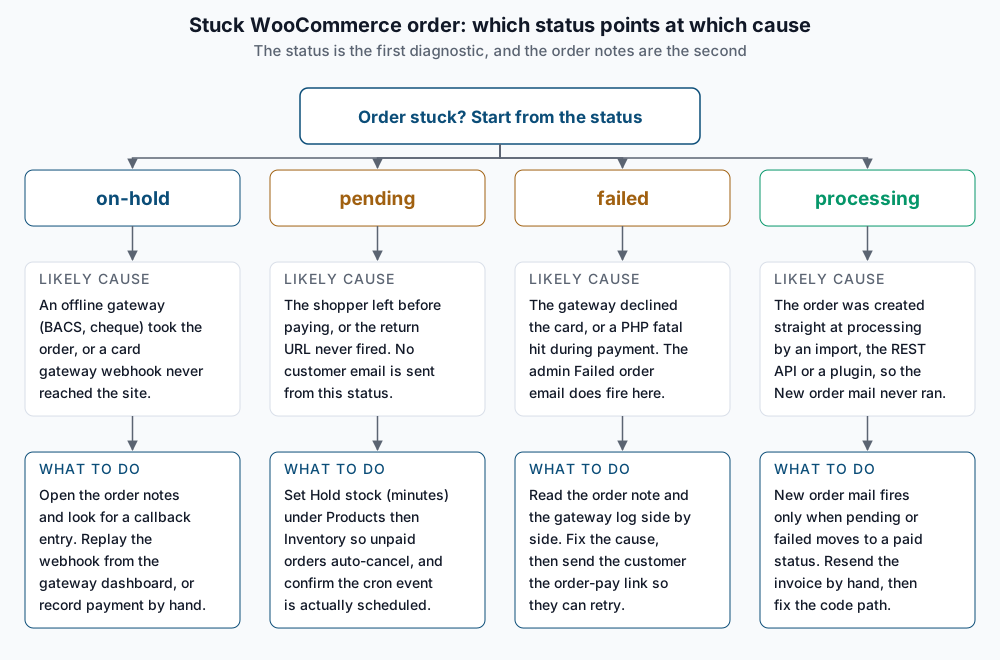
That map has a practical consequence worth stating plainly: an order created directly at processing by an importer, the REST API or a plugin never passed through pending, so the New order email never fires. The mail stack is fine. Before you spend an afternoon on SMTP, confirm the transition happened — the full mail-side checklist lives in new order email not received.
Finally, verify a full round trip on a test order: place it, watch it land in pending, complete payment, confirm it moves to processing and that stock dropped by the ordered quantity.
Troubleshooting
Every card order sits in on-hold or pending. The gateway is not calling back. Check that the callback URL the gateway has on file matches the site’s current URL (a staging-to-production move is the classic cause), that the endpoint is not behind HTTP auth or a firewall rule, and that the gateway’s dashboard shows delivery attempts. Most gateways let you replay a webhook, which is the clean fix — it drives the same code path the live callback would have.
Orders reach processing but the shop never gets the New order email. Look at the order notes for evidence of a pending state. If the order was born at processing, no transition hook fired. Fix the creating code path to create at pending and call payment_complete(), or accept it and notify by other means.
A custom status breaks reporting. Registering wc-awaiting-pickup is two hooks:
add_action( 'init', function () {
    register_post_status( 'wc-awaiting-pickup', array(
        'label'                     => 'Awaiting pickup',
        'public'                    => true,
        'exclude_from_search'       => false,
        'show_in_admin_all_list'    => true,
        'show_in_admin_status_list' => true,
        'label_count'               => _n_noop( 'Awaiting pickup (%s)', 'Awaiting pickup (%s)' ),
    ) );
} );

add_filter( 'wc_order_statuses', function ( $statuses ) {
    $statuses['wc-awaiting-pickup'] = 'Awaiting pickup';
    return $statuses;
} );
That gets it into the dropdown and nothing else. It is not a paid status, so revenue reports skip it; no email is attached to any transition into it; and gateways that assume processing means paid will not recognise it. Add it to the paid set explicitly if that is what you mean, using the unprefixed slug:
add_filter( 'woocommerce_order_is_paid_statuses', function ( $statuses ) {
    $statuses[] = 'awaiting-pickup';
    return $statuses;
} );
Then set the store’s actionable and excluded statuses under WooCommerce > Settings > Analytics so the new status is counted the way you intend.
A gateway does not appear at checkout, so orders never get created at all. That is a different failure with the same symptom of “no orders” — start with payment gateway not showing instead.
Refunded orders show the wrong totals. A full refund sets refunded; a partial refund records a refund object and leaves the status alone, which is correct but surprising. See partial refunds and restocking.
When this is the wrong approach
Statuses are a workflow state machine, not a data model. If you find yourself adding six custom statuses to track warehouse stages, you want order meta and a purpose-built screen instead — statuses leak into reports, emails, gateway assumptions and every plugin that queries orders. Bulk-editing statuses to “fix” historical data is also a bad idea: transitions fire email and stock hooks, so a bulk move of 800 old orders can send 800 messages. And if the real question is whether the money arrived, the gateway dashboard is the source of truth; WooCommerce statuses only ever reflect what the gateway managed to tell it.
Official references: register_post_status() and WooCommerce’s own managing orders documentation.
Running WordPress that earns real money deserves an operator — Stack Harbor runs that stack under Enterprise WordPress; book an infrastructure consult.