This guide walks you through moving a blog from Blogger, Google’s free blogging service, to self-hosted WordPress on a cPanel/WHM server. Most Blogger owners arrive here with years of posts, comments and search traffic they do not want to lose. The good news is that Blogger gives you a real export file, and WordPress has an official importer that reads it. Keeping your traffic depends on what you do after the import. You match Blogger’s URL shape, copy images off Google’s servers, and add 301 redirects for everything else. By the end, your old post addresses will load on WordPress, and every other old address will redirect to its new home.
What you’ll accomplish
- Export every post, page and comment from Blogger as one backup file, and count what it contains.
- Import that file into WordPress on a temporary hostname while Blogger keeps serving readers.
- Set WordPress permalinks so post URLs stay identical to the Blogger ones.
- Copy images from Google’s image servers into your own media library.
- Redirect Blogger pages, label pages, feeds and
?m=1mobile links, then move DNS without touching mail.
Prerequisites
- Admin access to the Blogger dashboard.
- Access to DNS for your custom domain, usually at the registrar where you bought it. If the blog only lives at a
blogspot.comaddress, read the “When this is the wrong approach” section first, because redirects work differently there. - A cPanel account on a server you control, or WHM root access to create one.
- SSH access with WP-CLI, the command-line tool for WordPress. Check with
wp --info. Every WP-CLI step has a slower equivalent in the WordPress admin. curlanddigon your own machine, to test URLs and DNS.- Apache or LiteSpeed on the cPanel server. Both read
.htaccessrewrite rules with the same syntax.
How it works
Blogger’s backup is an Atom file, a standard XML feed format, holding your posts, pages, comments and settings. The WordPress Blogger Importer plugin reads that file under Tools > Import. It does not read WXR files, and WP-CLI’s wp import command reads only WXR, so this one import happens in the browser.
Three things do not come across on their own. Images stay on Google’s hosts (blogger.googleusercontent.com or 1.bp.blogspot.com through 4.bp.blogspot.com). Your theme and gadgets stay behind. And Blogger’s URL shapes need either a matching permalink setting or a redirect.
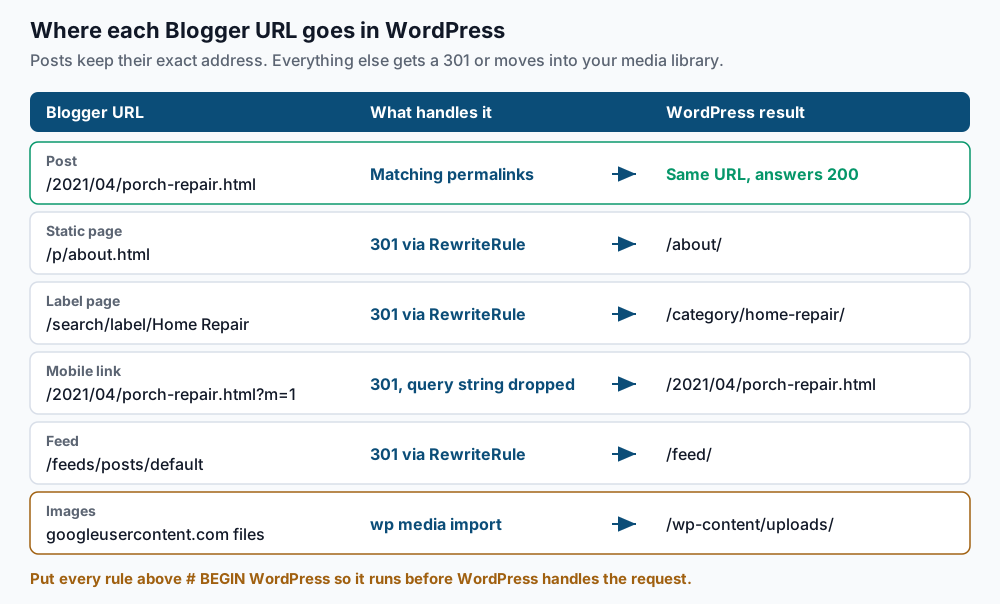
Posts are the easy win. Blogger publishes them at /2021/04/porch-repair.html, and WordPress can produce exactly that with the permalink structure /%year%/%monthnum%/%postname%.html. When the address is identical, you need no redirect at all, and search engines see nothing change.
Everything else needs a rule. The ?m=1 parameter deserves special attention. Blogger adds it to mobile links, and WordPress reads m as its own date-archive parameter. Left alone, those links can land on an empty archive or a 404 page, so you strip it with a redirect.
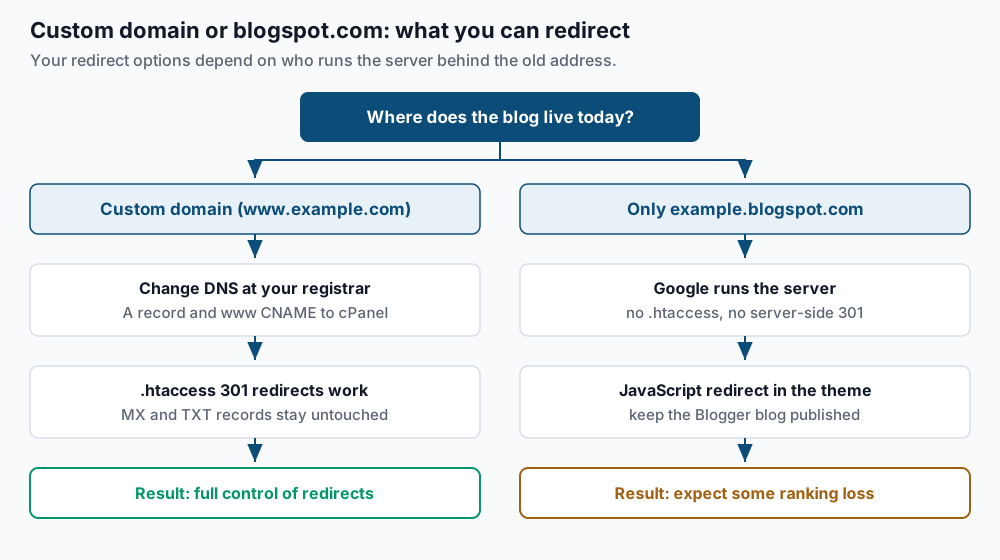
Where your blog lives today decides how much of this you control.
Step-by-step
-
List every live URL from the Blogger sitemap. Blogger publishes posts in
sitemap.xml, sometimes split into pages, and static pages insitemap-pages.xml.{ curl -s https://www.example.com/sitemap.xml; curl -s https://www.example.com/sitemap-pages.xml; } \ | grep -o '<loc>[^<]*</loc>' | sed 's|</*loc>||g' > ~/sm1.txt grep 'sitemap.xml?page=' ~/sm1.txt | while read -r s; do curl -s "$s"; done \ | grep -o '<loc>[^<]*</loc>' | sed 's|</*loc>||g' > ~/sm2.txt cat ~/sm1.txt ~/sm2.txt | grep -v 'sitemap.xml?page=' | sort -u > ~/blogger-urls.txt wc -l < ~/blogger-urls.txt grep -c '/p/' ~/blogger-urls.txtExpected: a total such as
193, then the page count such as6. Save this file. It is your checklist for every later test. -
Download the Blogger backup. In Blogger, open Settings, scroll to Manage blog, and choose Back up content, then Download. Upload the file to your cPanel account and count what is inside:
grep -oE 'kind#(post|page|comment)|<blogger:type>[A-Z]+</blogger:type>' ~/blog-backup.xml | sort | uniq -cExpected, depending on which export format Blogger gives you:
    412 kind#comment
      6 kind#page
    187 kind#post
The post count may be higher than the sitemap total, because drafts are included. A count of zero for both patterns means the file is incomplete, so download it again.
-
Build WordPress on a temporary hostname. Create the account in WHM under Account Functions > Create a New Account. Point
new.example.comat the server with an A record, then install:cd ~/public_html wp core download wp config create --dbname=exmpl_wp --dbuser=exmpl_wp --dbpass='REPLACE_ME' wp core install --url=https://new.example.com --title='Example Blog' \ --admin_user=admin --admin_email=you@example.com --skip-email wp option update timezone_string 'America/Toronto' wp rewrite structure '/%year%/%monthnum%/%postname%.html' --hardExpected:
Success: WordPress installed successfully., thenSuccess: Updated 'timezone_string' option., thenSuccess: Rewrite structure set.Use the time zone shown in Blogger under Settings > Formatting. A mismatch can shift posts published near midnight into the wrong month, which changes their URL. -
Import posts and comments. Install the importer, then check the upload limit:
wp plugin install blogger-importer --activate
wp eval 'echo size_format( wp_max_upload_size() ) . PHP_EOL;'
ls -lh ~/blog-backup.xml
Expected:
Success: Plugin installed successfully., then a limit such as64 MB. If the backup is larger, raiseupload_max_filesizeandpost_max_sizein cPanel’s MultiPHP INI Editor. Now go to Tools > Import > Blogger, upload the file and follow the prompts, including assigning authors. Then count the result:wp post list --post_type=post --post_status=any --format=count wp post list --post_type=page --post_status=any --format=count wp comment list --format=countExpected: numbers close to step 2. Exact behaviour varies between plugin versions, so compare rather than assume. Pages that did not arrive are few enough to rebuild by hand. If posts show
0, see Troubleshooting. -
Check that post URLs match. Test every post from the sitemap against the new site:
grep -v '/p/' ~/blogger-urls.txt | sed 's#https://www.example.com#https://new.example.com#' \
  | while read -r u; do printf '%s  %s\n' "$(curl -s -o /dev/null -w '%{http_code}' "$u")" "$u"; done \
  | grep -v '^200'
Expected: no output. Each line that appears is a post whose slug or month differs from Blogger. Fix the slug with
wp post update 42 --post_name=porch-repair, where42is the post ID fromwp post list --s='Porch' --fields=ID,post_name. -
Copy images into the media library. Find every Google-hosted image in the export:
grep -oE 'https://(blogger\.googleusercontent\.com|[0-9]\.bp\.blogspot\.com)/[^"&<> ]+' ~/blog-backup.xml \
  | sort -u > ~/blogger-images.txt
wc -l < ~/blogger-images.txt
Expected: a count such as
340. Blogger often links a small thumbnail to a large original, so expect two URLs per picture. For each image, import it and swap the address in post content:url='https://blogger.googleusercontent.com/img/b/AVvXsEi/s1600/porch.jpg' id=$(wp media import "$url" --post_id=42 --porcelain) new=$(wp eval "echo wp_get_attachment_url($id);") wp search-replace "$url" "$new" wp_posts --include-columns=post_contentExpected: an attachment ID, then
Success: Made 1 replacement.For hundreds of images, a plugin that sideloads external images does the same job in bulk. Usewp search-replacerather than raw SQL, because it handles serialized data, where PHP stores each string with its length. -
Write the redirect rules. Open
~/public_html/.htaccessand add this block above# BEGIN WordPress. Rules between the WordPress markers are erased when permalinks are saved.# --- Blogger legacy paths: keep above the WordPress block --- <IfModule mod_rewrite.c> RewriteEngine On RewriteCond %{QUERY_STRING} (^|&)m=[01](&|$) RewriteRule ^(.*)$ /$1? [R=301,L] RewriteRule ^p/([^/]+)\.html$ /$1/ [R=301,L] RewriteRule ^feeds/posts/default/?$ /feed/ [R=301,L] RewriteRule ^(\d{4})_(\d{2})_\d{2}_archive\.html$ /$1/$2/ [R=301,L] RewriteRule ^search/label/Home\sRepair$ /category/home-repair/ [R=301,L] RewriteRule ^search/label/([^/]+)$ /category/$1/ [R=301,L] </IfModule> # --- end Blogger legacy paths ---The first rule strips
?m=1; the trailing?drops the query string. Generate one explicit label line for each category whose name has spaces or capitals:wp term list category --fields=name,slug --format=csv | tail -n +2Expected: lines such as
Home Repair,home-repair. Any name that differs from its slug gets its own line above the catch-all label rule. UsingRewriteRulefor everything keeps the order predictable, because Apache’sRedirectdirective runs in a different phase. -
Cut over DNS. A day ahead, lower the TTL on the
wwwand root records to 300 seconds. Then check what exists:dig +short CNAME www.example.com dig +short A example.com dig +short MX example.comExpected for a Blogger custom domain:
ghs.google.com., then Google’s four addresses216.239.32.21,216.239.34.21,216.239.36.21and216.239.38.21, then your mail host. At your DNS host, replace the four A records with one A record for your cPanel server’s IP. Change thewwwCNAME to point atexample.com. Leave MX and TXT records alone. Blogger never handled your mail, so mail keeps flowing. Then finish on the server:wp search-replace 'https://new.example.com' 'https://www.example.com' --all-tables wp option get siteurlExpected: a replacement count, then
https://www.example.com. Run AutoSSL from cPanel’s SSL/TLS Status page once DNS resolves to the new IP.
Validate it works
Run the full list against the live domain and show anything unexpected:
while read -r u; do
  printf '%s  %s\n' "$(curl -s -o /dev/null -w '%{http_code}' "$u")" "$u"
done < ~/blogger-urls.txt | grep -vE '^(200|301)'
Expected: no output. Posts answer 200; /p/ pages answer 301. Then check the special cases:
curl -sI 'https://www.example.com/2021/04/porch-repair.html?m=1' | grep -i '^location'
curl -sI 'https://www.example.com/search/label/Home%20Repair' | grep -i '^location'
wp db query "SELECT COUNT(*) FROM wp_posts WHERE post_content REGEXP 'googleusercontent|bp.blogspot';" --skip-column-names
Expected: two location: lines pointing at the clean post URL and /category/home-repair/, then 0. Our post-migration smoke tests cover the rest of day one.
Troubleshooting
- The importer finishes but imports zero posts. Blogger has changed its export format over the years, and importer support has lagged at times. Confirm the plugin is current with
wp plugin list --name=blogger-importer. If it still fails, convert the file to WXR with a Blogger-to-WXR converter, then runwp import converted.xml --authors=createafterwp plugin install wordpress-importer --activate. wp media importfails on some Google URLs. Somegoogleusercontent.comaddresses end in a size code like=w640with no file extension, and WordPress refuses files without a recognised type. Try the same URL with/s1600/in place of the size code, or download it withcurl -o porch.jpgand runwp media import porch.jpg --post_id=42.- A few posts return 404 on WordPress. Blogger shortens long titles into slugs, and WordPress may build a different slug from the full title. Step 5 lists them; fix each with
wp post update <ID> --post_name=<slug>. If the month is wrong, check the site time zone. - Label redirects land on a 404. The category slug differs from the label text. Add an explicit rule for that label above the catch-all, as in step 7. See our guide to permalinks broken after a migration for rewrite checks.
- Commenters show no avatars. Blogger’s export often stores a placeholder email for commenters, so Gravatar has nothing to match. The comments themselves are intact.
When this is the wrong approach
If your blog only lives at example.blogspot.com, you cannot add server redirects there, because Google runs that server. If the blog had a custom domain attached, Blogger redirects the blogspot.com address to it while the domain stays attached. Google does not document whether that continues after DNS moves away, so keep the custom domain set in Blogger and test with curl -sI. Without a custom domain, the remaining option is a script in the theme’s <head>, added under Theme > Edit HTML:
<script>
  window.location.replace('https://www.example.com' + window.location.pathname);
</script>
Google says it can follow JavaScript redirects, but a server 301 is a stronger signal. Expect some ranking loss, and keep the Blogger blog published. Our guide to preserving rankings through a migration explains what to watch.
If you post rarely and value a free, maintenance-free blog, staying on Blogger is a fair choice. WordPress on cPanel means updates, backups and security are now yours. For the rewrite syntax used above, see Apache’s mod_rewrite documentation.
Running WordPress that earns real money deserves an operator — Stack Harbor runs that stack under Enterprise WordPress; book an infrastructure consult.