This guide walks you through moving a PrestaShop store to WooCommerce when both run on a cPanel/WHM hosting account. Many merchants reach this point with a PrestaShop 1.6 or 1.7 shop that is hard to upgrade, and they fear losing their catalogue, customer accounts and search rankings. Those fears are manageable, because PrestaShop keeps everything in a MySQL database on your own server. The practical answer is a data conversion. You build WooCommerce next to the live shop, an importer plugin reads the PrestaShop database with read-only access, and a 301 redirect map sends every old product URL to its new page. By the end, WooCommerce takes orders on your domain, and the PrestaShop files and database sit archived beside it, ready for a rollback.
What you’ll accomplish
- Read your PrestaShop version, table prefix, languages and catalogue size, so you know what the import has to carry.
- Build WordPress and WooCommerce on a subdomain of the same cPanel account while PrestaShop keeps selling.
- Import products, categories and images with the FG PrestaShop to WooCommerce plugin, using a
SELECT-only database grant. - Write a 301 redirect map in
.htaccessfor PrestaShop’s friendly URLs, language prefixes and query-string links. - Swap the new store into
public_htmlin a short window, test a real checkout, and keep a rollback ready.
Prerequisites
- A cPanel account holding the PrestaShop store, with access to the Domains and MySQL Databases screens (or WHM root access).
- SSH access with WP-CLI, the command-line tool for WordPress. Check with
wp --info. - Admin access to the PrestaShop back office.
- Enough disk space for a second copy of your product images. Check with
du -sh ~/public_html/img/p. - A full cPanel backup. Nothing here writes to the PrestaShop database, but the cutover moves files.
- A decision on the importer edition. The free edition imports products, categories, tags, images and content pages. Combinations, customers and orders need Premium, according to the plugin page.
The steps assume PrestaShop sits in public_html, the cPanel username is exmpl, and the table prefix is ps_. Swap in your own values wherever you see those.
How it works
PrestaShop and WooCommerce both run on PHP and MySQL. The importer only reads PrestaShop’s tables, so you do not need to upgrade PrestaShop first. cPanel’s MultiPHP Manager lets the old shop keep its PHP version while the new subdomain uses a current one.
Should you move at all? Stay on PrestaShop if you rely on multistore (several shops run from one back office). Also stay if you depend on business-to-business (B2B) or marketplace modules with no WooCommerce equivalent. Move if your content already lives in WordPress, or if a stuck 1.6 or 1.7 upgrade would be a rebuild anyway. A healthy PrestaShop 8 store with a happy team is a fine place to stay.
How the data maps. PrestaShop splits each product across several tables. ps_product holds the price, reference and status. ps_product_lang holds the name, description and link_rewrite (the URL slug), with one row per language, marked by id_lang. Combinations, which PrestaShop calls the size-and-colour variants of a product, live in ps_product_attribute. Categories are in ps_category, customers in ps_customer, orders in ps_orders, and image records in ps_image.
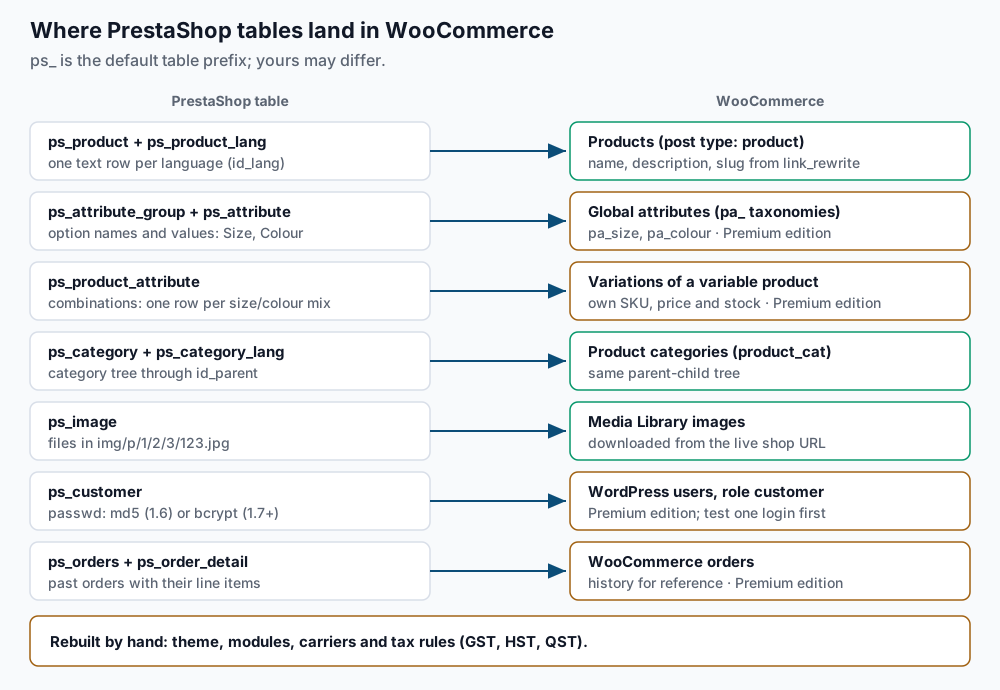
In WooCommerce, a product with combinations becomes a variable product. Each combination becomes a variation with its own SKU (stock-keeping unit), price and stock. Option names become global attributes, stored as pa_ taxonomies such as pa_size.
Images live in nested folders. Since PrestaShop 1.5, image number 123 is stored as img/p/1/2/3/123.jpg, one folder per digit, with resized copies such as 123-home_default.jpg beside it. The importer downloads images over HTTP from the shop URL you give it, so the shop must stay online and out of maintenance mode during the import.
Multilingual shops need a WordPress decision first. WooCommerce on its own is single-language. A bilingual English and French shop needs a multilingual plugin, usually WPML or Polylang, each with its WooCommerce companion. The Premium importer has an add-on that imports translations into WPML. Make that choice before you import.
Passwords depend on the PrestaShop version. PrestaShop 1.6 stored md5(_COOKIE_KEY_ . password), a hash that only works with that shop’s secret key. PrestaShop 1.7 and later use bcrypt through PHP’s password_hash(). The Premium importer’s feature list says customers can log in to WordPress with their PrestaShop passwords. Treat that as something to prove on one test account, not something to assume.
Step-by-step
-
Record the database details and version. On PrestaShop 1.7 and 8.x, read
app/config/parameters.php:grep -E "'database_(host|name|user|prefix)'" ~/public_html/app/config/parameters.phpExpected output:
    'database_host' => '127.0.0.1',
    'database_name' => 'exmpl_presta',
    'database_user' => 'exmpl_ps',
    'database_prefix' => 'ps_',
On PrestaShop 1.6, run
grep -E "_DB_(SERVER|NAME|USER|PREFIX)_|_PS_VERSION_" ~/public_html/config/settings.inc.phpinstead. It printsdefine(...)lines with the same values. Then confirm the version from the database:mysql -u exmpl_ps -p exmpl_presta -N -e "SELECT value FROM ps_configuration WHERE name='PS_VERSION_DB';"Expected: one line such as
8.1.7. If MySQL says the table does not exist, use the prefix from the file instead ofps_. -
Size the store and list the languages.
mysql -u exmpl_ps -p exmpl_presta -e "SELECT (SELECT COUNT(*) FROM ps_product WHERE active=1) AS products, (SELECT COUNT(*) FROM ps_product_attribute) AS combinations, (SELECT COUNT(*) FROM ps_customer WHERE deleted=0) AS customers, (SELECT COUNT(*) FROM ps_orders) AS orders;"
mysql -u exmpl_ps -p exmpl_presta -e "SELECT l.id_lang, l.iso_code, l.active, c.value IS NOT NULL AS is_default FROM ps_lang l LEFT JOIN ps_configuration c ON c.name='PS_LANG_DEFAULT' AND c.value=l.id_lang;"
Expected: one row of counts such as
412 | 1830 | 2917 | 6204, then one row per language. A non-zerocombinationscount means you need Premium for variations. More than one active language means the WPML or Polylang decision from “How it works” comes first. Note theid_langwhereis_defaultis1; the redirect map uses it. -
Check how customer passwords are stored.
mysql -u exmpl_ps -p exmpl_presta -e "SELECT LENGTH(passwd) AS hash_length, COUNT(*) FROM ps_customer WHERE deleted=0 AND is_guest=0 GROUP BY hash_length;"Expected: rows with
60(bcrypt) and possibly32(the old md5 format). PrestaShop 1.7 and later upgrade an old hash when that customer next logs in, so a store upgraded from 1.6 often shows both. Customers in the32group are the ones most likely to need a password reset. -
Build WordPress and WooCommerce on a subdomain. In cPanel, open Domains and create
new.example.com, then note its Document Root. The steps expect the recent cPanel default,~/new.example.com, outsidepublic_html. If cPanel placed it insidepublic_html, change it before you install, or the folder swap in step 10 will move the new store along with the old one. Create an empty database and user for WordPress in MySQL Databases, such asexmpl_wpandexmpl_wpuser. Then install:cd ~/new.example.com wp core download wp config create --dbname=exmpl_wp --dbuser=exmpl_wpuser --dbpass='REPLACE_ME' wp core install --url=https://new.example.com --title='Example Shop' \ --admin_user=admin --admin_email=you@example.com --skip-email wp rewrite structure '/%postname%/' --hard wp plugin install woocommerce --activateExpected:
Success: WordPress installed successfully.,Success: Rewrite structure set., thenPlugin 'woocommerce' activated.WooCommerce must be active before the importer runs. Its product pages use/product/<slug>/by default, which is what the redirect map targets. -
Give the WordPress database user read-only access to PrestaShop. Both databases sit on the same MySQL server under the same account, so one grant does it.
uapi Mysql set_privileges_on_database user=exmpl_wpuser database=exmpl_presta privileges=SELECTRun it as the cPanel user; as root, add
--user=exmplafteruapi. Expected: a YAML block containingstatus: 1. WithSELECTonly, a wrong importer setting cannot change a single PrestaShop row. -
Run the importer.
wp plugin install fg-prestashop-to-woocommerce --activateExpected:
Plugin 'fg-prestashop-to-woocommerce' activated.For Premium, install its zip instead. In the WordPress admin, open Tools > Import > PrestaShop. Enter the shop’s home page URL (https://example.com), the host from step 1, databaseexmpl_presta, userexmpl_wpuser, its password and prefixps_. Test the connection, start the import, and keep the tab open until it finishes. Then count what landed:wp post list --post_type=product --post_status=publish --format=count wp post list --post_type=product_variation --format=count wp term list product_cat --format=countExpected: a product count close to step 2’s active products, a variation count close to the combinations (zero on the free edition), and a category count close to PrestaShop’s. Check that slugs match
link_rewrite, since the redirects depend on it:wp post list --post_type=product --fields=ID,post_name --posts_per_page=3Expected: slugs such as
mug-best-daythat appear in your old product URLs. -
Confirm the images came across. Count the original image files, not the resized copies, and compare with the attachments in WordPress:
mysql -u exmpl_ps -p exmpl_presta -N -e "SELECT COUNT(*) FROM ps_image;"
find ~/public_html/img/p -type f -regex '.*/[0-9]+\.jpg' | wc -l
wp post list --post_type=attachment --post_status=inherit --format=count
Expected: three numbers in the same range. A much lower WordPress count means the importer could not fetch images; see Troubleshooting.
-
Generate the redirect map. PrestaShop’s default product URL is
/{category}/{id}-{rewrite}.html. Version 1.7 and later can add a combination ID, as in/home/12-45-mug-best-day.html. Multilingual shops add/en/or/fr/in front. With friendly URLs off, links look like/index.php?id_product=12&controller=product.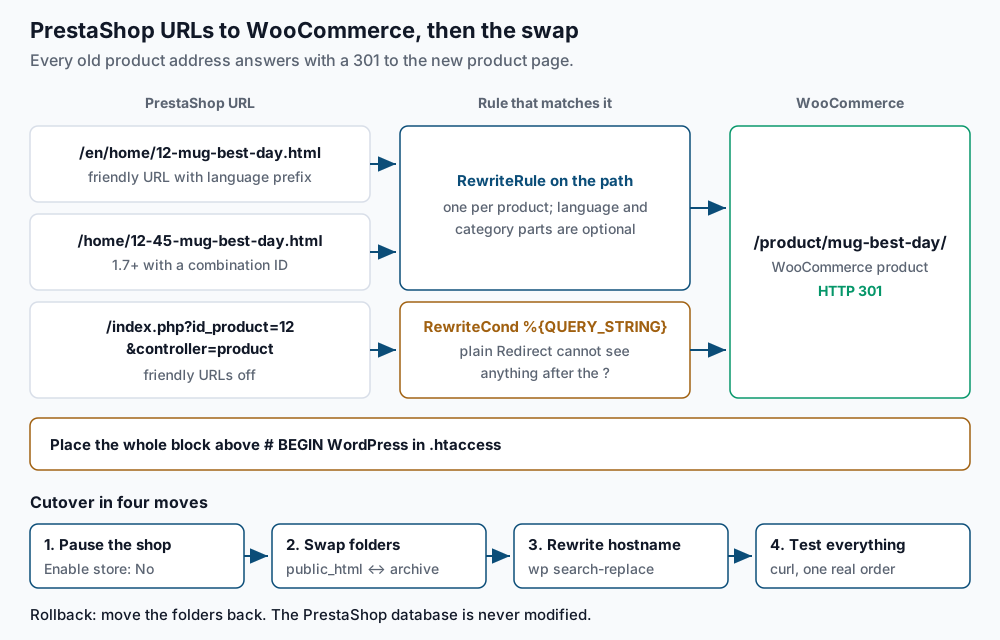
Export IDs and slugs for the default language (replace
id_lang=1with your value from step 2), then turn each row into rules:mysql -u exmpl_ps -p exmpl_presta -N -e "SELECT p.id_product, pl.link_rewrite FROM ps_product p JOIN ps_product_lang pl ON pl.id_product=p.id_product AND pl.id_shop=1 AND pl.id_lang=1 WHERE p.active=1 ORDER BY p.id_product;" > ~/ps-products.tsv awk -F'\t' '{ printf "RewriteRule ^([a-z]{2}/)?(.+/)?%s(-[0-9]+)?-%s(-[0-9]+)?\\.html$ https://example.com/product/%s/ [R=301,L]\n", $1, $2, $2 printf "RewriteCond %%{QUERY_STRING} (^|&)id_product=%s(&|$)\n", $1 printf "RewriteCond %%{QUERY_STRING} (^|&)controller=product(&|$)\n" printf "RewriteRule ^(index\\.php)?$ https://example.com/product/%s/? [R=301,L]\n", $2 }' ~/ps-products.tsv > ~/ps-redirects.conf head -4 ~/ps-redirects.confExpected:
RewriteRule ^([a-z]{2}/)?(.+/)?12(-[0-9]+)?-mug-best-day(-[0-9]+)?\.html$ https://example.com/product/mug-best-day/ [R=301,L]
RewriteCond %{QUERY_STRING} (^|&)id_product=12(&|$)
RewriteCond %{QUERY_STRING} (^|&)controller=product(&|$)
RewriteRule ^(index\.php)?$ https://example.com/product/mug-best-day/? [R=301,L]
The first rule catches the product with or without a language prefix, category path, combination ID or trailing EAN13 barcode number. The next three handle query-string links, which Apache’s plain
Redirectdirective cannot see. The trailing?in the target drops the old query string.On a bilingual shop, this map sends French URLs to the default-language product. Once each translation has its own address, repeat the export with the French
id_langand a^fr/rule. The Premium edition can also redirect old URLs by itself; if you use that, skip this step but still run the tests below.Paste the rules into
~/new.example.com/.htaccessabove# BEGIN WordPress, with hand-written lines for categories and CMS pages:# --- PrestaShop legacy URLs: keep above the WordPress block --- RewriteEngine On RewriteRule ^([a-z]{2}/)?3-mugs/?$ https://example.com/product-category/mugs/ [R=301,L] RewriteRule ^([a-z]{2}/)?content/4-about-us/?$ https://example.com/about-us/ [R=301,L] # ...rest of ps-redirects.conf... # --- end PrestaShop legacy URLs --- # BEGIN WordPressPlacement matters. The WordPress block starts with
RewriteRule ^index\.php$ - [L], which ends processing forindex.phprequests, so query-string rules below it never run. -
Rebuild taxes, shipping and payments. The importer’s feature list does not include tax rules, carriers or payment modules. Set these up in WooCommerce by hand before cutover. For a Canadian store, follow our guide to WooCommerce tax rates for GST, HST and QST. Our pre-flight audit for a WooCommerce migration lists the gateway and webhook checks to clear first. Place one test order on
new.example.comwith each payment method before moving on. -
Cut over. Run a final import so recent products and orders are current. Then record the last order, so you can spot any placed during the swap:
mysql -u exmpl_ps -p exmpl_presta -e "SELECT MAX(id_order), MAX(date_add) FROM ps_orders;"Expected: one row with the newest order ID and timestamp. In the PrestaShop back office, set Shop Parameters > General > Maintenance > Enable store to No (on 1.6, Preferences > Maintenance). Then swap the folders:
cd ~
mkdir prestashop-archive
mv public_html/* public_html/.htaccess prestashop-archive/
mv new.example.com/* new.example.com/.htaccess public_html/
cd ~/public_html
wp search-replace 'https://new.example.com' 'https://example.com' --all-tables
wp option get siteurl
Expected: a replacement table ending in a line such as
Success: Made 3412 replacements., thenhttps://example.com. WP-CLI keeps WordPress’s serialized settings intact, which a SQLREPLACEwould break. Run theMAX(id_order)query again; a higher number is an order to re-enter by hand.Both stores live on one account, so DNS does not change. If WooCommerce runs on another server, lower the TTL (how long resolvers cache the record) to 300 seconds a day ahead. Change the A record in the window and check it with
dig +short example.com, which should print the new IP.Rollback. If checkout fails and you cannot fix it quickly, reverse the swap. Move
public_htmlcontents into awoo-failedfolder, moveprestashop-archiveback, and set Enable store to Yes. The PrestaShop database was never written to, so the shop returns as it was. Orders taken on WooCommerce in between need re-entering. -
Test customer logins. Log in on
/my-account/as one real customer from the60group and one from the32group in step 3. If either test fails, send every customer account a reset link. Many cPanel servers cap how many emails a domain may send per hour, so the first line splits the customer IDs into files of 200 and the second sends the first file:wp user list --role=customer --field=ID | split -l 200 - ~/reset-batch- xargs wp user reset-password < ~/reset-batch-aaExpected: one
Reset password for ...line per user in the batch, then aSuccess:line. An hour later, run the second line again withreset-batch-ab, thenreset-batch-ac, until you have sent every file thatls ~/reset-batch-*lists. These commands cover all customers, not only the failing group. Warn customers before the emails go out, so they do not look like phishing.
Validate it works
Test each URL shape against a known product:
for u in '/home/12-mug-best-day.html' '/en/home/12-45-mug-best-day.html' '/index.php?id_product=12&controller=product'; do
  printf '%s  %s\n' "$(curl -s -o /dev/null -w '%{http_code} %{redirect_url}' "https://example.com$u")" "$u"
done
Expected: three lines, each starting 301 https://example.com/product/mug-best-day/. Then check that no content still points at PrestaShop image paths:
wp db query "SELECT COUNT(*) FROM wp_posts WHERE post_status='publish' AND post_content LIKE '%/img/p/%';" --skip-column-namesExpected: 0. Finish with one real order on the live domain, paid and refunded, and confirm the order email arrives.
Troubleshooting
- The importer cannot connect. The grant from step 5 is missing or the prefix is wrong. Test with
mysql -u exmpl_wpuser -p exmpl_presta -e "SHOW TABLES LIKE 'ps_product';", which should print the table name. If127.0.0.1fails, trylocalhost. - Products imported but images are missing. The plugin’s FAQ says the URL field must hold the shop’s home page and maintenance mode must be off. An
httptohttpsredirect, a Cloudflare challenge or cPanel hotlink protection can also block downloads. Fix those, then re-run the import. - Products have no size or colour options. Combinations and attributes are Premium features. The free edition imports each product without its variants.
- The import stops partway. Add
define('WP_MEMORY_LIMIT', '2G');towp-config.phpand run it again. The plugin’s FAQ says a new run continues where the last one stopped. - Old URLs return 404 after cutover. The redirect block is below
# BEGIN WordPress. Check withgrep -n 'BEGIN WordPress\|PrestaShop legacy' ~/public_html/.htaccess; the legacy line number must be smaller.
When this is the wrong approach
If the store’s value lives in modules, the catalogue import is the easy part. A marketplace module, a B2B price-list system or a custom checkout needs its own WooCommerce plan, settled before you schedule a cutover.
Multistore setups and shops in four or more languages are a bigger project than this guide covers. For those, upgrading to a supported PrestaShop release may cost less than a platform change. Apache’s mod_rewrite reference documents the RewriteCond and RewriteRule directives used above.
Running WordPress that earns real money deserves an operator — Stack Harbor runs that stack under Enterprise WordPress; book an infrastructure consult.