This guide is for store owners and administrators who want to move a Magento store to WooCommerce on a cPanel server without losing products, customers or search traffic. It covers Magento 2, sold as Adobe Commerce or free as Magento Open Source, and Magento 1 stores still running after its end of life in June 2020. The usual trigger is cost, because Magento needs specialist developers, heavy hosting and regular upgrade projects that many mid-sized stores cannot justify. The practical route is to restore a copy of the Magento database on the cPanel account, import from that copy into WooCommerce, and build redirects from Magento’s own URL table. By the end, WooCommerce serves the store, every old product and category address answers with a 301 redirect, and you have a plan for customer logins.
What you’ll accomplish
- Decide whether WooCommerce fits your store, or whether Magento or Mage-OS is the better call.
- Understand how Magento stores a product and where each piece lands in WooCommerce.
- Restore a copy of the Magento database on cPanel, readable through a
SELECT-only user. - Import products, variations, images, customers and past orders, checking every count.
- Turn the Magento
url_rewritetable into 301 redirects, switch DNS, and keep a rollback path ready.
Prerequisites
- Shell access to the Magento server, or a database dump and a copy of
pub/media. - A cPanel account with SSH access on the destination server, and WP-CLI, the command-line tool for WordPress. Check with
wp --info. - The
mysqlclient and theuapicommand, which every cPanel server includes. - PHP 8.2 or 8.3 for the WordPress site, set per domain in cPanel’s MultiPHP Manager.
- The pre-flight audit for a WooCommerce migration, done first, which scopes gateways, shipping, tax and email.
- For Magento 1 stores, the ideas are the same but a few table names differ. Each step points them out.
How it works
Magento stores products with an EAV model, short for entity-attribute-value. Each product is a row in catalog_product_entity holding only its ID (entity_id), its SKU and its type. Everything else, such as the name or price, sits in value tables grouped by data type, like catalog_product_entity_varchar and catalog_product_entity_decimal. Each value row also carries a store_id, so a product can have a different name in each store view. A store view is Magento’s word for one language or storefront within a website.
WooCommerce is flatter. A product is a post in wp_posts, and its SKU, price and stock are rows in wp_postmeta. The diagram shows where each Magento concept lands.
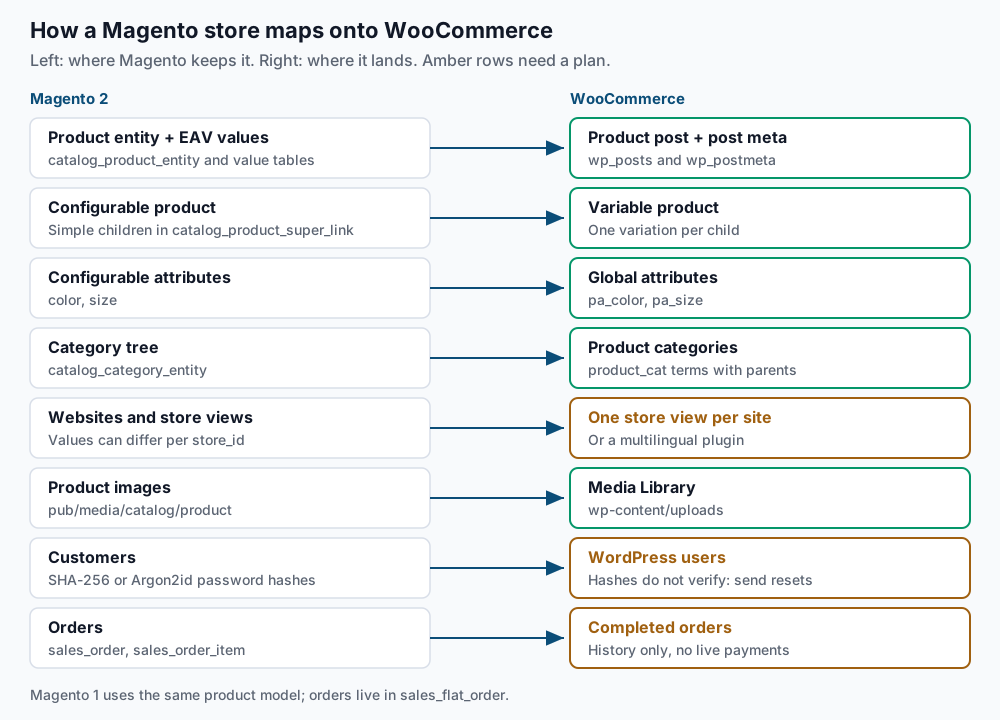
Three rows need care. A configurable product is Magento’s parent product, such as a hoodie, and each size and colour is a separate simple product linked to it in catalog_product_super_link. In WooCommerce this becomes a variable product with one variation per child. The options that pick a child, such as color and size, become global attributes, stored as taxonomies named like pa_color.
Passwords do not carry over. Magento 2 stores each customer’s password as a salted hash, a one-way fingerprint of the password, made with SHA-256 or Argon2id. WordPress cannot check either format, so plan a password reset for every customer. Orders come across as history, not as live payments. Your new gateway has no record of charges taken by Magento, so refunds for old orders stay in the old gateway’s dashboard. Before you start, read the last section of this guide to confirm WooCommerce is the right destination.
Step-by-step
-
Read the database settings and count what you have. On the Magento server, from the Magento root folder, print the connection settings from
app/etc/env.php:php -r '$c = include "app/etc/env.php"; print_r($c["db"]["connection"]["default"]); echo $c["db"]["table_prefix"], "\n";'Expected: an array showing
[host],[dbname],[username]and[password], then the table prefix, which is usually an empty line. Magento 1 keeps these inapp/etc/local.xml. Now take an inventory:mysql -u magento -p magento -e "SELECT type_id, COUNT(DISTINCT entity_id) AS products FROM catalog_product_entity GROUP BY type_id; SELECT store_id, code, website_id FROM store; SELECT COUNT(*) AS customers FROM customer_entity; SELECT COUNT(*) AS orders FROM sales_order;"Expected, on a mid-sized store:
+--------------+----------+
| type_id      | products |
+--------------+----------+
| configurable |      184 |
| simple       |     2317 |
+--------------+----------+
+----------+---------+------------+
| store_id | code    | website_id |
+----------+---------+------------+
|        0 | admin   |          0 |
|        1 | default |          1 |
+----------+---------+------------+
Customer and order counts follow.
DISTINCTmatters on Adobe Commerce, where scheduled updates can store several rows per product. Store0holds default values, so this store has one real store view. On Magento 1 the orders table issales_flat_order. Write every number down for the final checks. -
Copy the database to the cPanel account. On the Magento server, take a consistent dump without locking the live store:
mysqldump --single-transaction --no-tablespaces -u magento -p magento | gzip > ~/magento-copy.sql.gzCopy the file to your cPanel home folder with
scp, then create a database and restore it. cPanel database names start with the account name and an underscore, shown here asexmpl_:uapi Mysql create_database name=exmpl_mage gunzip < ~/magento-copy.sql.gz | mysql -u exmpl -p exmpl_mageExpected:
status: 1fromuapi, then a password prompt and no other output. The dump holds customer addresses and password hashes, so keep it outsidepublic_htmland delete it when the project ends. -
Create a read-only database user. The importer only needs to read Magento data, and a user limited to
SELECTcannot change anything by mistake:uapi Mysql create_user name=exmpl_mageread password='REPLACE_ME' uapi Mysql set_privileges_on_database user=exmpl_mageread database=exmpl_mage privileges=SELECT mysql -u exmpl_mageread -p exmpl_mage -e "DELETE FROM sales_order LIMIT 1;"Expected:
status: 1twice, thenERROR 1142 (42000): DELETE command denied to user. That error proves the limit works. If you ever read a live Magento database instead of a copy, this user is essential. -
Check the password hash format. Magento 2 writes each hash as
hash:salt:version. The last part tells you the algorithm:mysql -u exmpl_mageread -p exmpl_mage -e "SELECT SUBSTRING_INDEX(password_hash, ':', -1) AS version, COUNT(*) AS customers FROM customer_entity GROUP BY version;"Expected: rows such as
1for SHA-256 and2or a value starting with3_for Argon2id. WordPress cannot verify any of them, and the same goes for Magento 1’s salted MD5 or SHA-256 hashes. Step 8 covers the resets. -
Build WordPress and WooCommerce on a staging subdomain. In cPanel, create
new.example.comwith a document root of~/new.example.com, point its DNS at this server, and create an empty database and user for WordPress. Then install:cd ~/new.example.com wp core download wp config create --dbname=exmpl_wp --dbuser=exmpl_wp --dbpass='REPLACE_ME' wp core install --url=https://new.example.com --title='Example Store' \ --admin_user=admin --admin_email=you@example.com --skip-email wp plugin install woocommerce --activate wp rewrite structure '/%postname%/' --hardExpected:
Success: WordPress installed successfully., thenSuccess: Installed 1 of 1 plugins.andSuccess: Rewrite structure set.Settle the product and category bases in Settings > Permalinks now, because the redirect map depends on them. This guide uses the defaults,/product/and/product-category/. -
Create the global attributes. List the attributes your configurable products use:
mysql -u exmpl_mageread -p exmpl_mage -e "SELECT DISTINCT a.attribute_code, a.frontend_label FROM catalog_product_super_attribute s JOIN eav_attribute a ON a.attribute_id = s.attribute_id;"Expected: one row per attribute, such as
color | Colorandsize | Size. Create a matching global attribute for each:wp wc product_attribute create --name=Color --slug=color --user=1 wp wc product_attribute create --name=Size --slug=size --user=1Expected:
Success: Created product_attribute 1.and then2. Our guide to variable products and attributes explains how WooCommerce uses them. -
Export and import the catalogue. You have two routes.
The first is the FG Magento to WooCommerce plugin by Frédéric Gilles, which reads the Magento database directly. Install it with
wp plugin install fg-magento-to-woocommerce --activate, open Tools > Import > Magento, and enterlocalhost, theexmpl_magereaduser and any table prefix. The free version moves categories, simple products, images, stock and CMS pages. The plugin’s page lists variations, customers, orders and URL redirects as paid Premium features, so check the current split there.The second route is Magento’s own export. In the admin, open System > Data Transfer > Export, choose Products and CSV, then select Continue. Magento 2.4 queues the job, so if no file appears after a few minutes, start the queue consumer from the Magento root:
bin/magento queue:consumers:start exportProcessor --max-messages=1
ls var/export/
Expected: a file such as
catalog_product_20260915_140512.csv. On Magento 1, use System > Import/Export > Export. Convert the columns with a spreadsheet or a short script:Magento column WooCommerce column skuSKUproduct_type(configurable,simple)Type(variable,simple,variation)name,description,short_descriptionName,Description,Short descriptionprice,special_priceRegular price,Sale priceqty,is_in_stockStock,In stock?categories(Default Category/Men/Tops)Categories(Men > Tops)url_keyslug, set after import base_image,additional_imagesImages, as full URLsKeep only rows where
store_view_codeis empty, because the others are store view overrides that create duplicates. Theconfigurable_variationscolumn lists each child assku=MH01-S-Black,size=S,color=Black, with a pipe between children. Use it to set each variation’sParentto the configurable SKU. Import parents first, then variations, withAttribute 1 globalset to1. Our Shopify to WooCommerce guide walks through this two-pass import.For images, copy the media folder without Magento’s resized cache:
rsync -a --exclude=cache magento-host:/var/www/magento/pub/media/catalog/product/ ~/new.example.com/wp-content/uploads/magento/
find ~/new.example.com/wp-content/uploads/magento -type f | wc -l
Expected: a count close to your number of product images. In the
Imagescolumn,/m/h/mh01-black_main_1.jpgbecomeshttps://new.example.com/wp-content/uploads/magento/m/h/mh01-black_main_1.jpg, and the importer adds each one to the Media Library. -
Import customers and plan the resets. Export Customers Main File from the same Export screen and reshape it to the columns
user_login,user_email,first_name,last_nameandrole, withcustomeras the role:wp user import-csv magento-customers.csv --skip-update wp user list --role=customer --format=countExpected: one line per created user, then a count matching step 1. FG Premium says it can accept Magento passwords at login, so test one real account if you use it. Otherwise, send resets after cutover in batches of 200, because many cPanel servers cap how many emails a domain may send per hour. The first line splits the customer IDs into files of 200, and the second sends the first file:
wp user list --role=customer --field=ID | split -l 200 - ~/reset-batch-
xargs wp user reset-password < ~/reset-batch-aa
Expected: one
Reset password forline per user in the first batch, then aSuccess:line with the total. An hour later, run the second line again withreset-batch-ab, thenreset-batch-ac, and so on untills ~/reset-batch-*shows no batch left to send. Warn customers a day ahead so the email is not mistaken for phishing. -
Bring over order history as records. First, disable Completed order under WooCommerce > Settings > Emails, or every past customer gets an email. Completed orders also reduce stock, so import them before your final stock sync. Pull the orders with the read-only user:
mysql -u exmpl_mageread -p exmpl_mage -N -e "SELECT increment_id, created_at, customer_email, status, grand_total, order_currency_code FROM sales_order ORDER BY entity_id;" > ~/magento-orders.tsv
wc -l ~/magento-orders.tsv
Expected: a line count equal to your order total. FG Premium can import these, or a script can create each order from these rows and
sales_order_item, keeping the Magento order number in meta:wp wc shop_order create --user=1 --status=completed --customer_id=42 \ --billing='{"email":"jane@example.com"}' \ --line_items='[{"product_id":318,"quantity":1,"subtotal":"49.00","total":"49.00"}]' \ --meta_data='[{"key":"_magento_increment_id","value":"000000145"}]' --porcelainExpected: the new order ID alone, such as
2051. Then count the completed orders and compare:wp eval 'echo count( wc_get_orders( array( "status" => "completed", "limit" => -1, "return" => "ids" ) ) ), "\n";'Expected: a single number matching the line count of
~/magento-orders.tsv. -
Build the redirect map. Magento’s
url_rewritetable lists every public address inrequest_path. Rows withredirect_typeset to0are live URLs, andentity_typesays what each one points to.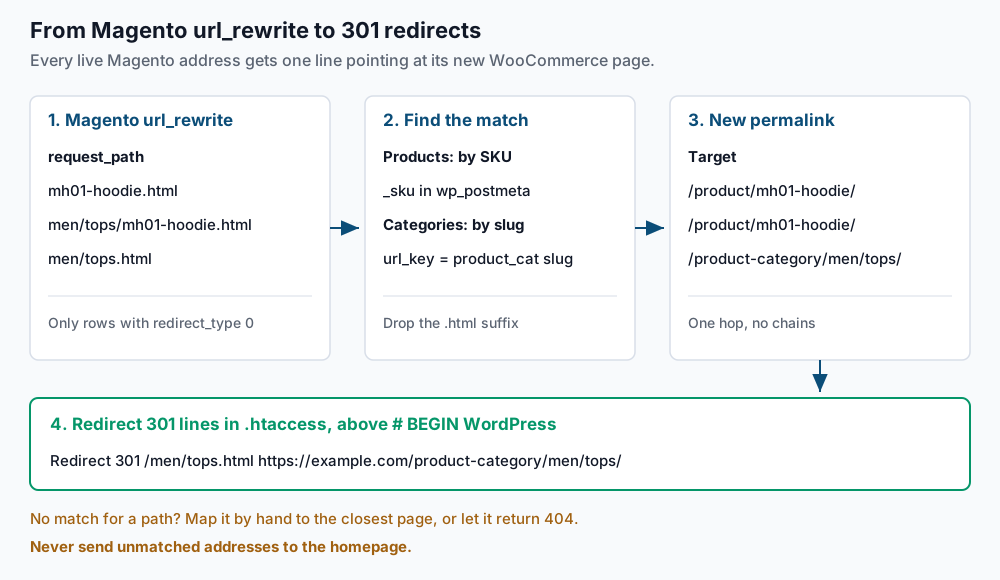
Export product paths with their SKU, and the WooCommerce SKU-to-slug list. Replace
1with your store view’sstore_id, andwp_with your WordPress table prefix if it differs:mysql -u exmpl_mageread -p exmpl_mage -N -e "SELECT DISTINCT u.request_path, p.sku FROM url_rewrite u JOIN catalog_product_entity p ON p.entity_id = u.entity_id WHERE u.entity_type = 'product' AND u.redirect_type = 0 AND u.store_id = 1;" > ~/product-paths.tsv wp db query "SELECT pm.meta_value, p.post_name FROM wp_postmeta pm JOIN wp_posts p ON p.ID = pm.post_id WHERE pm.meta_key = '_sku' AND p.post_type = 'product';" --skip-column-names > ~/woo-skus.tsv awk -F'\t' 'NR==FNR {slug[$1]=$2; next} ($2 in slug) {printf "Redirect 301 /%s https://example.com/product/%s/\n", $1, slug[$2]}' ~/woo-skus.tsv ~/product-paths.tsv > ~/magento-redirects.conf wc -l ~/product-paths.tsv ~/magento-redirects.confExpected: two matching line counts. A product often has several paths, such as
mh01-hoodie.htmlandmen/tops/mh01-hoodie.html, and each gets a line. A gap is a SKU that did not import. Category slugs usually match the Magentourl_key, so those paths map directly:mysql -u exmpl_mageread -p exmpl_mage -N -e "SELECT request_path FROM url_rewrite WHERE entity_type = 'category' AND redirect_type = 0 AND store_id = 1;" | awk '{p=$1; sub(/\.html$/, "", p); printf "Redirect 301 /%s https://example.com/product-category/%s/\n", $1, p}' >> ~/magento-redirects.conf head -3 ~/magento-redirects.confExpected:
Redirect 301 /mh01-hoodie.html https://example.com/product/mh01-hoodie/
Redirect 301 /men/tops/mh01-hoodie.html https://example.com/product/mh01-hoodie/
Redirect 301 /radiant-tee.html https://example.com/product/radiant-tee/
Paste the file into
~/new.example.com/.htaccessabove# BEGIN WordPress, so the block stays outside the section WordPress rewrites when permalinks are saved. If the store used a suffix other than.html, adjust thesub()pattern. On Magento 1, the table iscore_url_rewrite, with products linked byproduct_id. Beyond a few thousand lines, load the list into the Redirection plugin instead. -
Switch over, with a rollback ready. Lower the DNS TTL (time to live, how long resolvers cache the record) to 300 seconds two days ahead. On the day, put Magento in maintenance mode with
bin/magento maintenance:enable. Import orders and customers created since your dump, sync final stock, then move WordPress to the main domain:rsync -a ~/new.example.com/ ~/public_html/ cd ~/public_html wp search-replace 'https://new.example.com' 'https://example.com' --all-tables --skip-columns=guid wp option get siteurlExpected: a replacement count, then
https://example.com. Point the domain’s A record at the cPanel server. To roll back, point the record back to the Magento server and runbin/magento maintenance:disable. Orders placed on WooCommerce in between must be re-entered by hand, so set a rollback deadline in advance.
Validate it works
Test a random sample of old product addresses:
shuf -n 25 ~/product-paths.tsv | cut -f1 | while read -r p; do
  printf '%s  /%s\n' "$(curl -s -o /dev/null -w '%{http_code} %{redirect_url}' "https://example.com/$p")" "$p"
done
Expected: every line shows 301 and a /product/ address. A 404 is a path with no rule. Then confirm a redirect lands in one hop:
curl -sIL -o /dev/null -w '%{http_code} %{num_redirects} %{url_effective}\n' https://example.com/mh01-hoodie.htmlExpected: 200 1 https://example.com/product/mh01-hoodie/. Finally, compare catalogue counts with step 1:
wp post list --post_type=product --format=count
wp post list --post_type=product_variation --format=count
Expected: the first equals configurable products plus standalone simple products, and the second equals simple products linked to a parent. Then place one real test order and confirm it reaches the gateway dashboard.
Troubleshooting
- The restore stops with an error about the SUPER privilege. Magento 2 triggers carry a
DEFINERnaming the original database user, which a cPanel user cannot set. Drop and recreate the database, then restore withgunzip < ~/magento-copy.sql.gz | sed -E 's/DEFINER=[^*]*\*/\*/g' | mysql -u exmpl -p exmpl_mage. - Variable products show no options. The attribute was created per product instead of globally. Check with
wp term list pa_size --fields=name,count. An empty result meansAttribute 1 globalwas missing, so delete those products and re-import both passes. - Products appear two or three times. Store view rows were imported. Delete the duplicates and re-import from rows where
store_view_codeis empty. WooCommerce runs one catalogue per site, so serve other languages with a multilingual plugin, or run one WordPress site per Magento website. - Redirects return 404. The path has no line in the file. Check with
grep -c 'mh01-hoodie.html' ~/public_html/.htaccess, using the failing path;0means it is missing. The usual causes are a path from another store view, so re-run the export with thatstore_id, or a SKU that changed on import, which you can look up in~/woo-skus.tsv. If the line is present, confirm it was not pasted inside the# BEGIN WordPressblock, where saving permalinks erases it.
When this is the wrong approach
Stay on Magento, or move to Mage-OS, the community-run distribution of Magento Open Source, when the store depends on features WooCommerce lacks out of the box. That includes B2B tools such as company accounts, shared catalogues and negotiated quotes. It also includes several websites with their own prices run from one admin, and MSI, Magento’s Multi-Source Inventory, which splits stock across warehouses. Custom modules tied to an ERP (enterprise resource planning software) each become a plugin you commission from scratch. A catalogue of tens of thousands of SKUs with many filters can run on WooCommerce, but it needs careful database and search tuning.
Magento 1 has had no official patches since June 2020, so plan this migration or a move to Magento 2 or OpenMage soon. Adobe documents the admin export in its data export guide, and WooCommerce describes every import column in the product CSV importer documentation.
Running WordPress that earns real money deserves an operator — Stack Harbor runs that stack under Enterprise WordPress; book an infrastructure consult.