This guide is for store owners, and the admins who support them, who are choosing between BigCommerce and WooCommerce and may want to move. BigCommerce is a hosted store platform where the vendor runs the servers, while WooCommerce is a free plugin that turns WordPress into a store on hosting you control. The usual reasons to move are wanting your own data, a wider plugin choice and full control over content and search engine optimization (SEO). Our answer is to decide first with a short checklist, then move by pulling data through the BigCommerce API and importing it with WooCommerce’s own CSV importer. By the end, WooCommerce will serve your domain and every old product and category address will redirect to its new page.
What you’ll accomplish
- Decide, with clear criteria, whether staying on BigCommerce or moving to WooCommerce fits your store.
- Pull products, variants, images, categories, brands, customers and existing redirects out of BigCommerce with
curlandjq. - Import the catalogue into WooCommerce as variable products with global attributes and brands.
- Build a 301 redirect for every BigCommerce product and category URL, since none of them follow a pattern.
- Switch DNS while BigCommerce is still active, and cancel it only after everything checks out.
Prerequisites
- Owner access to the BigCommerce control panel, so you can create an API account.
- A cPanel account with SSH access, and WP-CLI, the WordPress command-line tool. Check with
wp --info. - WooCommerce 9.6 or later. That release made Brands part of WooCommerce itself, so you do not need a separate extension.
jq, a small command-line JSON processor. Check withjq --version. If the server lacks it, run the export steps on your own computer and upload the files.- A Bash shell, because the commands use Bash features. cPanel’s SSH shell is Bash by default.
- A WordPress staging site with WooCommerce active, on a subdomain such as
new.example.comwith its files in~/new.example.com. Step 4 of our Drupal to WordPress guide shows that setup. - Our WooCommerce migration pre-flight audit, done first. It covers payment gateways, tax and shipping, which this guide does not repeat.
How it works
Start with the decision, because a migration only pays off when a real reason drives it.
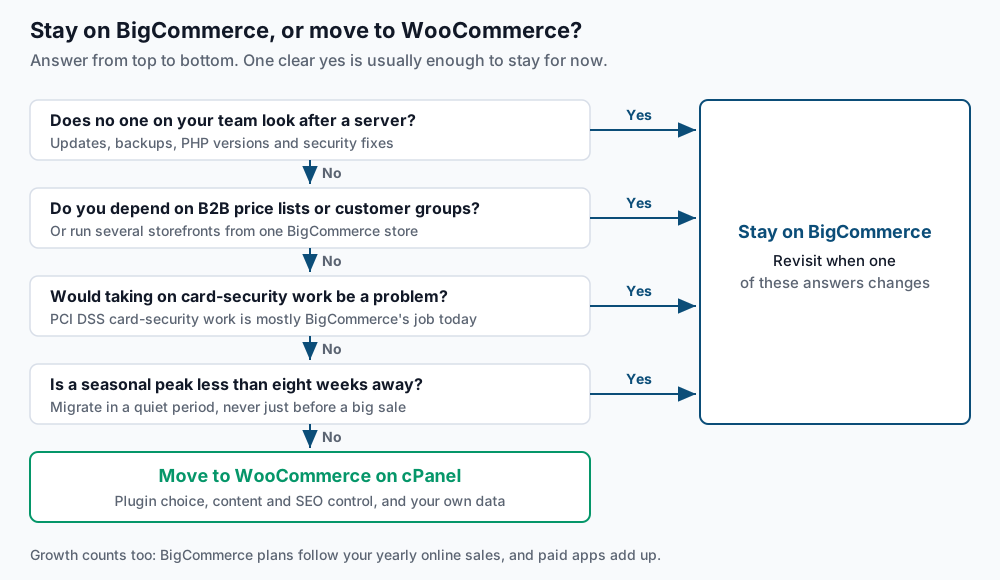
BigCommerce is software as a service (SaaS), which means the vendor runs the servers, security patches and backups. Its checkout also carries most of your PCI DSS work. PCI DSS is the card industry’s security standard for anyone who takes card payments. On WooCommerce, a gateway that hosts the card fields keeps card numbers off your server, but securing that server becomes your job. BigCommerce plans are tied to your yearly online sales, so growth moves you to a higher plan. Paid apps add up too. Those costs are real drivers, and so is the wish to own your data.
Once you decide to move, the data has to change shape. BigCommerce has two kinds of product options. Variant options, such as Size or Color, create a separate SKU (stock keeping unit, the code for one sellable item) with its own stock. Modifier options, such as a text box for engraving, change the order but create no SKU. WooCommerce handles the first kind natively and needs an add-on for the second.
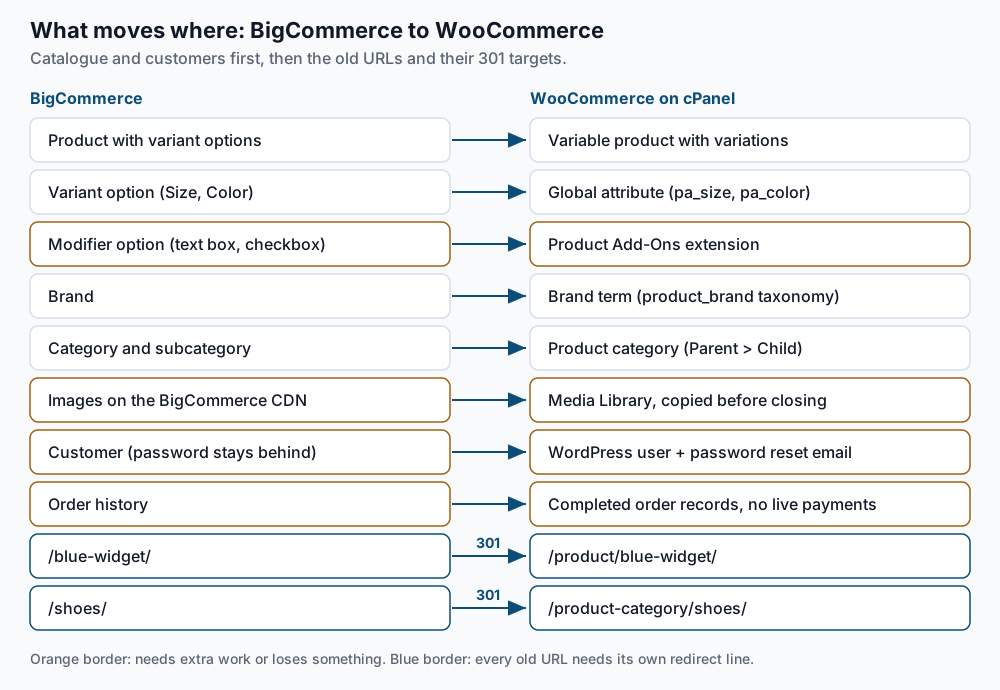
The URL rows matter most. BigCommerce puts both products and categories at the root of the site, such as /blue-widget/ and /shoes/. WooCommerce uses /product/blue-widget/ and /product-category/shoes/. A pattern rule cannot tell a product from a category, so every URL needs its own redirect line. The steps below generate those lines for you.
Step-by-step
-
Create a read-only API account. In the BigCommerce control panel, open Settings, then the API section, and create a store-level API account. Set Products, Customers, Orders and Content to read-only, and leave everything else at None. Copy the access token when it appears, because BigCommerce shows it only once. The API path it shows contains your store hash, the short code after
/stores/. Create a working folder outside the web root, so exported customer data is never public. Awp-cli.ymlfile there tells WP-CLI where the staging site lives. Then test the token:mkdir ~/bc-migration && cd ~/bc-migration echo "path: $HOME/new.example.com" > wp-cli.yml export BC_STORE='abc123def' export BC_TOKEN='REPLACE_ME' curl -s -H "X-Auth-Token: $BC_TOKEN" -H "Accept: application/json" \ "https://api.bigcommerce.com/stores/$BC_STORE/v3/catalog/products?limit=1" | jq '.meta.pagination'Run every later command from
~/bc-migrationunless a step says otherwise. Expected: a JSON object with"total": 412or similar, plustotal_pagesandlinks. A401status in the output means the token or store hash is wrong. A403means a scope is missing. -
Pull everything into JSON files. The API returns results in pages, and
meta.pagination.total_pagessays how many there are. This function fetches every page of any list:bc_pull() { page=1; pages=1 while [ "$page" -le "$pages" ]; do curl -s -H "X-Auth-Token: $BC_TOKEN" -H "Accept: application/json" \ "https://api.bigcommerce.com/stores/$BC_STORE/$1&page=$page" > "bc-export/$2-$page.json" pages=$(jq '.meta.pagination.total_pages' "bc-export/$2-$page.json") page=$((page + 1)) done } mkdir -p bc-export bc_pull 'v3/catalog/products?include=variants,images&limit=250' products bc_pull 'v3/catalog/products?include=modifiers&limit=10' modifiers bc_pull 'v3/catalog/categories?limit=250' categories bc_pull 'v3/catalog/brands?limit=250' brands bc_pull 'v3/customers?limit=250' customers bc_pull 'v3/storefront/redirects?limit=100' redirects jq -s '[.[].data[]] | length' bc-export/products-*.jsonExpected: no output until the last line, which prints your product count, such as
412. The modifiers pull useslimit=10because BigCommerce caps pages at 10 whenever you ask for modifiers. If you seeinteger expression expected, one file holds an error instead of data. Open it withjq . bc-export/<name>-1.jsonto read the message.Also download the admin CSV files as a backup you can open in a spreadsheet. Use Products > Export with the Default or Bulk Edit template, Customers > Export, and Orders > Export.
-
Save the list of live URLs. BigCommerce publishes a sitemap index at
/xmlsitemap.php. This list is your test sample later, and it disappears when the store closes:curl -s https://example.com/xmlsitemap.php \ | grep -oE '<loc>[^<]+</loc>' | sed -e 's|<loc>||' -e 's|</loc>||' -e 's|&|\&|g' \ | while read -r child; do curl -s "$child"; done \ | grep -oE '<loc>[^<]+</loc>' | sed -e 's|<loc>||' -e 's|</loc>||' | sort -u > bc-urls.txt wc -l bc-urls.txtExpected: a count close to your products plus categories, brands and pages. A count under 10 means the sitemap looks different, so open it in a browser and read the child links.
-
Prepare WooCommerce. Confirm the WooCommerce version and the brand taxonomy on the staging site, and list the option names you need as attributes:
wp plugin get woocommerce --field=version
wp taxonomy get product_brand --field=name
jq -r -s '[.[].data[].variants[].option_values[].option_display_name] | unique | .[]' bc-export/products-*.json
Expected: a version of 9.6 or higher, then
product_brand, then one option name per line, such asColorandSize. An error saying the taxonomy does not exist means WooCommerce is older than 9.6, so update it first. Create one global attribute for each option name in that list:wp wc product_attribute create --name=Color --slug=color --user=1 wp wc product_attribute create --name=Size --slug=size --user=1Expected: a
Success: Created product_attributeline with an ID for each. -
Build the two import files. WooCommerce imports a variable product in two passes. First come the parent products, then the variations that point at their parent’s SKU. Save these two
jqprograms:cat > bc-parents.jq <<'EOF' def attr($o): if $o then [$o[0].option_display_name, ($o | map(.label) | unique | join(", ")), 1, 1] else ["", "", "", ""] end; def sku: if .sku == "" then "BC-\(.id)" else .sku end; ($cats[0] | map({key: (.id | tostring), value: .name}) | from_entries) as $c | ($brands[0] | map({key: (.id | tostring), value: .name}) | from_entries) as $b | ["Type", "SKU", "Name", "Published", "Description", "Regular price", "Stock", "Categories", "Brands", "Images", "Attribute 1 name", "Attribute 1 value(s)", "Attribute 1 visible", "Attribute 1 global", "Attribute 2 name", "Attribute 2 value(s)", "Attribute 2 visible", "Attribute 2 global"], (.[].data[] | ([.variants[].option_values[]] | group_by(.option_display_name)) as $opts | (if ($opts | length) > 0 then "variable" else "simple" end) as $type | [$type, sku, .name, (if .is_visible then 1 else 0 end), .description, (if $type == "simple" then .price else "" end), (if $type == "simple" then .inventory_level else "" end), (.categories | map($c[tostring] // empty) | join(", ")), ($b[.brand_id | tostring] // ""), (.images | sort_by(.sort_order) | map(.url_zoom) | join(", "))] + attr($opts[0]) + attr($opts[1])) | @csv EOF cat > bc-variations.jq <<'EOF' ["Type", "SKU", "Parent", "Regular price", "Stock", "Attribute 1 name", "Attribute 1 value(s)", "Attribute 1 global", "Attribute 2 name", "Attribute 2 value(s)", "Attribute 2 global"], (.[].data[] | select([.variants[].option_values[]] | length > 0) | (if .sku == "" then "BC-\(.id)" else .sku end) as $parent | .variants[] | ([ "variation", (if .sku == "" then "BC-\(.product_id)-\(.id)" else .sku end), $parent, (.price // .calculated_price), .inventory_level ] + ([.option_values | sort_by(.option_display_name)[] | [.option_display_name, .label, 1]] | add // []) + ["", "", "", "", "", ""])[0:11]) | @csv EOF jq -r -s --slurpfile cats <(jq -s '[.[].data[]]' bc-export/categories-*.json) \ --slurpfile brands <(jq -s '[.[].data[]]' bc-export/brands-*.json) \ -f bc-parents.jq bc-export/products-*.json > woo-parents.csv jq -r -s -f bc-variations.jq bc-export/products-*.json > woo-variations.csv head -3 woo-parents.csvExpected: a header row, then rows such as
"variable","TS-100","Trail Shoe",1,...,"Acme","https://cdn11.bigcommerce.com/...","Color","Black, Red",1,1. Products without their own SKU get a stand-in likeBC-17, so variations can find their parent. The programs handle up to two options per product. Categories import by name only, so rebuild any subcategory nesting in WooCommerce afterwards. -
Import parents, then variations. Keep BigCommerce live for this step, because WooCommerce downloads each image from the BigCommerce CDN (content delivery network, the image servers) during the import. In WordPress, open Products > All Products > Import, upload
woo-parents.csv, and run it. Then count:wp post list --post_type=product --post_status=any --format=countExpected: the same number as step 2. Import
woo-variations.csvthe same way, then check for variations with no parent:wp post list --post_type=product_variation --post_status=any --format=count wp db query "SELECT COUNT(*) FROM $(wp db prefix)posts WHERE post_type='product_variation' AND post_parent=0;" --skip-column-namesExpected: your variant count, then
0. For variations, see variable products and attributes. -
Rebuild modifier options. List the products that use them:
jq -r -s '.[].data[] | select((.modifiers | length) > 0) | "\(.sku)\t\(.name)\t\([.modifiers[].display_name] | join(", "))"' bc-export/modifiers-*.jsonExpected: one line per product, such as
MUG-01 Custom Mug Engraving text. No output means you have none. Recreate each one with an add-ons extension such as WooCommerce Product Add-Ons, and test the price change in the cart. -
Import customers. BigCommerce never exports passwords, so customers will set a new one:
{ echo 'user_login,user_email,first_name,last_name,role'
  jq -r -s '.[].data[] | [.email, .email, .first_name, .last_name, "customer"] | @csv' bc-export/customers-*.json
} > bc-customers.csv
wp user import-csv bc-customers.csv --skip-update
wp user list --role=customer --format=count
Expected: one line per new user, then a count matching your customer total. WP-CLI sends no email here. After cutover, send the reset emails from
~/public_htmlin batches of 200, because many cPanel servers cap how many emails a domain may send per hour. Step 8 of our Magento to WooCommerce guide gives the two commands. Warn customers a day ahead so the email is not mistaken for phishing. -
Keep orders as records. Past orders cannot be refunded or charged from WooCommerce, because the payments belong to your old gateway setup. Keep the Orders CSV from step 2 as your archive. If staff need past orders inside WooCommerce, import them with an order-import tool and mark each one Completed. Refunds for older orders stay in BigCommerce or the gateway dashboard.
-
Generate the redirect map. The loop looks up each product’s new address by SKU and writes one rule per old URL. It then does the same for categories:
jq -r -s '.[].data[] | [(if .sku == "" then "BC-\(.id)" else .sku end), .custom_url.url] | @tsv' bc-export/products-*.json \
  | while IFS=$'\t' read -r sku old; do
      new=$(wp post list --post_type=product --meta_key=_sku --meta_value="$sku" --field=url </dev/null | sed 's|^https://[^/]*||')
      [ -n "$new" ] && printf 'RedirectMatch 301 ^%s/?$ %s\n' "${old%/}" "$new"
    done > bc-redirects.conf
jq -r -s '.[].data[] | [.name, .custom_url.url] | @tsv' bc-export/categories-*.json \
  | while IFS=$'\t' read -r name old; do
      new=$(wp term list product_cat --name="$name" --field=url </dev/null | head -1 | sed 's|^https://[^/]*||')
      [ -n "$new" ] && printf 'RedirectMatch 301 ^%s/?$ %s\n' "${old%/}" "$new"
    done >> bc-redirects.conf
head -2 bc-redirects.conf
Expected:
RedirectMatch 301 ^/trail-shoe/?$ /product/trail-shoe/
RedirectMatch 301 ^/blue-widget/?$ /product/blue-widget/
BigCommerce may already hold its own 301 redirects, listed under Settings > 301 Redirects. Point each one straight at its final page so visitors do not bounce twice:
jq -r -s '.[].data[] | [.from_path, (.to_url | sub("^https?://[^/]+"; ""))] | @tsv' bc-export/redirects-*.json \
  | while IFS=$'\t' read -r from to; do
      new=$(awk -v p="^${to%/}/?\$" '$3 == p {print $4}' bc-redirects.conf)
      [ -n "$new" ] && printf 'RedirectMatch 301 ^%s/?$ %s\n' "${from%/}" "$new"
    done > bc-legacy.conf
cat bc-legacy.conf >> bc-redirects.conf
wc -l bc-redirects.conf
Expected: a line count close to products plus categories plus old redirects. Paste the file into
~/new.example.com/.htaccessabove# BEGIN WordPress, so the block stays outside the section WordPress rewrites when permalinks are saved. The</dev/nullpart stops WP-CLI from reading the loop’s input by mistake. -
Switch DNS, and cancel BigCommerce last. Lower the DNS TTL (time to live, how long resolvers cache a record) to 300 seconds two days ahead. On the day, turn on BigCommerce maintenance mode so no new orders arrive, then re-run steps 2 and 8 for anything created since. Move the site from the staging subdomain to the main domain:
rsync -a ~/new.example.com/ ~/public_html/
cd ~/public_html
wp search-replace 'https://new.example.com' 'https://example.com' --all-tables
wp option get home
Expected: a table of replacements, then
https://example.com. Point the domain’s A record at the cPanel server’s IP address, then let cPanel’s AutoSSL issue a certificate once DNS resolves. Keep the BigCommerce plan active until images, redirects and your refund window are all confirmed.
Validate it works
Test a random sample of the URLs saved in step 3:
shuf -n 25 bc-urls.txt | while read -r url; do
  printf '%s  <- %s\n' "$(curl -s -o /dev/null -w '%{http_code} %{redirect_url}' "$url")" "$url"
done
Expected: 301 and a new address for products and categories. Pages whose path did not change return 200. A 404 marks a URL with no rule. A 200 on a product URL usually means your computer still sees the old DNS record, so wait and test again.
Confirm no product description still embeds an image from BigCommerce:
wp db query "SELECT COUNT(*) FROM $(wp db prefix)posts WHERE post_content LIKE '%bigcommerce.com%';" --skip-column-namesExpected: 0. Any other number means some descriptions point at BigCommerce images, which break when the store closes. Download those images into the Media Library and update the descriptions first. Finally, place one real test order and confirm it reaches the gateway dashboard.
Troubleshooting
- The import skips a row for a duplicate SKU. A parent product and one of its variants share a SKU. Change the parent’s SKU in
woo-parents.csv, and the matchingParentvalues inwoo-variations.csv, then re-import. - Product pages show no option dropdowns. The attribute was not created as global. Run
wp wc product_attribute list --user=1and confirm each option name from step 4 is there before importing again. - Images are missing after import. The import timed out or BigCommerce was already closed. Split the CSV into files of about 300 rows, keep the store live, and re-run with “Update existing products” ticked.
- Customers cannot log in. That is expected, because passwords stay in BigCommerce. Send the reset command from step 8.
When this is the wrong approach
Stay on BigCommerce when nobody on your team will own a server’s updates, backups and security. The same applies if you rely on B2B features such as customer-group price lists, or run several storefronts from one account. Never migrate within eight weeks of your busiest season. If you only want a better theme or a few features, a BigCommerce app is faster than a move.
Check the fields your store uses against the BigCommerce products API reference and the WooCommerce product CSV importer documentation before you set a date. Moving from Shopify instead? Our Shopify to WooCommerce guide covers that platform’s exports and URLs.
Running WordPress that earns real money deserves an operator — Stack Harbor runs that stack under Enterprise WordPress; book an infrastructure consult.