This guide is for owners and administrators who want to move a Drupal site to WordPress on a cPanel/WHM server without losing content, URLs or search traffic. The usual trigger is Drupal 7 end of life (EOL), the date on 5 January 2025 when the Drupal project stopped shipping security fixes for version 7. Upgrading from Drupal 7 to Drupal 10 or 11 is itself a rebuild, because themes and custom modules have to be rewritten. So many owners price that work against a move to WordPress. The practical route is to build WordPress next to Drupal on the same cPanel account and let an importer read the Drupal database directly. Then you add a redirect map and switch the domain. By the end you will have WordPress serving the domain, old Drupal addresses answering with 301 redirects, and a clear plan for user logins.
What you’ll accomplish
- Decide, with real criteria, whether WordPress or a Drupal 10/11 rebuild is the right destination.
- Inventory the Drupal site from its own database: content types, fields, taxonomy, path aliases and file count.
- Run WordPress on a staging subdomain in the same cPanel account while Drupal keeps serving visitors.
- Import content with FG Drupal to WordPress or a custom script, and map Drupal fields to WordPress custom fields.
- Keep your existing URLs as permalinks, redirect every
/node/<id>address, and swap the domain over with a rollback path.
Prerequisites
- A cPanel account with SSH access, or WHM root access to create one. The steps assume Drupal lives in
~/public_html. - WP-CLI, the command-line tool for WordPress. Check with
wp --info. - The
mysqlclient, which every cPanel server includes. Drush, the Drupal command-line tool, is helpful but optional; Drupal 7 sites usually pair with Drush 8, and Drupal 10/11 sites with Drush 12 or 13. - A full backup taken before you start, including files and database. Our pre-migration inventory guide lists what else to record.
- A current PHP 8 version, such as 8.3, for the WordPress subdomain. A Drupal 7 site may still depend on an older PHP version, and cPanel’s MultiPHP Manager lets each domain run its own.
- A note on versions. Drupal 7 stores its data in different tables from Drupal 8 and later. Each step shows both where they differ.
How it works
Drupal and WordPress store the same ideas in different shapes. Drupal calls every piece of content a node, and each node belongs to a content type such as Article or Basic page. Extra data like a subtitle or event date lives in fields, and each field gets its own database table: field_data_field_<name> in Drupal 7, node__field_<name> in Drupal 8 and later. WordPress keeps content in wp_posts and extra values in wp_postmeta, one row per value.
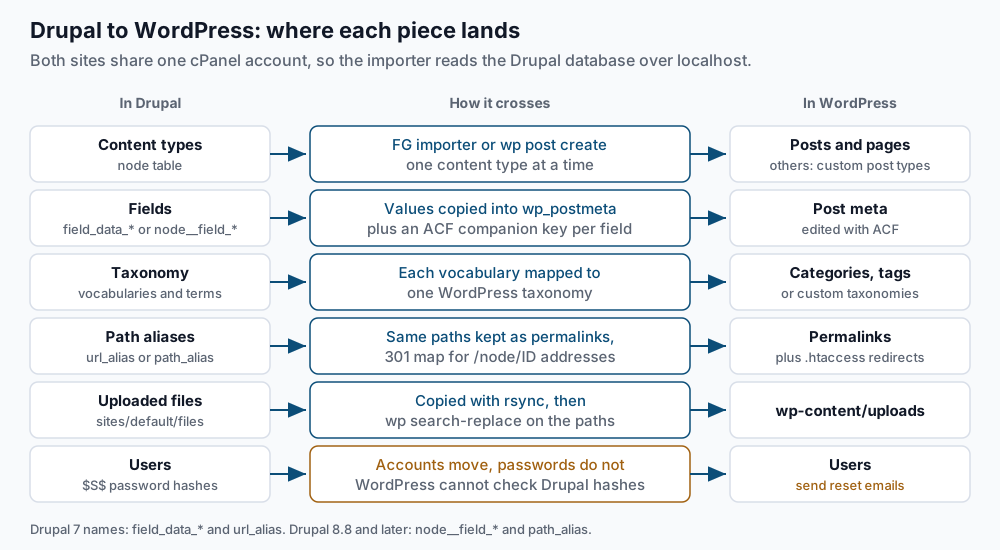
Read the diagram row by row. Articles usually become posts and Basic pages become pages. Any other content type becomes a custom post type, which is a WordPress content type you register yourself. Fields become post meta, and ACF (Advanced Custom Fields, a popular plugin that adds field editing screens to WordPress) gives editors a form for them. Drupal taxonomy vocabularies, its named lists of terms, become categories, tags or custom taxonomies.
Two rows need special care. Path aliases are the friendly URLs Drupal shows instead of /node/123. They live in the url_alias table in Drupal 7 and in path_alias from Drupal 8.8 onward. If WordPress uses the same paths, visitors and search engines notice nothing. Passwords do not carry over. Drupal 7 hashes passwords with a stretched SHA-512 scheme whose stored values start with $S$, and WordPress cannot check them. Drupal 8 through 10.0 use the same format. Drupal 10.1 and later store standard bcrypt hashes instead, which recent WordPress versions may accept, so test one imported account. For $S$ hashes, plan on sending every user a password reset.
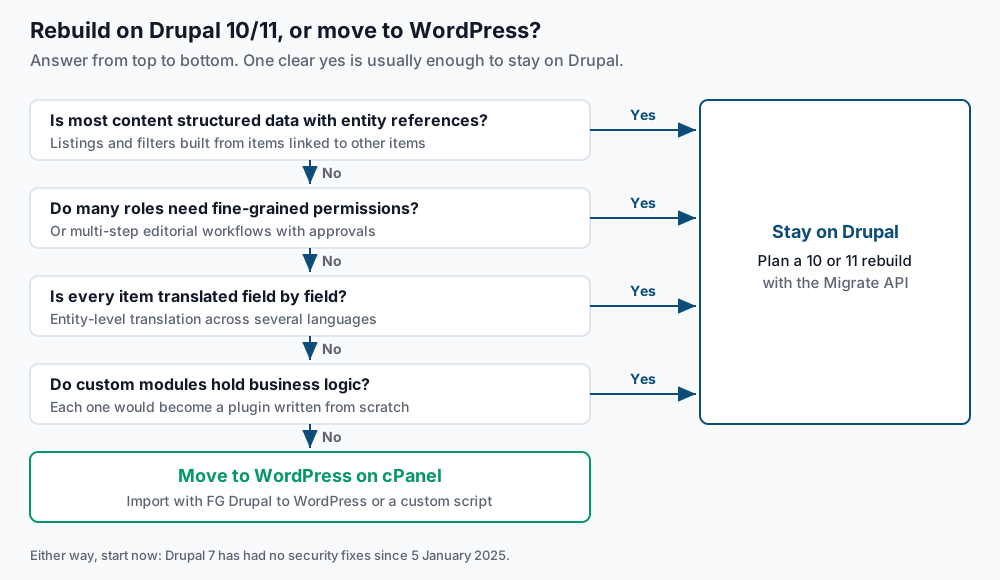
Before you import anything, decide whether WordPress is the right destination at all.
Step-by-step
-
Find the Drupal database credentials. Drupal keeps them in
sites/default/settings.php.grep -n -A 9 '^\$databases' ~/public_html/sites/default/settings.phpExpected, on a Drupal 7 site:
251:$databases = array (
252-  'default' =>
253-  array (
254-    'default' =>
255-    array (
256-      'database' => 'exmpl_d7',
257-      'username' => 'exmpl_d7',
258-      'password' => 'REDACTED',
259-      'host' => 'localhost',
260-      'port' => '',
Keep scrolling for a
'prefix'line. If it holds a value such as'dr_', every table name below starts with that prefix. No output means the credentials sit in an included file, so rungrep -rn "'database'" ~/public_html/sites/default/. -
Check the site and take a dump. If Drush is installed, confirm it can reach the site:
cd ~/public_html && drush statusExpected lines include
Drupal version : 7.98,Database : ConnectedandDrupal bootstrap : Successful. Then take the dump with plainmysqldump, which works on every version:mysqldump -u exmpl_d7 -p exmpl_d7 | gzip > ~/drupal-before-migration.sql.gz ls -lh ~/drupal-before-migration.sql.gzExpected: a password prompt, no other output, then a file size well above zero. With Drush the equivalent is
drush sql-dump --gzip --result-file=/home/exmpl/drupal-before-migration.sqlon Drush 8, ordrush sql:dumpwith the same options on Drush 9 and later. Both printDatabase dump saved tofollowed by the path. -
Inventory the content model. Count nodes by content type:
mysql -u exmpl_d7 -p exmpl_d7 -e "SELECT type, COUNT(*) AS nodes FROM node GROUP BY type;"Expected:
+---------+-------+
| type    | nodes |
+---------+-------+
| article |   412 |
| event   |    38 |
| page    |    27 |
+---------+-------+
Each row is a content type that needs a destination. List the field tables, using
field_data_field%on Drupal 7 ornode__field%on Drupal 8 and later:mysql -u exmpl_d7 -p exmpl_d7 -e "SHOW TABLES LIKE 'field_data_field%';"Expected: one row per field, such as
field_data_field_event_dateandfield_data_field_image. Then count aliases and files:mysql -u exmpl_d7 -p exmpl_d7 -e "SELECT COUNT(*) FROM url_alias; SELECT COUNT(*) FROM file_managed;"On Drupal 8.8 and later, use
path_aliasin place ofurl_alias. Write all four numbers down. They are your checklist for step 7. -
Build WordPress on a staging subdomain. In cPanel, open Domains and create
new.example.comwith a document root of~/new.example.com. Create an empty database and user for WordPress under cPanel’s Manage My Databases, then install WordPress there:cd ~/new.example.com wp core download wp config create --dbname=exmpl_wp --dbuser=exmpl_wp --dbpass='REPLACE_ME' wp core install --url=https://new.example.com --title='Example' \ --admin_user=admin --admin_email=you@example.com --skip-email wp option get siteurlExpected:
Success: WordPress installed successfully., thenhttps://new.example.com. Because both sites share one account, the importer can reach the Drupal database atlocalhostwith no remote access to set up. -
Match the permalink structure to your Drupal aliases. Look at a sample of aliases first:
mysql -u exmpl_d7 -p exmpl_d7 -e "SELECT source, alias FROM url_alias LIMIT 5;"On Drupal 8.8 and later, run
SELECT path, alias FROM path_alias LIMIT 5;instead. If articles look likeblog/spring-update, set the same shape in WordPress:wp rewrite structure '/blog/%postname%/' --hardExpected:
Success: Rewrite structure set.WordPress adds a trailing slash and redirects the slash-less Drupal form to it with a 301 on its own. Pages stay at/<slug>/regardless of this setting, so an alias likeabout-usmaps across unchanged. For the full set of rules WordPress follows here, see our guide on permalinks that break after a migration. -
Import the content. Most sites should start with the FG Drupal to WordPress plugin by Frédéric Gilles:
wp plugin install fg-drupal-to-wordpress --activateExpected:
Plugin installed successfully.followed bySuccess: Installed 1 of 1 plugins.Open Tools > Import > Drupal in the WordPress admin, enter the database values from step 1, including any table prefix, and test the connection before importing. The free version handles core content such as articles, pages, taxonomy and images. A paid Premium edition covers more, such as users and custom fields. Check the plugin’s own page for the current split, because it changes between releases.If the site has unusual structures, a custom script is the other route. It reads the Drupal tables and creates each post with WP-CLI:
wp post create --post_type=event --post_status=publish \
  --post_title='Spring open house' --post_name='spring-open-house' \
  --post_date='2024-04-02 10:00:00' --porcelain
Expected: the new post ID alone, such as
518. The--post_namevalue is the slug, so set it from the last part of the Drupal alias. For a field managed by ACF, store the value and ACF’s companion key, which starts with an underscore and holds the field key shown in ACF’s field group screen:wp post meta update 518 event_date '20240402' wp post meta update 518 _event_date 'field_6650a1b2c3d4e'Expected:
Success: Updated custom field 'event_date'.twice, once per key. Without the companion key, ACF may show an empty box in the editor even though the value exists. -
Check the counts against your inventory.
wp post list --post_type=post --format=count
wp post list --post_type=page --format=count
wp term list category --format=count
Expected: numbers matching step 3, such as
412and27. A shortfall usually means unpublished Drupal nodes were skipped, which may be what you want. Confirm before you move on. -
Move the files and fix their paths. Drupal serves uploads from
sites/default/files. If your importer did not copy them, do it yourself and rewrite the references:mkdir -p ~/new.example.com/wp-content/uploads/drupal rsync -a ~/public_html/sites/default/files/ ~/new.example.com/wp-content/uploads/drupal/ \ --exclude=css --exclude=js --exclude=styles --exclude=php wp search-replace '/sites/default/files/' '/wp-content/uploads/drupal/' --dry-runThe excluded folders hold generated caches that Drupal rebuilds and WordPress never needs. Expected from the dry run: a table of columns ending in a line such as
Success: 684 replacements to be made.Run it again without--dry-runonce the count looks right. Use WP-CLI rather than SQLREPLACE, because it keeps serialized PHP data valid. Files copied this way load on the page but do not appear in the Media Library. -
Build the redirect map. Aliased paths already match, so the map mostly covers the raw
/node/<id>addresses that old links and bookmarks still use. On Drupal 7:mysql -u exmpl_d7 -p exmpl_d7 -N -e "SELECT CONCAT('RedirectMatch 301 ^/', source, '/?\$ https://example.com/', alias, '/') FROM url_alias WHERE source LIKE 'node/%';" > ~/drupal-redirects.conf head -2 ~/drupal-redirects.confOn Drupal 8.8 and later, the columns are
pathandaliasand both already start with a slash, so drop the extra slashes from theCONCAT. Expected:RedirectMatch 301 ^/node/12/?$ https://example.com/about-us/ RedirectMatch 301 ^/node/48/?$ https://example.com/blog/spring-update/Add a line by hand for any taxonomy address such as
/taxonomy/term/5. Then paste the block into~/new.example.com/.htaccessabove# BEGIN WordPress. WordPress’s own rules end with a catch-all, so lines below it never run, and anything between its markers is rewritten when permalinks are saved. -
Plan the password resets. Imported users keep their Drupal hash, which WordPress cannot verify. Some add-ons claim to accept Drupal hashes at first login; test one real account before you rely on that. Otherwise, after cutover:
wp user reset-password $(wp user list --role=subscriber --field=ID)Expected: one
Reset password forline per user, then aSuccess:line with the total. WP-CLI sends the reset email by default. Warn users a day ahead so the message is not mistaken for phishing. -
Switch the domain. Put Drupal in maintenance mode, take a final dump, and re-run the importer for anything published since your first pass. Then swap the folders and the hostname:
mkdir ~/drupal-archive
mv ~/public_html/{*,.htaccess} ~/drupal-archive/
rsync -a ~/new.example.com/ ~/public_html/
cd ~/public_html
wp search-replace 'https://new.example.com' 'https://example.com' --all-tables
wp option get siteurl
Expected: a replacement count, then
https://example.com. Moving the contents rather than the folder keeps the ownership and permissions cPanel set onpublic_html. The~/drupal-archivefolder sits outside the web root, so it is not public, and moving its files back is your rollback.
Validate it works
Test a sample of old addresses, mixing aliases, node IDs and a file:
for p in /about-us /node/48 /blog/spring-update /sites/default/files/logo.png; do
  printf '%s  %s\n' "$(curl -s -o /dev/null -w '%{http_code}' "https://example.com$p")" "$p"
done
Expected: 301 for the first three, since WordPress adds the trailing slash or follows your map. The file path returns 404 unless you add RedirectMatch 301 ^/sites/default/files/(.*)$ https://example.com/wp-content/uploads/drupal/$1 to the block, which is worth doing if images from your site show up in image search.
Confirm no content still points at Drupal paths:
wp db query "SELECT COUNT(*) FROM wp_posts WHERE post_content LIKE '%sites/default/files%';" --skip-column-namesExpected: 0. Then work through our post-migration smoke tests for forms, email and caching.
Troubleshooting
- The importer cannot connect to the Drupal database. Use
localhostas the host and the exact table prefix fromsettings.php. If the connection still fails, add the WordPress database user to the Drupal database under cPanel’s Manage My Databases. - Posts show raw code like
[[{"fid":"12"...}]]. That is a Drupal 7 Media module embed token, which WordPress cannot read. Drupal 10 and 11 sites show<drupal-media>tags instead. Find affected posts withwp db query "SELECT ID FROM wp_posts WHERE post_content LIKE '%[[{%' OR post_content LIKE '%<drupal-media%';"and replace each token with a normal image. - Old URLs return 404. The redirect block sits below
# BEGIN WordPress, or a slug differs from its alias. Comparegrep -n 'BEGIN WordPress' ~/public_html/.htaccesswith the line of your first redirect, then check the slug withwp post list --name=<slug>. - Pages look unstyled or blocks are missing. Drupal themes and blocks do not transfer. Rebuild them in a WordPress theme; no importer moves them.
When this is the wrong approach
Stay on Drupal and plan a 10 or 11 rebuild when the site’s value lives in its structure. That means heavily structured content with entity references, which are links between content items that power listings and filters. It also means fine-grained permissions across many roles and editorial workflows. Entity-level translation, where every field of every item exists in several languages, belongs on this list too. WordPress needs extra plugins for multilingual sites and handles this less directly. Custom modules that hold business logic are the final reason, because each becomes a plugin you commission from scratch.
A small site of a few dozen pages is often faster to rebuild by hand than to import. You still need the redirect map from step 9. The Drupal project’s own Drupal 7 end-of-life page covers support options if you need more time.
Running WordPress that earns real money deserves an operator — Stack Harbor runs that stack under Enterprise WordPress; book an infrastructure consult.