This guide shows you how to move a website from Weebly to self-hosted WordPress on a cPanel/WHM server. Weebly, which Square now owns, has no WordPress export. Where its site download is offered at all, you get a ZIP of static HTML pages and image files, with no blog database behind it. The practical answer is to bring the blog over from its RSS feed and rebuild the pages by hand under the same names. Then import every image with WP-CLI while Weebly is still serving them. By the end, WordPress serves your domain, old Weebly addresses answer with a 301 redirect, and mail keeps arriving.
What you’ll accomplish
- Save a complete local copy of the Weebly site, so nothing is lost if the plan lapses early.
- Build WordPress on a temporary hostname while Weebly keeps serving your visitors.
- Move blog posts, pages, images and store products by the route that works for each one.
- Keep most blog URLs identical, and redirect the rest with a short
.htaccessmap. - Switch DNS in a safe order (mail first, website second) and cancel the Weebly plan last.
Prerequisites
- Owner access to the Weebly site, or to the Square account it now lives under.
- Access to the domain’s DNS. That is the registrar login, or Weebly’s own domain settings if you bought the domain through Weebly.
- A cPanel account on a server you control, or WHM root access to create one.
- SSH access with WP-CLI, the command-line tool for WordPress. Check with
wp --info. If your host has no SSH, the admin screens can do the same work, only more slowly. curl,digandwgeton your own machine. The first two ship with macOS and most Linux distributions. On macOS, installwgetwith Homebrew (brew install wget); on Windows, use WSL.- To know who holds your mailboxes. Weebly has resold Google Workspace, and whether mail moves depends on whose subscription it is.
This guide covers classic Weebly sites. If your account was already moved to Square Online, the ZIP download does not exist there, but the feed, mirror and redirect steps still apply.
How it works
Weebly gives you pieces, not a package. Each kind of content leaves by its own route, and one of them has no route at all.
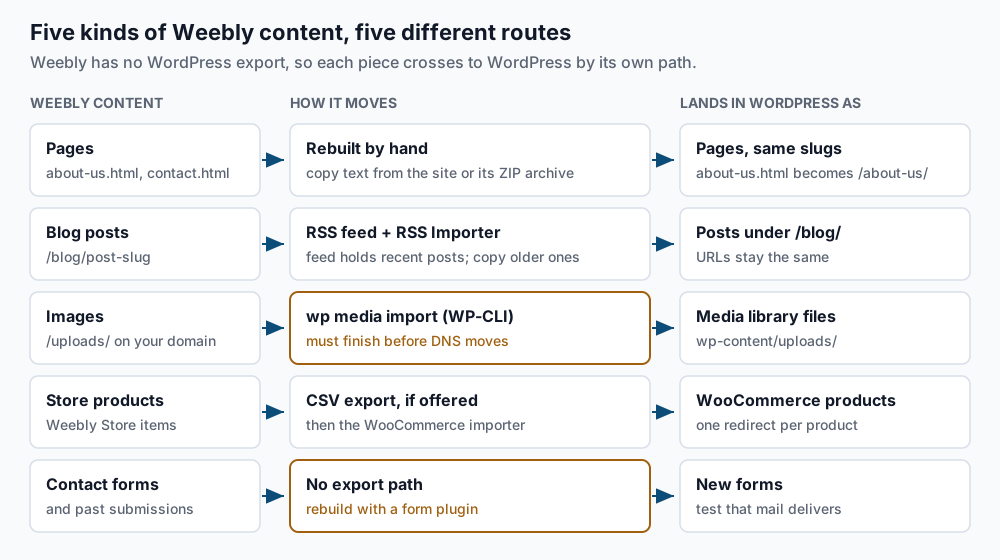
The site archive is where you start, when it exists. Classic Weebly accounts have offered a “download site as ZIP” option in the editor’s settings. It contains the rendered HTML of your pages plus the uploaded images. It is a snapshot of what visitors saw, not a data export, and it has not been available on every plan. Because of that, this guide also makes its own copy with wget --mirror, a mode that follows every link on your site and saves each page and image to disk.
Blog posts are the only content a machine can import. Weebly publishes an RSS feed (Really Simple Syndication, the XML list of recent posts that feed readers follow). WordPress reads it through the RSS Importer, a free importer maintained by the WordPress project that appears under Tools > Import. The catch is that the feed holds only a limited number of recent posts, so older posts are copied from your mirror.
Pages are rebuilt in the block editor. Weebly serves pages as /about-us.html, and WordPress serves the same page as /about-us/. If you keep each slug (the URL-friendly name of a page), one redirect rule covers every page.
Images are the trap specific to Weebly. They usually live under /uploads/ on your own domain. Everything looks fine on the new site until the day DNS moves, when those same addresses point at your new server, which does not have the files. Import them into the media library while Weebly still answers.
Store products move by CSV (comma-separated values, a spreadsheet file) into WooCommerce, but only if your Weebly Store or Square dashboard offers a product export. Contact forms and their past submissions have no export route. You rebuild the forms with a plugin.
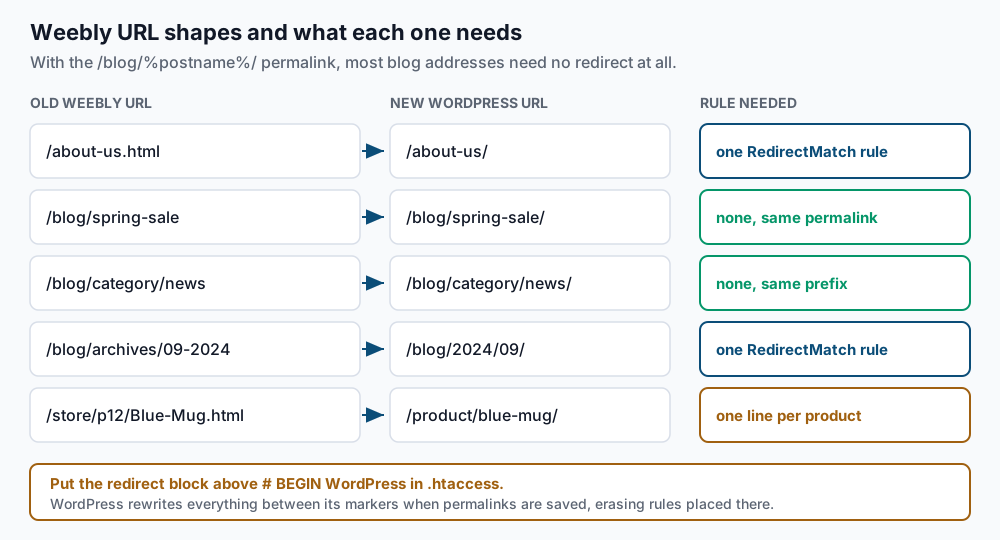
The URL side is kinder than on most closed platforms. Weebly blog posts live at /blog/<slug>, and WordPress can produce exactly that shape.
Step-by-step
-
List every live URL. Weebly publishes a sitemap at
/sitemap.xml. Save its addresses to a file:curl -s https://example.com/sitemap.xml \ | grep -o '<loc>[^<]*</loc>' | sed 's|</*loc>||g' | sort -u > ~/weebly-urls.txt wc -l < ~/weebly-urls.txt grep -c '\.html$' ~/weebly-urls.txtExpected: a total such as
58, then the page count such as14. If the file contains othersitemap.xmladdresses instead of pages, you have a sitemap index, so run the same command against each of those. Our pre-migration inventory guide lists what else to write down now. -
Save a full copy of the site. Download the ZIP from Weebly if your editor offers it. Make your own mirror either way, because it is the copy you control:
wget --mirror --adjust-extension --page-requisites --no-parent --wait=1 \
  --directory-prefix="$HOME/weebly-mirror" https://example.com/
Expected, at the end:
FINISHED --2026-09-14 10:22:31-- Total wall clock time: 1m 12s Downloaded: 214 files, 38M in 9.1s (4.19 MB/s)--page-requisitesalso fetches the images each page uses, and--wait=1pauses a second between requests so the crawl stays polite. Check that images came down withfind ~/weebly-mirror -path '*uploads*' -type f | wc -l. A result of0means the images are on another host, such as aweebly.comoreditmysite.comaddress; you will import those by URL in step 6. -
Read the current DNS. Before you change anything, record what is live today:
dig +short NS example.com
dig +short A example.com
dig +short MX example.com
Expected, for a domain at an outside registrar:
ns1.registrar-dns.com.
ns2.registrar-dns.com.
192.0.2.10
1 smtp.google.com.
Save this output. If the nameserver names mention Weebly or Square, the zone lives in your Weebly domain settings, so you will re-create every record, MX and TXT included, wherever DNS moves. Google MX records mean the mailboxes are Google Workspace. Find out from Weebly billing whose subscription that is before going further.
-
Create the cPanel account and install WordPress on a temporary hostname. In WHM, go to Account Functions > Create a New Account. Point a subdomain such as
new.example.comat the new server with an A record, then install:cd ~/public_html wp core download wp config create --dbname=exmpl_wp --dbuser=exmpl_wp --dbpass='REPLACE_ME' wp core install --url=https://new.example.com --title='Example Inc' \ --admin_user=admin --admin_email=you@example.com --skip-email wp rewrite structure '/blog/%postname%/' --hardExpected:
Success: WordPress installed successfully., thenSuccess: Rewrite structure set.That permalink setting is the key decision. Replaceblogwith your Weebly blog page’s name if it differs, such asnews. Because the structure starts with/blog/, WordPress also places category and date archives under/blog/. Confirm it:wp rewrite list --match=/blog/category/news/ --fields=match,queryExpected: at least one row whose query contains
category_name=news. An empty result means the permalink was not saved. -
Import the blog. Find the feed address in the blog page’s HTML, then save the feed to a file:
curl -s https://example.com/blog | grep -io '<link[^>]*rss[^>]*>'Expected, something like:
<link rel="alternate" type="application/rss+xml" title="Blog" href="https://example.com/1/feed" />curl -s https://example.com/1/feed > ~/weebly-feed.xml grep -c '<item>' ~/weebly-feed.xmlExpected: a number such as
20. Install the importer withwp plugin install rss-importer --activate, then uploadweebly-feed.xmlunder Tools > Import > RSS. Now compare the old post slugs with what WordPress created:grep '/blog/' ~/weebly-urls.txt | grep -vE '/blog/(category|archives|previous)/' \ | sed -E 's#.*/blog/##; s#/$##' | grep -v '^$' | sort -u > ~/old-slugs.txt wp post list --post_type=post --field=post_name | sort -u > ~/new-slugs.txt comm -23 ~/old-slugs.txt ~/new-slugs.txtExpected: only the older posts that were not in the feed. Create each one from your mirror’s copy, using the old slug and date:
wp post create --post_type=post --post_status=draft --post_title='Spring maintenance checklist' \
  --post_name=spring-maintenance-checklist --post_date='2021-04-02 09:00:00' --porcelain
Expected: a single post ID such as
87. Paste the body from the mirror in the editor, then publish. Runcommagain until it prints nothing.Rebuild each page the same way with
--post_type=page, and give it the Weebly name without.html, soabout-us.htmlbecomes--post_name=about-us. For a store, export products as CSV if Weebly or Square offers it, then map the columns in WooCommerce under Products > Import. -
Pull every image into WordPress before DNS moves. Collect the image addresses that the imported content still uses:
wp db query "SELECT post_content FROM wp_posts WHERE post_status IN ('publish','draft')" --skip-column-names \
  | grep -oE 'https?://[^" ]+/uploads/[^" ]+\.(jpe?g|png|gif|webp)' | sort -u > ~/weebly-images.txt
wc -l < ~/weebly-images.txt
Expected: a count such as
63. Import each one and swap its address in the content:while read -r old; do id=$(wp media import "$old" --porcelain </dev/null) || { echo "FAILED $old"; continue; } new=$(wp eval "echo wp_get_attachment_url($id);" </dev/null) wp search-replace "$old" "$new" wp_posts --include-columns=post_content --quiet </dev/null done < ~/weebly-images.txtExpected: no output. Each
FAILEDline is an image to import from your mirror instead, sincewp media importalso accepts a local file path. The</dev/nullstops WP-CLI from reading the list that feeds the loop.--porcelainmakes the import print only the new attachment ID.wp search-replaceis safer than raw SQL because it keeps WordPress’s serialized data (settings stored with a length prefix on each string) valid. If your table prefix is notwp_, changewp_postsin both commands. -
Add the redirect map. Open
~/public_html/.htaccessand paste this block above the# BEGIN WordPressline, with one line per store product:# --- Weebly legacy paths: keep this block above the WordPress block --- Redirect 301 /index.html https://example.com/ Redirect 301 /store/p12/Blue-Mug.html https://example.com/product/blue-mug/ RedirectMatch 301 ^/blog/archives/([0-9]{2})-([0-9]{4})/?$ https://example.com/blog/$2/$1/ RedirectMatch 301 ^/blog/previous/([0-9]+)/?$ https://example.com/blog/page/$1/ RedirectMatch 301 ^/([^/]+)\.html$ https://example.com/$1/ # --- end Weebly legacy paths ---Apache’s mod_alias applies the first rule that matches, so specific lines go first and the general
.htmlrule goes last. That last rule only matches top-level names, so it cannot catch a store URL. Keep thepreviousandarchiveslines only if those shapes appear in your URL list. Blog posts need no rule, because/blog/spring-maintenance-checklistnow exists on WordPress and it adds the trailing slash itself. Test on the temporary hostname:curl -sI https://new.example.com/about-us.html | grep -iE '^(HTTP|location)'Expected:
HTTP/1.1 301 Moved Permanently
Location: https://example.com/about-us/
A
404instead means the block is missing or inside the WordPress markers. WordPress rewrites everything between# BEGIN WordPressand# END WordPresswhen permalinks are saved. -
Cut over in a safe order, and cancel Weebly last. A day ahead, lower the TTL on the records you will change to 300 seconds. TTL (time to live) is how long resolvers cache a record. The order is mailboxes, then MX, then the website. If mail is moving to cPanel, create every mailbox first:
uapi Email add_pop email=info@example.com password='REPLACE_ME' quota=2048Run this as the cPanel user over SSH. As root, add
--user=exmplafteruapi. Expected: output that containsstatus: 1. Send a test message in and out through webmail. If Google Workspace stays, leave the MX records exactly as step 3 recorded them. Next, change MX and wait for the old TTL to pass. Then point the A record, andwww, at the new server. Finally, replace the temporary hostname:wp search-replace 'new.example.com' 'example.com' --all-tables wp option get siteurlExpected: a replacement count, then
https://example.com. Cancel the Weebly plan only after the checks below pass. If Weebly is also your registrar, move the domain out first, or confirm it renews on its own.
Validate it works
Follow every old URL to its final address and show only the ones that do not end in a 200:
while read -r u; do
  printf '%s  %s\n' "$(curl -s -o /dev/null -L -w '%{http_code}' "$u")" "$u"
done < ~/weebly-urls.txt | grep -v '^200'
Expected: no output. Each line printed is a page or post still missing.
Confirm nothing still depends on Weebly’s servers:
wp db query "SELECT COUNT(*) FROM wp_posts WHERE post_content LIKE '%/uploads/_/_/_/_/%' OR post_content LIKE '%editmysite%';" --skip-column-names
curl -s https://example.com/blog/ | grep -ciE 'weebly|editmysite'
Expected: 0 from both. The first pattern matches Weebly’s numbered upload folders but not WordPress’s wp-content/uploads/2026/09/. A non-zero count is an image that breaks once the plan closes.
Spot-check three old addresses:
for p in /about-us.html /blog/spring-maintenance-checklist /blog/archives/09-2024; do
  curl -sI "https://example.com$p" | grep -iE '^(HTTP|location)'
done
Expected: each shows 301 and a Location pointing at the new address. Then send a message from an outside account to each mailbox and confirm it arrives. Our post-migration smoke tests cover the rest of day one.
Troubleshooting
- Images broke the moment DNS switched. The content still pointed at
/uploads/on your own domain, and that path now reaches your new server. Rerun the collection command in step 6, then import the listed files from~/weebly-mirrorby local path, for examplewp media import ~/weebly-mirror/example.com/uploads/1/2/3/4/12345678/photo.jpg --porcelain. - Some old blog URLs return 404. The RSS Importer builds slugs from titles, and a few Weebly slugs were edited or shortened. Rerun
commfrom step 5 and fix each post withwp post update <ID> --post_name=<old-slug>. - Imported posts show only a short summary. Some feeds carry an excerpt instead of the full text. Paste the full body from your mirror, and check a few posts before fixing many.
- The redirect block vanished. It was pasted between the WordPress markers and erased when permalinks were saved. Put it back above
# BEGIN WordPressand confirm withgrep -n 'BEGIN WordPress' ~/public_html/.htaccess. - The new contact form sends nothing. Mail sent by PHP from the server often fails SPF (the DNS record naming which servers may send for your domain) or lands in spam. Use an SMTP plugin with a real mailbox, and test with an outside address.
When this is the wrong approach
A small brochure site with no blog is often faster to rebuild from scratch. Skip the feed and image loop, rebuild the pages, and keep the redirect map, which you still need.
If your store runs on Square’s point of sale, with in-person sales sharing one inventory, moving to WooCommerce breaks that link unless you add an integration such as the WooCommerce Square extension. Staying on Square Online may be the better call. And if you are moving from Wix rather than Weebly, use our Wix migration guide, because Wix blog URLs and exports work differently.
The reference docs for the two tools doing most of the work are WP-CLI’s media import command and Apache’s mod_alias module, which defines Redirect and RedirectMatch.
Running WordPress that earns real money deserves an operator — Stack Harbor runs that stack under Enterprise WordPress; book an infrastructure consult.