This guide is for OpenCart store owners and the admins who run their cPanel hosting, and it covers two questions: should you move to WooCommerce, and if so, how. The question usually comes up when an OpenCart 3 store must reach OpenCart 4 and its extensions (add-on modules) cannot follow, so the upgrade becomes a rebuild. If you are rebuilding anyway, WooCommerce is a sound place to land. You build it next to the live shop, import from the OpenCart database with read-only access, and send every old URL to its new page with a 301 (permanent) redirect. By the end, WooCommerce takes orders on your domain and OpenCart sits archived beside it, ready for a rollback.
What you’ll accomplish
- Decide honestly whether OpenCart or WooCommerce suits your store better.
- Measure your OpenCart store with SQL, including how many variations its options will turn into.
- Import products, options, customers, images and past orders into WooCommerce with a
SELECT-only database user and customer emails switched off. - Turn the
oc_seo_urltable into 301 redirects, including oldindex.php?route=links. - Swap the new store into
public_htmlin a short window, test real logins and a real order, and keep a rollback ready.
Prerequisites
- A cPanel account holding the OpenCart store, with access to Domains and MySQL Databases (or WHM root access).
- SSH access with WP-CLI, the command-line tool for WordPress. Check with
wp --info. - Admin access to the OpenCart dashboard.
- A full cPanel backup. Nothing here writes to the OpenCart database, but the cutover moves files.
- A choice of importer edition. The free FG OpenCart to WooCommerce plugin imports products, categories, tags, images and information pages. Options, customers, orders and tax classes need the Premium edition, according to that plugin page.
The steps assume OpenCart sits in public_html, the cPanel username is exmpl, the database is exmpl_oc and the table prefix is oc_. Swap in your own values wherever you see those. OpenCart 2.x works the same way, except that its URL table is called oc_url_alias.
OpenCart vs WooCommerce: should you move?
Both are free, open-source PHP applications that run well on cPanel. The real difference is what surrounds the cart.
Stay on OpenCart if you run several storefronts from one admin, which OpenCart does out of the box and WooCommerce does not. Stay too if you are already on OpenCart 4 with working extensions, or if the store is a catalogue with no need for articles, landing pages or a blog.
Move to WooCommerce if you are stuck on OpenCart 2 or 3 because extensions block the upgrade. Move if your marketing lives in WordPress already, or if you keep paying developers to build features that exist as maintained WooCommerce plugins. Expect more plugins to keep updated in return, and a heavier admin.
Our guides for PrestaShop, Magento and Shopify cover the same trade on other platforms.
How it works
The importer reads OpenCart’s tables over MySQL and writes WordPress objects, so OpenCart keeps selling until you switch. cPanel’s MultiPHP Manager lets the old shop keep an older PHP version while the new subdomain runs a current one.
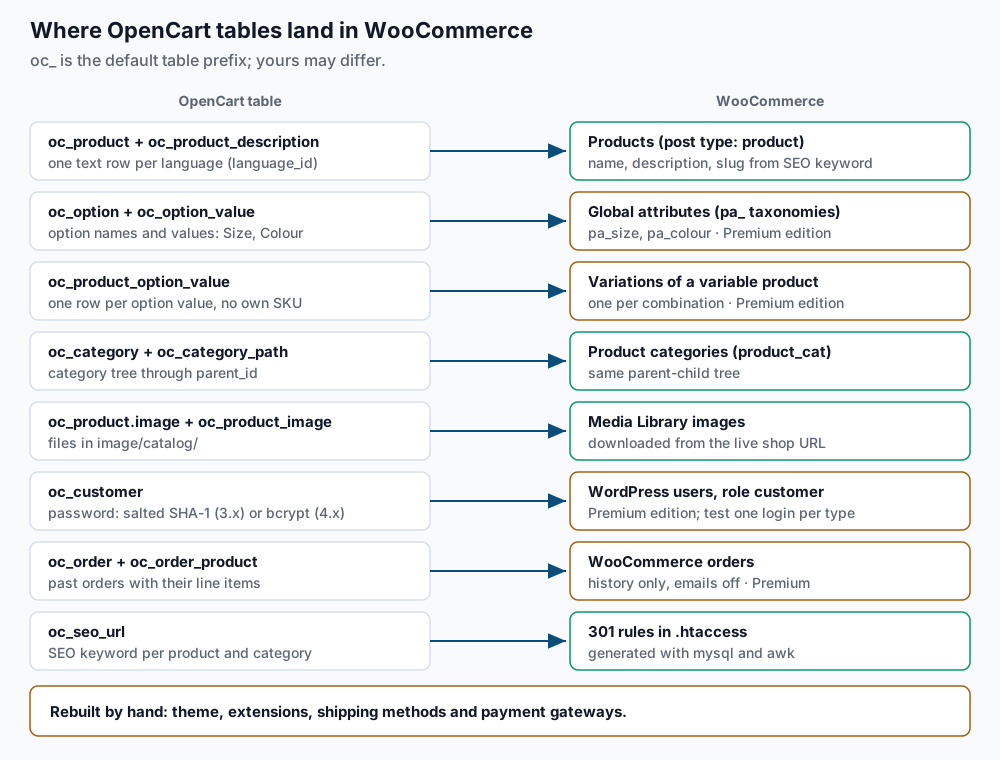
Products and languages. oc_product holds the model, SKU (stock-keeping unit), price, stock and main image. oc_product_description holds the name and description, with one row per language_id. WooCommerce on its own is single-language, so a bilingual shop needs WPML or Polylang before you import. The Premium importer has an add-on for either one.
Options are the part to understand before you import. In OpenCart, each product has its own options, such as Size and Colour. Each option has values stored in oc_product_option_value. A value can add or subtract an amount from the price and can track its own quantity. It does not carry its own SKU, and the options are independent of each other. A shirt with 3 sizes and 4 colours therefore has 7 value rows in OpenCart.
WooCommerce works the other way. A variable product has one variation per combination, each with its own SKU, price and stock. That shirt becomes 12 variations. Their prices come from the base price plus the modifiers, and stock needs a fresh count, because OpenCart counted sizes and colours separately. Options where the customer types text, uploads a file or picks a date are not variations at all. They need a product add-ons plugin. The importer sells a Product Options add-on, so ask its author which option types it covers.
Passwords depend on the release. Older OpenCart releases store a 40-character salted SHA-1 hash in oc_customer.password, with the salt in the salt column. Newer releases use PHP’s password_hash(), which gives a 60-character bcrypt hash. A store that has been upgraded over the years can hold both, and the exact release that switched varies, so step 4 checks your data instead of relying on the version number. The Premium importer says customers can log in with their OpenCart passwords. Prove that on one account of each hash type rather than assuming it.
Images live in image/catalog/. OpenCart stores paths such as catalog/demo/imac_1.jpg and keeps resized copies in image/cache/. The importer downloads the originals over HTTP from the shop URL you give it, so OpenCart must stay online and out of maintenance mode during the import.
Step-by-step
-
Record the database details and version.
grep -E "DB_(HOSTNAME|USERNAME|DATABASE|PREFIX)'" ~/public_html/config.php
grep "define('VERSION'" ~/public_html/index.php
Expected output:
define('DB_HOSTNAME', 'localhost');
define('DB_USERNAME', 'exmpl_ocuser');
define('DB_DATABASE', 'exmpl_oc');
define('DB_PREFIX', 'oc_');
define('VERSION', '3.0.3.8');
A version starting with
4.means OpenCart 4. If the prefix is notoc_, use yours in every query below. -
Size the store and find the default language.
mysql -u exmpl_ocuser -p exmpl_oc -e "SELECT (SELECT COUNT(*) FROM oc_product WHERE status=1) AS products, (SELECT COUNT(DISTINCT product_id) FROM oc_product_option_value) AS with_options, (SELECT COUNT(*) FROM oc_customer) AS customers, (SELECT COUNT(*) FROM oc_order WHERE order_status_id>0) AS orders;"
mysql -u exmpl_ocuser -p exmpl_oc -e "SELECT language_id, code, status FROM oc_language; SELECT \`key\`, value FROM oc_setting WHERE store_id=0 AND \`key\` LIKE 'config_language%';"
Expected: one row of counts such as
318 | 96 | 2140 | 5388, then the languages, then the default language code, such asconfig_language | en-gb. Note thelanguage_idwhosecodematches that value; the redirect export uses it. Theorder_status_id>0filter skips abandoned checkouts, which OpenCart saves as orders with status 0. -
Check option types and estimate variations.
mysql -u exmpl_ocuser -p exmpl_oc -e "SELECT o.type, COUNT(DISTINCT po.product_id) AS products FROM oc_product_option po JOIN oc_option o ON o.option_id=po.option_id GROUP BY o.type;"
mysql -u exmpl_ocuser -p exmpl_oc -e "SELECT product_id, ROUND(EXP(SUM(LN(n)))) AS variations FROM (SELECT product_id, product_option_id, COUNT(*) AS n FROM oc_product_option_value GROUP BY product_id, product_option_id) t GROUP BY product_id ORDER BY variations DESC LIMIT 5;"
Expected: a row per option type, such as
select | 88andtext | 6, then your five products with the most combinations.selectandradiooptions can become variations.checkbox,text,textarea,file,date,timeanddatetimeneed an add-ons plugin. A product showing hundreds of variations gets slow to edit in WooCommerce, so consider splitting it into several products. -
Check how passwords are stored.
mysql -u exmpl_ocuser -p exmpl_oc -e "SELECT LENGTH(password) AS hash_length, COUNT(*) FROM oc_customer GROUP BY hash_length;"Expected: rows with
40(salted SHA-1),60(bcrypt), or both. A32row means very old MD5 hashes from OpenCart 1.5. Pick one real customer from each group for step 11. -
Build WordPress and WooCommerce on a subdomain. In cPanel, open Domains and create
new.example.com. Make sure its Document Root is~/new.example.com, outsidepublic_html, or the swap in step 10 will move it with the old store. Create an empty database and user in MySQL Databases, such asexmpl_wpandexmpl_wpuser. Then install:cd ~/new.example.com wp core download wp config create --dbname=exmpl_wp --dbuser=exmpl_wpuser --dbpass='REPLACE_ME' wp core install --url=https://new.example.com --title='Example Shop' \ --admin_user=admin --admin_email=you@example.com --skip-email wp rewrite structure '/%postname%/' --hard wp plugin install woocommerce --activateExpected:
Success: WordPress installed successfully.,Success: Rewrite structure set., thenPlugin 'woocommerce' activated.Product pages will live at/product/<slug>/, which the redirects target. -
Switch off customer emails and grant read-only access. Imported orders must not email customers. Turn off the WooCommerce order and account emails, then give the WordPress database user
SELECTrights on the OpenCart database:for e in new_order customer_processing_order customer_completed_order customer_on_hold_order customer_refunded_order customer_new_account; do wp option update "woocommerce_${e}_settings" '{"enabled":"no"}' --format=json done uapi Mysql set_privileges_on_database user=exmpl_wpuser database=exmpl_oc privileges=SELECTExpected: six lines such as
Success: Updated 'woocommerce_new_order_settings' option., then a YAML block containingstatus: 1. On a fresh WooCommerce install these options do not exist yet, so the command creates them and WooCommerce fills every other email setting from its defaults. Because it replaces the whole setting, customise email subjects and headings only after cutover. As root, add--user=exmplafteruapi. WithSELECTonly, no importer setting can change an OpenCart row. -
Run the importer.
wp plugin install fg-opencart-to-woocommerce --activateExpected:
Plugin 'fg-opencart-to-woocommerce' activated.For Premium, install its zip from the author’s site instead. In the WordPress admin, open Tools > Import > OpenCart. Enter the shop’s home page URL (https://example.com), hostlocalhost, databaseexmpl_oc, userexmpl_wpuser, its password and prefixoc_. Test the connection, start the import and keep the tab open. Then count what landed:wp post list --post_type=product --post_status=publish --format=count wp post list --post_type=product_variation --format=count wp user list --role=customer --format=countExpected: product and customer counts close to step 2, and a variation count in line with step 3. The free edition shows zero variations and zero customers. Open one product with two options and check each variation’s price against OpenCart before going further.
A small catalogue with no options can use WooCommerce’s built-in CSV product importer instead, with the columns mapped by hand.
-
Confirm the images came across.
mysql -u exmpl_ocuser -p exmpl_oc -N -e "SELECT (SELECT COUNT(*) FROM oc_product WHERE image<>'') + (SELECT COUNT(*) FROM oc_product_image);"
wp post list --post_type=attachment --post_status=inherit --format=count
Expected: two numbers in the same range, or fewer in WordPress when products share an image. A far lower count means downloads failed.
-
Generate the redirect map. With SEO URLs on, OpenCart 3 serves a product at its keyword, often behind the category path, such as
/desktops/mac/imac. OpenCart 4 can add a language segment such asen-gb. With SEO URLs off, links look like/index.php?route=product/product&product_id=42.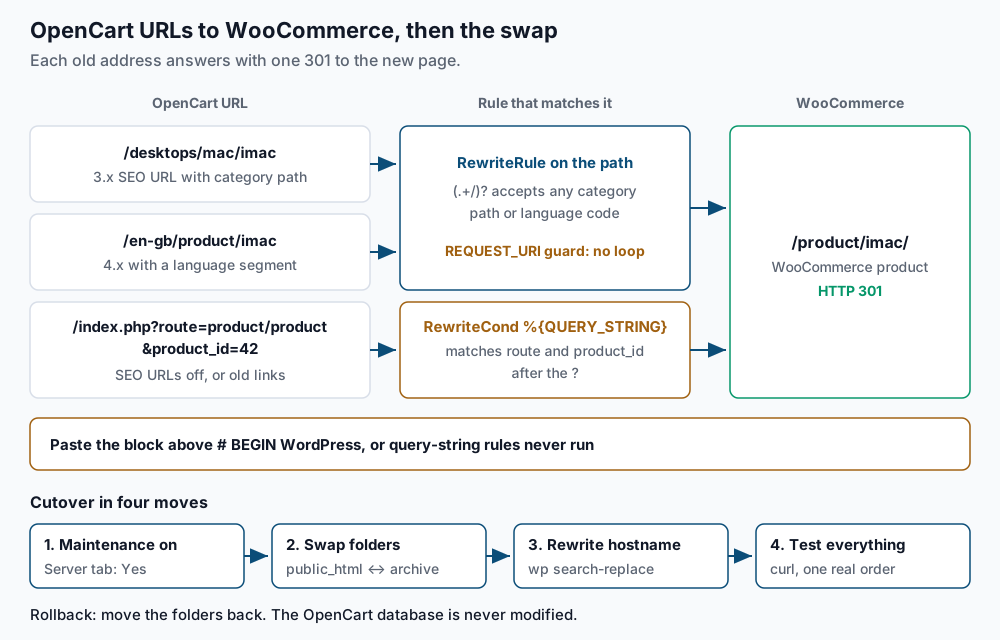
Export the keywords for the default language (replace
language_id=1with your value from step 2). On OpenCart 3:mysql -u exmpl_ocuser -p exmpl_oc -N -e "SELECT SUBSTRING_INDEX(query,'=',1), SUBSTRING_INDEX(query,'=',-1), keyword FROM oc_seo_url WHERE store_id=0 AND language_id=1 AND (query LIKE 'product_id=%' OR query LIKE 'category_id=%');" > ~/oc-urls.tsvOn OpenCart 4, the table stores the type and ID in separate
keyandvaluecolumns, so run this instead:mysql -u exmpl_ocuser -p exmpl_oc -N -e "SELECT \`key\`, value, keyword FROM oc_seo_url WHERE store_id=0 AND language_id=1 AND \`key\` IN ('product_id','category_id','path');" > ~/oc-urls.tsvCheck that every keyword is safe to drop into a rewrite pattern:
awk -F'\t' '$3 !~ /^[a-z0-9\/-]+$/' ~/oc-urls.tsvExpected: no output. Any printed line has a keyword with dots, capitals or accents; escape or fix those rules by hand. Then check that the importer kept the keywords as product slugs:
wp post list --post_type=product --field=post_name > ~/wc-slugs.txt
awk -F'\t' 'NR==FNR{s[$1];next} $1=="product_id" && !($3 in s)' ~/wc-slugs.txt ~/oc-urls.tsv
Expected: no output. Each printed product has a different slug in WooCommerce. Set it with
wp post update <ID> --post_name=<keyword>, or edit that line of the map. Now write the rules:awk -F'\t' '{ n = split($3, seg, "/"); slug = seg[n] if ($1 == "product_id") { dest = "product/" slug; route = "product/product"; q = "product_id=" $2 } else { dest = "product-category/" slug; route = "product/category"; q = "path=([0-9]+_)*" $2 } printf "RewriteCond %%{REQUEST_URI} !^/(product|product-category)/\n" printf "RewriteRule ^(.+/)?%s/?$ https://example.com/%s/ [R=301,L]\n", $3, dest printf "RewriteCond %%{QUERY_STRING} (^|&)route=%s(&|$)\n", route printf "RewriteCond %%{QUERY_STRING} (^|&)%s(&|$)\n", q printf "RewriteRule ^(index\\.php)?$ https://example.com/%s/? [R=301,L]\n", dest }' ~/oc-urls.tsv > ~/oc-redirects.conf grep -B1 -A3 'imac/?\$' ~/oc-redirects.confExpected, for product 42 with keyword
imac:RewriteCond %{REQUEST_URI} !^/(product|product-category)/ RewriteRule ^(.+/)?imac/?$ https://example.com/product/imac/ [R=301,L] RewriteCond %{QUERY_STRING} (^|&)route=product/product(&|$) RewriteCond %{QUERY_STRING} (^|&)product_id=42(&|$) RewriteRule ^(index\.php)?$ https://example.com/product/imac/? [R=301,L]The
(.+/)?part accepts any category path or language segment before the keyword. TheREQUEST_URIcondition stops a loop, since/product/imac/also ends inimac. Category links look likepath=18_20, so their pattern allows parent IDs first. The trailing?drops the old query string.Paste the file into
~/new.example.com/.htaccessabove# BEGIN WordPress, between two comment lines such as# --- OpenCart legacy URLs ---and# --- end OpenCart legacy URLs ---, withRewriteEngine Onat the top. The WordPress block ends processing forindex.phprequests, so query-string rules placed below it never run. The Premium edition can also redirect old URLs by itself; if you use that, skip the map but still run the tests below. -
Rebuild shipping and payments, then cut over. The importer does not carry your theme, extensions, shipping methods or payment gateways. Set those up, then place one test order per payment method on
new.example.com. For a Canadian store, check the imported tax classes against our guide to WooCommerce tax rates for GST, HST and QST.For the window, run a final import, then note the newest order:
mysql -u exmpl_ocuser -p exmpl_oc -e "SELECT MAX(order_id), MAX(date_added) FROM oc_order WHERE order_status_id>0;"Expected: one row with an order ID and timestamp. In OpenCart, open System > Settings, edit the store, and on the Server tab set Maintenance Mode to Yes. Then swap the folders:
cd ~
mkdir opencart-archive
mv public_html/* public_html/.htaccess opencart-archive/
mv new.example.com/* new.example.com/.htaccess public_html/
cd ~/public_html
wp search-replace 'https://new.example.com' 'https://example.com' --all-tables
wp option get siteurl
Expected: a table ending in a line such as
Success: Made 2870 replacements., thenhttps://example.com. If OpenCart never had a.htaccess(the file ships as.htaccess.txt), droppublic_html/.htaccessfrom the firstmv. Run theMAX(order_id)query again; a higher number is an order placed during the swap, to re-enter by hand. Turn the customer emails from step 6 back on by running the same loop with"yes".Rollback. If checkout fails and you cannot fix it quickly, move the contents of
public_htmlinto awoo-failedfolder, moveopencart-archiveback, and set Maintenance Mode to No. The OpenCart database was never written to, so the shop returns exactly as it was. -
Test customer logins, then reset in batches if needed. Log in on
/my-account/as your test customer from each hash group in step 4. If any test fails, send reset links. Many cPanel servers limit emails per domain per hour, so split the customer list into files of 200:wp user list --role=customer --field=ID | split -l 200 - ~/oc-reset- ls ~/oc-reset-* xargs wp user reset-password < ~/oc-reset-aaExpected: the list of batch files, then one
Reset password for ...line per user and aSuccess:line. Sendoc-reset-aban hour later, and continue hourly until every file is done. Warn customers first so the emails do not look like phishing.
Validate it works
Test each URL shape, plus the new page itself to prove there is no loop:
for u in '/desktops/mac/imac' '/en-gb/product/imac' '/index.php?route=product/product&product_id=42' '/product/imac/'; do
  printf '%s  %s\n' "$(curl -s -o /dev/null -w '%{http_code} %{redirect_url}' "https://example.com$u")" "$u"
done
Expected: three lines starting 301 https://example.com/product/imac/, and a last line starting 200. Then confirm no content still points at OpenCart image paths:
wp db query "SELECT COUNT(*) FROM wp_posts WHERE post_status='publish' AND post_content LIKE '%image/catalog/%';" --skip-column-namesExpected: 0. Finish with one real order on the live domain, paid and refunded, and confirm the order email arrives.
Troubleshooting
- The importer cannot connect. The grant from step 6 is missing, or the prefix is wrong. Test with
mysql -u exmpl_wpuser -p exmpl_oc -e "SHOW TABLES LIKE 'oc_product';", which should print the table name. - Products arrived without images. The URL field must hold the OpenCart home page, and the shop must be reachable. An
httptohttpsredirect, a Cloudflare challenge or cPanel hotlink protection can block the downloads. Fix that, then run the import again. - Variation prices look wrong. OpenCart stores each modifier with a
+or-sign in theprice_prefixcolumn. Compare one product with two options against its OpenCart page, and fix the mapping before importing the rest. - The import stops partway. Add
define('WP_MEMORY_LIMIT', '2G');towp-config.phpand start it again. The plugin’s FAQ says a new run continues where the last one stopped. - Every product page loops. The
REQUEST_URIcondition is missing above a path rule. Rungrep -c 'REQUEST_URI' ~/public_html/.htaccess; it should match the line count fromwc -l < ~/oc-urls.tsv.
When this is the wrong approach
If the store runs several storefronts, or relies on an extension with no WooCommerce match, settle that before any import. A catalogue with heavy per-option stock tracking may also be cheaper to keep on OpenCart 4 than to recount as variations.
Apache’s mod_rewrite reference documents the directives used in the redirect map.
Running WordPress that earns real money deserves an operator — Stack Harbor runs that stack under Enterprise WordPress; book an infrastructure consult.