This walk-through registers a custom taxonomy in WordPress, your own way of grouping content alongside Categories and Tags, for developers adding their first one or fixing one that half works. The usual complaint is a taxonomy that shows in wp-admin but has no panel in the block editor, or whose archive URLs return a 404 error. The fix is a short plugin that calls register_taxonomy() on the init hook with show_in_rest turned on and a clear URL slug, then flushes the permalink rules once. You finish with a Region taxonomy that works in the editor, the REST API and its own archive URLs.
What you’ll accomplish
- A hierarchical Region taxonomy attached to posts, registered in a small plugin so it survives a theme change.
- A Regions panel in the block editor sidebar, a Regions column on the Posts list and a REST API route (the
/wp-json/address the block editor reads terms from) at/wp-json/wp/v2/regions. - Archive pages at URLs like
/region/quebec/montreal/that answer with a 200 status. - Control over who may create terms and who may only assign them.
- A repeatable set of WP-CLI checks that prove each piece is working.
Prerequisites
- WordPress 6.0 or later (7.x included) and PHP 8.1 or later. Every argument used here has existed since WordPress 5.5 or earlier, so every release since then behaves the same way.
- Pretty permalinks turned on under Settings > Permalinks (any choice except Plain). With Plain permalinks, archives still work but only as
?sh_region=montrealquery strings. - File access to
wp-content/plugins/through SSH, SFTP or your host’s file manager. - WP-CLI, WordPress’s own command line, for the checks, plus jq (optional) to make JSON output readable. Each step also says what to look for in wp-admin if you prefer the browser.
- A staging copy for the first run. Registering a taxonomy is harmless, but the permalink flush touches every URL on the site.
How it works
A taxonomy is the right tool when editors need to sort posts by something like region, product line or audience, and visitors need a page that lists everything in one group.
register_taxonomy() takes three things: a name, the post types it attaches to, and an array of arguments. The name is the internal key stored next to every term in the database. It must be 32 characters or fewer, lowercase, and made of letters, numbers, hyphens and underscores. Prefixing it, as in sh_region, keeps it clear of names WordPress and other plugins already use.
The call itself saves nothing. It tells WordPress, for the current request only, that the taxonomy exists and how it should behave. That is why it must run on every request, on the init hook, before WordPress parses the URL. The hooks article explains what goes wrong when a call misses its hook. Your terms live in the database whether or not the taxonomy is registered. Take the registration away and they become invisible, but they are not deleted.
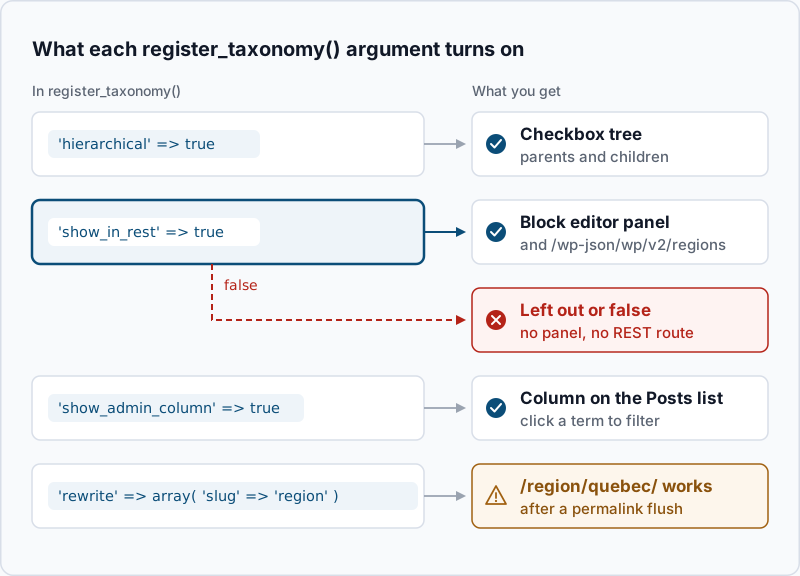
Most of the work happens in the arguments. Each one switches on a surface, and the one most often missed is show_in_rest. The block editor reads taxonomies through the REST API, so a taxonomy left out of the API never gets a panel in the editor.
Step-by-step
- Create the plugin file. Taxonomies describe your content, not your design, so they belong in a plugin. Create the folder and file:
mkdir -p wp-content/plugins/sh-regions
touch wp-content/plugins/sh-regions/sh-regions.php
No output means both commands worked.
- Register the taxonomy on
init. Put this insh-regions.php:
<?php
/**
 * Plugin Name: SH Regions
 * Description: Adds a hierarchical Region taxonomy to posts.
 * Text Domain: sh-regions
 */

add_action( 'init', 'sh_register_region_taxonomy' );

function sh_register_region_taxonomy() {
    $labels = array(
        'name'              => __( 'Regions', 'sh-regions' ),
        'singular_name'     => __( 'Region', 'sh-regions' ),
        'search_items'      => __( 'Search Regions', 'sh-regions' ),
        'all_items'         => __( 'All Regions', 'sh-regions' ),
        'parent_item'       => __( 'Parent Region', 'sh-regions' ),
        'parent_item_colon' => __( 'Parent Region:', 'sh-regions' ),
        'edit_item'         => __( 'Edit Region', 'sh-regions' ),
        'update_item'       => __( 'Update Region', 'sh-regions' ),
        'add_new_item'      => __( 'Add New Region', 'sh-regions' ),
        'new_item_name'     => __( 'New Region Name', 'sh-regions' ),
        'menu_name'         => __( 'Regions', 'sh-regions' ),
    );

    register_taxonomy(
        'sh_region',
        array( 'post' ),
        array(
            'labels'            => $labels,
            'hierarchical'      => true,
            'public'            => true,
            'show_admin_column' => true,
            'show_in_rest'      => true,
            'rest_base'         => 'regions',
            'rewrite'           => array(
                'slug'         => 'region',
                'with_front'   => false,
                'hierarchical' => true,
            ),
        )
    );
}
Here is what each choice does. hierarchical gives you parent and child terms with checkboxes, the way Categories work; set it to false for free-form, tag-style input. show_in_rest adds the editor panel and the API route, and rest_base names that route. show_admin_column adds a Regions column to Posts > All Posts. In rewrite, slug sets the first part of the archive URL, with_front set to false keeps any blog prefix such as /blog/ out of it, and the inner hierarchical puts parent terms in the path.
Check the file for syntax errors before WordPress loads it:
php -l wp-content/plugins/sh-regions/sh-regions.phpNo syntax errors detected in wp-content/plugins/sh-regions/sh-regions.php- Flush permalinks once, on activation. WordPress keeps a stored list of URL patterns, called rewrite rules, and builds it from every registered post type and taxonomy. A new taxonomy is not in that list until it is rebuilt. Rebuilding is slow, so do it on activation and deactivation, never on every request. Add this to the same file:
register_activation_hook( __FILE__, 'sh_regions_activate' );

function sh_regions_activate() {
    sh_register_region_taxonomy();
    flush_rewrite_rules();
}

register_deactivation_hook( __FILE__, 'sh_regions_deactivate' );

function sh_regions_deactivate() {
    unregister_taxonomy( 'sh_region' );
    flush_rewrite_rules();
}
The activation function calls the registration itself, because the plugin was not yet active when init fired on that request. Without that line, the flush would rebuild the rules without your taxonomy in them. The deactivation function does the reverse: it removes the taxonomy first, so the rebuilt rules no longer contain it. Now activate:
wp plugin activate sh-regionsPlugin 'sh-regions' activated.
Success: Activated 1 of 1 plugins.In the browser, Plugins > Installed Plugins > Activate does the same thing.
- Confirm WordPress sees the taxonomy.
wp taxonomy get sh_region --fields=name,label,object_type,hierarchicalExample output:
+--------------+-----------+
| Field        | Value     |
+--------------+-----------+
| name         | sh_region |
| label        | Regions   |
| object_type  | ["post"]  |
| hierarchical | 1         |
+--------------+-----------+
Error: Taxonomy sh_region doesn't exist. means WordPress does not know the taxonomy. Either the plugin is not active or the add_action() line has a typo in the function name.
- Add terms and attach one to a post. Create a parent and a child.
--porcelainprints only the new term ID, which you need for the parent:
wp term create sh_region 'Québec' --slug=quebec --porcelainExample output:
12wp term create sh_region 'Montréal' --slug=montreal --parent=12 --porcelain
wp post term add 42 sh_region montrealExample output:
13
Success: Added term.
Use your own IDs: 12 is the parent from the first command, and 42 stands for any published post on your site. You can do the same under Posts > Regions and in the Regions panel of the post editor.
- Decide who manages terms. By default, anyone who can manage categories can create, edit and delete regions, and anyone who can edit posts can assign them. That means Editors and Administrators manage the list, and Authors and Contributors can only pick from it. To make that explicit, or to tighten it, add a
capabilitiesarray to the arguments:
            'capabilities'      => array(
                'manage_terms' => 'manage_categories',
                'edit_terms'   => 'manage_categories',
                'delete_terms' => 'manage_categories',
                'assign_terms' => 'edit_posts',
            ),
Those values are the WordPress defaults. To let only Editors and above assign regions, change assign_terms to edit_others_posts. Run php -l again after editing.
Validate it works
Check each surface the arguments promised.
The block editor panel. Confirm the setting, then open any post:
wp eval 'var_dump( get_taxonomy( "sh_region" )->show_in_rest );'bool(true)In the editor, the Post tab of the sidebar now has a Regions panel with a checkbox tree. Québec appears with Montréal indented beneath it.
The REST route.
curl -s https://example.com/wp-json/wp/v2/regions | jq -r '.[] | "\(.id) \(.slug) parent=\(.parent)"'Example output:
13 montreal parent=12
12 quebec parent=0
The archive URL. First confirm the rewrite rule exists, then request the page:
wp rewrite list --match=/region/quebec/montreal/ --fields=match,query --format=csv
curl -s -o /dev/null -w '%{http_code}\n' https://example.com/region/quebec/montreal/
Example output, trimmed to the first rule:
match,query
region/(.+?)/?$,index.php?sh_region=$matches[1]
200
The first rule listed is the one WordPress uses. Generic page rules may follow it, because they match almost any path. A 404 with a correct first rule usually means a page cache is serving an old response.
The admin column. Open Posts > All Posts. A Regions column shows Montréal on post 42, and clicking it filters the list to that term.
Troubleshooting
No Regions panel in the block editor. show_in_rest is missing or false; its default is false. If you attached the taxonomy to a custom post type, that post type also needs show_in_rest => true, or the whole post type opens in the classic editor. The custom post types article covers the post-type side.
Archive URLs return 404. The rewrite rules were not rebuilt after registration, or the rewrite slug changed since the last rebuild. Run wp rewrite flush, which prints Success: Rewrite rules flushed., or open Settings > Permalinks and click Save Changes without changing anything. If it still fails, check that no page or post type already uses the slug region.
The taxonomy never appears, and the log shows a notice. A name longer than 32 characters makes register_taxonomy() refuse the call. The notice in debug.log includes “Taxonomy names must be between 1 and 32 characters in length.” Shorten the name. Also avoid names on WordPress’s reserved-terms list, such as year, author, type or name. They clash with core queries and can break unrelated front-end pages.
Terms disappeared after a theme change. The taxonomy was registered in the old theme’s functions.php. The terms are still in the database, so move the registration into a plugin as in step 2 and they come back. You can confirm they survived before you start:
wp db query "SELECT COUNT(*) FROM $(wp db prefix)term_taxonomy WHERE taxonomy = 'sh_region';"Any count above 0 means the terms are still there.
The panel appears, but the archive page uses the wrong layout. WordPress looks for taxonomy-sh_region-montreal.php, then taxonomy-sh_region.php, then taxonomy.php, then archive.php in the theme. Block themes follow the same order with .html templates in templates/. Add taxonomy-sh_region.php (or templates/taxonomy-sh_region.html) to give regions their own design.
When this is the wrong approach
A taxonomy is for grouping many posts under shared labels. If each value is unique to one post, such as an ISBN, a price or an event date, store it as post meta (a custom field) instead.
If the list of terms will grow into the thousands because every new item adds a term, look at the design first. The article on custom taxonomy performance explains where that starts to hurt and what to use instead.
If you need two kinds of content to point at each other with their own fields, such as speakers linked to talks, that is a relationship between post types. A taxonomy can fake it, but term pages cannot hold rich content the way posts can.
Finally, if the built-in Categories already fit and only the label is wrong, renaming the menu label is less work than a new taxonomy. The official register_taxonomy reference lists every argument and default.
Running WordPress that earns real money deserves an operator — Stack Harbor runs that stack under Enterprise WordPress; book an infrastructure consult.