This article shows developers how to build a shortcode, a tag in square brackets such as [sh_notice] that editors type into a post and WordPress swaps for real HTML on display. First versions tend to go wrong in one of three ways: the output lands at the top of the post, the box picks up stray paragraph tags, or an attribute reaches the page unescaped. The fix is to register the tag on init, merge attributes with defaults through shortcode_atts(), escape every value, and return a string instead of printing it. Escaping, which turns characters such as < into harmless text, matters because anyone who can write a draft, including the Contributor role, can type a shortcode.
What you’ll accomplish
- A
[sh_notice]shortcode in a small plugin, withtypeandtitleattributes and wrapped content. - Defaults for every attribute, an allowlist for values that end up in CSS classes, and escaping for everything else.
- A stylesheet that loads only on pages that contain the shortcode.
- A hook that lets a theme change the defaults without editing the plugin.
- WP-CLI checks that show exactly what HTML the shortcode produces, including when someone feeds it bad input.
Prerequisites
- WordPress 6.0 or later (7.x included) and PHP 8.1 or later. The Shortcode API has been stable for years, so every release since then behaves the same way.
- File access to
wp-content/plugins/, and an administrator account to activate the plugin. - WP-CLI, which drives WordPress from the terminal, for the tests. Each check also has a browser equivalent.
- A test post you can edit. The examples use one at
https://example.com/maintenance-window/.
How it works
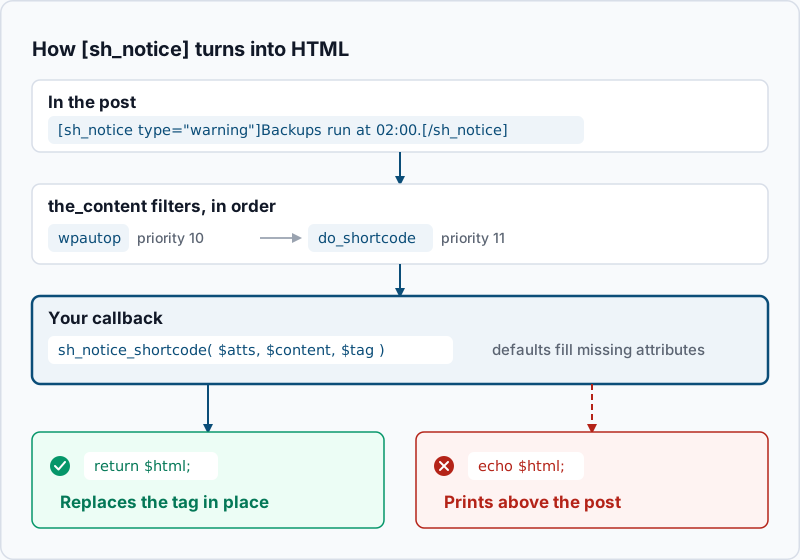
add_shortcode( 'sh_notice', 'sh_notice_shortcode' ) adds the tag name and its callback to a global list. Nothing else happens until a page is displayed. When WordPress prints a post, it passes the content through the the_content filter. At priority 11 on that filter, do_shortcode() searches the text for every registered tag and calls the matching callback once per occurrence. The callback receives three arguments: the attributes as an array, the wrapped content (or null when there is no closing tag), and the tag name. Whatever string it returns replaces the tag in the text.
Two details in that flow explain most shortcode bugs. Paragraph formatting runs earlier, at priority 10, so wrapped content arrives already split into <p> tags. In the block editor, the Shortcode block applies the same formatting when it renders. And WordPress only uses the value your callback returns. Anything the callback prints with echo goes straight to the browser before the post content, which is why it appears at the top.
Name tags with lowercase letters and underscores, and start them with a prefix such as sh_. Tag names share one global list, so a generic name like [notice] can be taken over by the next plugin that registers it. The hooks article covers why registration on init is the safe moment.
Step-by-step
- Create the plugin. Make a folder and an empty stylesheet:
mkdir -p wp-content/plugins/sh-notice
touch wp-content/plugins/sh-notice/sh-notice.php wp-content/plugins/sh-notice/notice.css
No output means both files exist. If you are new to plugin structure, the plugin boilerplate article explains how it grows past one file.
- Register the shortcode and write the callback. Put this in
sh-notice.php:
<?php
/**
 * Plugin Name: SH Notice
 * Description: Adds the [sh_notice] shortcode.
 */

add_action( 'init', 'sh_register_notice_shortcode' );

function sh_register_notice_shortcode() {
    add_shortcode( 'sh_notice', 'sh_notice_shortcode' );
}

function sh_notice_shortcode( $atts, $content = null, $tag = '' ) {
    $atts = shortcode_atts(
        array(
            'type'  => 'info',
            'title' => '',
        ),
        $atts,
        $tag
    );

    $types = array( 'info', 'success', 'warning' );
    $type  = in_array( $atts['type'], $types, true ) ? $atts['type'] : 'info';

    wp_enqueue_style( 'sh-notice' );

    $html = '<div class="sh-notice sh-notice--' . esc_attr( $type ) . '" role="note">';

    if ( '' !== $atts['title'] ) {
        $html .= '<p class="sh-notice__title">' . esc_html( $atts['title'] ) . '</p>';
    }

    $html .= '<div class="sh-notice__body">' . do_shortcode( (string) $content ) . '</div>';
    $html .= '</div>';

    return $html;
}
Each part has a job. shortcode_atts() keeps only the attributes you list, fills in a default for any the editor left out, and drops everything else. Passing $tag as the third argument also makes the defaults filterable, which step 5 uses. The $types allowlist means a typo like type="warnign" falls back to info instead of producing a broken CSS class. esc_attr() and esc_html() turn characters such as < and " into harmless text. The inner do_shortcode() lets editors put other shortcodes inside the notice. The wp_enqueue_style() line is explained in step 4.
Check the syntax, then activate:
php -l wp-content/plugins/sh-notice/sh-notice.php
wp plugin activate sh-notice
No syntax errors detected in wp-content/plugins/sh-notice/sh-notice.php
Plugin 'sh-notice' activated.
Success: Activated 1 of 1 plugins.- Render it from the command line.
do_shortcode()runs the same parser WordPress uses for posts, so you can test without opening the editor:
wp eval 'echo do_shortcode( "[sh_notice type=\"warning\" title=\"Heads up\"]Backups run at 02:00.[/sh_notice]" ) . PHP_EOL;'<div class="sh-notice sh-notice--warning" role="note"><p class="sh-notice__title">Heads up</p><div class="sh-notice__body">Backups run at 02:00.</div></div>If the output is the bracketed tag itself, unchanged, the shortcode is not registered. Check that the plugin is active with wp plugin list --name=sh-notice.
- Load the stylesheet only where the shortcode appears. Add this to
sh-notice.php:
add_action( 'wp_enqueue_scripts', 'sh_notice_assets' );

function sh_notice_assets() {
    wp_register_style(
        'sh-notice',
        plugins_url( 'notice.css', __FILE__ ),
        array(),
        (string) filemtime( plugin_dir_path( __FILE__ ) . 'notice.css' )
    );

    $post = get_post();

    if ( is_singular() && $post && has_shortcode( $post->post_content, 'sh_notice' ) ) {
        wp_enqueue_style( 'sh-notice' );
    }
}
On a single post or page that contains the tag, has_shortcode() returns true and the stylesheet goes into the <head>. The wp_enqueue_style() call inside the callback from step 2 is the safety net. It covers places has_shortcode() cannot see, such as a widget, and WordPress then adds the stylesheet later in the page. Since 6.9 it usually moves it back into the <head> for you. The enqueue article explains handles, versions and hooks in more depth.
- Let a theme change the defaults. Because step 2 passed
$tagtoshortcode_atts(), WordPress runs a filter namedshortcode_atts_sh_noticeevery time it merges attributes. A theme or another plugin can use it to set a site-wide default without touching your code:
add_filter( 'shortcode_atts_sh_notice', 'sh_child_notice_defaults', 10, 3 );

function sh_child_notice_defaults( $out, $pairs, $atts ) {
    if ( ! isset( $atts['type'] ) ) {
        $out['type'] = 'success';
    }

    return $out;
}
The isset() check matters. Without it, the filter would overrule a type the editor typed on purpose.
Check the new default with a notice that sets no type:
wp eval 'echo do_shortcode( "[sh_notice]Hi[/sh_notice]" ) . PHP_EOL;'<div class="sh-notice sh-notice--success" role="note"><div class="sh-notice__body">Hi</div></div>- Use it in the editor. In the block editor, add a Shortcode block and type the tag and its content on one line:
[sh_notice type="warning" title="Maintenance window"]The store is read-only from 02:00 to 02:30 on Sunday.[/sh_notice]The editor shows the raw tag, because shortcodes only run when the page is displayed. Preview the post to see the box.
Validate it works
The shortcode is registered.
wp eval 'var_dump( shortcode_exists( "sh_notice" ) );'bool(true)Bad input comes out harmless. Feed it markup in the title and an unknown type:
wp eval 'echo do_shortcode( "[sh_notice type=\"bogus\" title=\"<b>Bold</b>\"]Hi[/sh_notice]" ) . PHP_EOL;'<div class="sh-notice sh-notice--info" role="note"><p class="sh-notice__title"><b>Bold</b></p><div class="sh-notice__body">Hi</div></div>The type fell back to info, and the <b> tags became visible text instead of markup.
The live page shows HTML, not brackets. Publish the test post, then fetch it:
curl -s https://example.com/maintenance-window/ | grep -oE 'class="sh-notice sh-notice--[a-z]+"|id=.sh-notice-css.'
curl -s https://example.com/maintenance-window/ | grep -c '\[sh_notice'
Example output:
id='sh-notice-css'
class="sh-notice sh-notice--warning"
0
The stylesheet tag, the notice class and a count of 0 raw tags together mean everything worked. Run the first command on a post without the shortcode: it should print nothing.
Troubleshooting
The page shows [sh_notice] as plain text. The tag was never processed. Either the plugin is inactive, the tag name in the post does not match add_shortcode() exactly, or the text is printed by code that skips the_content. A theme that prints a custom field with echo get_post_meta( ... ) is a common case. Wrap that output in do_shortcode(), or move the content into the post body.
The notice appears at the top of the post. The callback prints with echo instead of returning a string. If your HTML lives in a template file, capture it with output buffering and return the result:
ob_start();
include plugin_dir_path( __FILE__ ) . 'templates/notice.php';
return ob_get_clean();
Empty paragraphs or stray <br /> tags inside the box. Paragraph formatting ran before your shortcode, so line breaks around the wrapped content became <p> and <br /> tags. Keep the opening tag, the content and the closing tag on one line, as in step 6. A line break right after the opening tag or before the closing one becomes a <br /> inside the box, and a blank line leaves a stray </p> or <p>.
An attribute is ignored. Only attributes listed in the shortcode_atts() defaults survive, so check the spelling there first. WordPress also lowercases attribute names, so Title="..." arrives as title. Text pasted from a word processor often brings curly quotes, as in type=”warning”. The parser does not treat those as quotes, so the value is wrong and the allowlist falls back to info. Retype the quotes as straight ones.
Two notices merge into one. Using the same shortcode with and without a closing tag in one post confuses the parser. An unclosed [sh_notice] followed later by [sh_notice]...[/sh_notice] gets read as one long notice. Always close this shortcode, or register a separate tag for the self-closing form.
When this is the wrong approach
On a site built with the block editor, a custom block usually serves editors better. They see the real box while they write, they pick the type from a menu instead of typing it, and nothing breaks over curly quotes. The block development workflow walks through building one. If the content never changes, a synced pattern needs no code at all.
Shortcodes also tie your content to the plugin. If it is ever deactivated, every post that uses the tag shows raw brackets. Before you remove one, find where it is used:
wp post list --post_type=any --s='[sh_notice' --fields=ID,post_title,post_statusEach row is a post to edit before you deactivate the plugin. An empty result means no post uses the tag.
Finally, a shortcode runs on every page view. If yours queries the database or calls an external API, cache the result in a transient (a stored value with an expiry time) instead of doing the work each time. The official Shortcode API documentation covers the remaining edge cases.
Running WordPress that earns real money deserves an operator — Stack Harbor runs that stack under Enterprise WordPress; book an infrastructure consult.