You have a JavaScript or CSS file of your own, in a child theme or a small plugin, and you want WordPress to load it on the pages that need it. A <script> tag pasted into header.php works at first, until a plugin loads the same library twice, browsers keep last week’s file, or the console reports an undefined function. The fix is to hand each file to WordPress’s enqueue system, the queue of scripts and styles it prints into the page, from inside the hook for that screen. Each file gets a handle (a short unique name), the handles it depends on, and a version that changes whenever the file does. The steps below take one script and one stylesheet from a hard-coded tag to a clean, conditional enqueue.
What you’ll accomplish
- Register a script and a stylesheet with handles, dependencies and a version taken from the file’s modification time, so browsers fetch the new file as soon as you deploy it.
- Load them only on the pages that use them, instead of on every request.
- Pass settings from PHP to your script as JSON (the data format JavaScript reads natively), without echoing variables into the template.
- Load admin-only assets on your own settings screen and nowhere else in wp-admin.
- Prove from the command line and from the page source that each file loads once, in the right order, with the right version.
Prerequisites
- WordPress 6.3 or later. The array form of the fifth
wp_enqueue_script()argument, within_footerandstrategy, arrived in 6.3. Check withwp core version; anything from6.3up works for every step here. - PHP 8.1 or later. Nothing in the code needs a newer version.
- Somewhere to put PHP that you control: a child theme for presentation code, or a small plugin for features that must survive a theme change. The examples use a child theme folder named
sh-childwithassets/js/slider.jsandassets/css/slider.cssinside it. - Debug logging on in
wp-config.php(WP_DEBUGandWP_DEBUG_LOGset totrue,WP_DEBUG_DISPLAYset tofalse), so notices land inwp-content/debug.loginstead of on the page. - WP-CLI, which runs WordPress admin tasks from a terminal, and curl for the checks. Both are optional, and the browser’s View Source shows the same tags.
How it works
WordPress keeps two registries for the current request: one for scripts and one for styles. Registering a file adds an entry with its handle, its URL, its dependencies and its version. Enqueuing a handle marks it for output. When WordPress prints the page, it walks the queue, pulls in every dependency first, prints each handle exactly once, and adds ?ver= with your version to the URL. A second plugin that enqueues the same handle does not get a second copy, which is the whole reason the system exists.
The registries only make sense once WordPress knows which screen it is building. That is why you register and enqueue inside an action hook instead of at the top of a file. Each kind of screen fires its own hook, and the one you pick decides where your files appear:
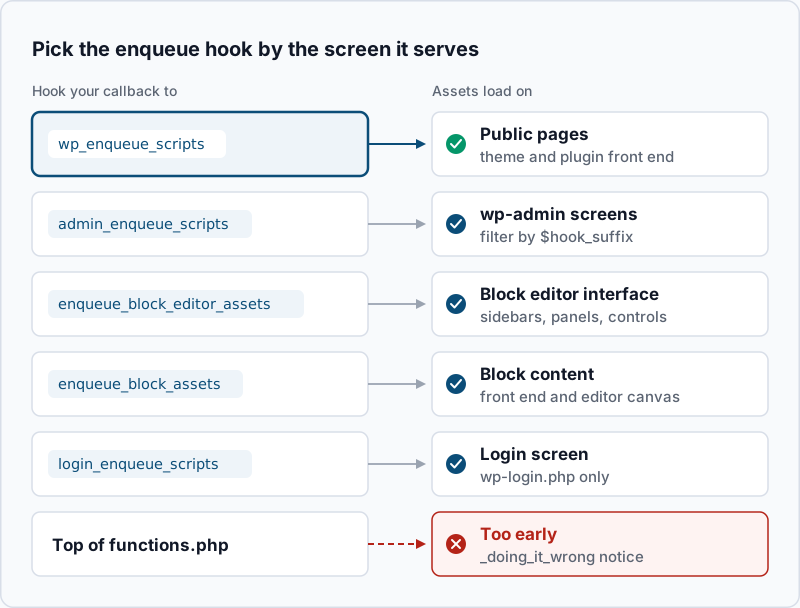
If you are new to hooks, the actions and filters guide explains why a callback attached to the wrong moment does nothing. For enqueuing, the rule is short: use wp_enqueue_scripts for the front end, and pick another hook only when the asset belongs to another screen.
Step-by-step
- Remove the hard-coded tags. Search the child theme for tags that point at your own files:
grep -rnE '<script[^>]+src=|<link[^>]+stylesheet' wp-content/themes/sh-child/ --include='*.php'Example output:
wp-content/themes/sh-child/header.php:14:<script src="/wp-content/themes/sh-child/assets/js/slider.js"></script>Delete each line it finds for a file you are about to enqueue. Leave wp_head() and wp_footer() in place. Those two calls are where WordPress prints the queue, and without them nothing you enqueue appears. No output from grep means there were no hard-coded tags to remove.
- Register both files on
wp_enqueue_scripts. Add this to the child theme’sfunctions.php:
add_action( 'wp_enqueue_scripts', 'sh_register_slider_assets' );

function sh_register_slider_assets() {
    $css = 'assets/css/slider.css';
    $js  = 'assets/js/slider.js';

    wp_register_style(
        'sh-slider',
        get_theme_file_uri( $css ),
        array(),
        (string) filemtime( get_theme_file_path( $css ) )
    );

    wp_register_script(
        'sh-slider',
        get_theme_file_uri( $js ),
        array( 'wp-dom-ready' ),
        (string) filemtime( get_theme_file_path( $js ) ),
        array(
            'in_footer' => true,
            'strategy'  => 'defer',
        )
    );
}
Four choices in that code matter. get_theme_file_uri() looks in the child theme first and then the parent, so the URL is right in both cases. The version is the file’s last-modified time, so it changes on every deploy that touches the file. wp-dom-ready is a core handle your script can rely on, and WordPress will print it first. defer tells the browser to download the file without pausing the page and run it once the HTML has been parsed. The defer and async article covers when another strategy fits better.
A style and a script can share the handle sh-slider because they live in separate registries. WordPress adds -css and -js to the id attributes it prints.
Confirm both handles are registered:
wp eval 'do_action( "wp_enqueue_scripts" ); var_dump( wp_style_is( "sh-slider", "registered" ), wp_script_is( "sh-slider", "registered" ) );'bool(true)
bool(true)A bool(false) means the callback never ran. Check that the child theme is active with wp theme list --status=active.
- Enqueue only where the files are used. Registering costs nothing on the page. Enqueuing is what prints a tag. Add the condition at the end of the same function, before its closing brace:
    if ( is_front_page() ) {
        wp_enqueue_style( 'sh-slider' );
        wp_enqueue_script( 'sh-slider' );
    }
Fetch the home page and an inner page:
curl -s https://example.com/ | grep -E "id=.sh-slider-(css|js)"
curl -s https://example.com/about/ | grep -cE "id=.sh-slider-(css|js)"
Example output:
<link rel='stylesheet' id='sh-slider-css' href='https://example.com/wp-content/themes/sh-child/assets/css/slider.css?ver=1793152814' media='all' />
<script src="https://example.com/wp-content/themes/sh-child/assets/js/slider.js?ver=1793149207" id="sh-slider-js" defer data-wp-strategy="defer"></script>
0
Two tags on the home page and a count of 0 on the inner page is the result you want. If the home page shows nothing, purge your page cache and fetch it again, because a cached copy of the HTML predates your change.
- Pass PHP values to the script as JSON. Add this inside the function, right after
wp_register_script():
    wp_add_inline_script(
        'sh-slider',
        'window.shSlider = ' . wp_json_encode(
            array(
                'delay'   => 5000,
                'restUrl' => esc_url_raw( rest_url( 'sh/v1/slides' ) ),
            )
        ) . ';',
        'before'
    );
wp_add_inline_script() prints your snippet next to the file’s own tag, and 'before' puts it ahead of the file so window.shSlider already exists when slider.js runs. Because the value goes through wp_json_encode(), 5000 arrives in JavaScript as a number. The older wp_localize_script() would turn it into the string "5000"; keep that function for translated strings.
curl -s https://example.com/ | grep -A3 'id="sh-slider-js-before"'Example output:
<script id="sh-slider-js-before">
window.shSlider = {"delay":5000,"restUrl":"https:\/\/example.com\/wp-json\/sh\/v1\/slides"};
//# sourceURL=sh-slider-js-before
</script>
WordPress 6.9 and later add the sourceURL line, which names the snippet in the browser’s developer tools. Versions 6.3 to 6.8 print the same tag without it.
- Load admin assets on one screen only.
admin_enqueue_scriptspasses your callback the hook suffix, which is the internal name of the admin screen being built. If your theme or plugin adds a settings page, log the suffix once to learn your screen’s name:
add_action( 'admin_enqueue_scripts', 'sh_admin_assets' );

function sh_admin_assets( $hook_suffix ) {
    error_log( $hook_suffix );
}
Open your settings page in wp-admin, then read the log:
tail -n 1 wp-content/debug.logExample output:
[29-Oct-2026 08:47:19 UTC] settings_page_sh-optionsReplace the error_log() line with a guard that uses that exact value, then enqueue:
    if ( 'settings_page_sh-options' !== $hook_suffix ) {
        return;
    }

    $css = 'assets/css/admin.css';
    wp_enqueue_style(
        'sh-admin',
        get_theme_file_uri( $css ),
        array(),
        (string) filemtime( get_theme_file_path( $css ) )
    );
Open the Dashboard and your settings page in turn and view the source of each. sh-admin-css should appear on the settings page only.
- Use the same pattern in a plugin. Only the path helpers change. In the plugin’s main file,
plugins_url( 'assets/js/slider.js', __FILE__ )builds the URL andplugin_dir_path( __FILE__ ) . 'assets/js/slider.js'gives the path forfilemtime(). Prefix every handle with your plugin’s slug. Two plugins that both register a handle calledslidercollide, and the second registration is ignored without a warning. Run thecurlcheck from step 3 again: thehrefandsrcvalues now start withhttps://example.com/wp-content/plugins/followed by your plugin’s folder.
Validate it works
Run these three checks after a deploy.
Each handle prints once. Count the tags on the page that should have them:
curl -s https://example.com/ | grep -oE "id=['\"]sh-slider-(css|js)['\"]" | LC_ALL=C sort | uniq -c 1 id="sh-slider-js"
1 id='sh-slider-css'A 2 in either line means a tag is still hard-coded somewhere. Repeat the grep from step 1 on the parent theme and on any snippet plugin.
The version follows the file. Touch the script, fetch the page again and compare the ver= value:
touch wp-content/themes/sh-child/assets/js/slider.js
curl -s https://example.com/ | grep -oE 'slider\.js\?ver=[0-9]+'
The number should be higher than the one you saw in step 3. If a page cache sits in front of WordPress, purge it first.
Nothing complains. Load the home page, your settings screen and the block editor, then read the log:
grep -i 'should not be registered or enqueued' wp-content/debug.log | tail -n 3No output is the success signal. Open the browser’s developer console on the home page as well; it should show no errors from slider.js.
Troubleshooting
The log says wp_enqueue_script was called incorrectly. The notice goes on to say that scripts and styles should not be registered or enqueued until one of the three enqueue hooks. The call ran before WordPress was ready, usually because it sits at the top level of functions.php or of a plugin file. Move it into a function attached to the hook for the right screen, as in step 2.
The file returns 404 in a child theme. get_template_directory_uri() always points at the parent theme, so a child-theme file built with it gets the wrong folder. Use get_theme_file_uri(), which checks the child first, or get_stylesheet_directory_uri(), which always means the active theme.
Browsers keep the old file after a deploy. The version is probably a fixed string such as '1.0'. It may also be false, which appends the WordPress core version instead of yours. Switch to filemtime() as in step 2. If the ver= number in the page source has already changed and visitors still get the old file, the stale copy is in a page cache or a CDN (content delivery network), not in the browser. Purge that layer.
The console says a function or variable is not defined. Your script ran before the code it needs. Add the provider’s handle to the dependencies array, for example array( 'jquery' ) for a jQuery plugin, so WordPress prints it first. If the missing name is your own window.shSlider object, check that the inline snippet was added with 'before' and that its handle matches the script’s handle exactly.
The file loads everywhere, or nowhere. Conditional tags such as is_front_page() and is_singular() only have an answer once WordPress has parsed the request. Inside wp_enqueue_scripts they work. Inside a callback on init or plugins_loaded they always return false. Keep the condition inside the enqueue callback.
When this is the wrong approach
If the asset belongs to a custom block, declare it in the block’s block.json with style, editorScript or viewScript. WordPress then loads it only on pages where the block appears, with no condition to maintain. The block development workflow shows that setup.
If your JavaScript is written as ES modules that use import, register it with wp_register_script_module() and wp_enqueue_script_module(), available since WordPress 6.5. The classic script functions print a normal script tag, and a browser will refuse an import statement inside it.
If the goal is to stop a plugin’s files from loading where they are not needed, that is dequeuing, not enqueuing. The article on how to remove unused CSS and JavaScript walks through finding the handle and removing it safely.
A handful of small style changes rarely needs a file at all. The Customizer’s Additional CSS panel in a classic theme, or Styles > Additional CSS in the Site Editor of a block theme, keeps them where the next person will look. The official wp_enqueue_script reference lists every argument when you need the edge cases.
Running WordPress that earns real money deserves an operator — Stack Harbor runs that stack under Enterprise WordPress; book an infrastructure consult.