Style variations are alternative looks that a block theme ships for its users to choose from, such as a dark scheme or a set of warmer fonts. This article is for theme developers and the people who maintain sites built on their themes. Each variation is a small JSON file in the theme’s styles/ folder that overrides part of theme.json, the file where a block theme declares its colors, fonts and spacing. When someone picks a variation and saves, WordPress copies it into that site’s database, so later edits to the file never reach that site on their own. Keep every variation on the base theme’s color and font slugs (the short names content uses to point at a preset), and plan how to roll changes out to existing sites.
What you’ll accomplish
- Add a variation called Night to a block theme, with its own palette and type.
- Keep content readable in every variation by reusing the theme’s preset slugs.
- Check that WordPress reads the file, then apply it in the Site Editor.
- Find the saved copy in the database and confirm which values a site really uses.
- Roll an updated variation out to sites that picked the old version.
Prerequisites
- WordPress 6.6 or later, the first release with theme.json version 3, and a block theme you can edit. Use a child theme if the theme comes from someone else.
- A base
theme.jsonthat declares"version": 3. The examples assume a palette with the slugsbase,contrastandaccent, and font families with the slugsbodyandheading. - An Administrator account for the Site Editor, which lives under Appearance > Editor.
- SSH access with WP-CLI and
jq, a small command-line JSON tool. Install it withsudo apt install jqon Debian or Ubuntu.
How it works
WordPress builds a site’s design from layers. The theme’s theme.json is the base. On top sits the site’s own saved styles, a post of the type wp_global_styles that holds whatever a person changed in the Site Editor. The value in the higher layer wins.
A variation sits outside both layers, as a set of changes waiting to be applied. When someone opens Styles, picks a variation and saves, WordPress copies its settings and styles into the saved-styles post. From then on, the site reads the copy, not the file in styles/.
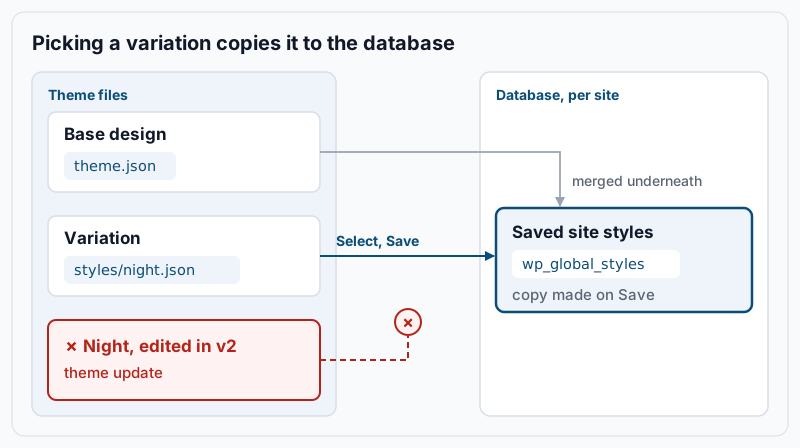
The diagram shows the consequence. Update the theme with a better Night palette, and new sites get it the first time they pick Night. A site that picked Night last month keeps last month’s colors. The WordPress Theme Handbook documents the file format on its style variations page.
Two smaller rules matter as you write the file. WordPress reads every .json file under styles/, including subfolders, and lists them in file-path order. If a variation has no title, WordPress shows the file name instead. A child theme can replace a parent’s variation by shipping a file with the same name in its own styles/ folder.
Step-by-step
-
List the variations the theme already has. From the WordPress directory on the server:
wp eval 'foreach ( WP_Theme_JSON_Resolver::get_style_variations() as $v ) { echo $v["title"], PHP_EOL; }'Example output, from Twenty Twenty-Five and trimmed to its first lines:
Evening
Noon
Dusk
Afternoon
The list also includes color-only and font-only files (step 8), so a theme like Twenty Twenty-Five prints more than twenty lines and repeats names such as Evening. No output means the theme has no variations yet, or no
styles/folder. Either is fine, since you create the folder in step 3. -
Read the base theme’s color and font slugs. A slug is the short name WordPress uses to build a color’s CSS variable, such as
--wp--preset--color--accent. Content saved with a color stores that slug, not the hex value. Print the slugs:jq -r '.settings.color.palette[].slug' "$(wp theme path "$(wp option get stylesheet)" --dir)/theme.json"Example output:
base
contrast
accent
Then the font family slugs:
jq -r '.settings.typography.fontFamilies[].slug' "$(wp theme path "$(wp option get stylesheet)" --dir)/theme.json"Example output:
body
heading
Write these down. Your variation must use the same slugs, or blocks colored with a missing slug lose their color in that variation.
-
Create the variation file. In the theme folder, create
styles/night.json. List every palette color, because a palette in a variation replaces the theme’s palette instead of merging with it. Night also changes the body font, which is what makes WordPress list it as a full style:{ "$schema": "https://schemas.wp.org/trunk/theme.json", "version": 3, "title": "Night", "settings": { "color": { "palette": [ { "slug": "base", "color": "#10161f", "name": "Base" }, { "slug": "contrast", "color": "#e8edf3", "name": "Contrast" }, { "slug": "accent", "color": "#f2b544", "name": "Accent" } ] } }, "styles": { "color": { "background": "var:preset|color|base", "text": "var:preset|color|contrast" }, "typography": { "fontFamily": "var:preset|font-family|heading" }, "elements": { "link": { "color": { "text": "var:preset|color|accent" } } } } }The
var:preset|color|baseform is how theme.json refers to a preset. WordPress turns it into the matching CSS variable. Leave out anything that should stay as the base theme has it.The
typographyline makes body text in the Night look use the heading font. Keep at least one value beyond colors in the file. A file that sets only colors is offered as a color palette under Colors, not as a full style (step 8). To bring in a font the theme lacks, list it undersettings.typography.fontFamiliesin the variation, together with the theme’s existing families, because this list also replaces the theme’s own. Give each font file asrcsuch asfile:./assets/fonts/inter.woff2. WordPress reads that path from the theme’s root folder, not fromstyles/. -
Check the JSON and that WordPress picks it up. First the syntax, from the theme folder:
jq empty styles/night.json && echo "valid JSON"Example output:
valid JSONA parse error with a line number means a missing comma or bracket. Fix it there, because WordPress skips a file it cannot read. Then run the command from step 1 again.
Nightshould now appear in the list. If it does not, check that the file is in the active theme’s ownstyles/folder and ends in.json. -
Apply it in the Site Editor. Go to Appearance > Editor > Styles. The variations appear as preview cards; in the editor’s Styles panel the same list sits under Browse styles. Select Night, look over a few templates, then select Save. Nothing on the live site changes until you save.
-
Confirm what the site saved. Find the saved-styles post for the active theme:
wp post list --post_type=wp_global_styles --fields=ID,post_name,post_modifiedExample output:
+-----+------------------------------------+---------------------+
| ID  | post_name                          | post_modified       |
+-----+------------------------------------+---------------------+
| 512 | wp-global-styles-harbour-theme     | 2026-10-29 10:16:44 |
+-----+------------------------------------+---------------------+
The name ends with the theme’s folder name. Read the copied styles back:
wp post get 512 --field=post_content | jq '.styles.color'Example output:
{
  "background": "var:preset|color|base",
  "text": "var:preset|color|contrast"
}
This is the copy from your file. From here on, the site reads these values, not
styles/night.json. -
Roll a changed variation out to existing sites. Say you later change the accent to
#e9a23band ship the theme update. Sites that saved Night keep the old accent. On each of them, open Appearance > Editor > Styles, select another variation, then select Night again, and save. That re-copies the current file. Then read the accent from the saved copy:wp post get 512 --field=post_content | jq -r '.settings.color.palette | .. | objects | select(.slug == "accent") | .color'Example output:
#e9a23bThe saved copy can group the palette under a
themekey instead of storing a plain list, so this filter searches for the slug rather than reading a fixed path. If it still prints#f2b544, the save did not happen or the theme update has not reached that server.Re-selecting a variation can overwrite changes someone made in Styles since the last pick. If the site has been customized, look at its saved styles first. Under Styles, Revisions shows earlier saves you can return to if the result is wrong.
-
Add color-only or font-only files, if you want them. From WordPress 6.6, a file that sets only colors is offered as a palette instead of a full style. A file that sets only typography is offered as a font set. People can then mix a palette with a different set of fonts. Twenty Twenty-Five, for example, keeps these files in
styles/colors/andstyles/typography/. They follow the same copy-on-save rule.
Validate it works
Check three things, in this order:
wp eval 'foreach ( WP_Theme_JSON_Resolver::get_style_variations() as $v ) { echo $v["title"], PHP_EOL; }' | grep -x Night
curl -s https://www.example.com/ | grep -o -- '--wp--preset--color--accent: #[0-9a-fA-F]*'
wp post get 512 --field=post_content | jq -r '.styles.color.background'
Example output:
Night
--wp--preset--color--accent: #f2b544
var:preset|color|base
The first line proves WordPress reads the file. The second proves the live page prints the variation’s accent color in its CSS variables. The third proves the site’s saved styles point at the right preset. You are done when all three match the file, the site looks right in a browser after clearing any page cache, and links use the Night accent color.
Troubleshooting
- The variation does not appear in Styles. WordPress could not read the file or never found it. Run the
jq emptycheck, confirm the file is under the active theme’sstyles/folder, and confirm it has noblockTypeskey. A file withblockTypesis treated as a style for individual blocks, not for the whole site. If Night shows up only under Colors, the file sets nothing but colors; add thetypographyvalue from step 3. - Some blocks lost their color in the new variation. Their color slug does not exist in the variation’s palette. Compare the slug list from step 2 with your file and add the missing slug.
- A theme update did not change the site’s look. That is the copy-on-save rule. Re-select the variation as in step 7.
- The variation shows the file name instead of a proper name. The
titlekey is missing or misspelled. Add"title": "Night"; the name is also what translators see. - A child theme lists the same look twice. The parent and the child both ship it, under different file names. Give the child’s file the same name as the parent’s file it replaces.
When this is the wrong approach
A variation changes settings and styles only. It cannot add templates, template parts or patterns, so a different page layout needs a child theme or new templates. If several teams edit the same base design, settle who owns theme.json first; our guide to theme.json governance for distributed teams covers that. When saved styles and theme values seem to fight in other ways, WordPress global styles gotchas walks through the precedence rules.
For one site with one look, a variation adds a file nobody chooses. Put the design straight in theme.json, as described in our guide to block theme file structure.
Running WordPress that earns real money deserves an operator — Stack Harbor runs that stack under Enterprise WordPress; book an infrastructure consult.