When one part of a site running a block theme needs its own layout, such as the News category or a campaign landing page, you add a template. Block themes keep templates as HTML files in templates/, and WordPress picks one per URL with the same template hierarchy classic themes use: an ordered list of names, most specific first. Name the file after a hierarchy slug, such as category-news.html, and it applies on its own. Declare it as a custom template in theme.json instead, and editors pick it page by page. A template edited in the Site Editor is saved to the database, and that copy beats your file.
What you’ll accomplish
- Know which template slugs WordPress tries for the common kinds of URL, and in what order.
- List every template the site can use, and see whether each comes from a file or the database.
- Add a template that applies automatically to one category.
- Add a custom template that editors can assign to any page, without header or footer.
- Confirm which template rendered a given URL, then remove the probe.
Prerequisites
- WordPress 6.6 or later with a block theme active. A theme is a block theme when it contains
templates/index.html. Thetheme.jsonbelow uses version 3 of the format, which needs 6.6; on older 6.x sites, use"version": 2. - Your own theme or a child theme to hold the files. Templates added to a theme you downloaded are lost at its next update. Creating a child theme takes a few minutes. The examples use a child theme called
harbor-childof Twenty Twenty-Five. - Shell access to
wp-content/and WP-CLI on the same host. - A staging copy for step 6, which adds a temporary must-use plugin.
How it works
For each request, WordPress first decides what kind of URL it is: a page, a single post, a category archive, a search. It then builds the list of template names, called slugs, for that kind, from most specific to least, and uses the first slug for which a template exists. For a page, an assigned template comes first, before anything based on the page’s name. index is always the final fallback.
| URL | Slugs tried, in order |
|---|---|
A page (slug about, ID 42) | assigned custom template, page-about, page-42, page, singular, index |
| A single post | assigned custom template, single-post-<slug>, single-post, single, singular, index |
A custom post type item (event) | assigned custom template, single-event-<slug>, single-event, single, singular, index |
A category archive (news, ID 7) | category-news, category-7, category, archive, index |
| A custom taxonomy term | taxonomy-<taxonomy>-<term>, taxonomy-<taxonomy>, taxonomy, archive, index |
| A post type archive | archive-<post_type>, archive, index |
| The latest-posts page | home, index |
| The front page | front-page, then the page or latest-posts list above |
| Search results / not found | search, index / 404, index |
A slug can be supplied by more than one source, and they have their own order. A copy saved from the Site Editor, stored as a wp_template post in the database, wins first. Next comes a file in the active theme (the child theme, if there is one), then a file in the parent theme. Last comes a template registered by a plugin with register_block_template(), which exists since WordPress 6.7.
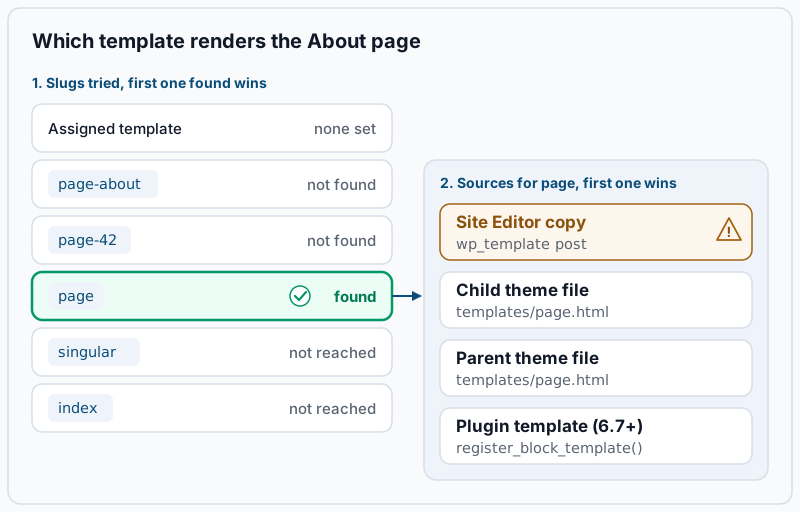
The two lists combine in that order. WordPress settles the slug first, then the source. A Site Editor copy of page never beats a page-about.html file, because page-about is more specific. Classic PHP templates follow the same list. If you want to print the full candidate list for a request, or compare this with classic themes, see the WordPress template hierarchy explained.
Step-by-step
1. Confirm the active theme and where your files go. Templates belong in the folder of the active theme, called the stylesheet directory:
wp eval 'var_dump( wp_is_block_theme() ); echo get_stylesheet(), " -> parent: ", get_template(), "\n";'Example output:
bool(true)
harbor-child -> parent: twentytwentyfive
bool(false) means a classic theme is active, and nothing below applies. If both names are the same, there is no child theme: create one before you add files.
2. List every template the site can use. get_block_templates() returns the templates WordPress would consider, already merged across the database, the child theme, the parent theme and plugins:
wp eval 'foreach ( get_block_templates() as $t ) { echo rtrim( sprintf( "%-15s %-7s file:%-3s %s", $t->slug, $t->source, $t->has_theme_file ? "yes" : "no", implode( ",", (array) $t->post_types ) ) ), "\n"; }'Example output on a fresh Twenty Twenty-Five child theme:
404             theme   file:yes
archive         theme   file:yes
home            theme   file:yes
index           theme   file:yes
page-no-title   theme   file:yes page
page            theme   file:yes
search          theme   file:yes
single          theme   file:yes
source is theme for a file and custom for a database copy. A line reading custom and file:yes means someone edited that template in the Site Editor, so your file is being ignored. The last column lists the post types a custom template may be assigned to. Keep this command; you will run it again.
3. Add a template that applies by name. Create templates/category-news.html in the child theme. Because category-news is the first slug WordPress tries for the News category, the file applies there automatically, and every other category keeps archive:
<!-- wp:template-part {"slug":"header","tagName":"header"} /-->

<!-- wp:group {"tagName":"main","className":"tpl-category-news","layout":{"type":"constrained"}} -->
<main class="wp-block-group tpl-category-news">
	<!-- wp:query-title {"type":"archive"} /-->
	<!-- wp:paragraph -->
	<p>Company news, newest first.</p>
	<!-- /wp:paragraph -->
	<!-- wp:query {"queryId":1,"query":{"inherit":true}} -->
	<div class="wp-block-query">
		<!-- wp:post-template -->
			<!-- wp:post-title {"isLink":true} /-->
			<!-- wp:post-date /-->
			<!-- wp:post-excerpt /-->
		<!-- /wp:post-template -->
		<!-- wp:query-pagination -->
			<!-- wp:query-pagination-previous /-->
			<!-- wp:query-pagination-numbers /-->
			<!-- wp:query-pagination-next /-->
		<!-- /wp:query-pagination -->
	</div>
	<!-- /wp:query -->
</main>
<!-- /wp:group -->

<!-- wp:template-part {"slug":"footer","tagName":"footer"} /-->
"inherit":true makes the Query Loop show the posts of the category being viewed, rather than running its own query. The tpl-category-news class is there so step 6 can prove the template rendered. Because category-news is not one of WordPress’s default template names, the editor also lists it in the template menu for posts and pages. Nobody needs to pick it there: it already applies to the category. Confirm the category slug matches the file name:
wp term list category --slug=news --fields=term_id,slug,countExample output:
+---------+------+-------+
| term_id | slug | count |
+---------+------+-------+
| 7       | news | 23    |
+---------+------+-------+
An empty table means no category has the slug news. Rename the file to match the real slug, such as category-company-news.html, or use category-7.html with the ID.
4. Add a custom template editors can choose. A custom template has no hierarchy name, so it applies only where someone assigns it. Create templates/landing.html for campaign pages that show the page content without the site header and footer:
<!-- wp:group {"tagName":"main","className":"tpl-landing","layout":{"type":"constrained"}} -->
<main class="wp-block-group tpl-landing">
	<!-- wp:post-content {"layout":{"type":"constrained"}} /-->
</main>
<!-- /wp:group -->
Then declare it in the child theme’s theme.json, which gives it a readable title and limits it to pages. Print the custom templates WordPress already knows about first, because the child’s list is merged with the parent’s position by position:
wp eval 'echo wp_json_encode( wp_get_theme_data_custom_templates(), JSON_PRETTY_PRINT ), "\n";'Example output:
{
    "page-no-title": {
        "title": "Page No Title",
        "postTypes": [
            "page"
        ]
    }
}
The parent declares one entry, so the child’s array must repeat it first, then add yours. If you put only landing in the child’s array, it lands in position one and replaces the parent’s page-no-title. Write theme.json in the child theme, or add the customTemplates key to the one you have:
{
	"$schema": "https://schemas.wp.org/trunk/theme.json",
	"version": 3,
	"customTemplates": [
		{
			"name": "page-no-title",
			"title": "Page No Title",
			"postTypes": [ "page" ]
		},
		{
			"name": "landing",
			"title": "Landing Page",
			"postTypes": [ "page" ]
		}
	]
}
name must equal the file name without .html. When postTypes is left out, WordPress offers the template for pages only. Run the wp eval again; it should now list both page-no-title and landing.
5. Assign the custom template to a page. Here the campaign page has ID 57. In the editor, open the page, click the template name in the Page panel of the sidebar, choose Change template, then pick Landing Page in the dialog that opens. From the command line, the same setting is the page_template field, and WordPress refuses names it does not know:
wp post update 57 --page_template=landing
wp post meta get 57 _wp_page_template
Success: Updated post 57.
landingError: Invalid page template. means WordPress does not offer landing for this post type. Check that the file exists, that name matches it exactly, and that postTypes includes this post’s type.
6. Check which template rendered each URL. On staging, create wp-content/mu-plugins/sh-block-template-probe.php. It prints the current template’s ID into the page source, but only when the URL carries ?sh-template:
<?php
add_action( 'wp_footer', function () {
	global $_wp_current_template_id;
	if ( isset( $_GET['sh-template'] ) ) {
		echo "\n<!-- block template: " . esc_html( (string) $_wp_current_template_id ) . " -->\n";
	}
} );
for u in /category/news/ /category/events/ /campaign/ /about/; do
printf '%-18s ' "$u"
curl -s "https://staging.example.com${u}?sh-template" | grep -o 'block template: [^ ]*'
doneExample output:
/category/news/    block template: harbor-child//category-news
/category/events/  block template: harbor-child//archive
/campaign/         block template: harbor-child//landing
/about/            block template: harbor-child//page
The ID always carries the active theme’s name, even when the file sits in the parent theme. Use step 2 to see where a slug really comes from.
Validate it works
Run the template list from step 2 again. Your new files should appear with source set to theme:
category-news   theme   file:yes
landing         theme   file:yes page
Then confirm each page uses the markup you wrote, by the classes you added:
curl -s https://staging.example.com/category/news/ | grep -c 'tpl-category-news'
curl -s https://staging.example.com/campaign/ | grep -c 'tpl-landing'
1
1A 0 means a different template rendered; step 6 names it. When everything matches, remove the probe:
rm wp-content/mu-plugins/sh-block-template-probe.phpTroubleshooting
You edited a template file and nothing changed. Step 2 shows that slug with source set to custom, so a Site Editor copy is winning. In Appearance > Editor > Templates, open the template’s actions and choose Reset to return to the file. Copy anything worth keeping from the edited version into your file first. The same file-versus-database tangle affects headers and footers, as explained in template part conflicts in Full Site Editing.
A page picked up a template nobody assigned. A custom template is named like a hierarchy slug. Twenty Twenty-Five’s page-no-title is one: a page whose slug is no-title matches it by name. Give custom templates names that cannot match a slug, such as landing rather than page-landing.
The custom template is missing from the template list, or shows its file name. If it is missing, postTypes leaves out this post type, or the file is misnamed or outside templates/. If it appears under its file slug, such as landing, WordPress found the file but not its theme.json entry. Either name does not match the file name, or theme.json is not valid JSON. Run python3 -m json.tool theme.json in the child theme folder; any error message names the broken line.
The page is blank, or says the template is empty. From WordPress 6.8, logged-in visitors see “This page is blank because the template is empty”, and everyone else sees an empty page. The template that matched has no blocks, usually because a Site Editor copy was saved empty. Reset it as in the first item above, or add blocks to the file if the file itself is empty.
The parent theme’s template wins over the child’s. The file is in the wrong folder or has the wrong case. It must be templates/ in the child theme, lowercase, ending in .html. Block themes from WordPress 5.8 used block-templates/; core still reads that folder, but keep new work in templates/.
When this is the wrong approach
Templates are static block markup. If the layout should change by user, date or device, a template will not help; that logic belongs in a block or in PHP. If only a section of the content differs, a pattern is lighter than a whole template; reusable blocks vs synced patterns covers the choice. If you are writing a plugin, register its templates with register_block_template() on WordPress 6.7 or later, instead of asking site owners to copy files. A theme file with the same slug still overrides it. And if the site still runs a classic theme, start with the block theme file structure. The official template hierarchy and custom templates pages cover every slug and option.
Running WordPress that earns real money deserves an operator — Stack Harbor runs that stack under Enterprise WordPress; book an infrastructure consult.