WP_Query is the WordPress class that fetches posts. Theme developers reach for it whenever a page needs a list the URL does not already provide, such as related posts or a news strip. It works alongside the Loop, the short while ( have_posts() ) block in every classic theme template that prints the posts WordPress already fetched for the current URL. Problems start when a second list is bolted on: the sidebar shows the wrong title, page 2 of the archive returns a 404, or the page slows down. The fix has two halves. Use new WP_Query followed by wp_reset_postdata() for an extra list, and use the pre_get_posts hook to change the main list for a URL. Avoid query_posts() in both cases.
What you’ll accomplish
- See exactly what the main query asked the database for on any URL, so you change the right thing.
- Write a secondary loop (a related-posts block, a “latest news” strip) that cannot leak into the rest of the template.
- Change the main query with
pre_get_postsso pagination, feeds and conditional tags keep working. - Paginate a custom query on a page template without 404s on page 2.
- Recognise the five mistakes behind most “my query shows the wrong posts” reports.
Prerequisites
- WordPress 6.x on PHP 8.1 or later. Everything below also works on 5.x, but the examples assume current core.
- A child theme or a small custom plugin to hold your code. Edits made to a parent theme are lost on its next update; see creating a WordPress child theme if you do not have one yet.
- A staging copy of the site, plus SSH access with WP-CLI (WordPress’s own command line) so you can run test queries without loading pages.
- Debug logging on staging:
WP_DEBUGandWP_DEBUG_LOGset totrueinwp-config.php, soerror_log()lines land inwp-content/debug.log. - If your theme is a block theme (it has a
templates/index.htmlfile), read the last section first. The Query Loop block may already do what you need without PHP.
How it works
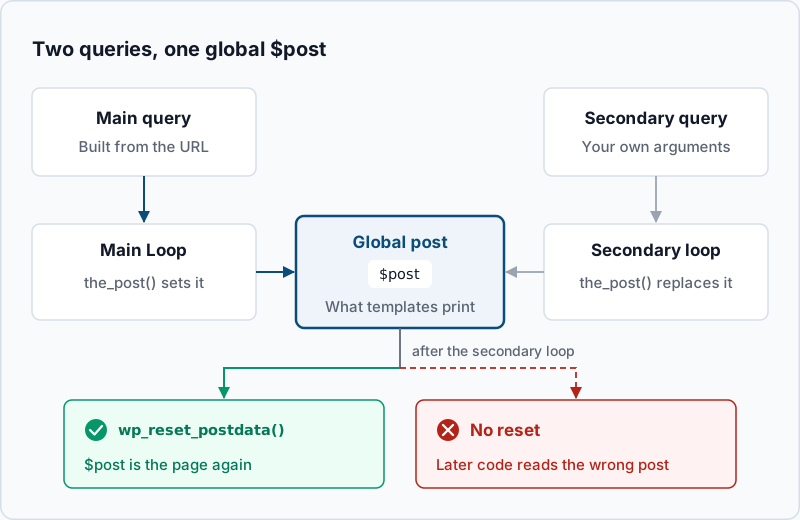
Every front-end request runs one query before any template loads. WordPress reads the URL, turns it into query variables such as category_name=news or paged=2, and runs a WP_Query object stored in the global $wp_query. This is the main query. It decides whether the request is a single post, an archive or a 404, and the template hierarchy picks a file from that answer.
The Loop then walks through the main query’s results. have_posts() asks whether another post is waiting. the_post() moves to it and copies it into the global $post variable. Template tags such as the_title(), the_permalink() and comments_template() read from that global, so they always print “the current post”.
A secondary query is any WP_Query you create yourself. It has its own results and its own position counter. Its the_post() method still writes to the same global $post, because template tags only know about that one variable. After your secondary loop finishes, $post points at the last post in your list. Anything that runs later in the template, such as the comments form or an SEO plugin’s footer code, then reads the wrong post. wp_reset_postdata() copies the main query’s current post back into $post and restores the page.
Four tools touch this machinery, and they are not interchangeable:
| Tool | What it does | Use it for |
|---|---|---|
new WP_Query( $args ) | Runs an extra query with its own results | A second list on the page: related posts, a news strip |
get_posts( $args ) | Same engine, returns a plain array of posts | Short lists where you do not need pagination or template tags |
pre_get_posts hook | Edits the main query before it runs | Changing what an archive, search or blog page lists |
query_posts() | Throws away the main query and replaces it | Nothing; it breaks pagination and conditional tags |
get_posts() sets three defaults that WP_Query does not: it ignores sticky posts, skips the row count used for pagination, and turns off most query filters with suppress_filters. That makes it cheap for a “3 latest posts” list. It also means plugins that hook into query filters, such as multilingual plugins, may not see the query at all.
Step-by-step
1. Log what the main query asked for. Before you add a query, check what the page already fetches. Many “custom query” problems turn out to be a main query that needed one argument changed. Create wp-content/mu-plugins/sh-query-probe.php on staging:
<?php
add_action( 'wp', function () {
	global $wp_query;
	if ( is_admin() || wp_doing_ajax() ) {
		return;
	}
	error_log( 'main query vars: ' . wp_json_encode( array_filter( $wp_query->query ) ) );
	error_log( "main query found {$wp_query->found_posts} posts, {$wp_query->max_num_pages} pages" );
} );
The wp action fires right after the main query runs and before the template loads. Request a page and read the log:
curl -s -o /dev/null https://staging.example.com/category/news/page/2/
tail -n 2 wp-content/debug.log
[29-Oct-2026 08:14:37 UTC] main query vars: {"category_name":"news","paged":"2"}
[29-Oct-2026 08:14:37 UTC] main query found 47 posts, 5 pagesExample output. If the variables already describe the posts you want and only the count or order is wrong, skip to step 4 and change the main query. If you need a separate list next to the main one, continue with step 2.
2. Write a secondary loop that cleans up after itself. This related-posts block goes in a template part, such as template-parts/related.php in your child theme:
<?php
$related = new WP_Query( array(
	'post_type'           => 'post',
	'posts_per_page'      => 3,
	'post__not_in'        => array( get_the_ID() ),
	'category__in'        => wp_get_post_categories( get_the_ID() ),
	'ignore_sticky_posts' => true,
	'no_found_rows'       => true,
) );

if ( $related->have_posts() ) {
	echo '<ul class="related-posts">';
	while ( $related->have_posts() ) {
		$related->the_post();
		printf( '<li><a href="%s">%s</a></li>', esc_url( get_permalink() ), esc_html( get_the_title() ) );
	}
	echo '</ul>';
	wp_reset_postdata();
}
Three arguments do quiet but important work. ignore_sticky_posts stops WordPress from adding sticky posts on top of your three. no_found_rows skips the extra count WordPress runs to work out page numbers, which you do not need for an unpaginated list. And wp_reset_postdata() sits inside the if, because the global $post only changes when the loop actually ran. Load a single post on staging: you should see three linked titles, none of them the post you are reading.
3. Test the query from WP-CLI before it reaches a template. wp eval runs PHP with WordPress loaded, so you can check the SQL and the results without a browser:
wp eval '
$q = new WP_Query( array( "post_type" => "post", "posts_per_page" => 3 ) );
echo preg_replace( "/\s+/", " ", trim( $q->request ) ), PHP_EOL;
echo "found: {$q->found_posts}, pages: {$q->max_num_pages}", PHP_EOL;
foreach ( $q->posts as $p ) { echo "- {$p->post_title}", PHP_EOL; }
'
SELECT SQL_CALC_FOUND_ROWS wp_posts.ID FROM wp_posts WHERE 1=1 AND ((wp_posts.post_type = 'post' AND (wp_posts.post_status = 'publish'))) ORDER BY wp_posts.post_date DESC LIMIT 0, 3
found: 128, pages: 43
- Autumn opening hours
- New invoice portal is live
- Plugin update checklistExample output. $q->request holds the SQL that WordPress sent, which is the fastest way to see whether an argument was ignored. If a category__in or meta_query argument does not appear in the WHERE clause, it was misspelled or given the wrong type. Your table prefix may differ from wp_.
4. Change the main query with pre_get_posts. To show 6 posts on the blog page and hide one category from it, edit the main query instead of adding a second one. Put this in your child theme’s functions.php or a plugin:
add_action( 'pre_get_posts', function ( WP_Query $query ) {
	if ( is_admin() || ! $query->is_main_query() ) {
		return;
	}
	if ( $query->is_home() ) {
		$query->set( 'posts_per_page', 6 );
		$query->set( 'category__not_in', array( 12 ) );
	}
} );
The two guards on the first line are not optional. Without is_admin(), the change also applies to post lists in the dashboard. Without is_main_query(), it applies to every secondary query on the page, including the one from step 2. Use the methods on $query ($query->is_home()) rather than the global is_home(), so you test the query being built. Find the category ID with wp term list category --fields=term_id,name. Request the blog page again. The second log line from step 1 should now show a lower post count, and the page count should equal that count divided by 6, rounded up. The first line will not mention posts_per_page, because it logs the variables parsed from the URL, not the ones your hook set.
5. Paginate a custom query on a page template. Sometimes the list really does belong to a page, such as a “News” page built from a page template. Read the page number from the URL and hand max_num_pages to the pagination links:
<?php
$paged = max( 1, (int) get_query_var( 'paged' ), (int) get_query_var( 'page' ) );
$news  = new WP_Query( array(
	'post_type'      => 'post',
	'posts_per_page' => 10,
	'paged'          => $paged,
) );

while ( $news->have_posts() ) {
	$news->the_post();
	get_template_part( 'template-parts/content', 'excerpt' );
}

echo paginate_links( array(
	'total'   => $news->max_num_pages,
	'current' => $paged,
) );
wp_reset_postdata();
On a normal page, /news/page/2/ sets paged. On a page used as the static front page, WordPress puts the number in page instead, which is why the code reads both. Leave no_found_rows off here, because max_num_pages depends on the row count it would skip.
6. Filter by a custom field only when you need to. meta_query matches values stored in post meta, the per-post custom fields table. This lists events from today onward, soonest first:
$events = new WP_Query( array(
	'post_type'      => 'event',
	'posts_per_page' => 10,
	'meta_key'       => 'event_date',
	'orderby'        => 'meta_value',
	'order'          => 'ASC',
	'meta_query'     => array(
		array(
			'key'     => 'event_date',
			'value'   => wp_date( 'Y-m-d' ),
			'compare' => '>=',
			'type'    => 'DATE',
		),
	),
) );
This works when event_date is stored as YYYY-MM-DD, which sorts correctly as text. Meta queries cannot use an index on the value column, so they slow down as the table grows. If the same filter runs on every page view, a taxonomy (a category-like grouping) or a cached result is usually faster.
Validate it works
Check the three places where a query mistake shows up. First, a paginated URL returns 200, not 404:
curl -s -o /dev/null -w '%{http_code}\n' https://staging.example.com/news/page/2/200Second, the main query is still the page’s own. Open a single post that shows the related-posts block and confirm the comments section and the browser tab title belong to that post, not to the last related post. Third, the log from step 1 shows the arguments you expect for each URL you changed:
grep 'main query' wp-content/debug.log | tail -n 4For a closer look at how many queries a page runs and how long each takes, the Query Monitor plugin guide shows each query with the code that called it. When you are done, delete wp-content/mu-plugins/sh-query-probe.php and set WP_DEBUG back to false.
Troubleshooting
Comments, the title tag or a sidebar widget shows another post. A secondary loop ran without wp_reset_postdata(), or a plugin’s loop did. Add the reset right after your while block. If it still happens, search the theme and plugins for the_post() calls on custom queries with no reset after them.
Page 2 of the blog or an archive returns a 404. The template runs a custom query with a different posts_per_page from the main query. WordPress decides 404 from the main query, before your template code runs. If the main query has 3 pages and yours has 5, pages 4 and 5 do not exist as far as WordPress is concerned. Move the change into pre_get_posts (step 4) and delete the custom query.
The list has more posts than posts_per_page. Sticky posts were added on top. WordPress treats a plain secondary query like a blog home page, which is where sticky posts are added. Set 'ignore_sticky_posts' => true.
A pre_get_posts change broke the admin, the feed or another list. A guard is missing. Keep is_admin() and is_main_query() as the first check, then test the specific condition (is_home(), is_post_type_archive( 'event' ), is_search()). Feeds also run a main query, so add ! $query->is_feed() if the change should not apply there.
The page got slow after adding a query. Look for 'posts_per_page' => -1, which loads every matching post into memory, and for meta_query on large tables. Set a real limit, add 'no_found_rows' => true when you do not paginate, and add 'fields' => 'ids' when you only need IDs. The Query Monitor database optimization guide covers finding the slow query.
When this is the wrong approach
On a block theme, the Query Loop block is the editor’s front end to WP_Query. It can reuse the template’s main query or run its own, with post type, category, author and order settings, and it needs no PHP. Reach for code when you need conditions the block does not offer.
If the goal is changing which template file renders a URL, that happens after the query and is covered in the template hierarchy guide. And if you are building search across thousands of posts, or faceted filters on many custom fields, WP_Query against MySQL will struggle. A search index such as Elasticsearch, or a plugin built on one, fits that job better. The full list of arguments is in the WP_Query reference, and the theme handbook explains the Loop in more depth.
Running WordPress that earns real money deserves an operator — Stack Harbor runs that stack under Enterprise WordPress; book an infrastructure consult.