If you run WordPress on your own VPS (virtual private server), stay self-managed only if you need root access and run the server well. Root access means full administrator control of the machine. Running it well means someone answers alerts after hours, you have tested a restore, and a second person knows the stack. If you need root but miss one of those, keep your server and put patching, backup checks and after-hours response under a support contract. If you cannot name what root buys you, managed hosting removes work you have probably stopped doing already.
Managed hosting takes over the operating system, PHP and database upgrades, certificate renewal, backups and, on most platforms, the night-time alerts. It never takes your plugins, your custom code, your content or your duty to the people who rely on the site. The sections below map that split across three models, then walk you through auditing your own server.
What you’ll accomplish
- Draw the responsibility boundary for three models: a self-managed VPS, a managed platform, and a self-managed server under an external monitoring and response contract.
- Name the recurring operational work of self-managed WordPress as specific tasks on specific cadences, not adjectives.
- Audit your own host for patch backlog, pending reboot, PHP and database lifecycle position, TLS renewal health, restore-provability and external monitoring.
- Separate the failure modes that only bite self-managed setups from the ones that bite you either way.
- Reach a decision you can defend in a room, from four inputs you can answer honestly tonight.
Prerequisites
- SSH with
sudoon the server currently running the site, or the credentials to get there. If you are already on a managed platform with no shell, several commands below will not run — and that absence is itself part of the answer. - WP-CLI on the host, or the ability to install it. Run every
wpcommand as the site’s file owner, never as root. - A backup file you can actually reach, plus enough free disk and MySQL privileges to create and drop a scratch database. The point of step 6 is to restore it, not to admire it.
- Command names differ by family. Debian and Ubuntu use
apt, put PHP under/etc/php/<version>/, and drop a/var/run/reboot-requiredflag file. RHEL, AlmaLinux and Rocky usednf, put PHP under/etc/php.d/or an SCL prefix, and exposeneeds-restartingfrom thednf-utilspackage. Where the two differ, both forms are shown. - A maintenance window is not required for the audit. Everything here is read-only except the restore test, which touches only a throwaway database.
How it works
Every WordPress site sits on the same stack whether you rent a VPS or a platform: hardware and network at the bottom, then a hypervisor, an operating system, a web server and runtime, TLS, backups, monitoring, then WordPress core, then your plugins and themes, then your content. The models differ in exactly one respect — where the line falls between what someone else operates and what you operate.
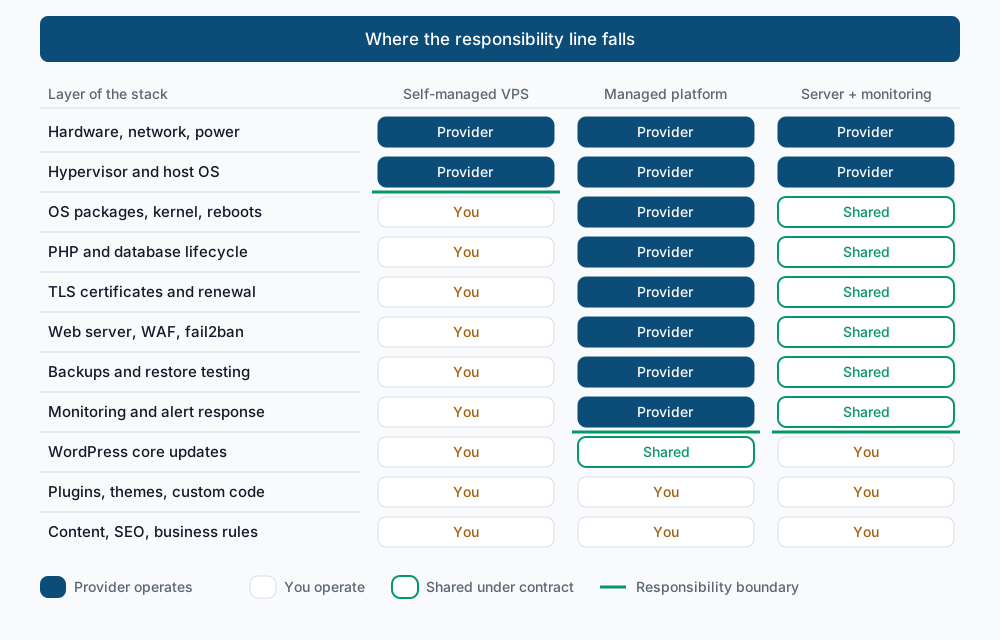
Read that diagram bottom-up. On a self-managed VPS the provider’s job ends two layers in: they keep the hardware alive and the hypervisor running, and everything from apt upward is yours. On a managed platform the line rises to just under WordPress core. The third column is the middle ground people forget exists: you keep your own server, but patching, backup verification and after-hours response run under a contract with someone whose job it is to answer — the line lands where the platform’s does, reached by shared work on a box you still control.
Note what does not move in any column. Plugins, themes, custom code, content and business rules sit above the line in all three. That is the single most-misread part of this decision.
What managed never takes off your plate
A managed platform will not review a plugin before you install it, will not notice that your theme’s new hero block ships a 4 MB image, and will not write your custom code. It will not stop an editor from deleting a category. Most incidents that take a busy WordPress site down originate above the line — a plugin vulnerability, a bad update, a slow query introduced by a new feature — and those follow you to any host.
What it genuinely removes is the layer under that: OS package patching and the reboots to take a new kernel, PHP and database major-version moves, TLS issuance and renewal, backup execution and retention, log rotation and disk headroom, WAF and rate-limit maintenance, and someone watching a dashboard at hours you are asleep. That is real work, and it is the work that most small teams quietly stop doing after month four.
The recurring work, named
| Work | Cadence | What skipping it looks like |
|---|---|---|
| OS security packages | Weekly to monthly | A glibc or openssl advisory sits unpatched for a year |
| Reboot to take a new kernel | Quarterly at minimum | uptime reads 400 days and the running kernel is not the installed one |
| PHP major version moves | Every 12 to 24 months | Pinned to an end-of-life branch with no security fixes; plugins start dropping support |
| MySQL or MariaDB major upgrades | Every 2 to 4 years | Distribution upgrade blocked; dumps that no longer import into current versions |
| TLS renewal | Automated, verified monthly | An expired certificate on a Saturday and browsers refusing the site outright |
| Backup verification | Monthly restore test | Backups that have been failing silently since a disk filled in March |
| Log rotation and disk headroom | Continuous | /var at 100 percent, MySQL refusing writes, 500s across the site |
| WAF and fail2ban tuning | Quarterly | Either no brute-force defence at all, or a jail that locks out your own office |
| External monitoring and response | Continuous | Nobody knows the site is down until a customer emails on Monday |
None of that is hard. All of it is easy to defer, and every line of it competes with work someone is actually asking you for.
What you give up when you go managed
Root, first. Then anything that needs it: arbitrary daemons (your own Redis, a search engine, a persistent queue worker, a nightly import process), PHP extensions outside the platform’s list, custom compile flags, cron granularity finer than the platform’s floor, kernel and sysctl tuning, custom web-server directives, arbitrary listening ports, and direct database access from outside the platform.
That matters for a real minority of sites: headless setups with their own render service, media pipelines that shell out to ffmpeg, integrations that need a long-running worker, or a data path a contract obliges you to control. For most content sites and most WooCommerce stores it does not matter — and if you cannot name the daemon you would lose, you are not keeping the control you think you are.
Step-by-step: audit your own server
1. Measure the patch backlog. Do not trust memory; count.
sudo apt update -qq && apt list --upgradable 2>/dev/null | headListing...
libssl3/jammy-security 3.0.2-0ubuntu1.19 amd64 [upgradable from: 3.0.2-0ubuntu1.15]
linux-image-generic/jammy-security 5.15.0.125.122 amd64 [upgradable from: 5.15.0.113.114]
php8.1-fpm/jammy-security 8.1.2-1ubuntu2.20 amd64 [upgradable from: 8.1.2-1ubuntu2.14]On the RHEL family, sudo dnf check-update prints the same information and exits 100 when updates exist, 0 when none do — worth knowing if you script it. A handful of pending packages is normal. Three pages of them, including openssl or the kernel, tells you nobody has run updates in months.
2. Check whether the box is running what it has installed.
uptime -p && ls -l /var/run/reboot-required 2>/dev/null || echo "no reboot flag"up 1 year, 2 months, 6 days
-rw-r--r-- 1 root root 32 Mar 14 06:22 /var/run/reboot-requiredThat pair is the single most revealing command on this page: a kernel update was installed nearly six months ago and the running kernel is still the old one. On RHEL, AlmaLinux and Rocky the equivalent is needs-restarting -r, which prints Reboot is required or No core libraries or services have been updated since boot-up.
3. Locate yourself on the PHP lifecycle.
php -vPHP 8.1.2-1ubuntu2.14 (cli) (built: Aug 18 2026 11:41:11) (NTS)Compare that branch against the official PHP supported versions table. A branch past its security-support end date gets no fixes at all, from anyone. Remember php -v reports the CLI binary — the version serving your site is the FPM pool’s, so also run php-fpm8.1 -v or list /etc/php/ to see which branches are installed. Before you move a branch, work through checking plugin compatibility for a PHP version bump.
4. Do the same for the database.
mysql -Vmysql Ver 15.1 Distrib 10.6.18-MariaDB, for debian-linux-gnu (x86_64)Note the branch and find its end-of-life date. Major database upgrades are the ones teams postpone longest, because they need a real rollback plan.
5. Prove TLS renews rather than assuming it.
echo | openssl s_client -connect example.com:443 -servername example.com 2>/dev/null | openssl x509 -noout -dates
systemctl list-timers --all --no-pager | grep -iE 'certbot|acme'
notBefore=Aug 3 04:11:02 2026 GMT
notAfter=Nov 1 04:11:01 2026 GMT
Tue 2026-09-09 23:12:00 UTC 10h left Tue 2026-09-09 05:31:04 UTC 7h ago certbot.timer certbot.serviceA live certificate with no renewal timer behind it is a dated outage, not a working setup.
6. Restore a backup, do not just list one. This is the step people skip, and the only one that produces evidence.
sudo mysql -e "CREATE DATABASE restore_test CHARACTER SET utf8mb4;"
time gunzip -c /var/backups/site-2026-09-08.sql.gz | sudo mysql restore_test
sudo mysql restore_test -e "SELECT option_value FROM wp_options WHERE option_name='siteurl'; SELECT COUNT(*) AS published FROM wp_posts WHERE post_status='publish';"
real 4m12.338s
user 0m21.702s
sys 0m6.115s
+---------------------+
| option_value |
+---------------------+
| https://example.com |
+---------------------+
+-----------+
| published |
+-----------+
| 1842 |
+-----------+Three things came out of that: the dump imports cleanly, the row counts are plausible, and the database restore takes four minutes — the floor of your recovery time, before a single file is touched. Confirm the file side too with tar -tzf /var/backups/files-2026-09-08.tar.gz | head, then clean up with sudo mysql -e "DROP DATABASE restore_test;". The full procedure, including the wp-content half, is in verifying a WordPress backup is actually restorable.
7. Find out whether anything outside your network is watching.
sudo awk -F'"' '{print $6}' /var/log/nginx/access.log | sort | uniq -c | sort -rn | head -5 41229 Mozilla/5.0 (Windows NT 10.0; Win64; x64) AppleWebKit/537.36 ...
8814 Mozilla/5.0 (compatible; Googlebot/2.1; +http://www.google.com/bot.html)
2160 Mozilla/5.0+(compatible; UptimeRobot/2.0; http://www.uptimerobot.com/)
944 Mozilla/5.0 (compatible; bingbot/2.0; +http://www.bing.com/bot.html)Apache writes to /var/log/apache2/access.log on Debian and Ubuntu, /var/log/httpd/access_log on the RHEL family. A monitoring agent shows up as a steady, boring count. If no such line exists, nothing outside the box is checking the site, and your outage detection is whichever customer notices first.
8. Read the schedule that is supposed to be doing all this.
sudo systemctl list-timers --all --no-pager | head -8
crontab -l 2>/dev/null; sudo crontab -l 2>/dev/null
NEXT LEFT LAST PASSED UNIT ACTIVATES
Tue 2026-09-09 23:12:00 UTC 10h Tue 2026-09-09 05:31:04 UTC 7h ago certbot.timer certbot.service
Wed 2026-09-10 00:00:00 UTC 11h Tue 2026-09-09 00:00:14 UTC 13h ago logrotate.timer logrotate.service
Wed 2026-09-10 06:14:31 UTC 17h Tue 2026-09-09 06:11:02 UTC 6h ago apt-daily-upgrade.timer apt-daily-upgrade.service
n/a n/a Mon 2025-10-13 02:30:11 UTC 10 months ago site-backup.timer site-backup.service
0 3 * * * /usr/local/bin/site-backup.sh >/dev/null 2>&1Look for backup jobs, unattended-upgrades, logrotate and the certificate timer — and read the LAST column, not the list of unit names. The last two lines are the whole point: site-backup.timer has no next run and last fired ten months ago, and root’s crontab still holds a 3 a.m. backup entry that nobody has watched. The nightly backup everyone assumes exists stopped in October and said nothing. A timer that last fired ten months ago is worse than no timer, because you believed in it.
Reading the audit
Four answers decide this, and none of them are about features.
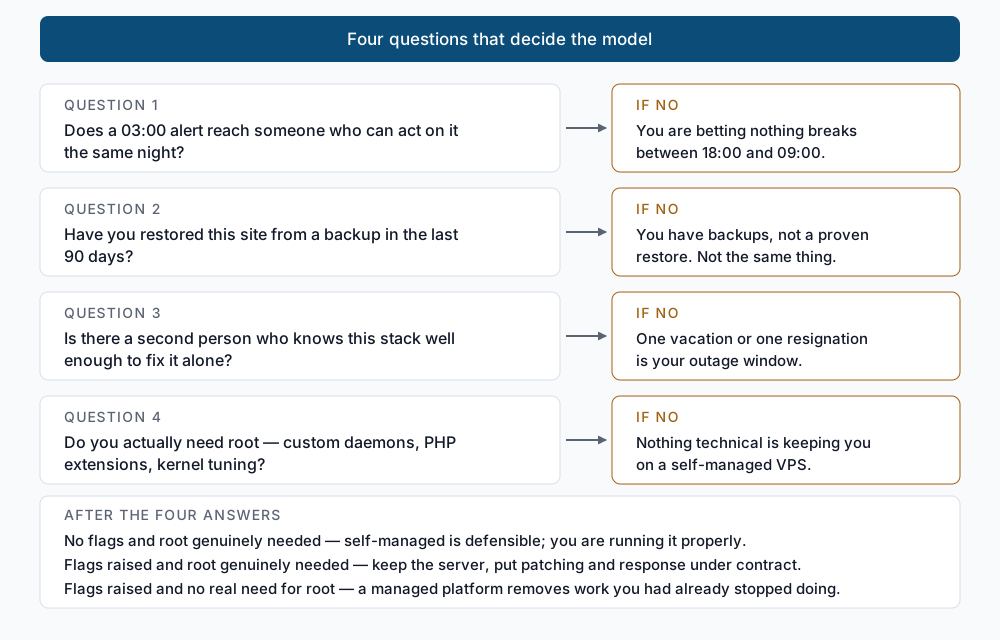
If you cleared all four gates and you genuinely need root, stay self-managed; you are running it properly and a platform would take away something you use. If you need root but raised a flag, the middle column is the honest answer — keep the server, put the patching, backup verification and after-hours response under a contract with someone whose job is to answer. If you raised a flag and cannot name what root buys you, a managed platform simply removes work you had already stopped doing.
Validate it works
Confirm the site itself is unmodified before you draw conclusions from anything above, and confirm your scratch database is gone:
sudo -u www-data wp core verify-checksums --path=/var/www/example.com
sudo mysql -e "SHOW DATABASES LIKE 'restore_test';"
Success: WordPress installs verify against checksums.An empty result from the second command is correct — the throwaway database is gone. If verify-checksums reports modified core files, resolve that before any hosting decision; you may be looking at a compromise rather than a comparison. The full command set is in the WP-CLI command reference.
Troubleshooting
apt list --upgradable is empty but the kernel is old. unattended-upgrades has been installing patches and nobody has rebooted. Compare uname -r against the newest installed linux-image package; if they differ, the fixes are on disk and not in memory.
needs-restarting is not found on AlmaLinux or Rocky. It ships in dnf-utils (yum-utils on older releases). Install that package, then use needs-restarting -r for the reboot verdict and needs-restarting -s for services holding stale libraries.
php -v disagrees with what the site reports. You are reading the CLI binary. Check the FPM pool instead — ls /etc/php/ on Debian and Ubuntu shows every installed branch, and the pool config names the one your vhost proxies to. A site can serve 8.2 while php on the shell is 7.4.
The restore test fails on collation. A dump taken from MySQL 8 carrying utf8mb4_0900_ai_ci will not import into MariaDB, which does not have that collation. That is not a broken backup — it is a portability constraint you need to know about before the night you need it.
The certbot timer is active but the certificate is not renewing. Run sudo certbot renew --dry-run. Renewal usually fails on an HTTP-01 challenge that a new redirect rule or WAF policy now blocks, and it fails silently because nothing reads the output.
When this is the wrong approach
This page compares operating models, not vendors — evaluating a specific platform’s feature set or its restore tooling is a separate exercise. It also assumes a single WordPress install of ordinary size; a fleet of two hundred sites changes the arithmetic entirely, because per-site work that is trivial once becomes the whole job at scale.
If your site is small, static, rarely updated and generates no revenue, none of this needs deciding. Run it wherever it already runs, keep an off-server backup, and spend the attention elsewhere. The audit above only pays off when downtime costs you something real.
Running WordPress that earns real money deserves an operator — Stack Harbor runs that stack under Enterprise WordPress; book an infrastructure consult.