Run wp search-replace, not a SQL UPDATE ... SET col = REPLACE(col, 'old', 'new'). WordPress keeps much of its configuration as serialized PHP, and that format writes a byte-length prefix in front of every string — s:23:"https://old.example.com". A raw SQL replace rewrites the string and leaves the 23 behind, so unserialize() returns false, the option falls back to its default, and nothing appears in the error log. WP-CLI’s search-replace unserializes each value, replaces inside the structure, and re-serializes with the prefix recomputed. On cPanel the whole job is seven moves: export a restorable backup, dry-run, read the report, run it, flush every cache, fix the layers that were never in the database, and verify.
What you’ll accomplish
- The old host rewritten across
wp_options,wp_posts,wp_postmetaand plugin-owned tables, with serialized values still parsing afterwards. - A backup taken first and a restore command you have actually read, so a bad run costs minutes rather than a night.
- WP-CLI running as the account user, against the PHP version the site really uses.
- The layers
search-replacecannot reach handled deliberately:wp-config.phpconstants, builder and page caches,.htaccess, CDN and plugin settings. - A verification pass covering the database, the rendered HTML and the response headers.
Prerequisites
- SSH into the cPanel account as the account user, or cPanel’s Terminal, which logs you in as that user already. WP-CLI refuses to run as root and suggests
--allow-root; treat that as a warning, not an instruction. Installing WP-CLI on cPanel and running it as the account user covers the habits this guide assumes. - WP-CLI 2.x available as
wp, or awp-cli.pharin the account home. - The docroot path.
/home/<user>/public_htmlfor the primary domain; addon domains and subdomains each have their own, and running from the wrong one silently targets the wrong site. - Free disk for a full database export — check with
wp db size --size_format=mb— and a window where writes are unlikely.
Multisite changes the shape of every command below; the --network notes say where. If you are pushing a staging copy to production rather than renaming a live site, read what moves and what never moves between staging and production first.
How it works
PHP’s serialize() is a length-prefixed format. A string is stored as s:<byte length>:"<the string>", an array as a:<element count>:{...}, and WordPress leans on it constantly: widget layouts, theme mods, WooCommerce shipping zones, ACF field groups, most plugin settings in wp_options, and much of wp_postmeta. The length is not a checksum — it is how the parser knows where the string ends. Change the string without changing the number and the parser reads the wrong count of bytes, hits a character it did not expect, and gives up.
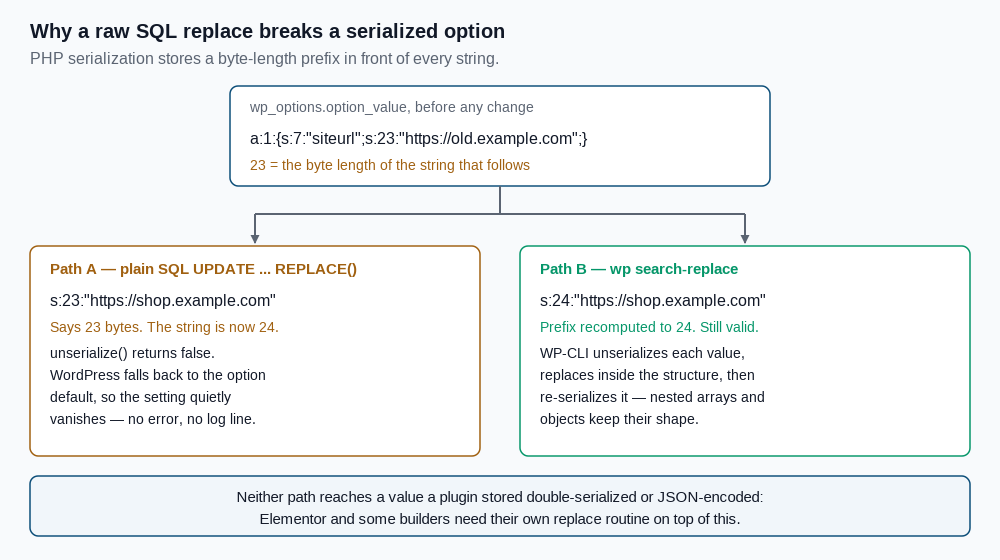
The failure is quiet, which is what makes it expensive. unserialize() returns false rather than raising; get_option() sees false and hands back the default; the settings screen renders empty as though nobody had configured it. No failed query, no fatal, no log line. You find out when a customer opens a page builder and half the widgets are gone.
There is a trap in the middle: when the old and new hosts happen to be the same byte length, a raw replace appears to work. old.example.com and new.example.com are both 15 bytes, so the naive sed pass survives — until the migration where the lengths differ. The serialized-data runbook goes deeper on the format and on JSON-in-meta cases.
wp search-replace sidesteps this by walking values rather than bytes: it reads each cell, unserializes it when it parses as serialized data, recurses into nested arrays and objects, replaces the needle wherever it appears, and re-serializes with correct prefixes.
The flags that actually change the outcome:
--dry-runruns the whole pass and writes nothing. The report is the point: table/column pairs with a replacement count each, ending inSuccess: N replacements to be made. Read it as a shape —wp_posts.post_contentandwp_options.option_valueshould dominate, and a table you do not recognise carrying thousands of hits deserves a look before you commit.--all-tablesversus the default. Without it, WP-CLI works on the tables WordPress registers in$wpdb— core tables plus any a plugin registered properly. That misses tables a plugin created with its ownCREATE TABLEand never registered, and anything not carrying the site’s prefix.--all-tables-with-prefixwidens to every table sharing the prefix;--all-tablestakes every table in the database. On a database holding only this site,--all-tablesis the safe default; on a shared one it is the dangerous one.--preciseforces the replacement through PHP for every row instead of letting MySQL handle rows WP-CLI judged free of serialized data. It removes that judgement call at the cost of speed — worth it for heavy page-builder content, custom tables, anything you would rather be slow about.--skip-columns=guidprotectswp_posts.guid. The guid is a permanent identifier feed readers use to decide whether an item is new; rewrite it and every subscriber’s reader treats your back catalogue as freshly published. It looks like a URL and is not one — attachments are located from_wp_attached_filemeta and the upload URL, never the guid — so leaving it alone breaks nothing.--report-changed-onlytrims the report to rows that actually changed. On a site with sixty tables that is the difference between a report you read and one you skim.--networkextends the pass across a multisite network:wp_blogs,wp_site,wp_signups, and every per-sitewp_<id>_optionstable. Without it you rewrite the main site and leave subsites pointing at a host that no longer answers.
One habit to keep: search for the bare host, not the full URL. Block editor content and plugin JSON store URLs with escaped slashes, so a search string of https://old.example.com never matches them while old.example.com matches everywhere.
Step-by-step
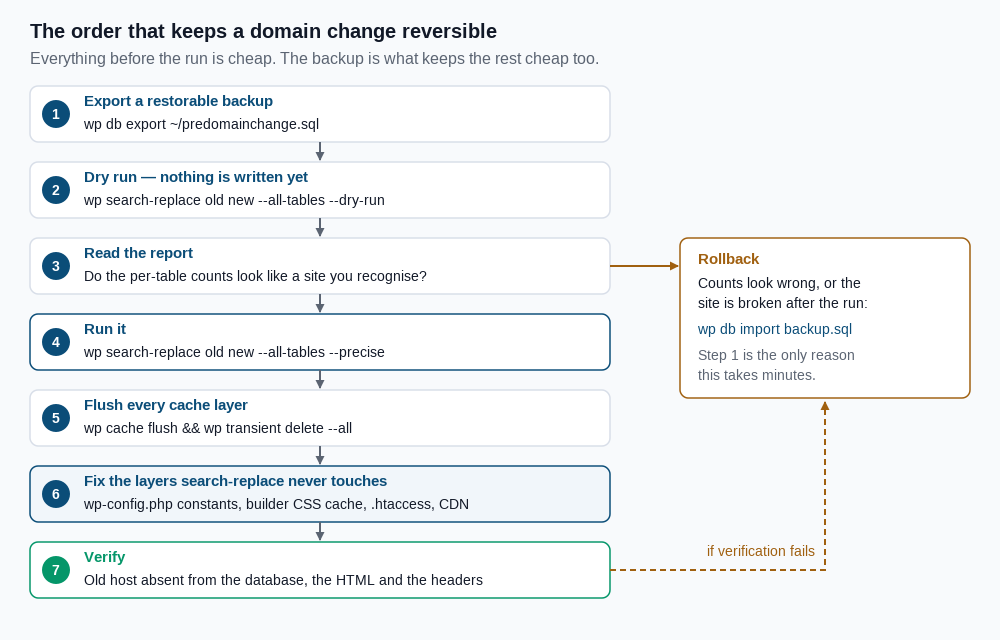
-
Pin the PHP binary and the docroot. On many cPanel servers the shell’s
phpis the server default, not the version MultiPHP Manager assigned to this domain, and WP-CLI under the wrong PHP can fail on syntax in a modern plugin.php -v ls -d /opt/cpanel/ea-php*/root/usr/bin/php cd ~/public_html && wp --infowp --infoprints the PHP binary, PHP version and WP-CLI version in use. If the PHP version does not match the site’s, call the right binary directly:/opt/cpanel/ea-php82/root/usr/bin/php $(command -v wp) --path=/home/USER/public_html core versionA WordPress version number confirms the pairing; “Error: This does not seem to be a WordPress installation” means the
--pathis wrong. -
Export a backup you can restore. This is what makes every later step reversible.
wp db export ~/predomainchange.sql
ls -lh ~/predomainchange.sql && tail -c 200 ~/predomainchange.sql
Success prints
Success: Exported to '/home/USER/predomainchange.sql'. Check the size is plausible and the tail ends on a complete statement rather than mid-INSERT. Read the restore command now rather than at 2 a.m.:wp db import ~/predomainchange.sqlBecause
wp db exportwritesDROP TABLE IF EXISTSbefore eachCREATE TABLE, the restore replaces tables rather than merging into them. It will not remove tables created after the export, so drop those by hand. -
Count what you expect to change, then dry-run. The count gives the dry-run report something to be measured against. Search the bare host, so escaped and protocol-relative forms are covered too.
wp db search 'old.example.com' --all-tables --stats
wp search-replace 'old.example.com' 'new.example.com' --all-tables --skip-columns=guid --precise --dry-run --report-changed-only
wp db searchends with a summary of tables searched and matches found; redirect it to a file on a large site, because the row output is verbose. The dry run printsTable / Column / Replacements / Typerows and a closingSuccess: N replacements to be made. A far largerNthan the search found usually means your string is a substring of something else —example.commatchingnotexample.com— and a far smaller one means the pass is not reaching the tables holding the data. -
Run it. Drop
--dry-run; keep everything else identical, so what runs is what you reviewed.wp search-replace 'old.example.com' 'new.example.com' --all-tables --skip-columns=guid --precise --report-changed-onlyThe final line becomes
Success: Made N replacements, andNshould match the dry run. On multisite add--network. To stage the result instead,--export=changed.sqlwrites the transformed data to a file rather than the database. -
Handle the protocol as its own pass. Doing host and scheme in one string is where half-rewritten databases come from. Change the host first, then the scheme on the new host:
wp search-replace 'http://new.example.com' 'https://new.example.com' --all-tables --skip-columns=guid --precise --report-changed-only
wp option update siteurl 'https://new.example.com'
wp option update home 'https://new.example.com'
Each
wp option updateprintsSuccess: Updated 'siteurl' option.— or reports the value unchanged if search-replace already did it, which is fine. For an http-to-https move with no host change, this pass is the whole job; the leftovers are covered in finding every remaining http source. -
Flush every cache layer. Rewritten rows mean nothing while a cache is still serving the old bytes.
wp cache flush
wp transient delete --all
wp rewrite flush
wp cache flushclears the persistent object cache if a drop-in is installed, reportingSuccess: The cache was flushed.; with no drop-in it is a no-op. Then purge the page cache from its own plugin — LiteSpeed Cache, WP Rocket and W3 Total Cache each keep a store on disk that a database replace never touches. Purge the CDN separately. -
Fix what was never in the database. This is the half
search-replacecannot do, and the half behind every “I ran it and the site still shows the old domain” report.grep -n "WP_HOME\|WP_SITEURL\|WP_CONTENT_URL\|DOMAIN_CURRENT_SITE" ~/public_html/wp-config.php grep -rn "old\.example\.com" ~/public_html/wp-content/themes/ ~/public_html/.htaccessAn empty result from both is what you want.
WP_HOMEandWP_SITEURLinwp-config.phpoverride the database entirely, so a perfect search-replace changes nothing visible while those constants hold the old host — and the Settings screen greys the fields out rather than saying why. Then the rest: hardcoded URLs in theme templates and child-theme CSS,.htaccessredirects andRewriteBase, CDN origin settings, SMTP and analytics plugin config, and any API callback URL registered with a third party.Page builders need their own routine. Elementor stores page data as JSON inside serialized meta — double-encoded — so a generic replace can miss it, and its compiled CSS carries absolute URLs on disk regardless. Use Elementor’s Tools → Replace URL screen, then flush its CSS cache:
wp elementor flush-cssRun
wp help elementorto see which subcommands your version exposes. Divi, Beaver Builder and WPBakery cache compiled CSS the same way — clear theirs before deciding the replace failed.
Validate it works
Check the database, then the rendered page, then the headers. Any one alone will lie to you.
wp option get siteurl && wp option get home
wp db search 'old.example.com' --all-tables --stats
wp db check
curl -sI https://new.example.com/ | head -20
curl -s https://new.example.com/ | grep -c 'old\.example\.com'
siteurl and home must both carry the final scheme and host. wp db search should report zero matches outside wp_posts.guid; guid hits are expected. wp db check should return OK for every table. curl -sI should show 200 with no redirect back to the old host. The last command should print 0 — any other number means finding which element still carries the old URL, which tells you which layer from step 7 you missed.
Then open the screens holding serialized settings: Appearance → Widgets, Customizer, WooCommerce shipping zones, and every page-builder template. One that renders empty where it held configuration is the signature of a broken unserialize; restore from step 2 and run again with --precise. Finally, submit a form, complete a test checkout if the site takes money, and watch the account’s error log for a few hours.
Troubleshooting
A settings screen is blank after the run. A serialized value did not survive — usually a run without --precise on data a plugin stored unusually, or a value already corrupt beforehand. Restore with wp db import ~/predomainchange.sql, confirm the screen is populated again, and re-run with --precise. If it breaks twice, that plugin needs its own migration routine.
Zero replacements reported, but the old domain is everywhere. Either you ran against the wrong install — check wp --info and --path — or the stored form differs from your search string. Search the bare host with no scheme: wp db search 'old.example' --all-tables --stats matches escaped and unescaped forms alike.
The replace worked but the site still serves the old domain. In order of likelihood: WP_HOME or WP_SITEURL in wp-config.php, an unpurged page cache, a CDN still holding the old origin, or a .htaccess redirect. The grep pair in step 7 finds the first and last in one shot.
“Error: YIKES! It looks like you’re running this as root.” You are on root’s shell, not the account’s. Do not add --allow-root; switch users so anything written stays owned correctly:
su -l USER -c 'cd ~/public_html && wp option get siteurl'Multisite subsites still resolve to the old host. --network was missing, or DOMAIN_CURRENT_SITE in wp-config.php still names the old domain. Fix the constant, re-run with --network, and confirm with wp site list --field=url.
When this is the wrong approach
If the database is shared with another application or a second WordPress install, --all-tables rewrites rows that are not yours. Scope the run with --all-tables-with-prefix or an explicit table list, and consider separating the databases first — moving a single database between cPanel accounts covers that cleanly.
If the string you are replacing sits inside a longer hostname that must survive — replacing example.com while staging.example.com stays — search-replace cannot tell them apart. Replace the longest forms first, most specific to least, verifying between passes.
If the site is a live store, this is not a casual shell exercise: freeze writes, run it, verify, then reopen. The full cutover runbook shows the ordering when a host move is involved too. The WP-CLI search-replace reference documents every flag, and cPanel’s documentation covers MultiPHP and Terminal.
Running WordPress that earns real money deserves an operator — Stack Harbor runs that stack under Enterprise WordPress; book an infrastructure consult.