If a WooCommerce attribute refuses to show up in the “Filter by Attribute” block, the cause is almost always the same: the attribute is a per-product custom attribute rather than a global pa_ taxonomy, or it is global but has “Enable archives” turned off. Filtering in WooCommerce is not a rendering feature — it is a taxonomy query plus a lookup-table range scan, driven by filter_<slug>, query_type_<slug>, min_price and max_price query vars. Once you know that, everything else follows: why filtered pages miss your page cache, why facet counts go stale, why the price slider collapses to a single value, and at what catalog size the built-in filters stop being the right tool. This guide walks the mechanism end to end and gives you the checks to run against a live store.
What you’ll accomplish
- Read a filtered catalog URL and predict exactly which SQL it produces.
- Confirm every attribute you want to filter on is a global, archive-enabled
pa_taxonomy with terms actually assigned. - Verify the price filter is backed by a populated
wc_product_meta_lookuptable instead of a postmeta scan. - Handle filtered query strings at the cache layer so facets do not turn every page view into an origin request.
- Decide, with a number rather than a feeling, when to move from core filter blocks to an index-backed approach.
Prerequisites
- WooCommerce 8.0 or newer on WordPress 6.4 or newer. Older WooCommerce ships the classic “Filter Products by Attribute” widget; current versions ship block equivalents, and recent releases consolidate them into a single Product Filters block. The query vars described here are identical across all three generations, which is why this guide applies to all three.
- A block theme or a classic theme with a widget area on the shop archive. Block themes place filters inside the Product Catalog template; classic themes use the shop sidebar.
- WP-CLI access with the WooCommerce command package available. Every
wp wcsubcommand goes through the REST controllers, so it needs--user=with an administrator ID. - Shell access to the database via
wp db query, and permission to read your cache configuration (Nginx, Varnish, or a caching plugin). - Assume a staging copy. Regenerating lookup tables on a large production catalog is a write-heavy background job.
How it works
A filtered catalog URL carries its state entirely in the query string. Nothing is stored server-side, and no rewrite rule is involved.
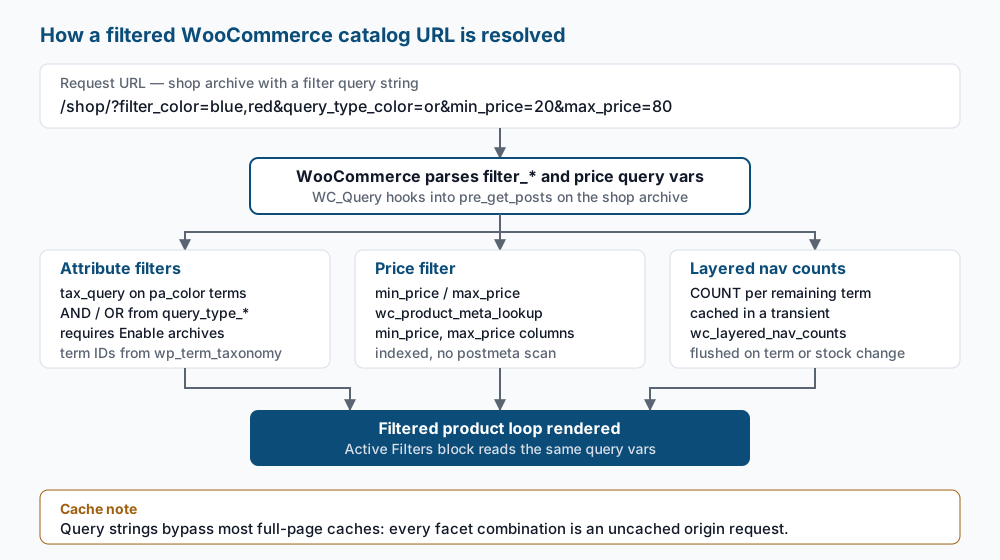
Attribute filters. For a global attribute pa_color, the filter block emits ?filter_color=blue,red — the taxonomy name minus the pa_ prefix. WooCommerce turns that into a tax_query clause against pa_color. A companion query_type_color var chooses the operator: and means a product must carry every selected term, or means any one is enough. Which one applies is a per-filter setting. or is what shoppers expect from colours and sizes; and suits orthogonal facets, and produces empty result sets fast when applied to values of the same attribute.
This is why a custom attribute can never be filtered. A custom attribute lives as a pipe-separated string inside one serialized postmeta value on a single product; there is no taxonomy, no terms, and nothing for tax_query to join against. The distinction, and how to convert products already built the wrong way, is covered in WooCommerce variable products and attributes. The second requirement is the “Enable archives?” checkbox on the attribute, stored as attribute_public in wp_woocommerce_attribute_taxonomies. It registers the taxonomy as public and gives the filter UI something to link to.
Price filtering does not touch postmeta. WooCommerce maintains wc_product_meta_lookup, a flat table with one row per product and indexed min_price and max_price columns, precisely so a range filter is a BETWEEN on indexed integers rather than a scan across a serialized meta table. For a variable product, min_price and max_price span its variations, which is what makes a price slider meaningful on a variable catalog.
Layered nav counts are the expensive part. To render “Blue (42)” the filter has to count matching products for every remaining term under the current filter state. WooCommerce caches that result in a transient whose name begins with wc_layered_nav_counts, keyed per taxonomy. With a persistent object cache the transient lives in memory; without one it becomes a wp_options row, and you get option-table growth plus a database write on every cold facet combination. Getting a persistent object cache in place first is described in Redis object cache for WordPress.
The caching problem is structural, not a misconfiguration. Full-page caches key on the full URL including the query string, so ?filter_color=blue and ?filter_color=blue,red are distinct cache entries — and most stacks are configured to bypass the cache entirely when unknown query args are present. Every facet click therefore lands on PHP and MySQL.
Step-by-step
-
List your attributes and check the archive flag. The
has_archivesfield is the API name for the “Enable archives?” checkbox.wp wc product_attribute list --user=1 --fields=id,name,slug,type,has_archivesYou should see one row per global attribute with
slugvalues likepa_color. Any attribute you intend to filter on must showhas_archivesas1ortrue. If an attribute you expected is missing entirely, it is a custom attribute and cannot be filtered. -
Enable archives on an attribute that is missing it. Substitute the numeric ID from the previous step.
wp wc product_attribute update 3 --user=1 --has_archives=trueThe command prints
Success: Updated product_attribute 3.Flush rewrite rules afterwards so the new public taxonomy resolves, withwp rewrite flush --hard. -
Confirm terms are actually assigned to published products. An archive-enabled attribute with zero assignments renders an empty filter block.
PREFIX=$(wp db prefix)
wp db query "SELECT t.name, tt.count FROM ${PREFIX}term_taxonomy tt JOIN ${PREFIX}terms t ON t.term_id = tt.term_id WHERE tt.taxonomy = 'pa_color' ORDER BY tt.count DESC;"
Expect a list of term names with non-zero counts. A term whose count is
0will not appear in the filter unless you have disabled hiding of empty terms. -
Verify the price lookup table is populated. Rows with
min_priceofNULLare products the price filter cannot see.wp db query "SELECT COUNT(*) AS total, SUM(min_price IS NULL) AS missing_min, MIN(min_price), MAX(max_price) FROM $(wp db prefix)wc_product_meta_lookup;"missing_minshould be0, and the min/max pair should match the real bounds of your catalog. Iftotalis far below your published product count, the table is stale. -
Regenerate the lookup table if it is stale. Find the tool ID first rather than guessing it.
wp wc tool list --user=1 --fields=id,name
wp wc tool run regenerate_product_lookup_tables --user=1
The run returns a success response confirming the regeneration was scheduled. It goes through Action Scheduler, so on a large catalog let the queue drain —
wp action-scheduler run, or the scheduled actions screen — before re-running step 4. -
Exercise the query vars directly. This is the fastest way to prove the mechanism without clicking through a theme.
curl -s "https://example.com/shop/?filter_color=blue&query_type_color=or" | grep -c 'class="product'
curl -s "https://example.com/shop/?filter_color=blue,red&query_type_color=and" | grep -c 'class="product'
The
orvariant should return at least as many matches as theandvariant. If both return the same number and that number equals your unfiltered page size, the filter is not being applied — the request is probably being served from a cached copy of the unfiltered archive. -
Decide deliberately how the page cache treats filter args. Bypassing on known filter args keeps filtered results correct without letting invented parameters fragment the cache. On Nginx with a
fastcgi_cache, set the bypass variable from the argument names:set $skip_cache 0; if ($arg_filter_color != "") { set $skip_cache 1; } if ($arg_min_price != "") { set $skip_cache 1; } if ($arg_max_price != "") { set $skip_cache 1; } fastcgi_cache_bypass $skip_cache; fastcgi_no_cache $skip_cache;After reloading with
nginx -t && systemctl reload nginx, a filtered request should return aMISSorBYPASScache header while the plain/shop/URL still returnsHIT. Broader catalog tuning around this sits in WooCommerce performance tuning. -
Inspect and clear the layered nav count transients. These are the rows that grow if you have no persistent object cache.
wp db query "SELECT option_name, LENGTH(option_value) AS bytes FROM $(wp db prefix)options WHERE option_name LIKE '%wc_layered_nav_counts%';"
wp transient delete --all
The first query lists one transient per filtered taxonomy. After the delete,
wp transient delete --allreports how many transients were removed, and the next filtered page load rebuilds the counts. -
Handle the SEO surface. Filtered URLs are near-duplicates of the archive and should not compete with it. Confirm the canonical points at the unfiltered archive, then keep crawlers out of the combinatorial space with a
robots.txtrule:User-agent: * Disallow: /*?filter_ Disallow: /*&filter_ Disallow: /*?min_price=Verify with
curl -s "https://example.com/shop/?filter_color=blue" | grep canonical— the printed URL should behttps://example.com/shop/, not the filtered variant. Catalog-level canonical and indexation rules are covered in WooCommerce SEO for product catalogs.
Validate it works
Run these against the live archive after the changes.
curl -s -o /dev/null -w "%{time_starttransfer}\n" "https://example.com/shop/"
curl -s -o /dev/null -w "%{time_starttransfer}\n" "https://example.com/shop/?filter_color=blue&min_price=20&max_price=80"
The unfiltered URL should be fast and cache-served; the filtered one will be slower because it reaches PHP by design. What matters is the gap: if the filtered request is more than roughly a second slower, the query itself is the problem, not the cache bypass.
wp db query "EXPLAIN SELECT product_id FROM $(wp db prefix)wc_product_meta_lookup WHERE min_price >= 20 AND max_price <= 80;"The key column should name an index rather than showing NULL. A NULL key on a large table means the lookup indexes were not created and the price filter is doing a full table scan.
Finally, confirm the two filters compose. Selecting a colour should shrink the counts shown next to the size facet, and the Active Filters block should list both selections with working remove links.
Troubleshooting
The attribute is missing from the Filter by Attribute block. Either it is a custom attribute (no pa_ taxonomy exists), or has_archives is false, or every term has a count of zero. Step 1 distinguishes the three in one command. Note that an attribute used only for variations still filters correctly as long as it is global and archive-enabled — “used for variations” and “filterable” are independent settings.
Selecting two values of the same attribute returns nothing. The query type is and, which requires a single product to carry both terms. A t-shirt is rarely blue and red. Switch that facet to or in the block settings; reserve and for facets like features or certifications where multiple values legitimately coexist on one product.
The price slider shows the same number at both ends. wc_product_meta_lookup is stale or partially populated — commonly after a bulk import, a price migration, or restoring a database dump that omitted the lookup tables. Run steps 4 and 5. Until the regeneration finishes, every variable product imported without a price rebuild reports a NULL minimum and is excluded from range results.
Facet counts disagree with the product grid. The counts came from a transient built under a different filter state or before a stock change. Clear them as in step 8. If they go stale repeatedly, the cause is usually an import that defers taxonomy count updates, leaving wp_term_taxonomy.count wrong; wp term recount pa_color fixes the term counts themselves.
Time to first byte collapses right after adding filters. This is the cache bypass working as intended plus crawler traffic exploring facet combinations. Confirm with your access log: a burst of distinct query strings from one user agent is a crawler, and the robots.txt rules in step 9 are the fix. If the traffic is genuinely human, you have hit the scaling ceiling described below.
When this is the wrong approach
Core WooCommerce filters are the right tool for a few thousand products and a handful of facets. Past that, the cost is not the tax query — it is the counts. Every facet on the page needs a count query per term, under the current filter state, and that grows with the product of facet cardinalities. A store with six facets of twenty terms each is asking for a hundred and twenty count queries on a cold cache.
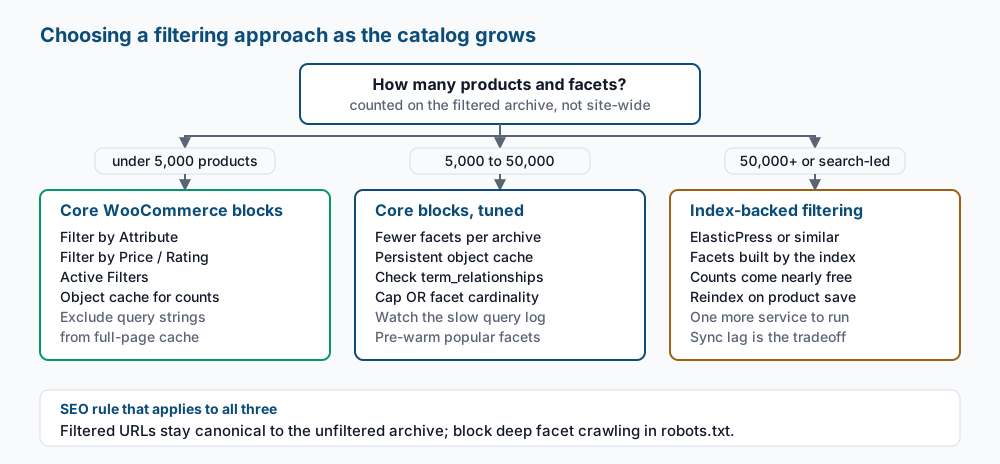
When your filtered archive holds tens of thousands of products, or shoppers arrive through search rather than category navigation, move the facets to an index. ElasticPress or a comparable dedicated filter plugin computes facets and counts as part of one index query, which is what search engines are built for. The tradeoffs are real: another service to run and monitor, reindexing on every product save, and a window where the index lags the database after a bulk price change. Do not adopt it for a two-thousand-product catalog — you inherit the operational cost without the benefit.
Filters are also the wrong answer when the real need is better category structure: a facet combination that gets meaningful traffic deserves an indexable category page with its own copy, not a query string. And if the store is slow before any filter is applied, fix that first. The official WooCommerce documentation covers the block options, and the WordPress taxonomy reference covers the API underneath them.
Running WordPress that earns real money deserves an operator — Stack Harbor runs that stack under Enterprise WordPress; book an infrastructure consult.