This guide helps store owners and their technical leads choose between WooCommerce and Shopify, or decide whether to switch from one to the other. WooCommerce is a free plugin that turns a WordPress site you host yourself into a store, while Shopify is a hosted service that runs the whole store for a subscription. Both run serious businesses, so the real question is which set of jobs you want to own. In short, Shopify fits a fast launch without a technical team, while WooCommerce fits when you need control over data, code and hosting and can staff that work. By the end, you will have a scored comparison, a workload estimate and pilot results that back your choice.
What you’ll accomplish
- See which layers of the store each platform makes you responsible for, from hosting to card data.
- Turn your requirements into a weighted fit matrix, a simple scoring table that compares both platforms.
- Measure an existing WooCommerce store with WP-CLI (the WordPress command-line tool) so the comparison uses real numbers.
- Estimate the monthly operating work and list the cost drivers for each option, without guessing at prices.
- Finish with a written decision, confirmed by a two-week pilot and a short checklist.
Prerequisites
- A list of what the store sells, how many products and variants it has, and where its customers live.
- For an existing WooCommerce store, shell access to a staging copy and WP-CLI 2.x run as the site user from the WordPress folder. The commands below were written for WooCommerce 8.x or newer.
- For an existing Shopify store, an owner or staff account that can see products, apps and reports in the Shopify admin.
- Access to your payment provider’s test mode, and about two weeks of part-time attention for the pilot.
- Someone who can speak for the business, because several questions below are business choices, not technical ones.
How it works
Every online store needs the same layers underneath it. Something has to host the site, apply updates, keep backups, protect card data and run the checkout. The two platforms split those layers very differently.
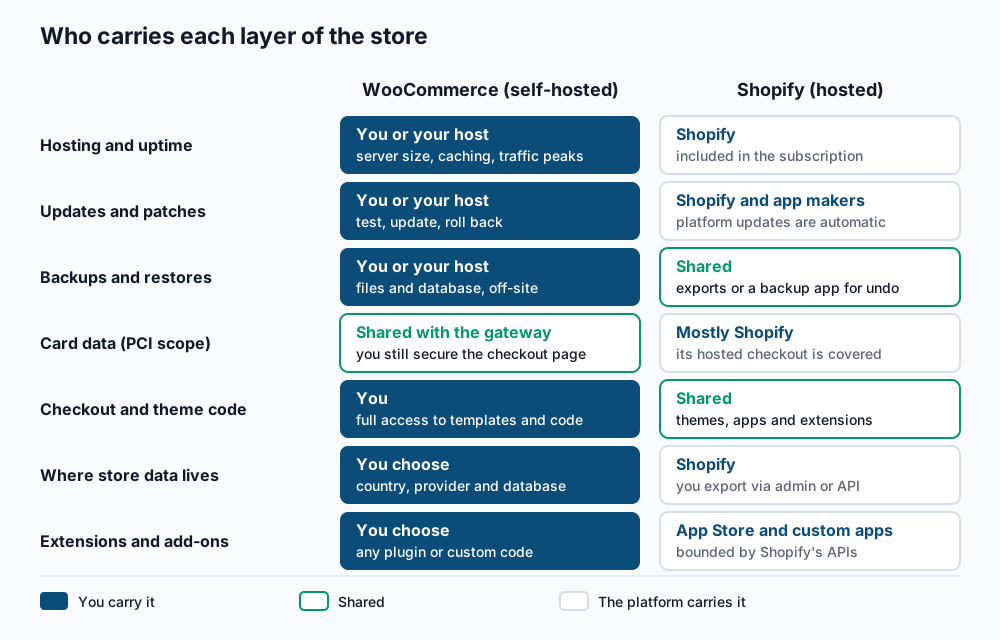
With WooCommerce, you or your hosting provider own almost every layer. You choose the server, the country it runs in, the database and every plugin. You also apply WordPress, WooCommerce and plugin updates, test them, keep backups and restore them when something breaks. Card data is usually handled by the payment gateway (the service that processes cards, such as Stripe or Moneris), which keeps your PCI scope small. PCI DSS, the card industry’s security standard, still applies to the site that loads the payment form.
With Shopify, the platform runs hosting, scaling, platform updates and most card security for its hosted checkout. You give up some control in return. Product URLs use fixed prefixes such as /products/ and /collections/. Checkout changes go through Shopify’s checkout extensions and apps, and some options depend on your plan. Extensions come from the Shopify App Store or custom apps, and they can only do what Shopify’s APIs allow. You can export your data through the admin or the API, but you do not choose where the platform stores it.
Costs follow the same split, and they are best compared as drivers rather than list prices:
- Shopify drivers. The subscription plan, payment processing fees, possible extra transaction fees if you use an outside payment provider, and monthly app subscriptions.
- WooCommerce drivers. Hosting sized for your traffic, paid extensions and their yearly licences, payment processing fees, and the operator time for updates, backups and security.
Each platform has situations where it tends to be the stronger fit:
- Fast launch, no technical team. Shopify wins, because there is no server, update or backup work to staff.
- Large or complex catalogs. Both can handle thousands of products. Shopify limits a product to a fixed number of options, while WooCommerce has no such cap but needs a server and database sized for the catalog.
- B2B and complex pricing. WooCommerce lets you write any pricing rule in code or with extensions. Shopify has B2B features too, so check which plan includes them before you score.
- French and English stores in Quebec. Both support several languages. WooCommerce also lets you pick a Canadian host, which makes Law 25 (Quebec’s privacy law) assessments simpler to document.
- Content-heavy stores. WooCommerce runs inside WordPress, so guides, recipes and product pages share one editor and one site.
- Headless builds. Both offer APIs for a separate front end, including Shopify’s Storefront API and the WooCommerce Store API.
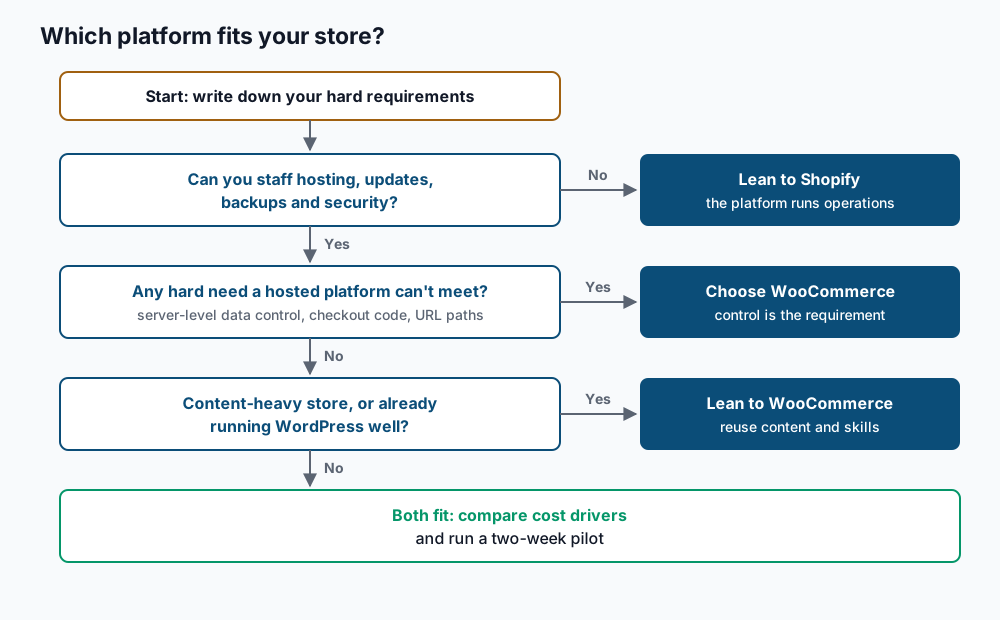
The decision then comes down to a few questions, in order.
Step-by-step
1. Write down your requirements and mark the hard ones. List what the store must do, then tag each line as “must” or “nice to have”. A “must” is something the business cannot launch or operate without. Use this shape so the next step can score it.
requirement,weight,type
Customer data stored in Canada,3,must
Wholesale price lists per customer group,3,must
French and English storefront,3,must
Launch within 6 weeks,2,nice
Custom checkout field for delivery notes,1,nice
Weight is 3 for critical, 2 for important and 1 for helpful. If your list has more than five “must” lines, check each one with the business owner, because an inflated list hides the real deciders.
2. Score the fit matrix. Give each platform a score for each requirement. Use 0 if it cannot do it, 1 if it needs an app, extension or custom work, and 2 if it works out of the box. Multiply by the weight and add up the totals. The scores below are an example for one store, not a verdict on either platform.
requirement,weight,type,woo,shopify
Customer data stored in Canada,3,must,2,0
Wholesale price lists per customer group,3,must,1,1
French and English storefront,3,must,1,1
Launch within 6 weeks,2,nice,1,2
Custom checkout field for delivery notes,1,nice,2,1
The rule is strict: any “must” scored 0 removes that platform, whatever its total. Score Shopify from its official documentation for the plan you would buy, not from memory, since features change between plans. If a score depends on a specific app, write the app name next to it so you can test it in the pilot in step 6.
3. Measure the current store. Real numbers keep the comparison honest. On a WooCommerce staging copy, run these commands from the WordPress folder.
wp core version
wp plugin get woocommerce --field=version
wp post list --post_type=product --post_status=publish --format=count
wp post list --post_type=product_variation --post_status=any --format=count
wp term list product_cat --format=count
wp user list --role=customer --format=count
6.6.2
9.3.3
1840
12675
96
48210You should see six lines of numbers. They show the WordPress version, the WooCommerce version, published products, variations, product categories and customer accounts. If wp plugin get woocommerce reports that the plugin was not found, you are in the wrong folder or on the wrong site in a multisite network.
Next, count orders from the last 90 days. This works whether orders live in the older posts tables or in the newer order tables.
wp eval 'echo count( wc_get_orders( array( "limit" => -1, "return" => "ids", "date_created" => ">" . ( time() - 90 * DAY_IN_SECONDS ) ) ) ) . PHP_EOL;'9412On a store with hundreds of thousands of orders, this can take a minute and use a lot of memory. Run it on staging, never on production during peak hours. On Shopify, read the same figures from the Products page, the Customers page and the orders report in the admin.
4. List what you depend on today. Plugins and apps are where most switching work hides.
wp plugin list --status=active --format=count
wp plugin list --status=active --field=name
wp plugin list --update=available --format=count
wp language core list --status=installed --field=language
wp option get woocommerce_currency
34
woocommerce
woocommerce-gateway-stripe
...
7
en_CA
fr_CA
CADFor each active plugin, write down whether the other platform has an equivalent, needs an app, or cannot match it. A high count of pending updates is a sign that nobody currently owns the update work, which matters in step 5. On Shopify, do the same with the list of installed apps in the admin, and note which apps store data you would need to move.
5. Estimate the operating workload. Write the recurring jobs as a table with a frequency and an owner. For WooCommerce, include at least a weekly update window with a staging test and a daily off-site backup. Add a monthly restore test, uptime and security monitoring, and a yearly review of PHP and server versions. For Shopify, include app updates and app reviews, theme updates, and a regular export of products, customers and orders for your own records.
The rule is simple: every job needs a named person or provider. If the WooCommerce list has jobs with no owner, either budget for someone to do them or treat that as a vote for Shopify.
6. Run a two-week pilot. Build the same small test store on both platforms. Use a staging copy for WooCommerce, and a free trial or a Shopify Partners development store for Shopify. Load 20 representative products, including your most complex variable product. Then place test orders through your payment provider’s test mode, in both languages if you sell in both. Test the apps and extensions you named in step 2. Record how long each task took and which requirement failed, if any.
7. Decide and write it down. Walk the decision tree above with your fit matrix, workload table and pilot notes. Write a one-page decision that names the platform, the reasons, the cost drivers you accept and who owns each recurring job. If the answer is to move from Shopify, follow the Shopify to WooCommerce migration runbook for the export, import and redirect work.
Validate it works
Your decision is ready when every line of this checklist is true:
- Every “must” requirement scores 1 or 2 on the chosen platform, and each score of 1 names the app or extension that was tested in the pilot.
- The current store’s product, variant, customer and 90-day order counts are recorded, and the pilot used your most complex product.
- Every recurring job in the workload table has a named owner.
- The cost drivers for the chosen platform are listed, with a quote or plan page for each one.
- A test order completed on the chosen platform in each storefront language.
- If you sell to Quebec customers, the privacy owner has confirmed where personal information will be stored and whether a privacy impact assessment is needed.
Re-run the counts from step 3 on the day you decide. If they changed by more than 10 percent since the start, update the matrix before you sign off.
Troubleshooting
Both platforms score almost the same. That usually means the requirements are too general. Split broad lines such as “good SEO” into testable ones, such as “keep our current URL paths”, then score again.
wp eval runs out of memory. Very large stores can exceed the PHP memory limit when loading all order IDs. Run the command with a shorter window, such as 30 days, and multiply, or ask your host for a one-time higher memory limit on staging.
wp user list --role=customer returns 0. Some stores allow guest checkout only, so buyers never get an account. Count unique billing emails from recent orders instead, or read the Customers report in WooCommerce.
An app you rely on has no equivalent. Check whether the feature can be rebuilt with a small custom plugin or a Shopify custom app, and price that as a cost driver. If it cannot, score that requirement 0 for the platform.
The team disagrees after the pilot. Go back to the weights. Disagreement usually means two people weighted the same requirement differently, and settling the weight settles the decision.
When this is the wrong approach
If you are testing a product idea and have no technical team, a formal matrix is more than you need. Start on Shopify, sell, and revisit this guide when the store earns enough to justify the work. If your requirements include strict Canadian data residency, read Quebec data residency in practice before scoring, because that single line can decide the outcome. You may need a fully custom storefront, often called headless, where a separate front end talks to the store through an API. Both platforms offer APIs, so the choice depends more on your developers’ skills than on this matrix. For platform details, the WooCommerce documentation and the Shopify Help Center are the references to score against.
Running WordPress that earns real money deserves an operator — Stack Harbor runs that stack under Enterprise WordPress; book an infrastructure consult.