If you are about to sell digital products on WordPress, this article helps you and your developer choose between WooCommerce and Easy Digital Downloads (EDD). Digital products here means files or access delivered online, such as ebooks, software licences, course material, design presets and stock media. Both plugins are free to install, so the real cost lands later, in the paid extensions each one needs for the job you actually have. The short answer is that WooCommerce fits if you also sell physical goods or already run a WooCommerce store, and EDD fits if files, licence keys and updates are the whole business. By the end you will have compared them on file delivery, licensing, taxes, gateways and hosting cost, and written down a choice you can defend.
What you’ll accomplish
- Match what you sell to one of the two plugins, using a short decision tree instead of a feature list.
- Understand how each one hands a paid file to a buyer, and how to keep that link from being passed around.
- Compare the two by cost drivers such as licence keys, subscriptions, taxes and gateway fees, rather than by sticker price.
- Set the download expiry and the per-order download limit to values you chose on purpose.
- Know what each choice costs your server in file storage, download bandwidth and order-table growth.
Prerequisites
- A WordPress 6.4 site or newer, running PHP 8.1 or newer, with a staging copy you can break.
- Shell access as the site user, and WP-CLI 2.x (the WordPress command-line tool) available in your path.
- WooCommerce 8.2 or newer, or EDD 3.x, depending on which side you are testing. Older versions store orders differently.
- Test-mode credentials for your payment provider, so you can place a real order without a real charge.
- Someone who can answer sales-tax questions for the places you sell to. Several decisions below are accounting decisions.
How it works
Both plugins do the same three things. They take the money, write an order record, and hand the buyer a link to a file. Every difference between them sits around those three steps.
WooCommerce is a general store engine. A digital product is an ordinary WooCommerce product with two boxes ticked, Virtual and Downloadable, plus one or more files attached to it. The rest of the engine stays loaded anyway: shipping zones, stock levels, coupons, tax classes and a full cart. That is handy the day you add a physical product, and it is weight you carry on a site that will never ship a box.
EDD is built only around downloads. Its products live in their own content type called download, there is no shipping, and the cart and checkout are smaller. A single download can carry several price options, such as a personal licence and a team licence, without the variable-product machinery WooCommerce uses for the same idea. Since version 3.0, EDD keeps orders in its own database tables instead of storing them as WordPress posts.
WooCommerce made the same move with High Performance Order Storage (HPOS), a mode that keeps orders in tables named wp_wc_orders and a few siblings rather than in wp_posts. HPOS is the default on new WooCommerce installs since version 8.2. Both projects changed this for the same reason. Order tables grow faster than anything else on a store, and the WordPress posts table was never shaped for them.
File delivery is where the two agree on the idea and differ on the defaults.
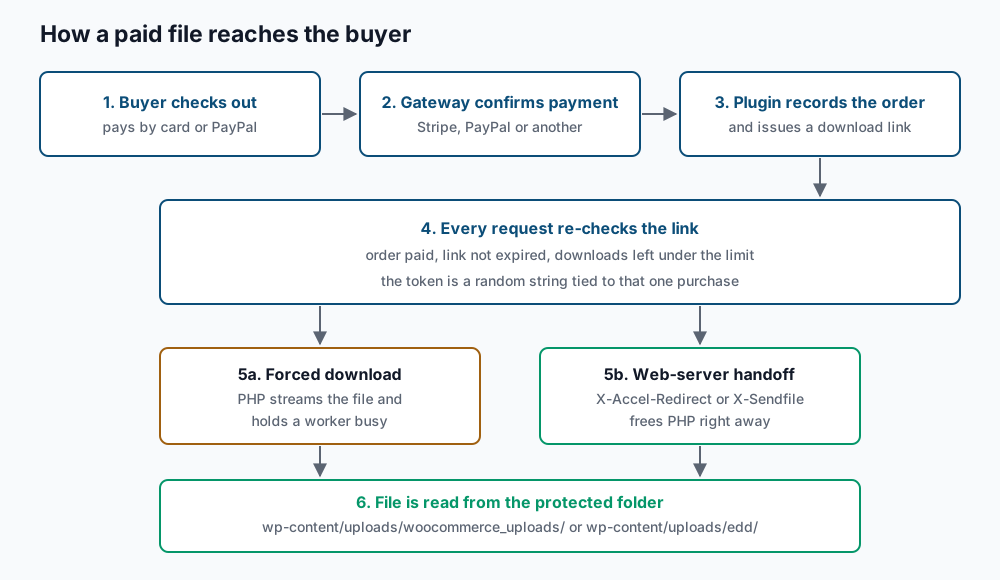
Neither plugin lets the buyer touch the file path directly. WooCommerce stores uploaded files under wp-content/uploads/woocommerce_uploads/ and EDD uses wp-content/uploads/edd/. Both write an .htaccess file there that tells Apache to refuse direct requests. On nginx that file is ignored, so you add the rule to the server config yourself. The buyer instead receives a link carrying a token, a random string that identifies the purchase. The plugin checks the order, the expiry date and the number of downloads already used, then serves the file.
How the file leaves the server is a setting, and it matters for hosting cost. Forced downloading reads the file through PHP, which holds a PHP worker busy for the whole transfer. On a 900 MB video that can be several minutes of a worker doing nothing else. The alternative hands the job to the web server through X-Accel-Redirect on nginx or X-Sendfile on Apache, which frees PHP immediately. For files above roughly 200 MB, or for any catalogue that sells in bursts, move storage to an object store such as Amazon S3 and serve signed links from there. EDD has a first-party extension for Amazon S3; on WooCommerce you pick a third-party one.
The cost drivers split cleanly. EDD ships Stripe and PayPal in its free core, and its paid extensions cover the things a download business needs, including software licensing, recurring payments and vendor submissions. WooCommerce ships a free Stripe extension and a free PayPal one, and its paid catalogue is much larger because it also has to cover shipping, bookings and point of sale. In both cases the recurring cost is annual extension licences, per site, plus your payment provider’s processing fee, plus hosting sized for your download bandwidth.
Step-by-step
1. Write down what you sell, then walk the decision tree. List every product line, including the ones planned for next year. Mark each as file-only, licence key with updates, subscription, or physical. Then follow the tree below from the top.
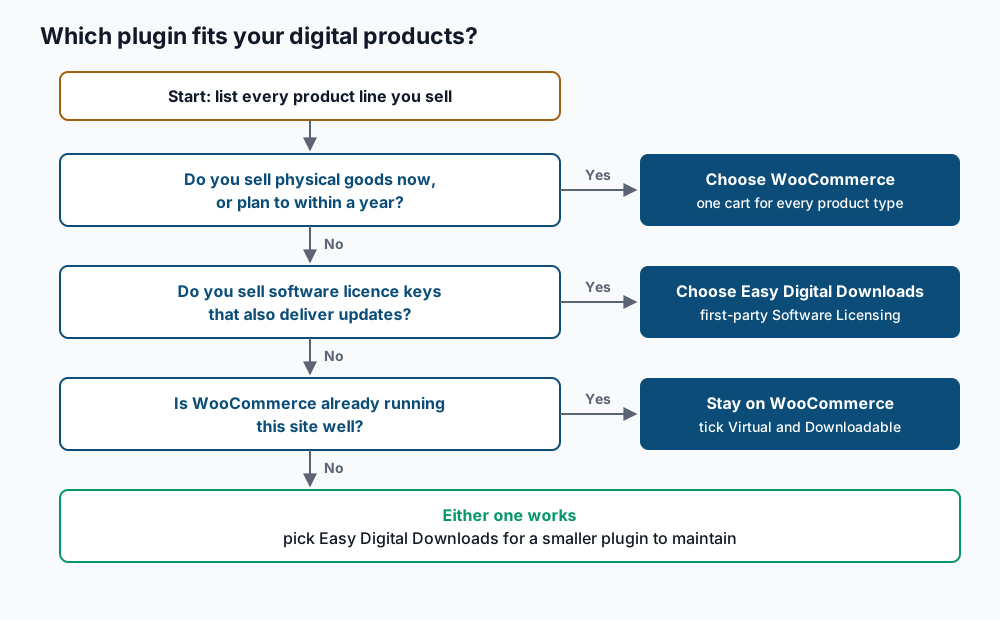
The rule is strict. One physical product line, now or planned, sends you to WooCommerce, because running two carts on one site costs more than carrying the unused shipping code.
2. Record what the site runs today. Run these from the WordPress folder on staging.
wp core version
wp plugin list --status=active --field=name
wp post list --post_type=product --post_status=publish --format=count
6.6.2
woocommerce
woocommerce-gateway-stripe
84If EDD is active, wp post list --post_type=download --post_status=publish --format=count returns its product count too. If the plugin is not active, the same command reports an invalid post type, which is the expected answer rather than a fault.
3. Protect the upload folder before you put a paid file in it. Request a file you know exists, from outside the site.
curl -sI https://example.com/wp-content/uploads/woocommerce_uploads/2026/09/sample.pdf | head -n 1HTTP/2 403A 403 or a 404 is correct. A 200 means the file is public and every link limit you set later is decoration. On nginx, add this block inside the server block and reload.
location ~* /wp-content/uploads/(woocommerce_uploads|edd)/ {
    deny all;
    return 403;
}
sudo nginx -t && sudo systemctl reload nginxnginx: configuration file /etc/nginx/nginx.conf test is successful4. Choose the delivery method and the link limits. Read the current WooCommerce values first.
wp option get woocommerce_file_download_method
wp option get woocommerce_downloads_require_login
wp option get woocommerce_downloads_grant_access_after_payment
force
no
yesSwitch to the web-server method if your host has X-Accel-Redirect or mod_xsendfile enabled, which most managed hosts do.
wp option update woocommerce_file_download_method xsendfileSuccess: Updated option 'woocommerce_file_download_method'.WooCommerce sets the download limit and the expiry per product, in the Downloadable section of the product editor. Set the limit to the number of devices one buyer plausibly uses, plus two, which gives 5 for an ebook. Set the expiry in days to the length of your refund window plus 15, which gives 30 days for a 14-day refund policy.
wp post meta update 412 _download_limit 5
wp post meta update 412 _download_expiry 30
Success: Updated custom field '_download_limit'.
Success: Updated custom field '_download_expiry'.EDD applies the same two settings globally, and each download can override the limit.
wp eval 'echo edd_get_option( "download_link_expiration", 24 ) . PHP_EOL;'
wp eval 'echo edd_get_option( "file_download_limit", "unlimited" ) . PHP_EOL;'
24
unlimitedThe EDD expiry is in hours, not days, so 24 is one day. Raise it to 720 to match the 30-day rule above, and set the limit to 5 for the same reason.
5. Settle licensing and software updates. Say you sell WordPress plugins or themes, and customer sites have to receive updates from you. EDD’s first-party Software Licensing extension issues licence keys, caps activations per key and runs the update endpoint those sites call. That single capability is the strongest reason to choose EDD. On WooCommerce you assemble the same thing from third-party extensions, so build the update endpoint on staging and test it against a real customer site before you commit. Licence keys that work while updates quietly fail is the usual failure here.
6. Decide how recurring payments will work. WooCommerce handles subscriptions through its own paid Subscriptions extension. EDD handles them through its own paid Recurring Payments extension. Both bill on a schedule through the gateway and both need a working scheduler on the server, so confirm WordPress cron is firing before you sell your first renewal.
wp cron event list --fields=hook,next_run_relative --format=table | head -n 5+-------------------------------+-------------------+
| hook | next_run_relative |
+-------------------------------+-------------------+
| wp_version_check | 3m 12s |
| woocommerce_scheduled_sales | 6h 41m |
+-------------------------------+-------------------+7. Configure taxes for the places you actually sell to. Digital goods are taxed where the buyer is, not where you ship, because nothing ships. In WooCommerce that means one specific setting.
wp option get woocommerce_calc_taxes
wp option get woocommerce_tax_based_on
wp option get woocommerce_prices_include_tax
yes
billing
noSet woocommerce_tax_based_on to billing. For Canada, add a rate row per province: GST alone in Alberta, HST in Ontario and the Atlantic provinces, and GST plus QST in Quebec. QST is Quebec’s sales tax, and since 2013 it is calculated on the pre-GST amount, so leave the compound box unticked on that row. EDD carries the same idea in its own tax rate table.
wp eval 'echo edd_use_taxes() ? "taxes on" : "taxes off", PHP_EOL;'taxes onFor the European Union, value added tax (VAT) on digital goods follows the buyer’s country and needs two pieces of evidence of where that buyer is. Neither plugin validates business VAT numbers on its own, so both need an extension for that and for One Stop Shop reporting. Confirm your registration duties with your accountant. Revenu Québec and the Canada Revenue Agency both have rules for suppliers outside their borders selling digital goods to residents.
8. Pick gateways and plan the exit before you commit. Both plugins support Stripe and PayPal, and the WooCommerce Stripe troubleshooting guide covers the failures that show up in either. Check each gateway integration for platform fees added on top of the processor’s own rate, because free connections sometimes carry one. Then write the migration answer down now, while the decision is fresh. Products move between the two as a CSV file using the method in importing WooCommerce products from CSV. Historical orders rarely move cleanly, so the usual plan is to leave old orders read-only in the old system for the retention period your accountant requires.
Validate it works
Place one order in your gateway’s test mode, then confirm the whole path from order to file.
wp eval 'foreach ( wc_get_orders( array( "limit" => 1, "status" => "completed" ) ) as $o ) { foreach ( $o->get_downloadable_items() as $i ) { echo $i["download_url"], PHP_EOL; } }'https://example.com/?download_file=412&order=wc_order_8Kd2&email=test%40example.com&key=9f2cRequest that exact URL and read the headers.
curl -sI "https://example.com/?download_file=412&order=wc_order_8Kd2&email=test%40example.com&key=9f2c" | head -n 3HTTP/2 200
content-type: application/pdf
content-disposition: attachment; filename="sample.pdf"On EDD, confirm the order landed in the new tables.
wp eval 'echo count( edd_get_orders( array( "number" => 1, "status" => "complete" ) ) ) . PHP_EOL;'1Then measure the two numbers that drive hosting cost. Download bandwidth comes from the access log.
awk '/download_file=|eddfile=/ {b += $10} END {printf "%d MB\n", b / 1048576}' /var/log/nginx/access.log4180 MBOrder-table growth comes from the database.
wp db query "SELECT TABLE_NAME, TABLE_ROWS, ROUND((DATA_LENGTH+INDEX_LENGTH)/1048576) AS mb FROM information_schema.TABLES WHERE TABLE_SCHEMA = DATABASE() AND TABLE_NAME REGEXP 'wc_order|edd_order' ORDER BY 3 DESC;"wp_wc_orders 18422 41
wp_wc_order_stats 18422 12
wp_wc_order_addresses 18422 9Record both figures on the day you launch. They are the baseline you compare against when the hosting bill moves.
Troubleshooting
The download link shows the login screen. woocommerce_downloads_require_login is set to yes while the buyer checked out as a guest, so there is no account to log into. Either turn guest checkout off, or set that option to no and rely on the token in the link.
Large downloads stop partway through. Forced downloading streams the file through PHP, and the transfer dies when it hits max_execution_time or the memory limit. Switch woocommerce_file_download_method to xsendfile, or move files above 200 MB to object storage.
Buyers report the file circulating outside your customers. Link limits do nothing if the folder itself is readable. Re-run the curl -sI check from step 3 against a real paid file. On nginx, a missing location block is the usual cause, because the .htaccess file both plugins write is an Apache instruction only.
Tax comes out as zero on a digital order. woocommerce_tax_based_on is set to shipping, and a virtual product collects no shipping address, so there is nothing to match a rate against. Set it to billing and place a fresh test order.
Reports and the orders screen crawl. Check whether HPOS is active by looking for wp_wc_orders in the table list from the validation step. If it is missing, orders still live in wp_posts, and the fix is the HPOS migration. The WooCommerce order statuses guide explains which statuses your reports are counting.
When this is the wrong approach
If you sell one ebook a few times a month, both plugins are more machinery than you need, and a hosted checkout link from your payment provider will do. If you are building a marketplace where other people sell and get paid, neither core handles vendor payouts, and the extension work is the real project. If you are selling courses or memberships rather than files, a dedicated learning or membership plugin usually fits better than either store plugin, and both can sit alongside one. If the choice is really about the whole platform rather than the plugin, read WooCommerce vs Shopify first. For the reference details, see the WooCommerce downloadable product documentation and the Easy Digital Downloads documentation.
Running WordPress that earns real money deserves an operator — Stack Harbor runs that stack under Enterprise WordPress; book an infrastructure consult.