To check whether a TCP port is reachable, run nc -zv <host> <port>: -z makes the connection without sending data, -v prints the result, and you get one line telling you succeeded or Connection refused. That single command answers the question “is the port open from here” more directly than telnet, curl, or a browser, because it does not care what protocol is behind the port. The rest of netcat — running a listener, transferring a file, grabbing a banner, scanning a range — is built from the same client/listener model, and the main thing that trips people up is that the flags differ across the several programs all named nc.
What you’ll accomplish
- Check whether a TCP or UDP port is open from where you are standing, with a clear success or failure signal.
- Stand up a throwaway listener and connect to it to prove two hosts can talk.
- Grab a service banner and scan a small range of ports.
- Move a file between two hosts when nothing fancier is available.
- Know which
ncvariant you are holding, because-p,-e, and-zare not the same everywhere.
Prerequisites
- A Linux or macOS host with
ncon thePATH. Runnc -hfirst — it prints the variant and its flags, and that output is how you tell which program you have. OpenBSD nc (the default on most current Linux distributions and on macOS) shows-zand-N; the older GNU/traditional nc shows-eand requires-pbefore the port on a listener; ncat (from the nmap project) shows--ssland--exec. - For the transfer demo, two hosts that can reach each other on a chosen port, or two terminals on one machine talking over
localhost. - Nothing needs installing to test a port to a host you already reach. To install nc where it is missing:
apt install netcat-openbsd,dnf install nmap-ncat(that gives youncat), orapk add netcat-openbsd.
How it works
Netcat has exactly two modes. In listener mode one process binds a local port and waits; in client mode another process connects to a host and port. Once connected, netcat wires its own standard input to the socket and the socket back to its standard output — so anything you type (or pipe in) is sent to the other side, and anything the other side sends is printed. That is the whole design: a pipe with a network socket in the middle, running in both directions at once.
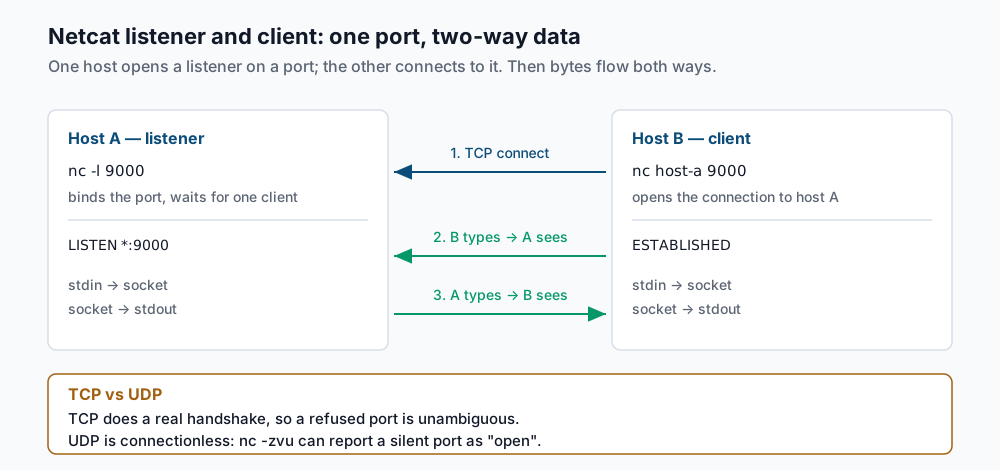
TCP is the default. Because TCP does a real handshake, a connection either completes, is actively refused, or times out — three distinct, trustworthy outcomes. UDP (-u) is connectionless: there is no handshake, so netcat often cannot tell an open UDP port from a silently dropped packet, and that ambiguity is worth remembering before you trust a UDP result.
Step-by-step
Check one TCP port. This is the command to reach for by reflex. -z means “scan without sending data” (zero-I/O), -v prints what happened:
nc -zv example.com 443Connection to example.com 443 port [tcp/https] succeeded!A closed port that actively rejects the connection is unambiguous:
nc -zv example.com 444nc: connect to example.com port 444 (tcp) failed: Connection refused“Connection refused” means something answered and said no — the host is up, nothing is listening on that port (or a firewall is sending a reset). That is different from a timeout, below.
Add a timeout so a filtered port fails fast. Without a timeout, a port that a firewall silently drops leaves nc hanging until the OS gives up. -w caps the wait in seconds:
nc -zv -w 3 example.com 8080nc: connect to example.com port 8080 (tcp) failed: Operation timed outA timeout (rather than “refused”) is the signature of a firewall dropping packets: nothing sent a reset, so netcat waited the full three seconds. Refused versus timed-out is the single most useful distinction netcat gives you.
Test a UDP port. Add -u. Read the result with suspicion:
nc -zvu -w 3 dns.example.com 53Connection to dns.example.com 53 port [udp/domain] succeeded!This “succeeded” only means no ICMP port-unreachable came back within the timeout. A silently filtered UDP port looks identical to an open one. Treat a UDP “open” as “not proven closed,” and confirm with an actual protocol probe (for DNS, dig @dns.example.com example.com) when it matters.
Start a listener. On the host you want to receive the connection, bind a port and wait. On OpenBSD nc:
nc -l 9000Leave that running. From a second terminal or the other host, connect and type a line:
nc 127.0.0.1 9000Anything you type in the client appears in the listener terminal, and anything you type in the listener appears in the client — that is the two-way pipe from the diagram. Press Ctrl-C or Ctrl-D to close. Note the flag difference: traditional/GNU nc wants the port after -p, as nc -l -p 9000, while OpenBSD nc takes the port as a plain argument. If nc -l 9000 errors, you are probably on the traditional variant.
Grab a banner. Many services announce themselves on connect, or reply to a minimal request. Pipe a request in and let netcat print the response. printf (not echo) keeps the line endings correct for HTTP:
printf 'HEAD / HTTP/1.0\r\nHost: example.com\r\n\r\n' | nc -w 3 example.com 80HTTP/1.0 200 OK
Server: nginx
Content-Type: text/htmlFor a plain-text service like SMTP, just connecting is enough — the server greets you with its banner. Use -w so netcat closes after the reply instead of sitting open.
Scan a small range. OpenBSD nc accepts a port range as start-end, and combined with -z -v it reports each port. Send the noise to grep to keep only the open ones:
nc -zv example.com 20-25 2>&1 | grep succeededConnection to example.com 22 port [tcp/ssh] succeeded!Netcat writes its -v results to standard error, hence the 2>&1. This is fine for a handful of ports on a host you own; it is not a real scanner (see the last section).
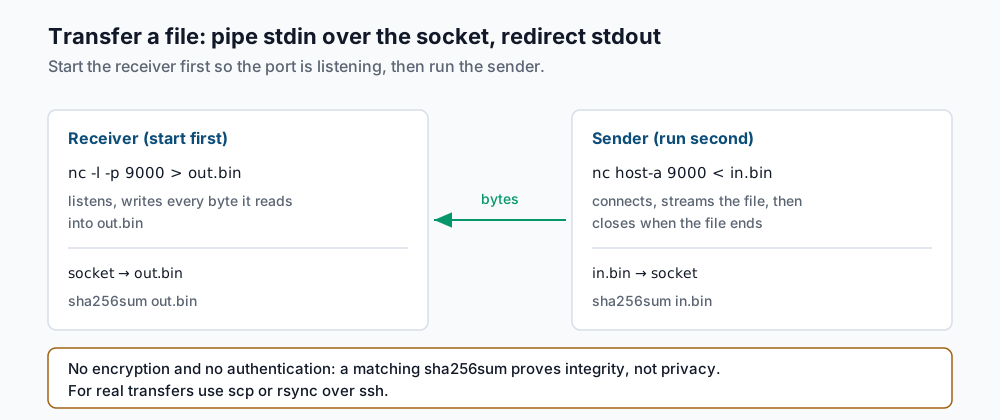
Transfer a file. Start the receiver first so the port is listening, then run the sender. On the receiving host:
nc -l -p 9000 > out.binOn the sending host, point it at the receiver and redirect the file into netcat’s input:
nc <receiver-host> 9000 < in.binWhen the input file ends, the sender closes the connection and both commands exit. The -p before the listener port is the traditional-nc form; on OpenBSD nc, nc -l 9000 > out.bin also works. If the listener stays open after the transfer, add -N (OpenBSD nc) on the sender so it half-closes the socket when its stdin ends, which lets the receiver see EOF and exit.
Validate it works
Netcat gives you no progress bar and no checksum, so verify the transfer yourself. Hash the file on both ends and compare. On the sender:
sha256sum in.bin9f2c...e1a4 in.binOn the receiver:
sha256sum out.bin9f2c...e1a4 out.binIdentical hashes mean every byte arrived intact. If they differ, the connection closed early — the most common cause is a listener that exited before the last bytes flushed, which -N on the sender side avoids.
For a port check, confirm the state matches what you expect by looking at the listener from the receiving host with ss:
ss -ltnp | grep 9000LISTEN 0 1 0.0.0.0:9000 0.0.0.0:* users:(("nc",pid=4821,fd=3))If nc -zv says a port is open but ss shows nothing listening locally, you are reaching a different host than you think, or a load balancer is answering on its behalf. For the process-and-socket side of that question, see lsof: find what has a file or port open.
Troubleshooting
nc -l 9000errors, or-zis not recognised. You are on the traditional/GNU variant, not OpenBSD nc. Usenc -l -p 9000for a listener there, and note that some of these builds (GNU netcat in particular) have no-z; test a port withnc -vzonly on OpenBSD nc orncat, or fall back tonc -w 3 host port </dev/null. Runnc -hto confirm which program you have before trusting any flag.- “Connection refused” versus a hang or timeout. Refused means the host is reachable and actively rejected the port — nothing is listening, or a firewall returned a reset. A hang (or a timeout with
-w) means packets are being dropped silently, which is the classic signature of a firewall DROP rule between you and the host. They are different problems; do not treat them the same. - A UDP port reports “open” but nothing works. UDP has no handshake, so
nc -zvucalls a port open whenever no ICMP rejection comes back — including when a firewall silently drops the probe. Never conclude a UDP service is up from netcat alone; send a real protocol request and look for a real reply. -eto run a program does not exist. The classicnc -e /bin/shgateway is only in traditional nc and in ncat (as--exec/--sh-exec); OpenBSD nc removed-edeliberately because it is a remote-shell footgun. If you need it, usencat --exec, and understand you have opened an unauthenticated shell to anyone who connects.- The listener will not release the port. A listener that stays open after a client disconnects is holding the port; stop it with Ctrl-C. If a new listener reports “Address already in use,” the previous socket is in
TIME_WAIT— wait it out, choose another port, or confirm what holds it withss -ltnp.
When this is the wrong approach
Netcat is a diagnostic, not a delivery mechanism. Its file transfer has no encryption and no authentication — anyone on the path can read the bytes, and anyone who can reach the port can connect to your listener. For any transfer that leaves a trusted network, use scp or rsync over ssh, which give you encryption, authentication, and (for rsync) integrity checks and resumability for free. For anything beyond a quick “is this port open,” reach for nmap, which does real service and version detection, handles large ranges properly, and distinguishes open, closed, and filtered states honestly. And when you genuinely need netcat’s pipe behaviour with TLS — talking to an HTTPS or SMTPS port by hand — use ncat --ssl rather than plain nc, which speaks only cleartext. For the DNS-layer version of “is this name resolving to what I expect,” see troubleshooting DNS with dig. The authoritative flag reference is the OpenBSD nc man page and, for the nmap variant, the Ncat documentation.
If this is the kind of work you’d rather never own again, it’s the daily job of Managed Cloud Ops — book an infrastructure review.