tc netem lets you make a healthy Linux host behave as if it were on a congested transatlantic link: add fixed delay, jitter, random packet loss, duplication, reordering or a hard bandwidth cap, in one command, with no extra software. The trap that catches almost everyone on the first attempt is direction and scope. netem is a queueing discipline on an interface’s egress path, so it only shapes packets leaving that interface — and attaching it to the root of the interface carrying your SSH session degrades your own control channel along with the traffic you meant to test. This guide covers the delay, loss and rate options that behave predictably, the filter recipe that limits the damage to one destination, and how to prove the shaping is actually in effect.
What you’ll accomplish
- Inspect the qdisc already attached to an interface before you change anything, and restore it cleanly afterwards.
- Add delay with realistic jitter and correlation, random loss, and a bandwidth ceiling — separately and combined.
- Scope netem to a single destination address with a
prioorhtbfilter so your SSH session and monitoring stay unaffected. - Verify the effect end to end with
ping,tc -s qdisc showcounters and a throughput or timing check. - Recognise which network faults netem can reproduce and which ones it cannot.
Prerequisites
- A Linux kernel with the
sch_netemmodule available, plusiproute2for thetcbinary. Both ship in every mainstream distribution:apt install iproute2on Debian and Ubuntu,dnf install iproute-tcon the RHEL family (Red Hat splitstcout of the baseiproutepackage, which surprises people on minimal images). - Root, or a process with the
CAP_NET_ADMINcapability. Every command below is written withsudo. - Container images are a common blocker. Minimal images often ship no
tcat all, and an unprivileged container cannot modify the host’s qdiscs even if the binary is present. - Know your kernel’s feature floor.
netem ratehas been available since Linux 3.3 andslotsince 4.15. If a token is rejected as unknown, yourtcuserspace is older than the syntax you copied. - Strongly recommended: run the first experiments in a network namespace or a throwaway VM, not on a host you reach over the network. A veth pair inside
ip netnsgives you a link you can wreck freely:
sudo ip netns add lab
sudo ip link add veth-host type veth peer name veth-lab
sudo ip link set veth-lab netns lab
How it works
Every Linux interface has a queueing discipline — a qdisc — sitting between the IP stack and the driver’s transmit queue. Packets are enqueued there on their way out and dequeued when the driver is ready. A qdisc can delay, drop, reorder or rate-limit whatever passes through it, and netem is simply a qdisc that does those things on purpose.
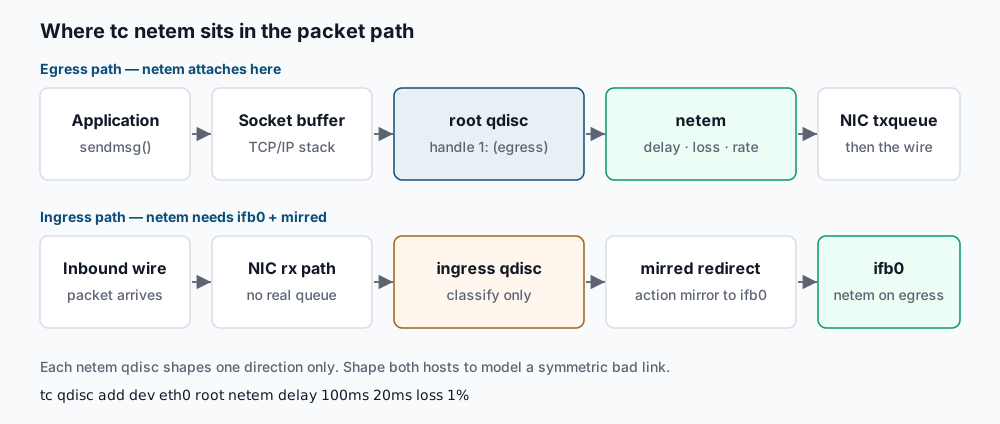
Two structural facts follow from that position in the stack.
netem is egress-only. There is no meaningful queue on the receive side — packets have already crossed the wire by the time the kernel sees them, so there is nothing left to delay. An ingress qdisc exists, but it can only classify and police, not add latency. To shape inbound traffic you redirect it to an intermediate functional block device with mirred, then attach netem to that device’s egress:
sudo modprobe ifb
sudo ip link set ifb0 up
sudo tc qdisc add dev eth0 handle ffff: ingress
sudo tc filter add dev eth0 parent ffff: protocol ip u32 match u32 0 0 \
  action mirred egress redirect dev ifb0
sudo tc qdisc add dev ifb0 root netem delay 80ms
Handles and hierarchy matter. A qdisc is attached either at root — the top of the egress path, where it sees every outbound packet — or as a child of a class inside a classful qdisc such as prio or htb. Attaching netem at root is one command and shapes everything, including your SSH replies. Attaching it under a class means only traffic your filters steer into that class gets degraded. Almost every real test wants the second form.
One more thing to internalise: delay applied on one host affects one direction only. ping reports round-trip time, the sum of both directions, so 100 ms of egress delay on a single host raises RTT by roughly 100 ms, not 200 ms. Loss configured on both hosts compounds rather than averages.
Step-by-step
1. Inspect what is already attached. Never assume the interface is bare. Modern distributions install fq_codel, fq or mq by default, and you need to know what to put back.
sudo tc qdisc show dev eth0Expected output on a typical Ubuntu host:
qdisc fq_codel 0: root refcnt 2 limit 10240p flows 1024 quantum 1514 target 5ms interval 100ms memory_limit 32Mb ecn drop_batch 64Write that line down. If you instead see qdisc noqueue 0: root refcnt 2, the interface has no configurable qdisc — common on virtual and bridge devices; you can add one, but there is nothing to restore.
2. Set a deadman switch before you touch a remote host. If the shaping goes wrong, you want the machine to fix itself. Launch a detached teardown before the first change.
sudo sh -c 'sleep 300; tc qdisc del dev eth0 root' &The shell prints a job number such as [1] 41822. Five minutes later the qdisc is removed whether or not your session survived. Cancel it with sudo pkill -f 'sleep 300' when done, and re-arm if you need longer.
3. Add fixed delay. The simplest useful case — every outbound packet waits 100 ms.
sudo tc qdisc add dev eth0 root netem delay 100msSuccess is silence: tc prints nothing on a successful add. Confirm with sudo tc qdisc show dev eth0, which now reports:
qdisc netem 8001: root refcnt 2 limit 1000 delay 100msThe 8001: handle was auto-assigned. limit 1000 is netem’s own backlog in packets; at high delay and high rate you can hit it and start dropping unintentionally, so raise it with limit 10000 for a fat, slow pipe.
4. Add jitter and correlation. A constant delay is unrealistic — real links vary. The second value is the jitter amplitude, the third is the correlation between consecutive packets as a percentage.
sudo tc qdisc change dev eth0 root netem delay 100ms 20ms 25%Delay is now uniformly distributed between 80 ms and 120 ms, with each packet’s delay 25% correlated to the previous one. For a bell-shaped distribution closer to real WAN behaviour, add a distribution table:
sudo tc qdisc change dev eth0 root netem delay 100ms 20ms distribution normalsudo tc qdisc show dev eth0 reflects the change:
qdisc netem 8001: root refcnt 2 limit 1000 delay 100ms 20msThe two spaces before the jitter value are normal in tc output, not a formatting error.
5. Add packet loss. Loss is expressed as a percentage, optionally with a correlation to produce bursts rather than evenly scattered drops.
sudo tc qdisc change dev eth0 root netem loss 3% 25%Be careful with magnitudes. 1% loss is enough to collapse TCP throughput on a long path; 30% makes most application protocols time out rather than degrade, which tells you nothing useful. Start at 0.5% and work up.
6. Combine delay, loss and reordering in one qdisc. All netem parameters live on the same qdisc, so they must be given together — a second change with only loss silently drops the delay you set earlier.
sudo tc qdisc change dev eth0 root netem delay 120ms 30ms distribution normal \
  loss 1% 25% duplicate 0.1% reorder 2% 50%
Read the resulting line back in full:
sudo tc qdisc show dev eth0qdisc netem 8001: root refcnt 2 limit 1000 delay 120ms 30ms loss 1% 25% duplicate 0.1% reorder 2% 50% gap 17. Cap the bandwidth. netem has its own rate parameter, which is the easiest way to combine a slow pipe with latency:
sudo tc qdisc change dev eth0 root netem delay 40ms rate 5mbitWhen you need a proper token bucket with a configurable burst, stack tbf as the parent and hang netem underneath it:
sudo tc qdisc del dev eth0 root
sudo tc qdisc add dev eth0 root handle 1: tbf rate 5mbit burst 32kbit latency 400ms
sudo tc qdisc add dev eth0 parent 1:1 handle 10: netem delay 40ms 8ms
sudo tc qdisc show dev eth0 should now list both layers:
qdisc tbf 1: root refcnt 2 rate 5Mbit burst 4Kb lat 400ms
qdisc netem 10: parent 1:1 limit 1000 delay 40ms  8ms
8. Understand add versus change versus replace. add creates a qdisc and fails if one already occupies that position. change modifies parameters of an existing qdisc, keeping its handle and its backlog. replace swaps it out, creating it if absent — the idempotent choice for scripts:
sudo tc qdisc replace dev eth0 root netem delay 60ms loss 0.5%9. Scope the shaping to one destination. This is the step that keeps you logged in. Use a prio root qdisc, attach netem to band 3 only, and filter just the test destination into it. Everything else — SSH, monitoring, package updates — keeps flowing through the unshaped bands.
sudo tc qdisc del dev eth0 root
sudo tc qdisc add dev eth0 root handle 1: prio
sudo tc qdisc add dev eth0 parent 1:3 handle 30: netem delay 150ms 30ms loss 2%
sudo tc filter add dev eth0 protocol ip parent 1:0 prio 3 u32 \
  match ip dst 203.0.113.45/32 flowid 1:3
Verify the filter landed:
sudo tc filter show dev eth0filter parent 1: protocol ip pref 3 u32 chain 0
filter parent 1: protocol ip pref 3 u32 chain 0 fh 800: ht divisor 1
filter parent 1: protocol ip pref 3 u32 chain 0 fh 800::800 order 2048 key ht 800 bkt 0 flowid 1:3 not_in_hw
match cb00712d/ffffffff at 16To narrow further to a single service, match the destination port as well — for example TCP 443:
sudo tc filter add dev eth0 protocol ip parent 1:0 prio 2 u32 \
  match ip dst 203.0.113.45/32 match ip dport 443 0xffff flowid 1:3
The htb equivalent also gives you a rate class per destination:
sudo tc qdisc add dev eth0 root handle 1: htb default 10
sudo tc class add dev eth0 parent 1: classid 1:10 htb rate 1000mbit
sudo tc class add dev eth0 parent 1: classid 1:20 htb rate 10mbit
sudo tc qdisc add dev eth0 parent 1:20 handle 20: netem delay 150ms 30ms
sudo tc filter add dev eth0 protocol ip parent 1:0 prio 1 u32 \
  match ip dst 203.0.113.45/32 flowid 1:20
10. Tear it all down. Removing the root qdisc removes every child qdisc, class and filter with it.
sudo tc qdisc del dev eth0 rootThen confirm the interface is back to its default:
sudo tc qdisc show dev eth0qdisc fq_codel 0: root refcnt 2 limit 10240p flows 1024 quantum 1514 target 5ms interval 100ms memory_limit 32Mb ecn drop_batch 64If the original line was something other than fq_codel or noqueue, re-add it explicitly — deletion restores the kernel default, not necessarily what your distribution had configured.
Validate it works
Take a baseline before you shape anything, then repeat the identical measurement after. Without it you cannot tell netem’s contribution from the path’s own behaviour.
ping -c 5 203.0.113.45Baseline on a nearby host:
5 packets transmitted, 5 received, 0% packet loss, time 4006ms
rtt min/avg/max/mdev = 0.812/0.934/1.104/0.098 ms
After netem delay 150ms 30ms loss 2% on the same host, the same command should show RTT jumping by roughly the configured delay, mdev climbing to near the jitter figure, and loss appearing over a longer run:
5 packets transmitted, 5 received, 0% packet loss, time 4007ms
rtt min/avg/max/mdev = 121.4/150.8/179.2/19.7 ms
Loss at 2% needs volume to show up — run ping -c 500 -i 0.05 203.0.113.45 and read the summary percentage rather than trusting five packets.
Next, confirm packets are actually traversing the netem qdisc. The statistics counters are the authoritative answer:
sudo tc -s qdisc show dev eth0qdisc netem 8001: root refcnt 2 limit 1000 delay 150ms 30ms loss 2%
Sent 148320 bytes 1104 pkt (dropped 23, overlimits 0 requeues 0)
backlog 0b 0p requeues 0A non-zero and rising Sent counter proves your traffic is going through this qdisc; dropped should track your configured loss percentage. If Sent stays at zero during the test, you shaped the wrong interface or your filter is not matching.
Finally, measure the application-level consequence. A throughput test shows the effect on bulk transfer — see measuring throughput with iperf3 for how to read its output:
iperf3 -c 203.0.113.45 -t 10For request latency, a curl timing breakdown is more informative than raw bandwidth:
curl -o /dev/null -s -w 'connect %{time_connect}s ttfb %{time_starttransfer}s total %{time_total}s\n' https://203.0.113.45/healthconnect 0.302s ttfb 0.461s total 0.478sThe TCP handshake costs one extra round trip, so time_connect should rise by about the configured delay — a clean signal that the shaping reached connection setup, not just the payload.
Troubleshooting
RTNETLINK answers: No such file or directory on tc qdisc add. The sch_netem kernel module is not loaded or not built. Run sudo modprobe sch_netem and confirm with lsmod | grep sch_netem. On stripped-down cloud kernels it may be absent from linux-image entirely — install linux-modules-extra-$(uname -r) on Ubuntu. The same error appears if you typo a qdisc name.
RTNETLINK answers: File exists. A qdisc already occupies that position. Use sudo tc qdisc replace dev eth0 root netem ... to overwrite it, or sudo tc qdisc del dev eth0 root first. This also happens when a previous run left a prio or htb root behind.
You locked yourself out of SSH. Applying heavy loss or a low rate at root degrades your own session’s egress. If you can still reach a console — cloud serial console, hypervisor terminal, IPMI — run tc qdisc del dev eth0 root. Otherwise a reboot clears every qdisc, since none of this persists. Prevent the repeat: arm the deadman switch from step 2 and scope with a filter as in step 9.
Delay applied but ping is unchanged. Almost always the wrong interface. eth0 is not universal — bonded, bridged and cloud instances often use ens5, enp0s3 or a bridge. Resolve it explicitly with ip route get 203.0.113.45 and re-apply to the interface named in the dev field. Two other causes: traffic to a container or VM on the same host may never touch the physical NIC, and ping to a local address stays on lo, which netem on eth0 never sees.
Loss or delay looks doubled. You shaped both hosts, or both a physical interface and the veth or bridge in the same path. Loss compounds — 5% each way yields about 9.75% end-to-end. Delay adds one direction each, so 100 ms per host means roughly 200 ms RTT. Decide deliberately whether you are modelling a symmetric link (shape both) or an asymmetric one (shape one).
Throughput drops far more than the configured rate. netem’s default limit 1000 packets is a small backlog. Combine high delay with high offered load and the queue overflows, adding drops you never asked for. Raise it with limit 10000 and re-measure, watching the dropped counter in tc -s qdisc show. Use tcpdump to capture the traffic if you need to see the retransmissions directly.
When this is the wrong approach
netem models the link, not the network. It cannot reproduce a misbehaving middlebox, an MTU black hole, asymmetric routing, a DNS resolver that intermittently returns SERVFAIL, or a load balancer that resets idle connections. Those are the failures that actually take production down, and no qdisc tuning will surface them.
It also does not persist. Every qdisc disappears on reboot or ip link down/up — right for an experiment, wrong as an enforcement mechanism. A durable bandwidth ceiling belongs in your hypervisor, your cloud provider’s traffic controls, or a systemd unit that reapplies it deliberately.
The scope is a single host’s interface. Fault-injecting across a whole service mesh or many pods turns netem into a lot of fragile per-node scripting; a chaos-engineering controller that manages the qdiscs for you is a better fit.
Finally, netem’s models are statistical. loss gemodel approximates burstiness, but real congestion is correlated with real traffic in ways a random model will not capture. Use netem to find out whether your timeouts, retries and circuit breakers are configured sanely — not to certify behaviour under a specific customer’s link. The authoritative reference for every parameter is the tc-netem man page, with the classful qdisc and filter syntax documented in tc(8).
If this is the kind of work you’d rather never own again, it’s the daily job of Managed Cloud Ops — book an infrastructure review.