This guide helps store owners and technical leads choose between WooCommerce and Magento, whether they are planning a new store or wondering if their current one has outgrown its platform. WooCommerce is a free plugin that turns a WordPress site into a store, and Magento is a dedicated e-commerce application, free as Magento Open Source or licensed from Adobe as Adobe Commerce. Both run large, profitable stores, so the useful question is which one matches your catalogue, your team and the servers you are prepared to run. In short, WooCommerce fits most small and mid-sized catalogues and teams that already know WordPress. Magento fits complex catalogues, several storefronts on one back office and B2B selling, provided you have developers who know its module system. By the end, you will have measured your store, rehearsed each platform’s routine work and written a decision you can defend.
What you’ll accomplish
- Understand what each platform needs underneath it, from the web server to the search engine.
- Measure a real WooCommerce or Magento store with a few read-only commands, so the comparison uses your numbers.
- Check whether your team can carry Magento’s deploy routine, or WordPress’s update routine, week after week.
- List the cost drivers for each platform in plain terms, without guessing at prices.
- Finish with a short written decision and a checklist that proves it is complete.
Prerequisites
- A list of what the store sells, the number of products and variants, how many storefronts or languages you need, and whether you sell to businesses.
- For a WooCommerce store, shell access to a staging copy and WP-CLI (the WordPress command-line tool), run as the site user from the WordPress folder. The commands below assume WooCommerce 8.x or newer.
- For a Magento store, shell access to a staging copy of Magento 2.4.x, run as the file-system owner from the Magento root folder, plus read access to its MySQL database.
- If you have neither store yet, skip the measuring steps and use the numbers from your product spreadsheet instead.
- About two weeks of part-time attention, and someone who can speak for the business.
How it works
The two platforms start from different places. WooCommerce adds a store to WordPress, the content system that already runs a large share of the web. Products, orders and customers live in the same MySQL database as your pages and posts. Recent versions store orders in HPOS, short for High-Performance Order Storage, a set of dedicated order tables that replaced the older approach of saving orders as WordPress posts. HPOS is on by default for new stores since WooCommerce 8.2.
Magento was built only for commerce. It includes, out of the box, several product types (simple, configurable, bundle, grouped, virtual and downloadable). It also supports a website, store and store view hierarchy that lets one back office run several brands, countries or languages with their own prices and catalogues. Adobe Commerce, the paid edition, adds B2B features such as company accounts, shared catalogues and quote requests, along with other features that are not in Magento Open Source.
The biggest practical difference is what each one needs on the server.
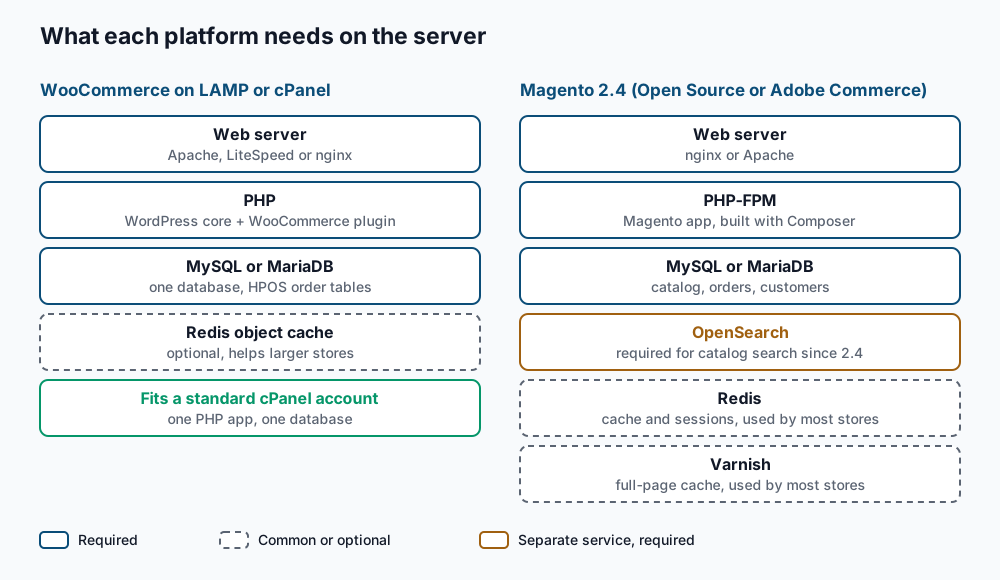
WooCommerce runs on the ordinary LAMP stack (Linux, Apache or a similar web server, MySQL and PHP). A normal cPanel hosting account can run a small store, and a larger one adds more PHP workers, a page cache and often Redis as an object cache. Magento 2.4 needs more parts, starting with PHP-FPM (the FastCGI Process Manager, which keeps a pool of PHP workers ready). Since 2.4, catalogue search requires a separate search engine, either Elasticsearch or OpenSearch, and OpenSearch is the one recent releases point to. Most production Magento stores also run Redis for cache and sessions and Varnish, a caching proxy that serves full pages from memory. Adobe’s system requirements page lists the supported versions for each release.
Team skills follow the same split. A WooCommerce developer writes PHP in the WordPress style of hooks and plugins, and changes usually go live by updating a plugin or theme. Magento uses Composer (PHP’s package manager) for every module, a dependency injection system that wires classes together from XML files, and a build step on every deploy.
Costs are best compared as drivers, not list prices:
- WooCommerce drivers. Hosting sized for your traffic, paid extensions and their yearly licences, payment fees, and operator time for updates, backups and security.
- Magento drivers. A larger server footprint with more services to run, and developers with Magento experience. Add paid extensions from the Adobe Commerce Marketplace or vendors, payment fees, and an Adobe licence if you choose Adobe Commerce.
Step-by-step
1. Write down the requirements that tend to decide this choice. Use this shape, with a weight of 3 for critical, 2 for important and 1 for helpful.
requirement,weight,type
Configurable products with 3+ options each,3,must
Two brands on one back office with separate prices,3,must
Company accounts and quote requests for B2B buyers,2,nice
Weekly blog and buying guides edited by marketing,2,nice
Team of two PHP developers who know WordPress,3,must
A “must” is something the business cannot launch or operate without. Keep the list to about five lines, because an inflated list hides the real deciders.
2. Measure a WooCommerce store. On the staging copy, run these commands from the WordPress folder.
wp plugin get woocommerce --field=version
wp post list --post_type=product --post_status=publish --format=count
wp post list --post_type=product_variation --post_status=any --format=count
wp option get woocommerce_custom_orders_table_enabled
wp plugin list --status=active --format=count
9.3.3
2140
15820
yes
31You should see five lines. They show the WooCommerce version, published products, variations, whether HPOS is active (yes) and how many plugins are active. A result of no for HPOS means orders still live in the posts tables. That is supported, but plan the switch before the store grows. If wp plugin get woocommerce reports that the plugin was not found, you are in the wrong folder.
3. Measure a Magento store. From the Magento root on staging, check the version and the search engine first.
bin/magento --version
bin/magento config:show catalog/search/engine
Magento CLI 2.4.7-p3
opensearchThe first line confirms the release. The second shows the configured search engine, and elasticsearch7 is the older option. Then list the store structure.
bin/magento store:website:list
bin/magento store:list
+----+------------------+-------------+------------+------------+------------+
| ID | Default Group Id | Name | Code | Sort Order | Is Default |
+----+------------------+-------------+------------+------------+------------+
| 1 | 1 | Main Brand | base | 0 | 1 |
+----+------------------+-------------+------------+------------+------------+You get one table per command, and the column names can differ slightly between releases. The first has one row per website, and the second one row per store view (a language or regional version of a store). The admin row with ID 0 in the second table is built in, so do not count it. One website with one store view means you are not yet using Magento’s multi-store structure. Next, count products by type in MySQL.
mysql -u magento_user -p magento_db -e "SELECT type_id, COUNT(*) AS products FROM catalog_product_entity GROUP BY type_id;"+--------------+----------+
| type_id | products |
+--------------+----------+
| configurable | 610 |
| simple | 18244 |
| bundle | 35 |
+--------------+----------+Replace the user and database names with the values in app/etc/env.php. If MySQL says the table does not exist, your install uses a table prefix; add it in front of the table name. Many simple products are usually children of configurable ones, so both numbers matter.
4. Check the health of the Magento indexes. Indexers are background jobs that copy product, price and stock data into fast lookup tables and into the search engine.
bin/magento indexer:status+------------------------+----------------+--------+--------------------+---------------------+
| ID | Title | Status | Update On | Schedule Status |
+------------------------+----------------+--------+--------------------+---------------------+
| catalogsearch_fulltext | Catalog Search | Ready | Update by Schedule | idle (0 in backlog) |
| cataloginventory_stock | Stock | Ready | Update by Schedule | idle (0 in backlog) |
+------------------------+----------------+--------+--------------------+---------------------+The real table has more rows and a final column for the last schedule update; the example is trimmed. Every row should say Ready. Rows that say Reindex required, or a large backlog, mean the cron jobs or the search engine need attention. That is routine Magento operating work, so note who does it today. The OpenSearch catalogue search guide covers fixing it.
5. Rehearse the deploy routine your team will own. Each platform has a routine every change goes through. On Magento, a code or module change on a production-mode store runs these steps.
bin/magento maintenance:enable
composer install --no-dev
bin/magento setup:upgrade
bin/magento setup:di:compile
bin/magento setup:static-content:deploy en_US fr_CA -f
bin/magento cache:flush
bin/magento maintenance:disable
Each step should finish without errors. setup:upgrade applies database changes, setup:di:compile generates the wiring code, and setup:static-content:deploy builds the CSS and JavaScript for each language. Ask your developer to run it once on staging and time it, since the store is in maintenance mode for the length of the run. On WooCommerce, the matching rehearsal is a plugin update on staging.
wp plugin update --all --dry-runAvailable plugin updates:
+-------------+----------+---------+----------------+
| name | status | version | update_version |
+-------------+----------+---------+----------------+
| woocommerce | active | 9.3.3 | 9.4.0 |
+-------------+----------+---------+----------------+The table lists every plugin with a pending update, and --dry-run means nothing is changed. Remove --dry-run on staging to apply them, then click through the shop and checkout. The rule for this step is plain. If nobody on the team can run the Magento routine confidently, score every Magento “must” that needs custom code as 1 at best, until you have hired or contracted that skill.
6. Score the fit matrix. Give each platform 0 if it cannot meet a requirement, 1 if it needs an extension or custom work, and 2 if it works out of the box. Multiply by the weight. The example below is for one store, not a verdict on either platform.
requirement,weight,type,woo,magento
Configurable products with 3+ options each,3,must,2,2
Two brands on one back office with separate prices,3,must,1,2
Company accounts and quote requests for B2B buyers,2,nice,1,1
Weekly blog and buying guides edited by marketing,2,nice,2,1
Team of two PHP developers who know WordPress,3,must,2,1
Any “must” scored 0 removes that platform, whatever its total. For B2B, score Magento Open Source and Adobe Commerce as separate columns if the B2B features decide the outcome, because they differ on exactly those features.
7. Decide and write it down. Walk the decision tree below with your matrix and your step 5 timings.
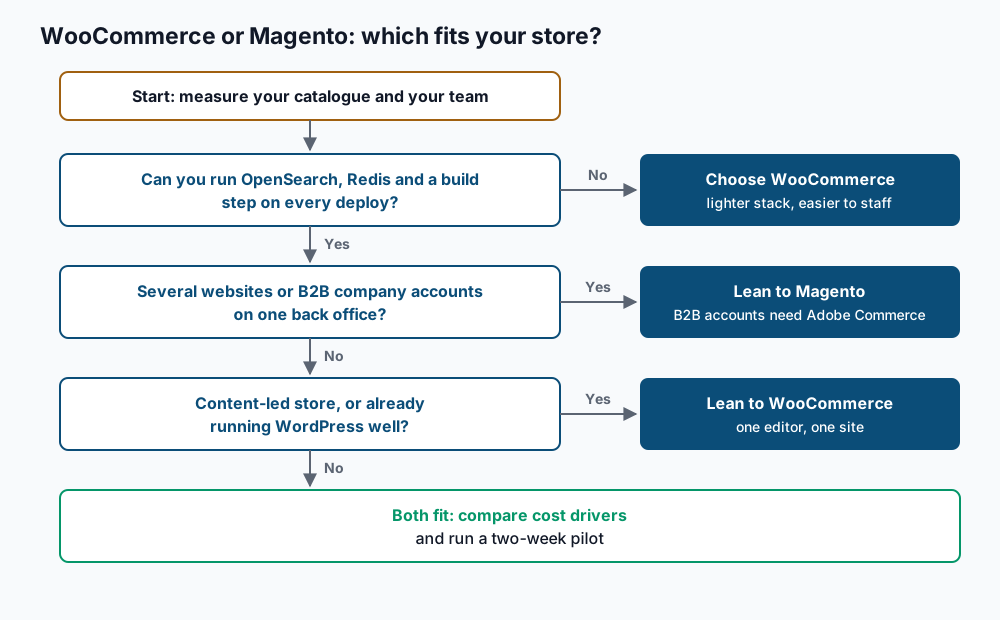
Write one page that names the platform, the reasons, the cost drivers you accept and who owns each recurring job. If the answer is to leave Magento, the Magento to WooCommerce migration guide covers the move. If Shopify is also on your list, compare it with the WooCommerce vs Shopify guide.
Validate it works
Your decision is ready when every line of this list is true:
- Every “must” requirement scores 1 or 2 on the chosen platform, and each 1 names the extension or custom work behind it.
- Product, variant and store view counts are recorded from real commands, not estimates.
- For Magento,
bin/magento indexer:statusshows every index asReadyon staging, and the deploy routine has been timed. - For WooCommerce, HPOS is active or a date is set to switch it on.
- Every recurring job, from updates to search engine upkeep, has a named owner.
- The hosting plan lists every service the platform needs, including OpenSearch for Magento.
Troubleshooting
bin/magento fails with a permissions or memory error. Run it as the file-system owner, not as root. If PHP runs out of memory, run php -d memory_limit=2G bin/magento indexer:status, swapping in the command that failed.
config:show says the search engine path does not exist. The value may be locked in app/etc/env.php or app/etc/config.php, or left at the release default. Look for catalog/search/engine in those files. In the admin, the Catalog Search section under Stores, Configuration, Catalog shows the engine in use.
wp option get woocommerce_custom_orders_table_enabled reports that the option does not exist. The store has never had HPOS settings saved, which usually means an older WooCommerce version. Update WooCommerce on staging first, then check again.
Both platforms score almost the same. Your requirements are probably too broad. Split lines such as “fast search” into testable ones, such as “search returns results for part numbers with dashes”, and score again.
The team is split. Disagreement usually comes from different weights on the same line. Settle the weights first; the decision tends to follow.
When this is the wrong approach
If your catalogue is small and you have no developers at all, a hosted platform may suit you better than either option; the Shopify comparison above covers that case. If you already run Magento well, with a team that owns the deploy routine and healthy indexes, a working store is rarely worth rebuilding for its own sake. Mage-OS, a community-run distribution of Magento Open Source, is also worth a look if you want to stay on Magento without an Adobe licence. For WooCommerce details, including HPOS, start from the WooCommerce documentation on High-Performance Order Storage.
Running WordPress that earns real money deserves an operator — Stack Harbor runs that stack under Enterprise WordPress; book an infrastructure consult.