Stack Harbor PaaS is built on three layers that together make environments feel simple: you declare what you want, the platform places it. This page explains what lives in each layer, how they interact, and why the design choices matter for how you operate your applications.
What this covers
- The three-layer model: application environments, cluster orchestrator, and infrastructure level.
- What a cluster is and how regions map to clusters.
- How the orchestrator processes every action you take — dashboard, API, or CLI.
- How host nodes are partitioned into containers and why that makes live vertical resize possible.
- The network fabric and shared load balancer that sit around every environment.
- How an environment is physically placed when you create it.
This is a conceptual page (Beginner → Intermediate). It does not contain commands. For the mental model that sits above this, see the Platform overview. For hands-on environment creation, see Environment management.
The three layers
The platform stacks three layers, top to bottom:
- Application environments — the unit you interact with as a developer. An environment is a logical grouping of containers that run one application: a web tier, a database, a cache, a load balancer. This is where your work lives.
- Cluster orchestrator — the control plane. Every action you take through the dashboard, the API, or the CLI is processed here. The orchestrator provisions environments, schedules containers on hardware hosts, runs lifecycle operations, enforces firewall rules, and surfaces metrics.
- Infrastructure level — the hardware fleet. Physical hosts are partitioned into isolated containers using a system-container substrate. The orchestrator decides which host each container lands on.
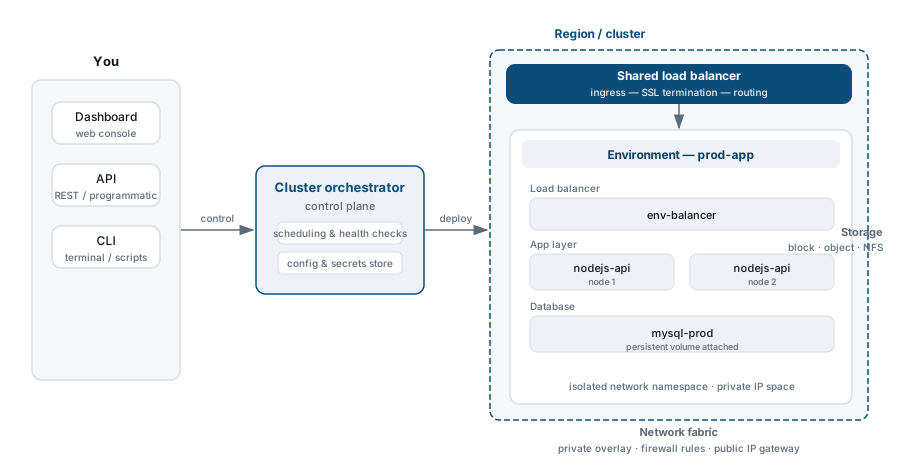
Clusters and regions
A cluster is one region. Each cluster has its own hardware capacity, its own internal network, and its own orchestrator instance. When you pick a region for an environment, you are picking a cluster.
Clusters are independent. An outage in one region does not affect another. Environments are scoped to a single cluster at any time, but they can be exported and re-imported into a different cluster to move a workload between regions — see Environment management.
The cluster orchestrator
The orchestrator is the platform’s control plane. It is the only component that talks to hardware; you never do.
When you create an environment, resize a container, redeploy an application, or flip a firewall rule, the action flows to the orchestrator, which validates it, schedules the work, dispatches it to the target host, and reports the result back to the dashboard and API. The orchestrator handles:
- Container provisioning and placement — chooses which host node receives each new container, taking into account capacity, isolation, and affinity rules.
- Lifecycle operations — start, stop, restart, redeploy, migrate. These are atomic: the orchestrator tracks each operation as a task you can observe in the dashboard Tasks Panel.
- Vertical and horizontal scaling — changes resource limits on a running container (vertical) or adds and removes nodes from a layer (horizontal), coordinating rollouts to preserve availability.
- SSL certificate issuance and renewal — manages the full certificate lifecycle for built-in SSL and Let’s Encrypt certificates without manual intervention.
- Firewall rule evaluation — applies inbound and outbound rules at the container level before traffic reaches your application.
- Backup scheduling and snapshot management — coordinates scheduled backups and on-demand snapshots across the storage layer.
- Metric collection and load alerts — collects per-container resource metrics and evaluates thresholds to fire load alerts.
Infrastructure level: host nodes and containers
The hardware layer is a fleet of physical hosts running a system-container substrate. Understanding how this layer works explains several platform behaviours that would otherwise seem unusual.
System containers and the nested model
Each physical host runs multiple system containers. A system container is a full OS-level environment: it has its own filesystem, network interfaces, and process tree, but it shares the host kernel. There is no hypervisor and no guest OS — this removes the overhead of traditional virtualization.
Your application containers (Docker containers, Kubernetes pods) run inside a system container. This nesting gives the platform two properties:
- Kernel-level isolation without VM overhead. Each environment’s containers are isolated from other tenants at the OS level, but they do not carry the latency or memory cost of a full guest OS.
- Live vertical resize without a reboot. The orchestrator adjusts a container’s resource limits (CPU shares, memory ceiling) in place. The container keeps running; the workload sees the new limits within seconds.
The cloudlet — the platform’s unit of RAM and CPU — is enforced at this layer. Each container is given a reserved cloudlet floor (guaranteed minimum) and a dynamic cloudlet ceiling (burst limit). Consumption is measured at the host; you pay for what is actually used, not the ceiling.
Environment placement
When you create an environment and choose a region, the orchestrator evaluates the available host nodes in that cluster and places each layer’s containers according to capacity and isolation constraints. You do not choose which host; the orchestrator handles placement transparently.
If a host node becomes unhealthy, the orchestrator can live-migrate containers to another host in the same cluster without requiring a manual action on your part.
The network fabric
Every cluster runs an internal network fabric that connects containers to each other and to the outside world.
- Internal addressing — containers within the same environment can reach each other by hostname. Containers in different environments are isolated by default.
- Shared load balancer (SLB) — the platform front-end that terminates TLS and routes inbound traffic to the correct environment. For environments without a dedicated public IP, the shared load balancer is the ingress point. Custom SSL requires a dedicated IP or the SLB-compatible certificate path; see SSL and TLS overview.
- Public IPs — you can attach a dedicated public IP to any container layer. Traffic then bypasses the SLB and arrives directly at that container’s network interface. See Public IP.
- Endpoints — for exposing non-HTTP ports (databases, custom TCP/UDP services) without a public IP, the platform maps a port on the SLB to the target container. See Endpoints.
The storage layer
Persistent data is stored outside the container’s ephemeral filesystem through managed storage. The platform provides:
- Local filesystem storage — data written to specific paths within a container that survive a redeploy. See Storing data in the local filesystem.
- Container volumes — explicit volume mounts that persist across container replacements. See Container volumes.
- Dedicated storage containers — a separate container type optimised for data storage, accessible over NFS by other containers in the environment. See Dedicated Storage Container.
- Mount points — NFS mounts that let containers share data within or across environments. See Mount points.
Managed databases handle their own storage internally; you interact with them through connection strings and the platform’s backup and replication controls.
Constraints and edge cases
- An environment lives in exactly one cluster (region). To run in multiple regions, you create multiple environments and handle traffic distribution at the DNS or load balancer level.
- Vertical resize is live for system containers running the platform’s supported stacks. Some application-level processes may need to be restarted to observe the new limits — this depends on how the runtime reads resource configuration.
- Live migration between hosts is orchestrator-initiated and transparent for most workloads. Stateful workloads that hold open connections may see brief interruptions; test migration behaviour in a staging environment before relying on it in production.
- The shared load balancer has connection and request-rate limits that apply to all environments using it. Environments with high throughput or strict latency requirements should use a dedicated public IP and a load-balancer layer (NGINX or HAProxy) within the environment.
Where to go next
- Platform overview — the developer-facing model (environments, layers, nodes, cloudlets) that sits above the architecture.
- Container types and use cases — system containers, custom Docker, and Kubernetes; when to use each.
- Environment management — create, clone, export, import, and transfer environments.
- Scaling and clustering — vertical and horizontal scaling, auto-clustering, multi-region patterns.
- SSL and TLS overview — how the shared load balancer, built-in SSL, and custom SSL fit together.
- Public IP — attach a dedicated IP to bypass the shared load balancer.
- Dashboard guide — where to find each architectural concept in the UI.