This page is the parent reference for all deployment flows on Stack Harbor PaaS. It explains which method to reach for, walks through every parameter in each deploy dialog, covers the runtime-specific caveats, and points to the dedicated pages for each topic.
For a conceptual map of every way to ship code — including Git-Push-Deploy and blue/green — start with the Application deployment overview.
What this covers
- Deployment method map — archive (local file / URL), VCS (Git / SVN / Bitbucket), and registry (Hub / Docker Hub / public / private).
- Entry points — the Deployment Manager panel and the Deployments row on the application server.
- Archive deployment — every field in the deploy dialog.
- VCS deployment — every field plus runtime-specific caveats (Java/Maven build node, .NET/IIS separate flow, PHP zero-downtime deployment).
- Auto-deploy — periodic polling, conflict resolution.
- Editing an existing VCS project — adjusting parameters and updating credentials.
- Post-deploy validation — Open in Browser, Logs, File Manager, SSH.
- Supported runtimes and archive formats.
- Related pages — all dedicated pages for each deployment topic.
Deployment method map
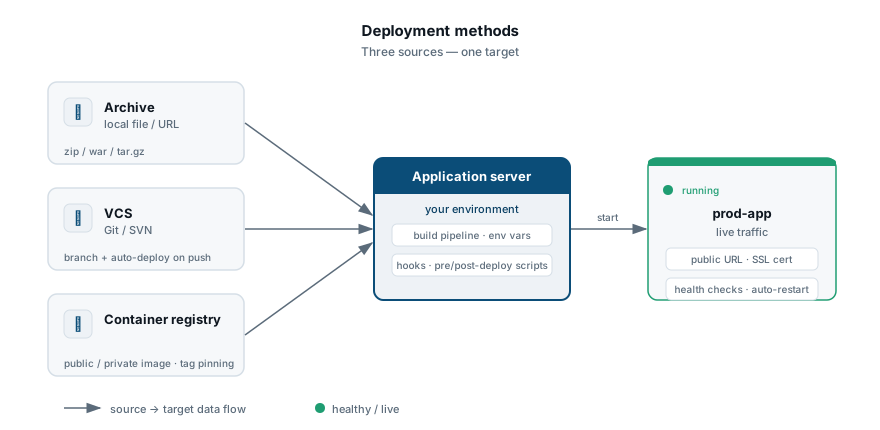
Three broad categories cover every way to deploy application code on the platform:
| Method | When to use it |
|---|---|
| Archive (local file or URL) | Your build pipeline produces a packaged artifact (.zip, .war, .jar, .tar.gz, etc.) and you upload or link it directly. The platform does not clone any repository. |
| VCS (Git / SVN) | Your code lives in a version control repository. The platform clones the repository, optionally invokes a build step, and copies files onto the application server. Auto-deploy polling is available. |
| Registry (Hub / Docker Hub) | You ship a container image rather than source or an artifact. The platform pulls the image from a registry and redeploys the container. |
Entry points
Two places in the dashboard open the same deploy dialog:
- Deployment Manager — the panel at the bottom of the dashboard. Hover over a stored archive or VCS project and click Deploy to. See the Deployment Manager page for how to add and manage stored archives and repositories.
- Application server (Deployments row) — hover over the Deployments row on the application server and click Local file, URL, or Git / SVN.
The first two icons (Local file and URL) open the archive deploy dialog. The last (Git / SVN) opens the VCS deploy dialog.
Which entry point you use changes only which fields are pre-filled: starting from the Deployment Manager pre-selects the archive or repository; starting from the application server pre-selects the target environment and server.
Archive deployment
Archive deployment takes a packaged artifact — uploaded directly or fetched from a URL — and deploys it to an application server. No repository access, no build step.
Deploy — prod-app
Fields
| Field | Description |
|---|---|
| Local file or URL | The archive to deploy. Accepted formats: .zip, .tar.gz, .tar.bz2, .tar, .war, .jar. Auto-selected when starting from the Deployment Manager. |
| Environment | The target environment containing the application server. Auto-selected when starting from the application server row. |
| Path | The deployment context path on the server. Available values may be constrained by the runtime — Python and Node.js use a single predefined path and do not allow a custom value. |
| Hooks | Pre- and post-deploy scripts. Run before and after the archive is unpacked. See Deployment hooks. |
| Deploy strategy | For scaled application server layers with more than one node: Simultaneous (all nodes updated at once — faster, brief downtime) or Sequential with delay (nodes updated one at a time — no downtime, configurable delay between nodes). |
| Enable zero-downtime deployment | PHP application servers only. Swaps the document root atomically so in-flight requests are not interrupted. See the PHP zero-downtime caveat below. |
Click Deploy to start the operation.
VCS deployment
VCS deployment instructs the platform to clone a repository (or pull the latest commits if already cloned) and copy files onto the application server. The repository must first be registered in the Deployment Manager.
VCS deployment — prod-app
nodejs-apiWatches the branch and deploys on new commits.
Java / Maven projects build on a dedicated build node. Build logs stream to the activity console.
Fields
| Field | Description |
|---|---|
| Repository | Select a registered Git or SVN project from the Deployment Manager, or open the add-repository form from the same dropdown. |
| Branch | The branch, tag, or SVN revision to deploy. Defaults to master. |
| Environment | The target environment containing the application server. |
| Path | The deployment context path. Same constraints as for archive deployment. |
| Build | Java application servers only. Selects the Maven build node to use for compilation and packaging. You can also set a custom Working Directory inside the repository if the buildable module is not at the repository root. See Java VCS caveat. |
| Hooks | Pre- and post-deploy scripts. See Deployment hooks. |
| Deploy strategy | Same options as archive deployment: Simultaneous or Sequential with delay. |
| Check and auto-deploy updates | Enables periodic polling of the repository. When new commits are detected on the configured branch, the platform redeploys automatically. See Auto-deploy from Git / SVN and Git & SVN auto-deploy. |
| Auto-resolve conflicts | When enabled, the platform discards any local changes on the application server in favour of the repository version before applying the update. Prevents merge conflicts caused by files modified directly on the server. |
| Enable zero-downtime deployment | PHP application servers only. Same behaviour as in archive deployment. |
Click Deploy. The platform clones or updates the repository, runs any pre-deploy hook, copies files, and runs any post-deploy hook.
Runtime caveats
Java — Maven build node
Java VCS deployment is not a straight file-copy. When you deploy a Java application from a repository, the platform sends the source to a dedicated Maven build node, which compiles and packages the artifact before the result is transferred to the application server. The Build field in the VCS dialog selects which build node to use.
This means:
- A Maven build node must exist in your environment (or be added) before you can deploy a Java application from a repository.
- Build logs appear on the build node, not the application server.
- The Working Directory option lets you point the build at a subdirectory, which is useful for monorepo layouts.
For the full walkthrough see Git-Push-Deploy and CLI VCS project deployment.
.NET — separate deployment flow
The Windows-based IIS application server uses a separate deployment flow from the one described on this page. If your application targets .NET on IIS, consult the .NET runtime documentation for the applicable steps.
PHP — zero-downtime deployment
For PHP application servers, the Enable zero-downtime deployment toggle changes how files are written during a deploy. Instead of overwriting files in the live document root while the server is serving requests, the platform stages the new files in a separate directory and swaps the document root atomically when staging is complete. Requests in flight at the moment of the swap complete against the old document root; new requests see the new version immediately after the swap.
This differs from the Sequential with delay deploy strategy, which is about the order in which nodes in a scaled layer are updated. Both can be used together on a scaled PHP layer.
Auto-deploy and conflict handling
When Check and auto-deploy updates is enabled on a VCS deployment, the platform polls the repository at a configurable interval. When new commits are detected on the tracked branch, it triggers a redeploy automatically.
Two settings control what happens when the platform finds changes:
- Polling interval — how often the platform checks the repository. Set when adding the VCS project in the Deployment Manager or when editing the deployment.
- Auto-resolve conflicts — if local files on the application server differ from the repository (for example, because a file was edited directly via the dashboard file manager or SSH), enabling this setting makes the platform discard the local version and apply the repository version. Disabling it leaves conflict resolution to you.
For a detailed walkthrough of auto-deploy behaviour — including how simultaneous deploys triggered by two rapid commits are queued — see Auto-deploy from Git / SVN.
Editing an existing VCS deployment
To change the configuration of an active VCS deployment — switch the tracked branch, update the polling interval, add or change a hook, change the Maven build node — click Edit next to the deployment row on the application server. The same fields from the deploy dialog are available.
Credential changes: if the repository access credentials (username/password or SSH key) have been rotated, update them in the Deployment Manager first. After you save new credentials there, the platform offers to propagate the updated credentials to every VCS project that references the same repository. Accept the prompt to avoid broken auto-deploys.
Post-deploy validation
After a deploy completes, use these four controls to confirm the application is working:
| Action | How to reach it |
|---|---|
| Open in Browser | Click Open in Browser on the environment row to load the application in a new tab. Confirm the expected response is served. |
| Logs | Click the Log icon on the application server node. Application logs, deployment logs, and error logs are available. See Viewing log files. |
| File Manager | Click the Config icon on the application server node and open the file manager. Inspect deployed files and directory structure. |
| SSH | Click Web SSH on the application server node to open a terminal session. Run diagnostics, inspect processes, or tail logs directly. See Add an SSH key. |
Supported runtimes and archive formats
Archive and VCS deployment are supported across: Java, PHP, Ruby, Python, Node.js, Go, and .NET (via the separate IIS flow — see above).
Accepted archive formats: .zip, .tar.gz, .tar.bz2, .tar, .war, .jar.
Python and Node.js constrain the deployment Path to a single predefined value; you cannot specify a custom context path for those runtimes.
Choosing between archive and VCS
Use archive deployment when:
- Your build pipeline (CI/CD, local
mvn package, a GitHub Actions artifact) produces a packaged file. - You want full control over the build step outside the platform.
- You are deploying a single artifact without a repository connection.
Use VCS deployment when:
- You want the platform to clone and track a repository branch.
- You want auto-deploy on commits without configuring an external webhook.
- You are deploying a Java application and want the platform to handle the Maven build step.
For a webhook-driven push model — where a commit to your repository triggers an immediate deploy without polling — see Git-Push-Deploy.
For blue/green deployments with traffic shifting between two environments, see Blue/green deployment.
Constraints and edge cases
- Scaled layers and deploy strategy: on a single-node layer, Deploy strategy has no effect. The setting only matters when the layer has two or more nodes.
- PHP zero-downtime and scaled layers: the atomic document-root swap applies per node. On a scaled layer, combine Enable zero-downtime deployment with Sequential with delay to avoid serving mixed versions during a rolling update.
- VCS projects and multiple environments: the same repository can be deployed to more than one environment. Each deployment row tracks its own branch, path, and auto-deploy settings independently.
- Redeploying a container (replacing its base image rather than its application code) is a separate operation. See Container redeploy and Data preserved during redeploy.
Related
- Application deployment overview — the full map of every deployment method.
- Application deployment — in-depth reference for the deploy operation.
- Deployment Manager — managing stored archives and VCS repositories.
- Deployment hooks — pre- and post-deploy scripts.
- Auto-deploy from Git / SVN — polling-based auto-deploy.
- Git & SVN auto-deploy — step-by-step auto-deploy setup.
- Git-Push-Deploy — webhook-driven deploy triggered by a git push.
- CLI VCS project deployment — scripting VCS deployments from the platform CLI.
- Blue/green deployment — traffic-shifting between two environments.
- Container redeploy — replacing the base image of a running container.
- Data preserved during redeploy — what survives a container redeploy.