TLS is a first-class platform feature on Stack Harbor PaaS. Every environment can serve traffic over HTTPS without any infrastructure you have to operate. This page explains where TLS terminates on the platform and maps out the four routes to a certificate — so you can choose the right path before touching any settings.
What this covers
- Where TLS actually terminates: the Shared Load Balancer vs. a container node in your environment.
- The four certificate routes: built-in SSL, custom SSL, custom SSL via the Shared Load Balancer (SLB), and Let’s Encrypt.
- A decision table: which route fits your situation.
- Database encryption in transit: the SSL/TLS add-ons for managed database tiers.
- Links to the dedicated how-to pages for each route.
If you are already familiar with TLS termination and just need steps, go directly to the page for your certificate route (see Where to go next at the bottom).
Where TLS terminates
Traffic reaching an environment can terminate TLS at one of two points, depending on the certificate route you choose.
At the Shared Load Balancer (SLB): The SLB is the platform’s shared ingress layer. Environments that do not own a public IP are reached through it. The SLB handles the TLS handshake for built-in SSL and for custom SSL via SLB, then forwards traffic to the environment’s entry point over the internal network. Your containers never see the raw TLS negotiation.
At the environment’s entry point: Environments that have a public IP attached to their entry-point node (a load balancer or an application server in a single-node topology) handle TLS directly on that node. Custom SSL and Let’s Encrypt both follow this path. The platform installs the certificate material on the entry-point container; TLS terminates before traffic enters the application layer.
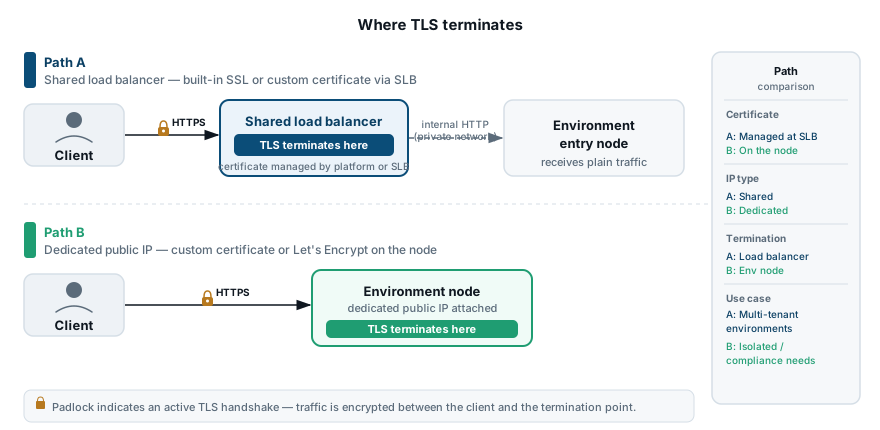
The four certificate routes
Built-in SSL
The platform provides a wildcard certificate covering every environment’s platform-issued hostname (for example, myenv.region.paas.example.com). You enable it with a single toggle in the topology settings — no DNS changes, no certificate management, no public IP required.
Built-in SSL terminates at the SLB. Because it binds to the platform-issued hostname, it does not work with custom domains, and it is incompatible with environments that have a public IP attached to the entry point.
Use this path for internal tooling, staging environments, or any situation where the platform-issued URL is acceptable.
Custom SSL
You supply your own private key, the domain certificate, and the full intermediate chain for a custom domain you control. The platform installs the material on the environment’s entry-point container, and TLS terminates there.
Custom SSL requires two prerequisites: a custom domain pointed at the environment, and a public IP attached to the entry-point node. Without a public IP the platform cannot expose port 443 directly on your entry point.
Use this path when you have a compliance requirement to use a specific certificate authority, or when you already manage certificates through your organization’s PKI.
Custom SSL via Shared Load Balancer
You supply your own certificate, but termination happens on the SLB using SNI rather than on a container you own. This makes it possible to use a custom domain with a custom certificate on an environment that does not have — and cannot have — a public IP. Configuration is done through the platform API rather than through the topology UI.
Use this path when your infrastructure constraints prevent attaching a public IP, but your certificate policy requires a CA-signed certificate on a custom domain.
Let’s Encrypt
The platform offers a Let’s Encrypt add-on you install directly from the topology UI. It handles certificate issuance and automatic renewal; renewal runs roughly 30 days before the certificate expires. Let’s Encrypt certificates are free and trusted by all major browsers.
Let’s Encrypt requires a custom domain and a reachable public IP on the entry point. The add-on uses an HTTP-01 challenge to verify domain ownership, so the domain must resolve to the environment’s public IP before issuance.
Use this path for production custom domains where you do not need to specify a particular certificate authority.
When to use which
| Situation | Recommended path |
|---|---|
| Quick HTTPS on the platform-issued URL (no custom domain) | Built-in SSL |
| Production custom domain, public IP available, any CA acceptable | Let’s Encrypt |
| Production custom domain, public IP available, specific CA required | Custom SSL |
| Custom domain, no public IP available | Custom SSL via SLB |
| Compliance: specific CA on a custom domain, no public IP | Custom SSL via SLB |
| Database connections — encryption in transit for MySQL/MariaDB/Percona or PostgreSQL | Database SSL/TLS add-on (see below) |
Database encryption in transit
The four routes above all apply to HTTP/HTTPS traffic reaching your application. The platform also exposes dedicated SSL/TLS add-ons for managed database tiers, which operate at the connection level rather than the HTTP level.
The database SSL/TLS add-on generates per-node certificates and reconfigures the database daemon to require or prefer encrypted connections from clients. Two variants exist: one for MySQL, MariaDB, and Percona, and a separate one for PostgreSQL. The details of each — certificate structure, client connection strings, and how to verify encryption is active — are on the dedicated pages.
Where to go next
- Built-in SSL — enable HTTPS on the platform-issued URL with one toggle.
- Custom SSL — install your own certificate on an environment with a public IP.
- Custom SSL via Shared Load Balancer — API-configured custom certificate for environments without a public IP.
- Custom domains — point your own domain at an environment before attaching a certificate.
- SSL/TLS for MySQL, MariaDB, and Percona — encryption in transit for the MySQL-family database tier.
- SSL/TLS for PostgreSQL — encryption in transit for the PostgreSQL database tier.