Stack Harbor PaaS scales along two independent dimensions — vertical (resize a container in place by adjusting its cloudlet ceiling) and horizontal (change the number of nodes in a layer) — and provides an auto-clustering layer that turns a single-node service into a production cluster in one switch from the Topology Wizard. This page frames the full scaling and clustering section.
What this covers
- The two scaling dimensions and how they compose.
- Manual versus automatic triggers for each dimension.
- Auto-clustering: what the platform configures when you flip the switch.
- Database-specific clustering for MariaDB/MySQL/Percona, PostgreSQL, and MongoDB.
- Multi-region and failover, and where each topic lives in this section.
The two dimensions
Vertical scaling — resize the container
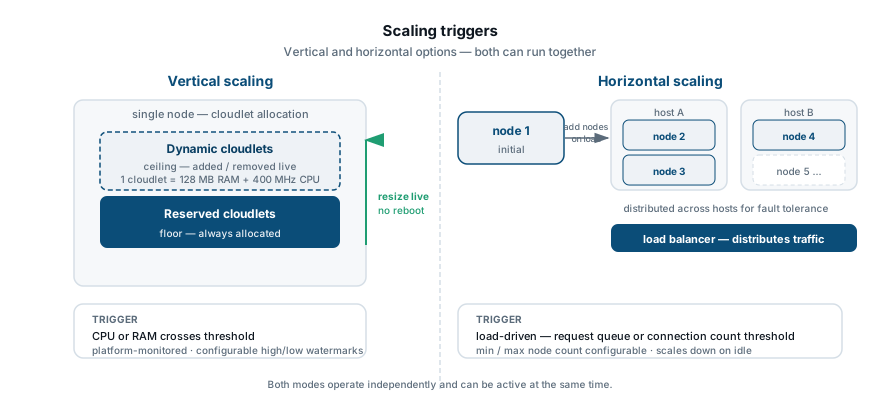
Every container on the platform is allocated resources in cloudlets, the platform’s unit of RAM and CPU. Each container has two cloudlet values: a reserved floor (always available, always billed) and a dynamic ceiling (drawn from and released back as load changes, billed by actual consumption). Vertical scaling is the act of moving that ceiling. You raise it to give a container more headroom; you lower it to cap resource consumption. The platform adjusts allocation in place — the container keeps running. In automatic vertical scaling mode, the platform tracks live consumption and adjusts the allocation continuously within the range you set, so you pay approximately for what the process actually uses rather than for a fixed reservation. See Automatic vertical scaling for the trigger logic and configuration.
Horizontal scaling — change the node count
A layer is the node group that runs one role in your environment: your application servers, your database replicas, your cache nodes. Horizontal scaling changes how many nodes that layer contains.
Manual horizontal scaling moves a slider in the topology panel: you choose a count, the platform provisions or removes nodes and redistributes traffic. New nodes are placed on different hardware hosts under platform anti-affinity rules, so a single-host failure cannot take down the whole layer.
Automatic horizontal scaling fires on tunable load triggers. You define thresholds — CPU, memory, network throughput, disk I/O, or disk IOPS — and the platform adds nodes when the upper threshold is sustained for a configurable period, and removes them when load drops below the lower threshold for another. See Automatic horizontal scaling for trigger configuration.
Each layer also has a scaling mode that governs how new nodes are created:
- Stateless — new nodes are built from the base image template. The right default for most application server layers.
- Stateful — new nodes are cloned from the current master container, preserving any configuration applied after initial provisioning. Useful when a stack stores configuration on disk that is not captured in the image.
The platform chooses a default mode per stack type; you can override it from the Topology Wizard.
Auto-clustering
Auto-clustering turns a single-node stack into a production cluster from inside the Topology Wizard — one switch, no manual replication wiring. When you enable it, the platform configures replication, elects or designates a primary, adds the appropriate number of replica nodes, and provisions an entry-point proxy where the stack topology requires one. When you scale the layer horizontally after enabling auto-clustering, the platform joins each new node to the cluster automatically and removes it cleanly on scale-in.
Supported stacks include Tomcat/TomEE, GlassFish, Payara, Jenkins, WildFly, MySQL, MariaDB, Percona, PostgreSQL, MongoDB, Couchbase, Redis, OpenSearch, and the Shared Storage Container.
The What is auto-clustering page explains the concept and when to enable it. The Auto-clustering via Topology Wizard page covers the supported stacks in detail, cluster modes, and the JPS properties for use in packaged solutions.
Database auto-clustering
Database tiers have dedicated auto-clustering flows because the replication schemes, proxy layers, and failover modes differ substantially across engines:
- MariaDB, MySQL, Percona — ProxySQL as the entry-point, primary-secondary or Galera replication. See MariaDB/MySQL/Percona auto-clustering.
- PostgreSQL — primary-secondary replication with Pgpool-II; supports automatic and manual failover. See PostgreSQL auto-clustering.
- MongoDB — replica sets with default election timings; connection strings that survive failover without client-side changes. See MongoDB auto-clustering.
Failover protection
The Traffic Distributor add-on runs a built-in health-check module that monitors backends on a configurable interval. It pulls an unhealthy node out of the routing table without waiting for a new horizontal scaling event and re-adds it automatically when the node recovers. This is separate from auto-clustering’s own membership management: failover protection operates at the load-balancer level and applies to any layer, clustered or not. See Failover protection.
Combining dimensions
Both scaling axes are independent and can be active simultaneously on the same layer. A common pattern: set a generous cloudlet ceiling to absorb short CPU spikes without adding nodes (vertical), and configure horizontal scale-out only when sustained load consistently reaches that ceiling. The platform reconciles the declared state; you do not coordinate the two mechanisms manually.
Where to go next
- Horizontal scaling — manual scale-out and scale-in, stateless vs. stateful mode, per-stack specifics.
- Automatic horizontal scaling — configuring load triggers: thresholds, cooldown periods, and monitoring.
- Automatic vertical scaling — cloudlets, reserved vs. dynamic allocation, and how the platform adjusts resources in real time.
- What is auto-clustering — when to enable auto-clustering and what the platform configures behind the switch.
- Auto-clustering via Topology Wizard — supported stacks, cluster modes, and JPS properties.
- MariaDB/MySQL/Percona auto-clustering — ProxySQL entry point and replication schemes.
- PostgreSQL auto-clustering — Pgpool-II, primary-secondary replication, and failover.
- MongoDB auto-clustering — replica sets, election timings, and connection strings.
- Failover protection — health checks under the Traffic Distributor add-on.
- CLI scaling — changetopology — scripting both scaling axes from the platform CLI.