Infrastructure is where you run cloud servers and everything around them: networks, storage, backups and the SSH keys you sign in with. Its Overview page is the front door. It shows one card for each part of Infrastructure, grouped by job.
Before the first visit, the account owner must enable Infrastructure. See Enable a service.
Open Infrastructure
- In the side menu, select Infrastructure.
- The menu opens a list under it. Overview is the page with every card.
- Select a card, or a row in the side menu, to open that part of Infrastructure.
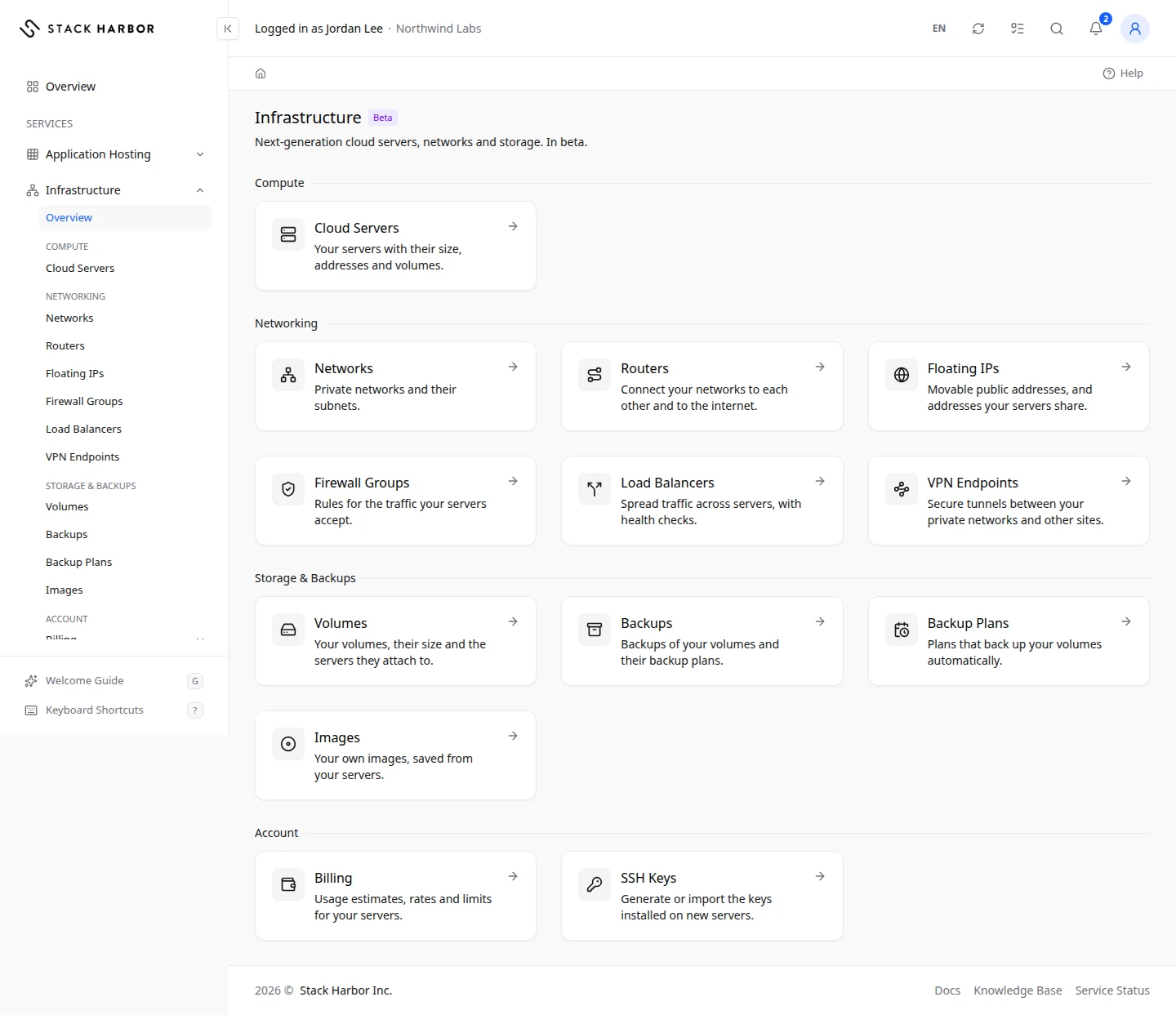
The groups
- Compute holds Cloud Servers, your servers with their size, addresses and volumes. See Deploy a server.
- Networking holds Networks, Routers, Floating IPs, Firewall Groups, Load Balancers and VPN Endpoints. See Create a network.
- Storage & Backups holds Volumes, Backups, Backup Plans and Images. See Create a volume.
- Account holds Billing, the usage estimates, rates and limits for your servers, and SSH Keys, the keys installed on new servers. See Read your Infrastructure usage and Add an SSH key.
You only see the groups you are allowed to use. A team member needs the networking permission to see Networking, and the storage permission to see Storage & Backups. Billing needs a billing permission, and SSH Keys needs the SSH keys permission. The account owner sees everything. See Manage a team member.
What you see while your account is set up
Right after Infrastructure is enabled, a notice can appear above the cards:
- Northwind Labs Is Being Set Up (with your project’s name) means setup is running. It usually takes a few minutes, and your servers and networks appear once it is ready. You don’t need to do anything.
- Northwind Labs Is Still Being Set Up means setup is taking longer than usual. Wait a little longer.
- Setup Of Northwind Labs Has Stopped means our team has been told and will finish it. You don’t need to do anything for now.
While a notice shows, the card pages can be empty.
If something goes wrong
- If a card is missing, you may not have the permission for it. Ask your account owner.
- If a page says it couldn’t read your servers, wait a moment and select Try Again. If it keeps happening, open a support ticket.
Fields and statuses
What each item on this page means, what it does and how to read it.
- Northwind Labs Is Being Set Up Status
-
What it is. Infrastructure is being set up for your account. The title carries your project’s name.
How to read it. It usually takes a few minutes. Your servers and networks appear once it is ready. You don’t need to do anything.
- Northwind Labs Is Still Being Set Up Status
-
What it is. Setup of your Infrastructure project is taking longer than usual.
How to read it. Wait a little longer. Open a support ticket if it lasts.
- Setup Of Northwind Labs Has Stopped Status
-
What it is. Setup of your Infrastructure project stopped before the end.
How to read it. Our team has been told and will finish it. You don’t need to do anything for now.