Many plans include a number of engineering hours each period. The Billable tab shows how that time was used and how much of it is billed. You need the Access Billing permission to see it.
Read a period
- Open the plan from Managed Services.
- Select the Billable tab.
- Choose a period in the period menu. Current Period is selected first. The menu also offers the previous twelve months.
The Engineering Time card shows the period’s dates and whether it is Open or Closed. A closed period is final. A bar shows the time used against what is available, for example “6 h of 10 h used”.
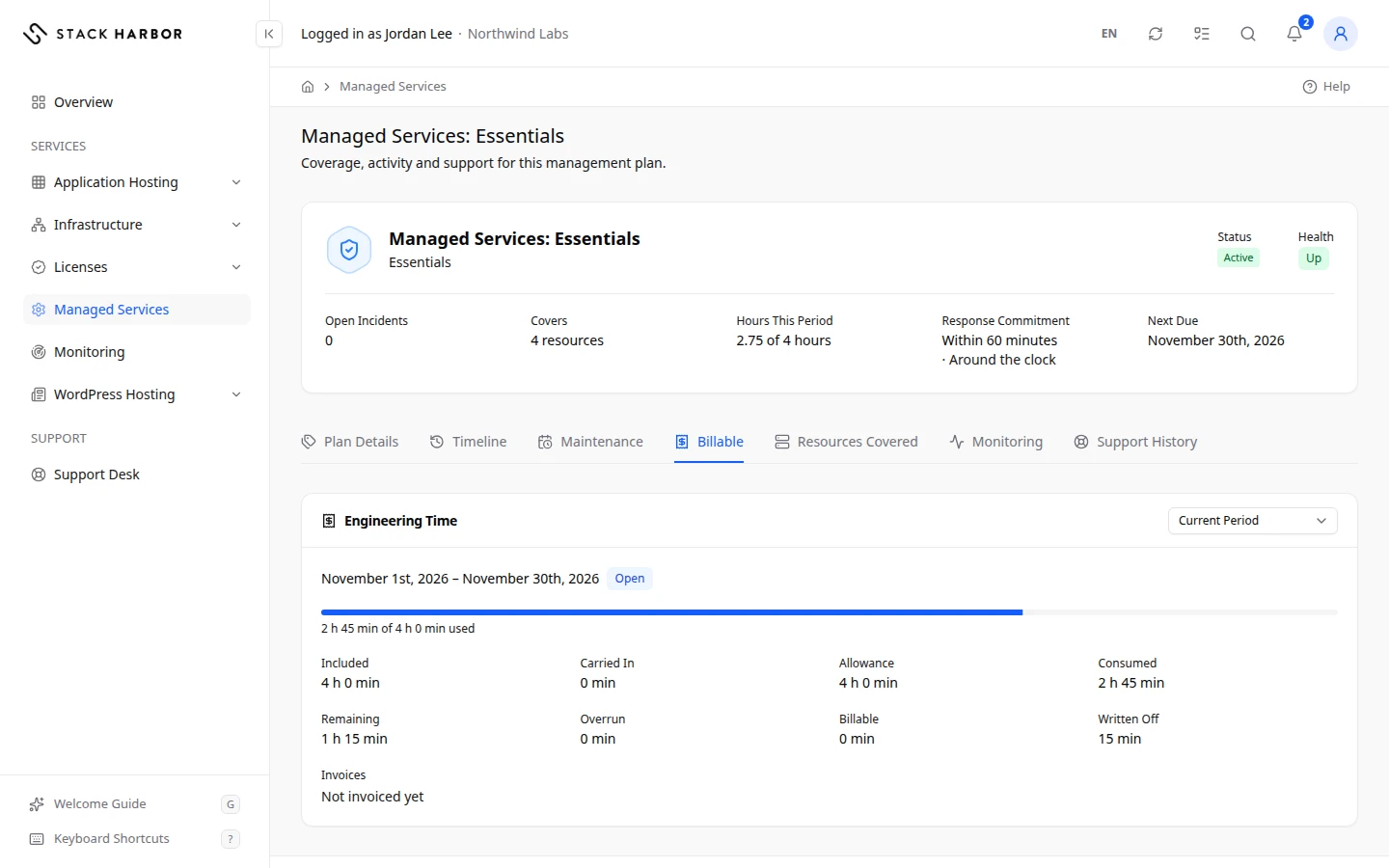
Times are in hours and minutes.
- Included is the time the plan includes for the period.
- Carried In is unused time brought forward from the previous period, if your plan allows it.
- Allowance is the total time available, so the included time plus the time carried in.
- Consumed is the time our engineers spent on the plan in the period.
- Remaining is the allowance left.
- Overrun is the time spent beyond the allowance.
- Billable is the time we will invoice, at your plan’s rate.
- Written Off is time we spent and chose not to charge.
- Invoices lists the invoices for this time, or Not invoiced yet.
A healthy period shows Consumed below Allowance and no Overrun.
If something goes wrong
- Nothing Recorded means no engineering time was recorded for that period, or the plan didn’t exist yet.
- If the tab shows You Do Not Have Access to This, your role can’t see billing figures. Ask your account owner for Access Billing.
Fields and statuses
What each item on this page means, what it does and how to read it.
- Current Period Field
-
What it is. The period the Engineering Time card shows.
What it does. Choose another period in the menu. It offers the previous twelve months.
- Open Status
-
What it is. The period is still running.
How to read it. Its figures can still change.
- Closed Status
-
What it is. The period has ended.
How to read it. Its figures are final.
- Included Metric
-
What it is. The engineering time the plan includes for the period.
How to read it. Hours and minutes.
- Carried In Metric
-
What it is. Unused time brought forward from the previous period.
How to read it. Hours and minutes. Only when your plan allows it.
- Allowance Metric
-
What it is. The total time available in the period: included time plus time carried in.
How to read it. Hours and minutes.
- Consumed Metric
-
What it is. The time our engineers spent on the plan in the period.
How to read it. Hours and minutes. Healthy when it stays below Allowance.
- Remaining Metric
-
What it is. The allowance left in the period.
How to read it. Hours and minutes.
- Overrun Metric
-
What it is. The time spent beyond the allowance.
How to read it. Hours and minutes. Healthy is none.
- Billable Metric
-
What it is. The time we will invoice for the period, at your plan’s rate.
How to read it. Hours and minutes.
- Written Off Metric
-
What it is. Time we spent and chose not to charge.
How to read it. Hours and minutes.
- Invoices Field
-
What it is. The invoices for this period’s billable time.
What it does. Select one to open it.
How to read it. Not invoiced yet means no invoice exists for it so far.