A Managed Services plan is an agreement for our engineers to look after part of your setup for you. A plan can cover your whole account, one environment or one resource. Managed Services lists every plan on your account. The section is read-only. To change a plan, open a support ticket.
You need the Managed Services permission to open it. The account owner always has it.
Open your plans
- In the side menu, under Services, select Managed Services.
- The list shows one row per plan.
Each row shows:
- Plan, the plan’s name and tier.
- Scope, what the plan applies to. Whole Account covers everything on your account. One Environment covers a single environment. One Resource covers a single resource, such as one server.
- Covers, how many resources the plan looks after, for example “4 resources”. Nothing yet means none are linked so far.
- Managed Since, the date the plan started.
- Status, the plan’s billing status, such as Active, Pending or Suspended.
- Health, how the monitored resources are doing right now. This column appears only if you have the monitoring permission.
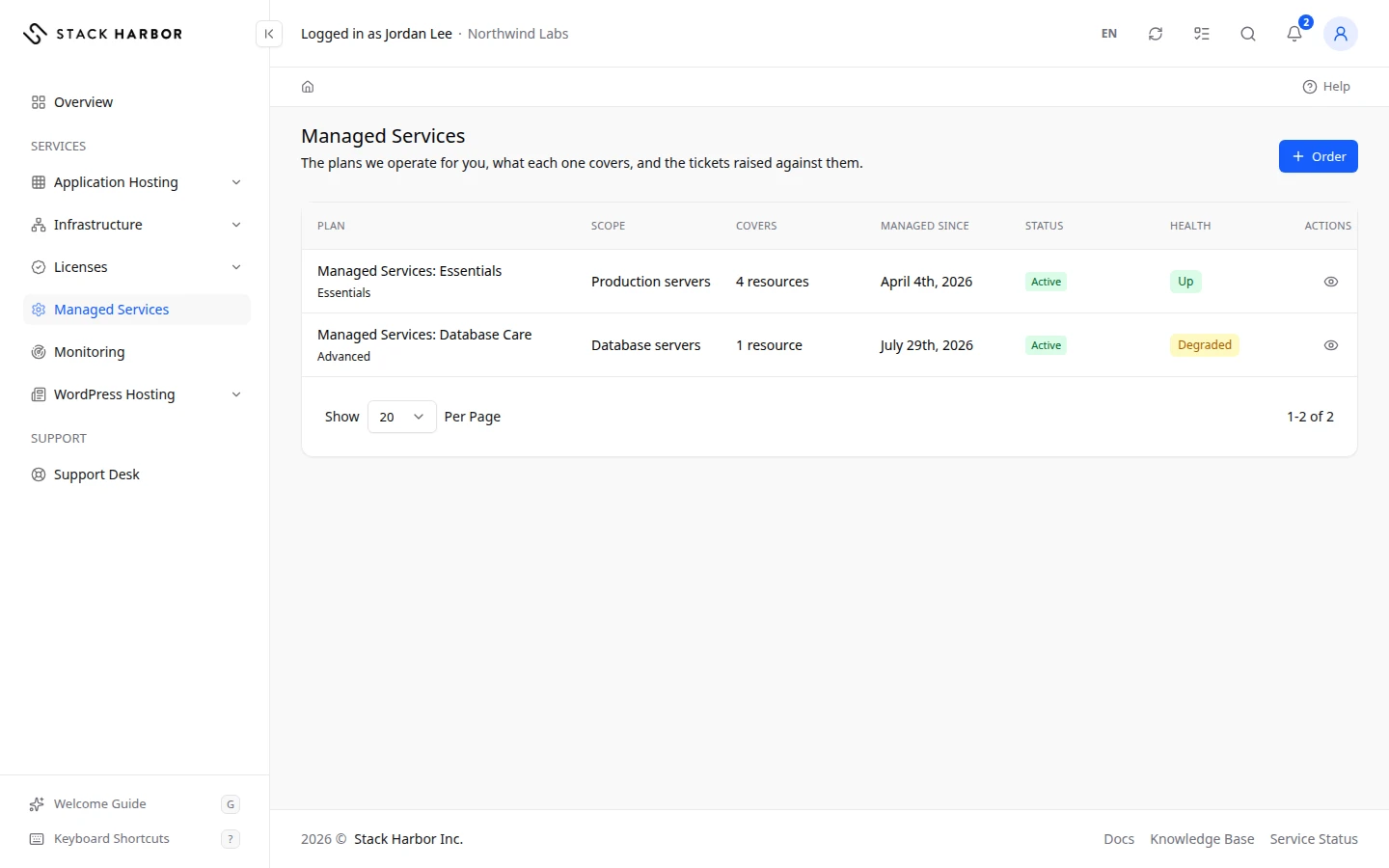
Select a row, or its button in Actions, to open the plan. See View a Managed Services plan.
Read the Health badge
- Up means every monitor that is reporting sees the resources working.
- Degraded means at least one check is slow or partly failing.
- Down means at least one monitored resource isn’t responding.
- Maintenance means planned work is in progress.
- Suspended means monitoring is paused.
- Unknown means the monitors haven’t reported yet.
- A count such as “1 unknown” beside the badge means one monitor isn’t reporting. It doesn’t change the badge’s colour.
- Not Monitored Yet means no monitor is linked to the plan. This is normal for many plans.
- Monitoring Unavailable means we can’t read fresh figures right now, so we show no verdict rather than an old one.
If something goes wrong
- No Management Plan means your account has no plan. To ask us to look after a server, an application or your whole account, select Ask About Management. It opens a support ticket.
- If you see You Do Not Have Access to This, ask your account owner for the Managed Services permission.
Fields and statuses
What each item on this page means, what it does and how to read it.
- Plan Column
-
What it is. The plan’s name and tier.
What it does. Select the row to open the plan.
- Scope Column
-
What it is. What the plan applies to.
How to read it. Whole Account, One Environment or One Resource.
- Whole Account Option
-
What it is. The plan covers everything on your account.
- One Environment Option
-
What it is. The plan covers a single environment.
- One Resource Option
-
What it is. The plan covers a single resource, such as one server.
- Covers Column
-
What it is. How many resources the plan looks after.
How to read it. A count, for example 4 resources. Nothing yet means none are linked so far.
- Managed Since Column
-
What it is. The date the plan started.
- Status Column
-
What it is. The plan’s billing status.
How to read it. For example Active, Pending or Suspended. A suspended plan is paused: check for an unpaid invoice or contact support.
- Health Column
-
What it is. How the monitored resources of the plan are doing right now.
How to read it. A coloured badge. Shown only with the monitoring permission.
- Up Status
-
What it is. Every monitor that is reporting sees the resources working.
How to read it. Green. Nothing to do.
- Degraded Status
-
What it is. At least one check is slow or partly failing.
How to read it. Amber. Our team is alerted. Open the plan’s Monitoring tab to see which resource.
- Down Status
-
What it is. At least one monitored resource isn’t responding.
How to read it. Red. Our team is alerted. Open the plan’s Monitoring tab for details, or open a ticket.
- Maintenance Status
-
What it is. Planned work is in progress.
How to read it. Blue. Alerts wait until the work ends.
- Suspended Status
-
What it is. Monitoring is paused.
How to read it. No new readings arrive until it restarts. Contact support to ask why.
- Unknown Status
-
What it is. The monitors haven’t reported yet.
How to read it. Wait for the first check. A count such as 1 unknown beside another badge means one monitor isn’t reporting.
- Not Monitored Yet Status
-
What it is. No monitor is linked to the plan.
How to read it. This is normal for many plans. Our team links monitors.